
Chief of Staff
English · 简体中文
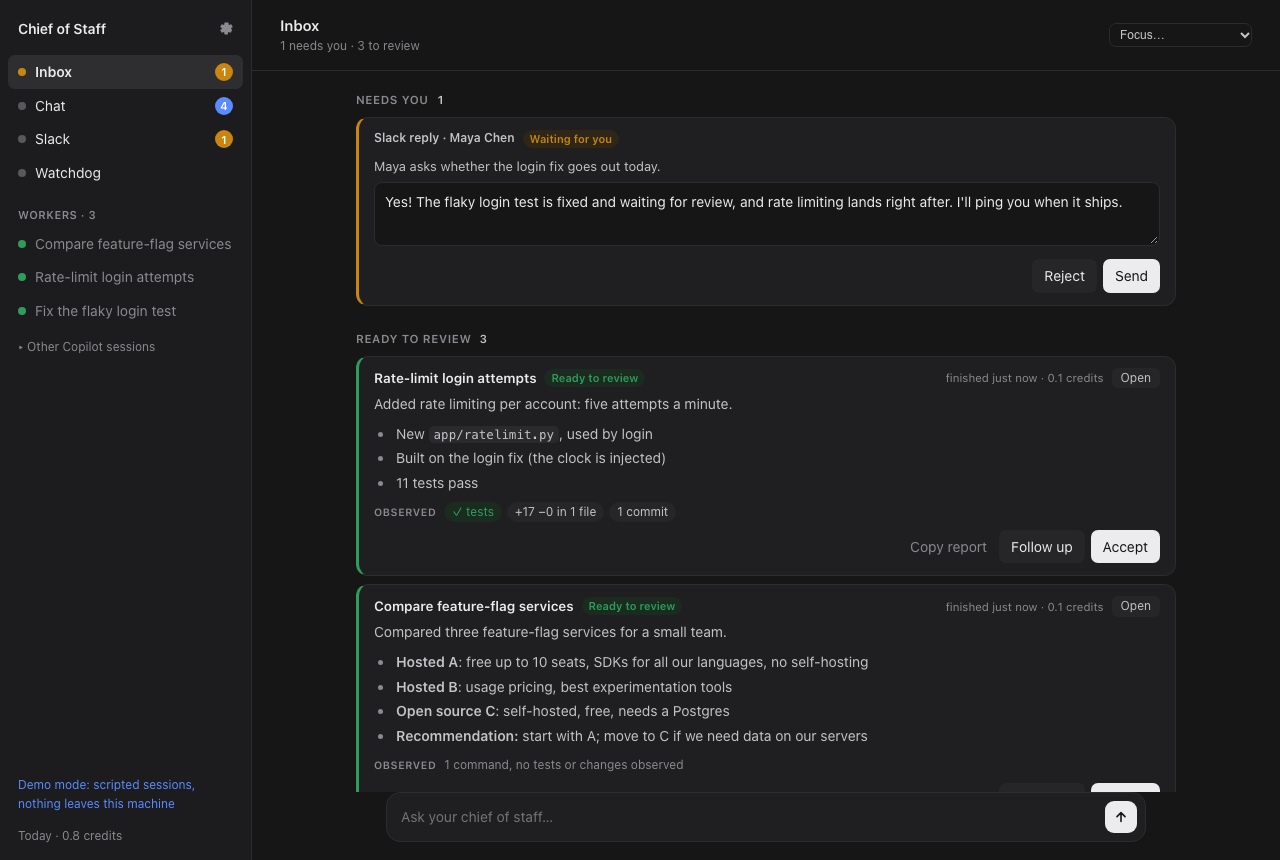
One inbox for all your GitHub Copilot sessions. Tell it what you need. It gives each task to its own Copilot session, sends follow-ups to the session that already has the context, drafts your Slack replies, and lets you know when something is ready to review.
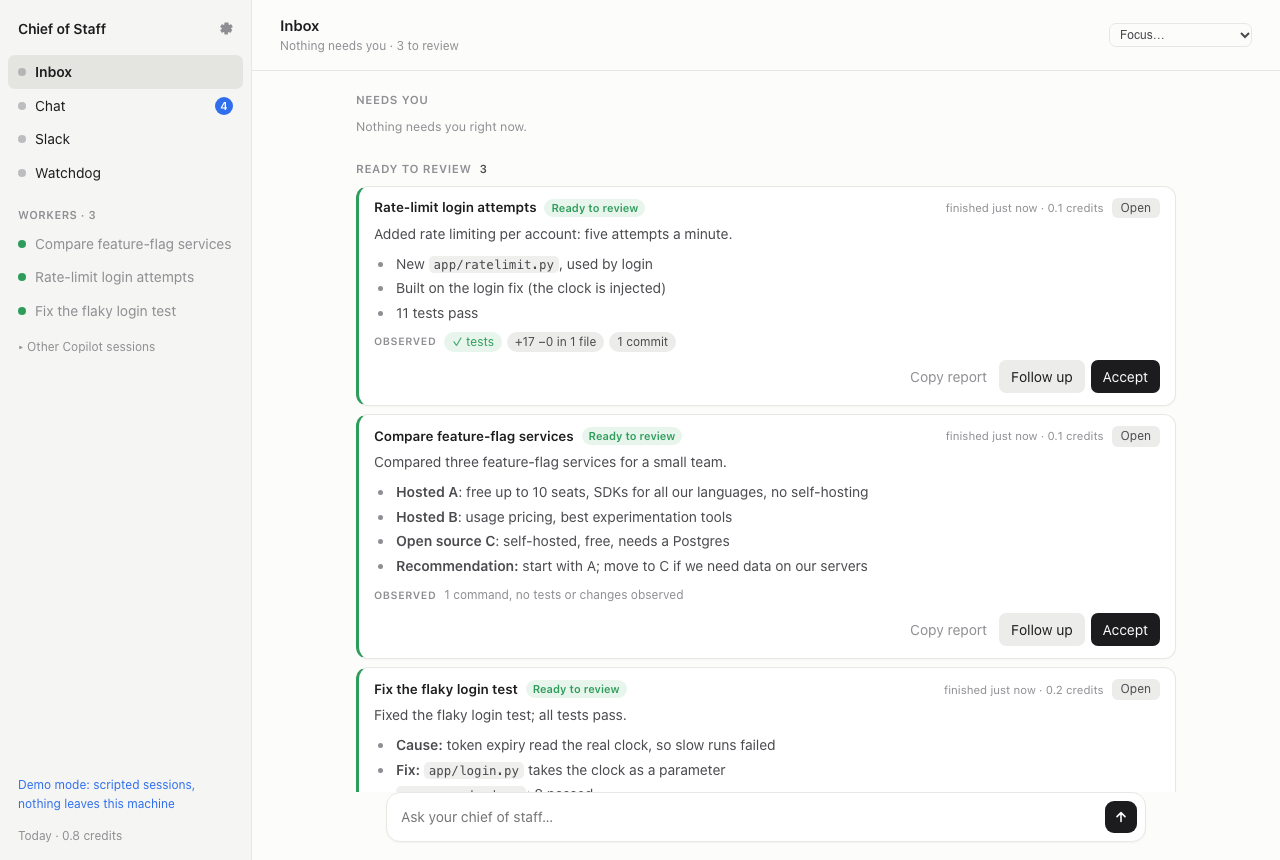
Try it with scripted sessions first. No account needed:
uvx chiefofstaff --demo
Why I built this
I usually have several Copilot sessions going at once: one fixing a test, one reviewing a PR, one digging through logs. Every few minutes I'd flip between terminals to see which one was stuck, which one had a question, and which one had quietly finished. Slack kept pinging me in between. After a while I couldn't remember which session knew what, and I'd start a new one for a follow-up that an old one could have answered in a minute.
Now I talk to one session, the Router, and Chief of Staff keeps track of the rest.
What it does
- Splits a request into tasks. "Fix the flaky login test, then add rate limiting, and compare feature-flag services" becomes three tasks. The second waits for the first and starts with its result.
- Sends follow-ups to the session that did the work, with its history and checkout, instead of starting over in a new one.
- Shows what was observed next to what the worker reports: the test runs, commits, diff and PR checks. If a report says "all tests pass" and no test ran, the card says so.
- Leaves your own checkout alone. Each worker gets its own folder and git worktree and runs in Copilot's OS sandbox, so it can't write anywhere else.
- Drafts replies to Slack DMs and mentions in your style. Nothing is sent until you press Send.
- Lets you delegate from Slack: react 🤖 to any message ("can someone look at the export bug?") and it becomes a task. When it's done, the answer is drafted in that thread.
- Has a focus mode. Pick how long: notifications wait, the Router handles what it can, and you get one summary at the end.
- Watches for workers that stall or go in circles, and nudges them.
It runs on the Copilot you already have: your plan, your models, your MCP servers and your company's policies. No other AI service or API key.
Install
You need macOS or Linux, Python 3.11 or newer, uv (or pipx), and the GitHub Copilot CLI:
npm install -g @github/copilot
copilot login
uvx chiefofstaff            # or: pipx install chiefofstaff && chiefofstaff
Your browser opens http://127.0.0.1:8765. Tell it where your code lives (like ~/workspace),
then type what you need in the box at the bottom. Repositories a task needs that aren't there
yet get cloned into that folder, and each worker works in its own git worktree inside it, so
your own checkouts are never touched.
Everything runs on your machine, and your data stays in ~/Library/Application Support/chiefofstaff
(macOS) or ~/.local/share/chiefofstaff (Linux). Closing the tab doesn't stop anything; press
Ctrl+C in the terminal to stop. Sessions continue where they left off when you start it again.
If it's already running, starting it again just opens the page.
Options: --port, --data-dir, --no-browser, --demo. To update: uvx chiefofstaff@latest
or pipx upgrade chiefofstaff.
Signing in
There are a few separate sign-ins. Only the first one is required.
- Copilot. Run
copilot loginonce. If you haven't, the page tells you what to do. On a company plan, an admin may need to turn on Copilot CLI for you. - The page itself. Every start prints a private link with a fresh token in the terminal and opens it for you. It stays signed in for 24 hours. After a restart, use the new link. Keep it to yourself: whoever has it can act as you.
- GitHub, to review PRs you're asked to review:
gh auth login. With the sandbox on, also runcopilot sandbox ca create && copilot sandbox ca trustonce, soghworks inside it. - Slack and other services. Paste a Slack user token in Settings (how to get one). When a worker needs another service, like your docs or issue tracker, a sign-in card shows up in the inbox.
How it works
Every session is a regular Copilot CLI session. You'll find them in copilot --resume, named
"Chief of Staff · …". Chief of Staff drives them through the Copilot SDK:
you ── inbox ── Router ── tasks ──► worker · worker · worker
                  ▲                 (own folder, worktree, sandbox)
Slack, GitHub ────┘    Slack session ──► drafts you approve
                       Watchdog ──► nudges stuck workers
Sessions never talk to each other directly. They call tools like spawn_worker, report or
ask_session, and Chief of Staff delivers the message. Each message is saved before it's sent
and labeled with who it's from, so a Slack message can't pass itself off as you.
- User guide
- Architecture
- Security: what the OS sandbox enforces, what Chief of Staff enforces, and what relies on the model following instructions.
Status
Early (0.1). Expect rough edges. Copilot usage counts against your plan like any other session, and the inbox shows the credits each task used.
Bug reports and ideas are welcome as issues. If you'd like to contribute, start with CONTRIBUTING.md and the good first issues.
License
MIT. Chief of Staff is an independent project, not made by or affiliated with GitHub. GitHub Copilot is a trademark of GitHub, Inc.
1 maintainer

Metadata
1 maintainer
Release files for chiefofstaff 0.1.4
For a detailed explanation of source distributions (sdists) and built distributions (wheels), please see the package formats documentation.
Source distribution (sdist)
| File | Size | Uploaded | Provenance | Actions |
|---|---|---|---|---|
| chiefofstaff-0.1.4.tar.gz | 642.6 kB | With provenance | Details for chiefofstaff-0.1.4.tar.gz |
Built distribution (wheel)
| File | Interpreter | ABI | Platform | Actions Reset |
|---|---|---|---|---|
| chiefofstaff-0.1.4-py3-none-any.whl | Python 3 | none | any | Details for chiefofstaff-0.1.4-py3-none-any.whl |
Total release size: 819.7 kB
Release files / chiefofstaff-0.1.4.tar.gz
| Download URL | chiefofstaff-0.1.4.tar.gz |
|---|---|
| Size | 642.6 kB |
| Tags | Source |
|
SHA-256 checksum How to use checksums |
6583f2c1f029cbbbe2d897f52352b8b873683aea14305e4189a1a5955c95d14e
|
|
BLAKE2b-256 checksum How to use checksums |
2e01aad49fbcff2ca39309002cafd99a01465f012f3af899dbc28bacbe1a15f5
|
| Upload date | |
|
Uploaded using Trusted Publishing? What is trusted publishing? |
Yes |
| Uploaded via |
twine/7.0.0 CPython/3.13.16
|
Provenance
Provenance describes where a file came from. On PyPI, provenance is shared via attestations, which provide a verifiable record of the build or publishing details. View details, limitations and caveats.


PyPI Publish Attestation
PyPI verified that this artifact, at this checksum, originated from the publisher listed below.
Signed by GitHub Actions, verified by PyPI on Nov 2, 2026.
Transparency logRelease files / chiefofstaff-0.1.4-py3-none-any.whl
| Download URL | chiefofstaff-0.1.4-py3-none-any.whl |
|---|---|
| Size | 177.1 kB |
| Tags | Python 3 |
|
SHA-256 checksum How to use checksums |
47c6589f136b26832e40a32f98e0c7b3ee227e73cc701d797ed7759e97a1b5ba
|
|
BLAKE2b-256 checksum How to use checksums |
5f75f572df08c3314976e29c7d77460ebc5ac22092c96e56e8f430d0979bee75
|
| Upload date | |
|
Uploaded using Trusted Publishing? What is trusted publishing? |
Yes |
| Uploaded via |
twine/7.0.0 CPython/3.13.16
|
Provenance
Provenance describes where a file came from. On PyPI, provenance is shared via attestations, which provide a verifiable record of the build or publishing details. View details, limitations and caveats.
PyPI Publish Attestation
PyPI verified that this artifact, at this checksum, originated from the publisher listed below.
Signed by GitHub Actions, verified by PyPI on Nov 2, 2026.
Transparency logSecurity for chiefofstaff 0.1.4
Provenance
Provenance describes where a file came from. On PyPI, provenance is shared via attestations, which provide a verifiable record of the build or publishing details. View details, limitations and caveats.
Full provenance
All 2 files in this release have been uploaded with provenance metadata.
Attestation for chiefofstaff-0.1.4.tar.gz
PyPI Publish Attestation
PyPI verified that this artifact, at this checksum, originated from the publisher listed below.
Signed by GitHub Actions, verified by PyPI on Nov 2, 2026.
Transparency logA note on package security
PyPI is a repository for distributing packages, not a service for auditing them. While third-party security researchers and our staff do their best to detect and remove malicious packages, PyPI cannot guarantee the quality, security or suitability of any given package.
To learn more about protecting yourself from malicious actors, visit our package security documentation.














