
A template-based development environment manager

Project description
ChimeraStack CLI
🐉 One command to launch a production-ready development stack.
Skip the boilerplate, focus on code.


📚 Table of Contents
- Why ChimeraStack?
- TL;DR Quick Demo
- Key Features
- Installation
- Creating Your First Project
- Template Gallery
- How It Works
- Authoring Custom Templates
- Roadmap
- Contributing
- License
🛈 Project Status
❓ Why ChimeraStack?
| Persona | Pain Points | How ChimeraStack Helps |
|---|---|---|
| Beginners | Confusing Docker setup, port clashes, missing environment variables | chimera create blog -t fullstack/react-php → ready-to-run project with sensible defaults |
| Students / Teachers | Need consistent environments on many machines | Project templates ensure everyone runs identical containers and ports |
| Senior Devs | Tiring to maintain many local micro-services | Dynamic port allocator + compose fragments = run multiple stacks side-by-side without conflicts |
⚡ TL;DR Quick Demo
# Install (isolated) – requires Python 3.8+
pipx install chimera-stack-cli

# Spin up a React + PHP + MySQL stack in <10 s
chimera create my-app -t fullstack/react-php -d mysql   # choose db variant
cd my-app

docker compose up -d  # 🚀 Boom – services are live!
Open http://localhost:8xxx (ports are auto-assigned) and start coding.
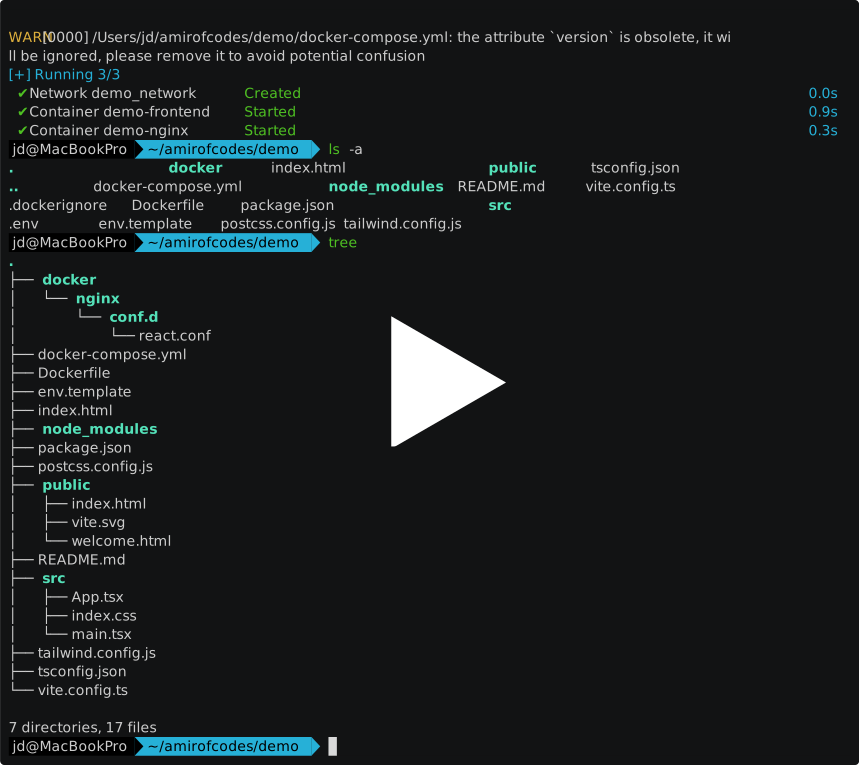
📽 Interactive Demo
✨ Key Features
- 🔌 Template Catalogue – ready-made stacks for frontend, backend & databases
- 🔄 Smart Port Allocation – avoid
address already in useforever - 🗜️ Zero-Config – works with a single CLI command, no manual Docker files
- 🧩 Composable – mix components or add plugins (coming v0.3)
- 🧑🎓 Learning-Friendly – minimal jargon, helpful errors & docs
📦 Installation
| Method | Command |
|---|---|
pipx (recommended) |
pipx install chimera-stack-cli |
pip |
pip install chimera-stack-cli |
| Homebrew | brew install chimerastack/tap/cli (soon) |
| Binary | Grab the latest release from Releases page & chmod +x |
Requires Python 3.10+ and Docker 20.10+ with Docker Compose plugin.
🛠️ Creating Your First Project
# Interactive wizard
chimera create my-blog

# Non-interactive: choose stack + variant up-front
chimera create my-api -t backend/php-web -d postgresql
Once finished:
cd my-api
docker compose up -d
Your containers are accessible on dynamically allocated ports printed by the CLI.
🎨 Template Gallery (v0.2.5)
| Category | Templates |
|---|---|
| Frontend | frontend/react-static (Vite + Tailwind; Vite dev server on 3000-3999), frontend/vue (soon) |
| Backend | backend/php-web (MySQL, PostgreSQL, MariaDB), backend/node-express (roadmap) |
| Databases | database/mysql, database/postgresql, database/mariadb |
| Fullstack | fullstack/react-php (React + PHP; dev server on dynamic port, Nginx on 8000-8999; DB variants: MySQL/MariaDB/PostgreSQL) |
Run chimera list to explore the full list and search by tag.
🔍 How It Works
- Selects stack + components based on CLI flags.
- Renders all files through a Jinja2 pipeline (variable substitution).
- Allocates free ports via
PortAllocator(ranges defined inconfig/ports.yaml). - Executes optional
post_copytasks for final clean-up. - Outputs a ready project you can commit to Git or deploy.
No global state, no magic network shims – just Docker Compose done right.
🧑🎨 Authoring Custom Templates
Want to add Django + Redis? Check out the dedicated guide:
➡️ docs/authoring-templates.md
It covers directory layout, template.yaml schema, Jinja2 helpers, testing & publishing.
🔮 Roadmap
| Version | Highlights |
|---|---|
v0.3 |
Plugin system (chimera add redis, monitoring…) |
v0.4 |
Mix-&-Match wizard (chimera init --frontend react --backend node) |
v0.5 |
chimera deploy to Coolify or bare VPS |
v1.0 |
Stable API, web/CLI sync, template marketplace |
See ROADMAP.md for the full list.
🤝 Contributing
- Fork → create feature branch → commit (semantic) → PR.
- Run
pre-commit&pytestlocally – CI must stay green. - Need help? Open an issue or start a discussion.
See CONTRIBUTING.md for environment setup, commit policy & test guide.
📄 License
MIT © Amirofcodes & contributors


Download files
Download the file for your platform. If you're not sure which to choose, learn more about installing packages.
Source Distribution
Built Distribution
Filter files by name, interpreter, ABI, and platform.
If you're not sure about the file name format, learn more about wheel file names.
Copy a direct link to the current filters
File details
Details for the file chimera_stack_cli-0.2.6.tar.gz.
File metadata
- Download URL: chimera_stack_cli-0.2.6.tar.gz
- Upload date:
- Size: 144.8 kB
- Tags: Source
- Uploaded using Trusted Publishing? No
- Uploaded via: twine/6.1.0 CPython/3.11.12
File hashes
| Algorithm | Hash digest | |
|---|---|---|
| SHA256 |
b48839000c82317f5240dd3b9ab43fa23d68bca7fe3f3b764bf3125a0e56ae25
|
|
| MD5 |
700e817bc11b9ae35740c7a3589df78e
|
|
| BLAKE2b-256 |
b38f7f9fc566b7c163dd2ccbd2f10da9f4c079d17e0bb99a88f543f70b510d42
|
File details
Details for the file chimera_stack_cli-0.2.6-py3-none-any.whl.
File metadata
- Download URL: chimera_stack_cli-0.2.6-py3-none-any.whl
- Upload date:
- Size: 141.3 kB
- Tags: Python 3
- Uploaded using Trusted Publishing? No
- Uploaded via: twine/6.1.0 CPython/3.11.12
File hashes
| Algorithm | Hash digest | |
|---|---|---|
| SHA256 |
a345158162022d58723850a9b95d3011a177d2f1f368541fe9e803ee42e16fab
|
|
| MD5 |
d309be4f1449f1fb9963c226fb2d7144
|
|
| BLAKE2b-256 |
0ee7a7331c7e96ec32d71c64bf5b9517d5ff90a8646369bf44705d20223a10c0
|






