
MCP server that connects AI coding tools to UCSF ChimeraX for natural-language protein editing

Project description
ChimeraX MCP Server


Talk to proteins in natural language. This MCP server connects AI coding tools (Claude Code, Cursor, VS Code, etc.) to UCSF ChimeraX, letting you load, edit, visualize, and analyze protein structures through conversation -- no manual ChimeraX commands needed.
Just say "open 6VXX, mutate A:501 to Lys, color by hydrophobicity, and take a screenshot" and watch ChimeraX do it in real time.
This project is in early development and actively looking for contributors. Bug reports, feature requests, and pull requests are very welcome -- check out the issues page or open a PR!
Demos
Load & Visualize
"Load 3LJ5, show only chain A, make it publication-ready with rainbow coloring and transparent surface"

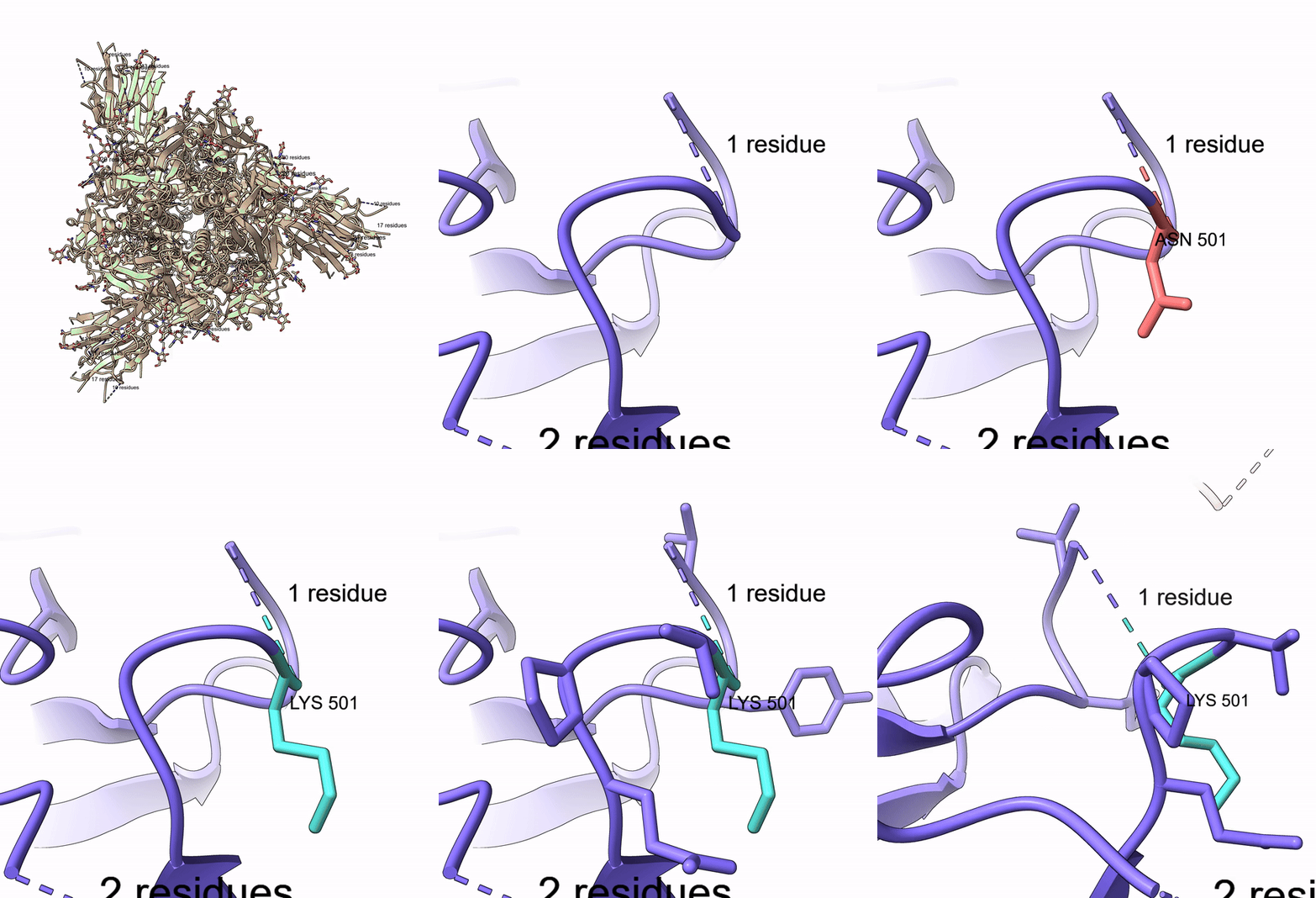
Mutate Residue
"Open 6VXX, zoom to residue A:501, highlight it, mutate Thr to Lys, show nearby residues"
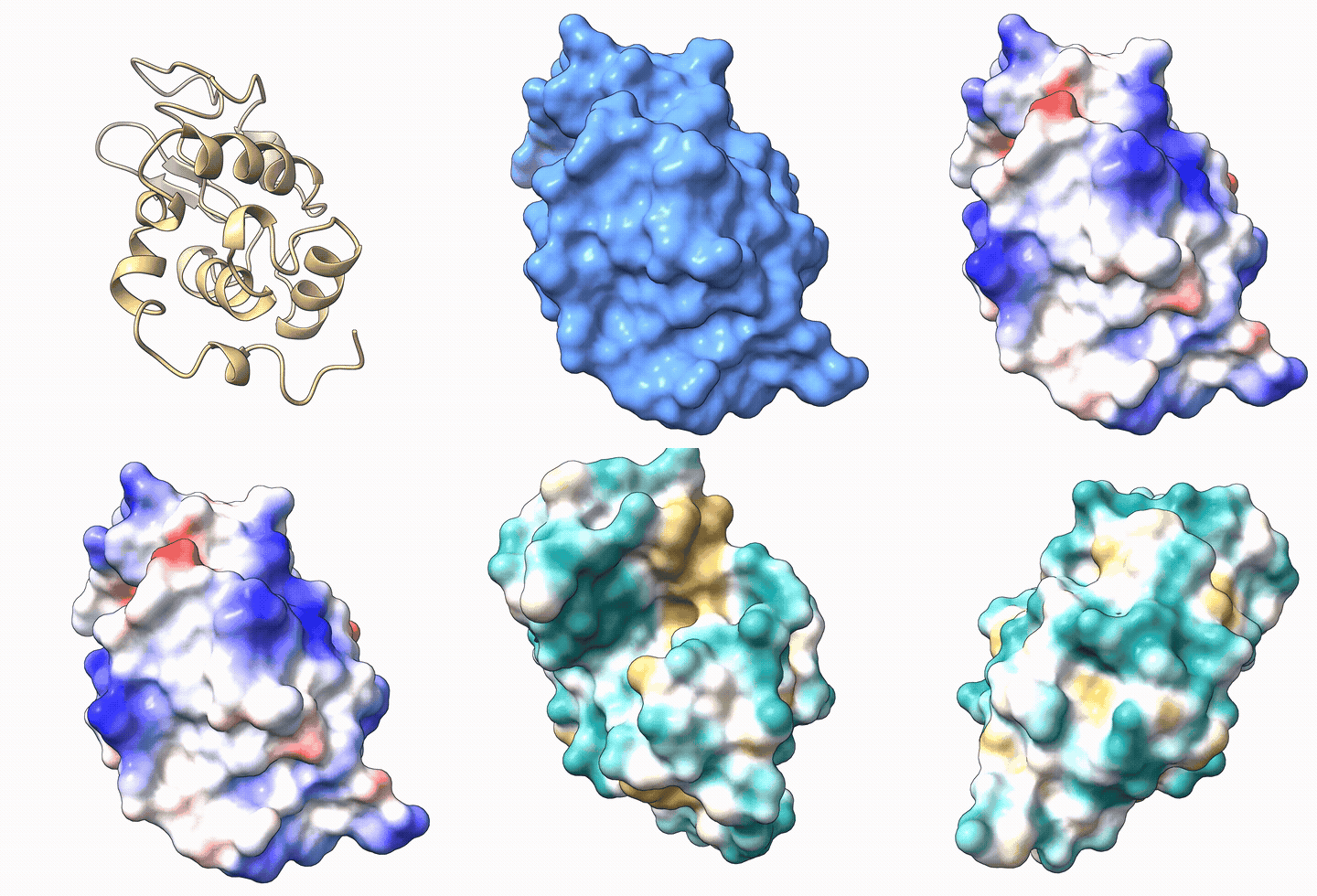
Electrostatic & Hydrophobicity Surfaces
"Load 1AKI, show surface, color by electrostatic potential, then switch to hydrophobicity"
Features
- 39 tools covering structure loading, editing, visualization, measurement, selection, and video recording
- Auto-launches ChimeraX -- no manual setup needed, just install and go
- Works with any MCP client -- Claude Code, Cursor, Windsurf, VS Code Copilot, Cline, OpenCode, Continue, Claude Desktop
- Built-in agent instructions -- AI agents automatically learn ChimeraX spec syntax and common workflows
- Security hardened -- command injection prevention, dangerous command blocking, script path validation
- Accepts flexible input -- both
A:48and/A:48spec formats, both 1-letter and 3-letter amino acid codes - Video recording -- capture sessions as MP4, record turntable spins
- Run custom scripts -- execute
.cxcand.pyscripts with path validation
Prerequisites
- UCSF ChimeraX installed (download)
- Python 3.10+
ChimeraX will be launched automatically when the first tool is called. No need to start it manually or enable the REST API yourself.
Manual setup (if auto-launch doesn't work)
Open ChimeraX and run in its command line:
remotecontrol rest start port 8765
To use a custom ChimeraX install location, set the CHIMERAX_BIN environment variable:
export CHIMERAX_BIN="/path/to/ChimeraX"
Installation
pip install chimerax-mcp
Other install methods
From GitHub (latest dev):
pip install git+https://github.com/mahynotch/chimerax-mcp.git
From source (development):
git clone https://github.com/mahynotch/chimerax-mcp.git
cd chimerax-mcp
pip install -e .
MCP Configuration
After installing, add the server to your AI coding tool:
Claude Code
claude mcp add -s user chimerax -- chimerax-mcp
Claude Desktop
Edit config file:
- macOS:
~/Library/Application Support/Claude/claude_desktop_config.json - Windows:
%APPDATA%\Claude\claude_desktop_config.json - Linux:
~/.config/Claude/claude_desktop_config.json
{
  "mcpServers": {
    "chimerax": {
      "command": "chimerax-mcp",
      "args": []
    }
  }
}
Cursor
Add to ~/.cursor/mcp.json (global) or .cursor/mcp.json (project):
{
  "mcpServers": {
    "chimerax": {
      "command": "chimerax-mcp",
      "args": []
    }
  }
}
Windsurf
Add to ~/.codeium/windsurf/mcp_config.json:
{
  "mcpServers": {
    "chimerax": {
      "command": "chimerax-mcp",
      "args": []
    }
  }
}
VS Code (Copilot)
Add to .vscode/mcp.json:
{
  "servers": {
    "chimerax": {
      "type": "stdio",
      "command": "chimerax-mcp"
    }
  }
}
Cline
Use the "Edit MCP Settings" button in the Cline panel, or edit directly:
- macOS:
~/Library/Application Support/Code/User/globalStorage/saoudrizwan.claude-dev/settings/cline_mcp_settings.json - Windows:
%APPDATA%\Code\User\globalStorage\saoudrizwan.claude-dev\settings\cline_mcp_settings.json
{
  "mcpServers": {
    "chimerax": {
      "command": "chimerax-mcp",
      "args": [],
      "disabled": false
    }
  }
}
OpenCode
Add to ~/.config/opencode/opencode.json or project opencode.json:
{
  "mcp": {
    "chimerax": {
      "type": "local",
      "command": ["chimerax-mcp"],
      "enabled": true
    }
  }
}
Continue
Add to .continue/config.yaml:
mcpServers:
  - name: chimerax
    type: stdio
    command: chimerax-mcp
Quick Start
Once configured, just talk naturally:
"Open 6VXX, color by chain, show surface, zoom to residue A:501"
The AI will call MCP tools sequentially and ChimeraX renders each step in real time:
open_structure("6VXX")-- fetches the structure from RCSBcolor_structure("#1", "chain")-- colors each chain differentlyshow_surface("#1")-- displays the molecular surfacezoom_to("/A:501")-- centers the view on residue 501 of chain A
Available Tools (39)
Structure (6)
| Tool | Description |
|---|---|
open_structure |
Open PDB ID, file path, or URL |
close_structure |
Close one or all models |
save_structure |
Save to PDB/mmCIF/mol2 |
list_models |
List all open models |
get_sequence |
Get amino acid sequence for a chain |
run_script |
Execute a .cxc or .py script |
Editing (4)
| Tool | Description |
|---|---|
mutate_residue |
Swap residue using Dunbrack rotamer library |
delete_atoms |
Delete atoms or residues |
add_hydrogen |
Add hydrogens (protonate) |
minimize_energy |
Run energy minimization |
Visualization (18)
| Tool | Description |
|---|---|
color_structure |
Color by scheme (chain, bfactor, rainbow) or named/hex color |
show_electrostatic_surface |
Coulombic ESP (red=negative, blue=positive) |
show_hydrophobicity_surface |
Molecular Lipophilicity Potential |
show_surface |
Show molecular surface with optional transparency |
hide_surface |
Hide molecular surface |
show_cartoon |
Show ribbon/cartoon |
show_sticks |
Show stick representation |
hide_atoms |
Hide atoms |
zoom_to |
Zoom camera to a selection |
set_background |
Set background color |
label_residues |
Add text labels to residues |
clear_labels |
Remove all labels |
reset_view |
Reset to default camera view |
take_snapshot |
Save PNG screenshot |
start_recording |
Begin recording session as video |
stop_recording |
Stop recording and save to MP4/WebM/MOV |
spin |
Rotate model around an axis |
record_spin |
Record a full turntable spin video |
Measurement (6)
| Tool | Description |
|---|---|
measure_distance |
Distance between two atoms (Angstroms) |
measure_angle |
Bond angle from three atoms (degrees) |
align_and_rmsd |
Structural alignment with RMSD |
find_contacts |
Residues within N Angstroms of selection |
get_bfactors |
B-factor values for selection |
measure_buried_area |
Buried solvent-accessible surface area |
Selection (5)
| Tool | Description |
|---|---|
select_atoms |
Select by ChimeraX specifier |
select_near |
Select within distance |
select_chain |
Select entire chain |
invert_selection |
Invert current selection |
name_selection |
Save selection under a reusable name |
Security
Commands are sanitized before being sent to ChimeraX:
- Command injection blocked --
;and newlines rejected (ChimeraX uses these as command separators) - Dangerous commands blocked --
exec,shell,systemare rejected - Script execution validated --
run_scriptonly accepts existing.cxc/.pyfiles with path validation - Local-only -- REST API listens on
127.0.0.1only, not exposed to the network
Testing
Run the full test suite (53 tests) against a live ChimeraX instance:
pip install pytest
python -m pytest tests/test_live.py -v
Security tests run without ChimeraX. Live tests auto-skip if ChimeraX is not available.
For AI Agents: Auto-Install
If a user asks you to install this MCP server, follow these steps:
- Install the package:
pip install chimerax-mcp
- Register the MCP server (detect the user's tool and run the appropriate command):
| Tool | Command |
|---|---|
| Claude Code | claude mcp add -s user chimerax -- chimerax-mcp |
| Cursor | Add to ~/.cursor/mcp.json |
| VS Code | Add to .vscode/mcp.json |
For Cursor / VS Code / others, create or update the config file with:
{
  "mcpServers": {
    "chimerax": {
      "command": "chimerax-mcp"
    }
  }
}
- Restart the AI tool to load the new MCP server.
- Verify with a test call:
open_structure("1aki")
Important: Before proceeding, confirm with the user that UCSF ChimeraX is installed on their machine. If not, direct them to https://www.cgl.ucsf.edu/chimerax/download.html -- the server auto-launches ChimeraX but cannot install it.
Disclaimer
This project is not affiliated with, endorsed by, or sponsored by UCSF or the RBVI team. "ChimeraX" is a trademark of the University of California. This server communicates with ChimeraX through its public REST API and contains no ChimeraX source code.
Users are responsible for complying with ChimeraX's license terms. ChimeraX is free for academic and non-commercial use; commercial use requires a separate license from UCSF.
License
MIT -- see LICENSE
Release history Release notifications | RSS feed


Download files
Download the file for your platform. If you're not sure which to choose, learn more about installing packages.
Source Distribution
Built Distribution
Filter files by name, interpreter, ABI, and platform.
If you're not sure about the file name format, learn more about wheel file names.
Copy a direct link to the current filters
File details
Details for the file chimerax_mcp-0.1.1.tar.gz.
File metadata
- Download URL: chimerax_mcp-0.1.1.tar.gz
- Upload date:
- Size: 24.8 kB
- Tags: Source
- Uploaded using Trusted Publishing? No
- Uploaded via: twine/6.2.0 CPython/3.10.20
File hashes
| Algorithm | Hash digest | |
|---|---|---|
| SHA256 |
bc59481d5c80c67626dcc671d63f201284edd0fabf94e439cc4b903286ea0c4c
|
|
| MD5 |
dbcc69aadca2f36e8c924d8fe858d6e2
|
|
| BLAKE2b-256 |
aa902895c64d62d7a09d21e12cb51aa8ee1585c6efb884a9003f81a611eeec7f
|
File details
Details for the file chimerax_mcp-0.1.1-py3-none-any.whl.
File metadata
- Download URL: chimerax_mcp-0.1.1-py3-none-any.whl
- Upload date:
- Size: 22.6 kB
- Tags: Python 3
- Uploaded using Trusted Publishing? No
- Uploaded via: twine/6.2.0 CPython/3.10.20
File hashes
| Algorithm | Hash digest | |
|---|---|---|
| SHA256 |
c695228c9ef3929b6c5edcfcfcb07fc9b37f3671292d3b1227dd354693529a52
|
|
| MD5 |
97a70e6865292400723cdd31a7334102
|
|
| BLAKE2b-256 |
80c3041b239eea92ad6ebf84e67a08c5b856c4dec79a8e5195ae4be1abaeda26
|






