
ChimericMesh
Kiroween 2026, category: Frankenstein.
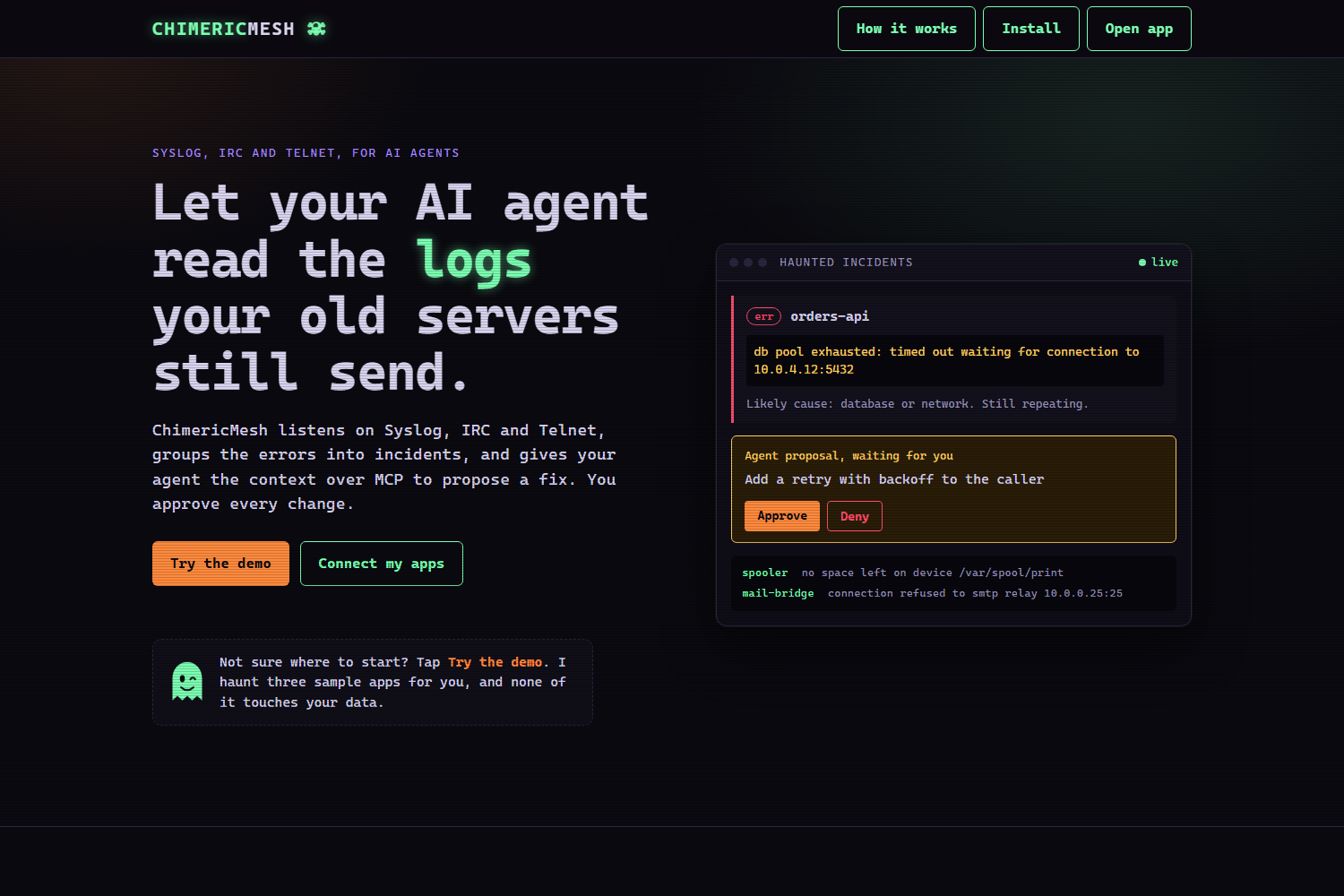
ChimericMesh stitches 1980s infrastructure protocols (Syslog, IRC, Telnet) onto modern AI agent workflows. Legacy systems keep talking the way they always have. Incidents are detected, exposed to Kiro agents through the Model Context Protocol (MCP), and announced back on IRC and via webhooks.
Syslog/UDP ─┐
Telnet/TCP ─┼─> parsers ─> Hub ─> incident detection ─┬─> IRC announce
IRC/TCP ────┘                                         └─> webhook
Kiro agent ── MCP (stdio) ──> REST API ──> Hub
Quick start
Install
Install the chimericmesh command with pipx, or run it without installing through uvx from uv. Python 3.11 or newer.
From GitHub:
pipx install git+https://github.com/HarshitDhaduk/chimericmesh
uvx --from git+https://github.com/HarshitDhaduk/chimericmesh chimericmesh
From PyPI:
pipx install chimericmesh
uvx chimericmesh
Then:
chimericmesh                  # start the hub; dashboard at http://127.0.0.1:8000
chimericmesh --version
chimericmesh --help           # start | token --rotate | mcp | demo | --version | --help
chimericmesh start is the same as chimericmesh. chimericmesh mcp runs the MCP server for Kiro (see "MCP for Kiro"). chimericmesh demo runs the guided demo on its own, without your hub (see "Try the demo").
Try the demo
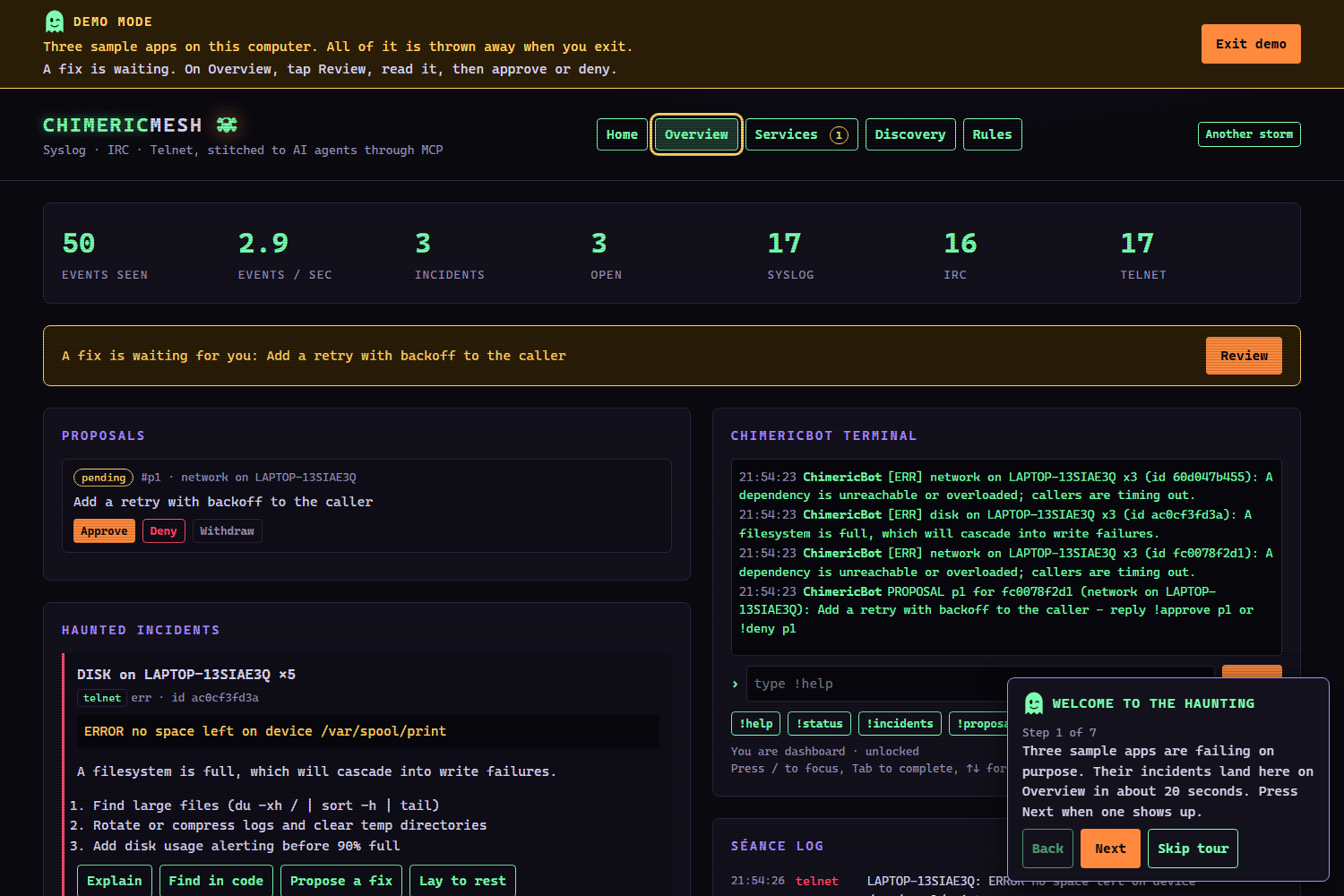
Open http://127.0.0.1:8000 (the Home page) and press Try the demo. Nothing is typed and nothing is installed.
- The hub starts a second, throwaway hub on free loopback ports, with an in-memory database and a temporary home folder, plus three sample apps that fail on purpose (
orders-api,spooler,mail-bridge). Their errors arrive over Syslog, Telnet and IRC. The first incident appears in about 20 seconds, and a demo agent leaves a fix under Proposals for you to approve or deny. - Your hub, its database, its admin token and its ports are not used. The demo hub is started with an allow-listed environment, so
CHIMERICMESH_DB, the token file and the webhook URL are never passed on. Approving a demo fix changes nothing outside the demo. - A banner marks the demo page. A seven-step guided tour (Overview, an incident, Services, Discovery, a proposal, Mute, Exit demo) walks through it. Skip it at any time and bring it back with Show tour.
- There is no time limit. Exit demo, Ctrl+C, closing the real hub, or the real hub dying stops the demo hub and the sample apps and deletes the temporary folder. Exit demo returns you to Home with a note that the demo closed.
chimericmesh demoruns the same demo from a terminal without the real hub. It prints the demo address and stops on Ctrl+C. It does not open a browser.
If the demo cannot start (no free ports, a child that exits), Home says why and nothing on your machine is changed.
Mute a service
Mute on a service card, on its page or on the Unassigned card drops that service's incoming events at the hub. Muted events are not stored, do not count in the stats, do not open incidents and are not announced. They are counted, and the card shows how many were dropped. Log-file offsets still advance, so unmuting does not replay what was dropped. Existing incidents are not changed and show a "muted" tag.
| Route | Needs the admin token | Does |
|---|---|---|
PUT /api/services/{id}/mute |
yes | Mute (also unassigned). |
DELETE /api/services/{id}/mute |
no | Unmute. |
GET /api/mutes |
no | The muted keys and the dropped counts. |
Mutes are saved in the database and every change goes to the audit log. /api/ingest answers a muted event with id: 0 and "muted": true. Muting Unassigned asks for confirmation first.
From a checkout (contributors)
pip install -e ".[dev]"
python -m chimericmesh        # same as `chimericmesh`, with the same arguments
Ports (override with env vars): HTTP 8000, Syslog/UDP 5514, IRC 6667, Telnet 2323. Everything binds to 127.0.0.1 by default (CHIMERICMESH_BIND).
Try it:
- Run
.\scripts\demo.ps1to send real Syslog, Telnet and IRC traffic (-Only syslog|telnet|ircto send one,-Count 12to trigger anUPDATEline). - Click "Summon a failure storm" on the dashboard, or
POST /api/demo/storm. - Join IRC (
/server 127.0.0.1 6667,/join #ops) and watch the bot announce incidents. - Send syslog:
<27>Nov 13 11:10:08 db01 kernel: Out of memory: Kill process 4412 - Open a Telnet session to port 2323 and type an
ERROR ...line.
The dashboard's Events seen tile is a cumulative counter (total_events in /api/stats, with total_by_source and a 10 second events_per_second). The hub only keeps the latest 2000 events in memory for the log view (events, buffer_capacity), so the log header reads "latest N of TOTAL" once the buffer has wrapped.
Data and proposal ids
The hub keeps events (bounded), incidents, proposals, an append-only audit log and counters in one local SQLite database, ~/.chimericmesh/chimericmesh.db by default. The startup log prints its path. Proposal ids are unique per database; deleting the database restarts them at p1. Ids look like p1, p2, p3 and nothing else.
| Variable | Meaning | Default |
|---|---|---|
CHIMERICMESH_DB |
Database file, or :memory: for no file |
<home>/chimericmesh.db |
CHIMERICMESH_HOME |
Directory for the database | ~/.chimericmesh |
CHIMERICMESH_MAX_EVENTS |
Most event rows kept (1 to 10,000,000) | 100000 |
CHIMERICMESH_EVENT_TTL_DAYS |
Event rows older than this are removed (1 to 3650) | 7 |
CHIMERICMESH_REOPEN_AFTER_SECONDS |
A resolved incident reopens when a matching event arrives after this many seconds (0 to 86400) | 300 |
A bad value logs one warning and uses the default. An explicit relative CHIMERICMESH_DB is resolved once against the current directory at startup; the defaults never depend on the current directory, so starting the hub from two folders opens the same file.
Things to know:
- One database file supports one running hub process. Two processes serving one file are not supported. A start that fails before serving leaves the crash marker untouched.
- Event ids keep rising across restarts. After a crash a restart skips ahead by a safety margin so clients holding an
after_idcursor stay valid. After a crash that follows a long storage outage, a restart may reuse event ids a client saw; this is the one known gap. - A database written by a newer build is refused at startup and is not modified. Refusing a newer-schema database after a crash may still checkpoint its
-walfile into the database file; the data is not changed. - The audit log can only be appended to. Log text, secrets and URL credentials never reach it.
- On Windows the owner-only permission step uses
icaclsand is verified by hand; on other systems the directory is0700and the file0600. - The decider name of a proposal is display text. These prefixes are reserved for the hub's own rule logic and never make a decision count as the hub's:
rule:,rule-,withdrawn:,expired:,expired-.
Replaying real logs
Besides the hand-written demo traffic, you can stream real public logs into the mesh over UDP syslog:
$env:PYTHONPATH = "src"
python -m chimericmesh.replay --dataset openssh --rate 200   # real SSH brute-force traffic
python -m chimericmesh.replay --dataset linux                # real /var/log/messages
python -m chimericmesh.replay --file my.log --limit 500      # your own file
Samples are downloaded on first use into data/ (git-ignored, never committed). Lines are sent exactly as they appear in the file, with no <PRI> header, so the parser infers severity from the text.
Data credit: Loghub by the logpai group. The datasets are free for research and academic use; please cite Zhu et al., "Loghub: A Large Collection of System Log Datasets for AI-driven Log Analytics", ISSRE 2023. Replayed data is real but is not a live production system.
What replaying real data taught us (each now has a regression test): real logs often have no <PRI> header, one attacker produces hundreds of near-identical lines that differ only in user and address, one-off errors are noise, and re-analyzing history on every event drops UDP packets. Incidents are now tracked incrementally and the syslog socket has a 4 MB receive buffer.
Replaying real IRC chat
$env:PYTHONPATH = "src"
python -m chimericmesh.replay_irc --dataset ubuntu-server --rate 100
python -m chimericmesh.replay_irc --file chat.txt --channel "#ops" --limit 200   # "[HH:MM] <nick> text" format
This replays a real Ubuntu support channel through the mesh's IRC server, with one connection per speaker. The logs come from irclogs.ubuntu.com; the Common Pile dataset card describes them as released into the public domain. Nicknames belong to real people, so they are replaced with pseudonyms by default (--no-mask disables this). The file is downloaded on first use into data/ and never committed.
Things the real chat taught us: a chat line is evidence, not proof, so IRC text is capped at error severity and a single message about the OOM killer can no longer open an incident, and the IRC server now ignores any sender prefix a client supplies and uses the registered nickname. Clients must register (NICK) before their messages are ingested.
Log files and TCP syslog
Servers that only write log files (Apache, nginx, IIS, vsftpd, Postfix) are read in place; nothing wraps or launches them. Register a file on a service with POST /api/services/{id}/log-sources and a body like {"path": "C:\\inetpub\\logs\\u_ex.log", "format": "w3c"}. The formats are syslog-text, ncsa (Apache and nginx access logs), w3c (IIS), xferlog (FTP) and plain. GET /api/services/{id} shows each source's status and counters.
- The hub opens the file for a moment on each poll and never holds it open, so rotation by rename works on Windows too. A rename that lands inside a read can fail with WinError 32; the rotating program should retry after a short wait. Measured on a Windows 11 machine while the file was being appended to, 1.5 to 3 percent of renames needed one retry; on an idle file none did.
- Lines written in the last half second before a rename or truncation can be lost, and so can a line without its newline at that moment.
- Read positions are saved every 5 seconds. After a crash the hub can repeat up to 5 seconds of lines, and can lose a few hundred milliseconds of events that the store had not yet written. A graceful stop saves the final position.
- A source that is disabled and enabled again starts at the end of the file. A new source starts at the end too, unless
backfill_linesasks for recent lines. - Event times are the arrival time at the hub, not the time written in the line.
- Limits: 2000 lines per second per source (extra lines are counted as dropped and summarised in one warning event), 8192 bytes per line, 1 MiB per poll.
- The path is fixed. Date-named files such as IIS
u_exYYMMDD.logneed a new path each day. - Secrets in query strings and in
password=,token=andAuthorization:values are replaced by<redacted>. This is a best effort, not a guarantee.
Syslog over TCP (octet-counted or newline-framed) listens on CHIMERICMESH_SYSLOG_TCP_PORT, which defaults to 5514 (the UDP port number, on its own socket); 0 disables it. A busy port logs one warning and the hub starts anyway.
Discovery
Discovery is an opt-in scan of the local machine that suggests services for well-known legacy servers (Apache, nginx, IIS, vsftpd, ProFTPD, FileZilla Server, Sendmail, Postfix, Exim, BIND, Samba, Squid, inetd and telnetd, syslog daemons, snmpd). It never runs on its own: no scan at startup, on a timer or as a side effect. Nothing is watched until you accept a suggestion.
Every route needs the admin token (X-Admin-Token), including reading the results, because a scan lists the software installed on the machine:
| Route | Does |
|---|---|
POST /api/discovery/scan |
Start one scan. 202 {"scan_id", "state": "running"}; 409 while a scan runs; 503 when the catalog could not be loaded. |
GET /api/discovery/scans/{id} |
state (running, done, failed), started_at, finished_at, limited, os, reason and the suggestions. Results are kept in memory for one hour (at most 5 scans). |
POST /api/discovery/suggestions/{id}/accept |
Body {"id", "name", "log_paths": [{"path", "format"}], "code_folder"?, "app_names"?}. Creates the service and its log sources in one step (origin: discovery), or 422 with a field and nothing created. |
POST /api/discovery/suggestions/{id}/dismiss |
Do not offer this app with these paths again. |
GET /api/discovery/dismissals |
List dismissals. |
DELETE /api/discovery/dismissals |
Clear all dismissals; the apps are offered again on the next scan. |
$h = @{ "X-Admin-Token" = (Get-Content "$env:USERPROFILE\.chimericmesh\admin.token") }
$scan = Invoke-RestMethod -Method Post -Headers $h http://127.0.0.1:8000/api/discovery/scan
Invoke-RestMethod -Headers $h "http://127.0.0.1:8000/api/discovery/scans/$($scan.scan_id)"
What a scan does: it runs the operating system's own tools with a fixed argument list, never through a shell, from their system directory (never the current folder or PATH), each with a 10 second timeout and 2 MB of output, 30 seconds in total. On Windows tasklist /fo csv /nh and netstat -ano; on Linux the names in /proc/<pid>/comm and ss -ltnup (or netstat -ltnup when ss fails); on macOS ps -axo pid=,comm= and lsof -nP -iTCP -sTCP:LISTEN -iUDP. It matches process names (and, for protocol-specific ports such as 21, 23 and 25, listening ports) against src/chimericmesh/catalog/legacy_apps.json, then looks at each candidate log path with stat only. It never reads log contents, never reads command lines, makes no network connection and keeps no process list: a suggestion holds only the matched process name, the lowest pid, the number of matching processes and the listening ports. It runs with your normal rights and never asks for elevation. When some details were not visible (a tool failed or timed out, output was cut, another user's processes are hidden, a candidate list was cut at 25 paths), the result says limited: true and gives a reason.
Discovery cannot be started by an agent: there is no MCP tool for it, and the results are not exposed to MCP. The dashboard's discovery screen (when built) uses the same routes; you can always add a path by hand with POST /api/services/{id}/log-sources.
Limits to know:
- Accept stores the files that exist at accept time, not the pattern. A rotating log needs its new file added by hand; patterns are not stored. This matters for daily files such as IIS
u_exYYMMDD.logand FileZilla Server logs. - IIS may not appear: its worker
w3wpstarts only after the first request to a site, and port 80 alone is not evidence of IIS. Make one request to the site, then scan again, or add the IIS log path by hand. - Discovery never guesses a code folder. Suggestions contain no
code_folder; you may type one at accept time, and the services rules refuse a home directory, a drive root or the hub's data directory. - The demo
examples/legacy_appis not in the catalog on purpose. Add it by hand as a service to show the manual path. - To add or change an app, edit
catalog/legacy_apps.json(it is validated at startup; an invalid file disables discovery and nothing else). If thew3corxferlogformat is ever dropped, change those entries toplainin the same change.
Manual checks (not automated):
- Verify the catalog paths against vendor documentation or a sample machine for each of the 15 entries.
- On the Windows development machine, scan with a real IIS or Apache if present, otherwise with the demo
legacy_apprunning (it is not suggested and is added by hand;examples/legacy_app/upstream.pyis not changed by discovery). Check that the suggestions and thelimitedflag are sensible. - Run once as a non-admin user on Linux and check
limited: true. - Rehearse the demo with nginx or Apache: scan, accept, append an error line, watch the incident.
- On a Windows machine with IIS, scan once before and once after the first request to the site:
iisshould appear only afterw3wpruns. - Capture real output of
ss -ltnup,netstat -ltnup,lsofandnetstat -anoon a non-English Windows and add them as parser fixtures.
MCP for Kiro
Installing the package does not change any Kiro settings. You add the MCP server yourself, in three steps.
1. Install
pipx install chimericmesh, or nothing at all if you use uvx (needs uv). See "Install" above for the GitHub routes.
2. Start the hub
chimericmesh
The dashboard is at http://127.0.0.1:8000. The MCP server only talks to this hub, so keep it running.
3. Add the MCP server named chimericmesh
Add one of these blocks to ~/.kiro/settings/mcp.json (all your workspaces) or to .kiro/settings/mcp.json in a workspace. The server name must be exactly chimericmesh, because the agents and the power below refer to it by that name.
Installed with pipx:
{
  "mcpServers": {
    "chimericmesh": {
      "command": "chimericmesh",
      "args": ["mcp"],
      "env": { "CHIMERICMESH_URL": "http://127.0.0.1:8000" }
    }
  }
}
Or without installing, through uvx (from PyPI; put "--from", "git+https://github.com/HarshitDhaduk/chimericmesh" before "chimericmesh" to run it from GitHub):
{
  "mcpServers": {
    "chimericmesh": {
      "command": "uvx",
      "args": ["chimericmesh", "mcp"],
      "env": { "CHIMERICMESH_URL": "http://127.0.0.1:8000" }
    }
  }
}
From a checkout (contributors; this is what the repository's own .kiro/settings/mcp.json has, run with the repository root as the working directory):
{
  "mcpServers": {
    "chimericmesh": {
      "command": "python",
      "args": ["-m", "chimericmesh.mcp_server"],
      "env": { "PYTHONPATH": "src", "CHIMERICMESH_URL": "http://127.0.0.1:8000" }
    }
  }
}
Tools (17): list_incidents, get_incident, find_code_for_incident, recent_events, announce_to_irc, resolve_incident, propose_remediation, get_proposal, list_proposals, complete_proposal, list_services, get_service, service_events, explain_log_window, find_code_for_service, verify_proposal, wait_for_work.
Optional: set CHIMERICMESH_WEBHOOK_URL for webhooks and CHIMERICMESH_CODE_ROOT for code lookups.
How incidents behave
- Hosts: Syslog carries a host field. For IRC and Telnet, a leading
hostname:in the message (for exampleweb02: upstream timed outorALERT sw-core-1: Failed password) sets the host. Otherwise the IRC nick or the Telnet peer address is used. - Opening: an incident is announced on IRC (and by webhook) once it has 3 events, or immediately at crit severity or worse.
- Updates: follow-up
UPDATElines go out when the count passes 10, 50, 100 and 500, so channels do not get flooded. - Code lookup: searches
examples/legacy_app/by default, a small sample app whose log lines match the demo storm. PointCHIMERICMESH_CODE_ROOTat your own source tree to use it for real.
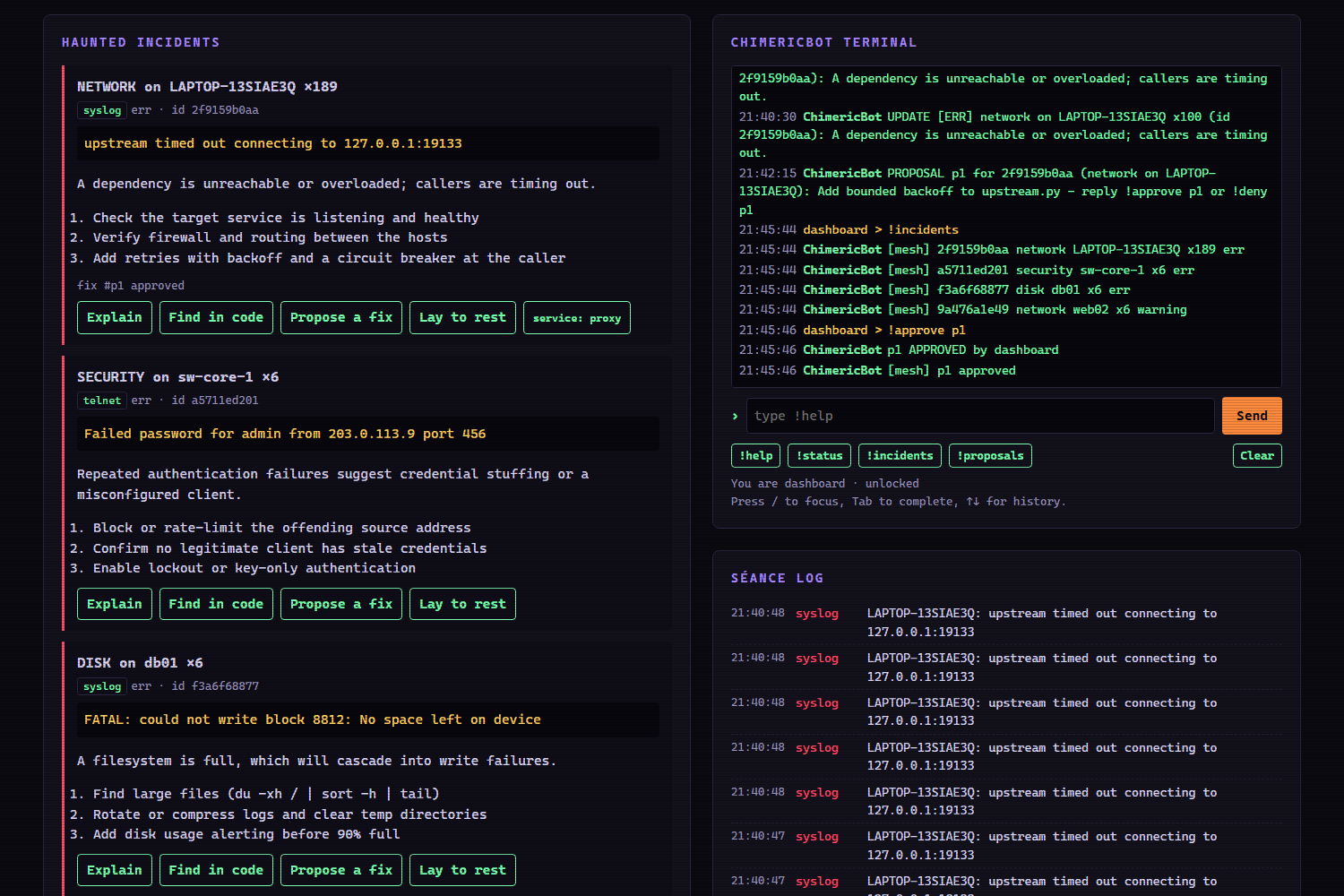
Screenshots
Captured from the running app in headless Edge.
Tests
python -m pytest -q
Includes Hypothesis property tests for parser totality, IRC injection safety, and chunking.
Kiro usage
The full write-up, with commit evidence for each claim, is in docs/kiro-usage.md. Exported Kiro IDE sessions of the live agent runs are in docs/kiro-sessions/.
- Specs:
.kiro/specs/legacy-mesh/(baseline) and seven V1 module specs in.kiro/specs/<module>/(requirements, design with correctness properties, tasks); the plan is indocs/v1-capability-map.md - Steering:
.kiro/steering/ - Hooks:
.kiro/hooks/(smoke tests on save, about 40 seconds, not the full suite; innerHTML guard), plus the opt-in.kiro/hooks-optional/mesh-verify-write - MCP:
src/chimericmesh/mcp_server.py - Custom agents:
.kiro/agents/mesh-responder.json(on demand) and.kiro/agents/mesh-watcher.json(watch mode); both run in Kiro IDE and Kiro CLI - Power:
powers/chimericmesh-remediation/
Kiro agent and power
Both are optional and need the MCP server from "MCP for Kiro" (named chimericmesh). Installing the package does not copy or enable them.
4. Optional: the custom agents
mesh-responder (.kiro/agents/mesh-responder.json) runs the human-approved remediation loop on demand. mesh-watcher (.kiro/agents/mesh-watcher.json) is the watch-mode profile (see "Agent watch mode"). Neither defines an MCP server itself: they set includeMcpJson to true and use the chimericmesh server from your mcp.json. They list file://.kiro/steering/project.md under resources, which is a ChimericMesh steering file; outside this repository, delete that line from your copy or add your own steering file. They auto-allow only the read-only MCP tools (mesh-watcher also the watch and proposal tools; the hub holds its approval gate), and keep the permission rules of the repository versions.
Copy the files into your workspace's .kiro/agents/ folder (create it first). Raw URLs:
- https://raw.githubusercontent.com/HarshitDhaduk/chimericmesh/main/.kiro/agents/mesh-responder.json
- https://raw.githubusercontent.com/HarshitDhaduk/chimericmesh/main/.kiro/agents/mesh-watcher.json
New-Item -ItemType Directory -Force .kiro\agents | Out-Null
Invoke-WebRequest https://raw.githubusercontent.com/HarshitDhaduk/chimericmesh/main/.kiro/agents/mesh-responder.json -OutFile .kiro\agents\mesh-responder.json
Invoke-WebRequest https://raw.githubusercontent.com/HarshitDhaduk/chimericmesh/main/.kiro/agents/mesh-watcher.json -OutFile .kiro\agents\mesh-watcher.json
Trust the workspace, start the hub, then select the agent with the agent picker in Kiro IDE or /agent in Kiro CLI. In a checkout the agents are already in place and use the repository's own .kiro/settings/mcp.json.
5. Optional: the power
Power chimericmesh-remediation (powers/chimericmesh-remediation/) uses the Agent Plugins layout: plugin.json, mcp.json and skills/ (getting-started, remediation-loop, triage, watch-mode). Its mcp.json starts the server with uvx chimericmesh mcp, so it needs uv on your PATH. Kiro prefixes the power's server name on install, so it does not replace the chimericmesh server from step 3; the agents above use the one from mcp.json.
- From GitHub: open the Powers panel, choose Add Custom Power, then Import power from a repository URL, and enter https://github.com/HarshitDhaduk/chimericmesh/tree/main/powers/chimericmesh-remediation
- From a checkout: Add Custom Power, then Import power from a folder, and select
powers/chimericmesh-remediation.
Kiro CLI installs powers only from a catalog name or a local folder.
tests/unit/test_kiro_assets.py checks the agents and the power statically (JSON validity, tool names against the MCP server, consistency with .kiro/settings/mcp.json). It does not show that Kiro loads them.
- PBT:
tests/pbt/
Agent watch mode
The custom agent mesh-watcher (.kiro/agents/mesh-watcher.json) keeps one Kiro session running as a watcher. It loops on wait_for_work, investigates an incident with the read-only tools, sends one propose_remediation per incident with files (absolute paths inside the service's code folder), estimated_lines and verification, and edits code only after the hub reports the proposal as approved and verify_proposal answers ok. Ids are p1, p2 and so on. The power skill watch-mode carries the same loop. Like mesh-responder, it takes the chimericmesh server from mcp.json (includeMcpJson); see "Kiro agent and power" for installing it outside this repository.
Setup: trust the workspace in Kiro (an untrusted workspace does not load the profile or its MCP server), start the hub (chimericmesh, or python -m chimericmesh from a checkout), register a service with a code folder, and select mesh-watcher. Tools added for the loop: list_services, get_service, service_events, explain_log_window, find_code_for_service, verify_proposal and wait_for_work. They only read; none takes the admin token.
Workspace root. The hub finds the workspace root by walking up from its working directory to the nearest folder that has .kiro/; set CHIMERICMESH_WORKSPACE_ROOT (an existing absolute directory) to override it. The permissions snippet uses it to write workspace-relative paths. files in verify_proposal (and in the hook) are absolute paths; a relative path fails verify. files in propose_remediation are written relative to the service's code folder, as the proposal check of the standing rules requires.
Prompt mode (default) and autonomous mode
Prompt mode (default). No snippet is pasted. The mesh tools run without a Kiro prompt, but every file edit and every shell command asks you. The approval gate is the hub: you approve a proposal with !approve <id> (or the dashboard terminal) and the agent edits only after get_proposal and verify_proposal agree.
Autonomous (hands-off) mode. Paste the snippet from GET /api/services/<id>/permissions-snippet (optional ?test_command=...) into a Kiro permissions.yaml. It allows fs_write inside the service's code folder, denies writes to protected names (.env, keys, .git, .kiro, .github) and has one commented line for a single test command. Nothing writes the file for you; the hub only returns text. Prefer the workspace-scoped file (~/.kiro/workspace-roots/<hash>/permissions.yaml, the hash is looked up on your machine). The user-scoped ~/.kiro/settings/permissions.yaml applies to every session and agent of this user, not only mesh-watcher, so use it only on purpose. Hands-off write allows use workspace-relative globs only. Permission rules are static: if the service's code folder changes, the old allow no longer matches and Kiro prompts again until you paste a new snippet.
The snippet is a standing allow. It also applies while a proposal is still pending, so in this mode the gate rests on the agent following its prompt, on verify_proposal and on the audit trail, not on a Kiro prompt. That the agent cannot approve its own proposal or widen the rules is a design goal with the limits stated below, not a guarantee.
Hands-off test-command risk (accepted for hands-off mode only). The one allowed test command in autonomous mode runs code the agent has just written, with your privileges. That code could read the admin token file or call the hub. You accepted this risk for hands-off mode; prompt mode stays the default and has no such command. Pause, revoke and withdraw need no token and can only reduce the agent's permissions; create, widen, re-enable and resume need the token.
Waiting and timeouts
wait_for_work holds the request for 25 seconds at most (the hard ceiling; CHIMERICMESH_WATCH_MAX_WAIT can only lower it) and then returns status: "timeout". The MCP server's own client timeout is 35 seconds, and Kiro's default requestTimeout is 120000 ms (the profile no longer sets it).
Live check, 2026-11-23, Kiro IDE with mesh-watcher: one call with the default returned timeout after the full wait, with no tool error. No fallback was needed. Which file the IDE reads requestTimeout from was not checked. The profile no longer carries a server, so it can only be set as mcpServers.chimericmesh.requestTimeout in your .kiro/settings/mcp.json (or ~/.kiro/settings/mcp.json); add it there yourself if the call ever fails with an IDE timeout. As a fallback, set CHIMERICMESH_WATCH_MAX_WAIT (for example 10) in the environment of the hub process, the terminal that runs python -m chimericmesh, and restart the hub. Only the hub reads it; an entry in the profile's env changes nothing.
Optional enforcement hook
.kiro/hooks-optional/ holds mesh-verify-write.json and mesh_verify_write.py. To opt in, copy both files into .kiro/hooks/; to remove it, delete both copies. While it is installed, every write needs an active proposal: the agent writes the proposal id (for example p4) to .chimericmesh-active-proposal in the workspace root, and the hook asks the hub's verify route about the target file and blocks (exit 2) when the answer is not ok, when the state file is missing or bad, or when the hub cannot be reached. The hook sends no token, talks to loopback only, and exits 0 (no block) when its input cannot be parsed. It covers fs_write, fs_append and str_replace only; it does not see shell commands. The state file is written by the agent, so an injected agent can name another approved proposal; verify then still limits the write to that proposal's declared files and folder. The snippet has a commented allow for that one state file. The hook files are not installed by default, and .kiro/hooks/ is unchanged.
Limits
- The agent runs as the same OS user as the hub. With a shell command allowed it could read the token file and call the REST API, including the token-free pause, revoke and withdraw routes. Kiro's own prompt on shell commands is the real gate for that.
- The
~/.chimericmesh/**and token deny globs in the profile are check live items: confirm in the IDE that they match. If they do not, what remains is the name-based denies and Kiro's read prompt; the hook covers writes only. - The
PermissionRequesthook trigger is not part of V1. verify_proposalrefuses.env-type and other protected names inside the code folder for a user approval without declared files, but it cannot see edits made through a shell command.- In an in-memory (bare) hub the proposals list keeps the latest 200, so a user-denied proposal that falls off it makes its incident show up as work again. With the store, every proposal is kept.
- Code search and digests read only the service's code folder and its log text, and treat all log text as untrusted.
- Demo precondition. Restore the defect in
examples/legacy_app/upstream.pyyourself before the demo, for example withgit checkout -- examples/legacy_app/upstream.py. Nothing in this module runs that command. The demo testexamples/legacy_app/tests/test_resilience.py::test_long_outage_keeps_running_with_bounded_positive_delaysfails by design until the upstream client has a bounded backoff; the rootpython -m pytest -qdoes not collect it.
Standing approval rules
A standing rule lets the hub approve a fix without asking each time. The hub decides, never the agent: the agent has no tool to create, edit, widen or resume a rule, and "approved by a rule" is read from the approved_by_rule column of the proposal, never from the decider text.
What a rule covers. One service (it must have a code folder), plus either one incident signature or one category (memory, disk, network, security, crash, unknown), and a most-urgent severity (3 or 4; severity 0 to 2 is never covered). A proposal is approved by the rule only when every condition holds: the hub is not paused, the rule is active and not expired, the proposal says kind code_change, the incident belongs to the rule's service and matches, the hourly and per-incident limits have room, it declares 1 to max_files files that all lie inside the service's code folder with a source-file extension (no .git, .kiro, .github, .env, keys; no .json, .yaml, .ini, .conf, .toml), declares estimated_lines up to max_lines, names a verification, and the service's code folder is still the one the rule was made for.
Limits (hub-side). At most 10 proposals per service per hour (all proposals, not only rule approvals), max_per_hour 1 to 10 (default 3), max_per_incident 1 to 3 (default 1) per opening of an incident, max_files 1 to 20 (default 5), max_lines 1 to 500 (default 100), expiry at most 30 days (default 7). One rule approval is valid for 30 minutes; after that it is denied by the hub (rule-expired:<id>). A pending proposal older than CHIMERICMESH_PROPOSAL_TTL_HOURS (default 24) is denied (expired:ttl). 20 rules per service and 100 in total.
Cooldown. If an incident reopens within CHIMERICMESH_AUTOFIX_COOLDOWN_SECONDS (default 86400, 0 to 2592000) of an auto-fixed proposal being completed, the next proposal for it needs your approval. The hub announces it with the normal PROPOSAL ... reply !approve line plus a note and writes an autofix_cooldown audit row. The reopen time is the moment the hub first saw the new opening, which may be up to 60 seconds late.
Creating a rule. Approve a proposal as usual, let the fix pass its verification, then GET /api/proposals/<id>/rule-defaults shows the suggested rule and POST /api/proposals/<id>/rule (admin token, optional overrides in the body) creates it. POST /api/rules creates one directly. Create, widen (PATCH /api/rules/<id>), re-enable (POST /api/rules/<id>/enable) and resume (POST /api/rules/resume) need the token. Only a proposal approved by a person and completed with verification_result passed can seed a rule.
Emergency stop, no token. Pause, revoke and withdraw need no token, are never refused, are rate limited in the audit trail (ten rows a minute per caller, then one coalesced row) and are announced: !rules, !revoke <rule id>, !pause and !withdraw <proposal id> on IRC or the dashboard terminal for any registered nick, and POST /api/rules/<id>/revoke, POST /api/rules/<id>/pause, POST /api/rules/pause, POST /api/proposals/<id>/withdraw over REST. Revoking or suspending a rule denies its approved proposals at once (rule-revoked:<id>, rule-suspended:<id>). Changing or removing a service's code folder, or deleting the service, suspends its rules the same way. !pause stops all auto-approval without changing any rule; only POST /api/rules/resume (token) ends it. Every automatic decision is announced as AUTO-APPROVED p3 by rule r1 (service api-gw): <action>. Revoke with !revoke r1 (nobody has to reply) and written to the audit log (GET /api/audit).
Completion check. When a rule-approved fix is completed with files_changed, lines_changed or verification_result, the hub compares them with the rule. A file outside the code folder or on the protected list, too many files, too many lines or a failed verification completes the proposal but suspends the rule (rule_suspended row, one announcement). A completion without details is recorded as unverified and leaves the rule active.
Reserved decider names. The prefixes rule:, rule-, withdrawn:, expired: and expired- (any case) are used only by the hub's own rule logic. They are refused as the by of POST /api/proposals/<id>/decide and as IRC nicks.
Honest limits. The hub checks the files a proposal and a completion declare; the hub does not stop file writes outside the code folder, because it never executes anything. The agent runs as the same OS user as the hub and could read the token file, so Kiro's shell permission prompt is the real gate for that. In short: pause, revoke and withdraw need no token; create, widen, re-enable and resume need the token.
Security notes
Intended for localhost. Changes that widen what can happen (approving, denying, editing services) need the admin token; see "Access control". Log text is rendered as text only, and outbound IRC is stripped of control characters.
Access control
python -m chimericmesh turns access enforcement on. A test or embedding that passes its own hub to create_app gets it off unless it asks for enforce_access=True.
- Admin token. A random token lives in
~/.chimericmesh/admin.token(owner-only permissions). SetCHIMERICMESH_TOKEN_FILEto use another path. The path is chosen in this order:CHIMERICMESH_TOKEN_FILEif set, elseadmin.tokeninsideCHIMERICMESH_HOMEif set, else~/.chimericmesh/admin.token.~means the home of the account that runs the hub (USERPROFILEon Windows,HOMEelsewhere), not the browser user's. The dashboard's Unlock box shows that exact absolute path, so read the file on the machine where the hub runs. The startup log prints the file's path, never the token.python -m chimericmesh token --rotatewrites a new token and prints only the path. A running hub keeps its old token, and the new one takes effect at the next hub start. WithCHIMERICMESH_DB=:memory:the token exists only in memory and no file is written. - What needs the token. Creating, editing or deleting services and log sources (
/api/services...),POST /api/proposals/{id}/decide, and!approve/!denyin the dashboard terminal. Clients send it in theX-Admin-Tokenheader. Reads, ingest, creating or completing proposals,!resolveand the demo routes need no token. - Reducing operations are open. Pause, revoke and withdraw need no token and are open to any local caller, including the agent from a shell. The cost is that a local process can stop auto-approvals or withdraw proposals: an annoyance, not escalation. Resume and every other rule change need the user.
- Honest limit. The token keeps out web pages and local processes that cannot read your files. It does not stop the agent, which runs as you and can read the token file. Kiro's shell prompt is the real gate for what the agent does.
- Host check. Requests to
/api/*must carry aHostof127.0.0.1,localhostor[::1](any port), which blocks DNS rebinding.CHIMERICMESH_ALLOWED_HOSTS(comma-separated) replaces that list.CHIMERICMESH_BINDsets the listen address; a non-loopback value logs a warning, because the dashboard is then reachable from other machines. - IRC operators.
CHIMERICMESH_OPERATORSlists the nicks that may use!approve,!denyand!resolve. With enforcement on, an IRC client must also set the server password to the admin token (PASS, for example/server 127.0.0.1 6667 <token>). The bundledscripts/irc_client.pydoes this with--password <token>or--token-file(reads the admin token file; honoursCHIMERICMESH_HOMEandCHIMERICMESH_TOKEN_FILE) and never prints the secret. IfCHIMERICMESH_OPERATORSis unset, operator commands are refused on IRC. The nicksdashboardandChimericBotare reserved. - Services and incidents. Two services behind one sender host that log the same error signature share an incident; it belongs to the service of its first tagged event.
License
MIT
Talking to the mesh over IRC
IRC is a two-way operator interface. Registered clients can send commands (messages starting with !) in a channel the bot is in. Commands are never ingested as log events. Replies are posted to the channel, prefixed [mesh].
| Command | Who | What it does |
|---|---|---|
!help |
anyone | List commands |
!status |
anyone | Events seen, open incidents, pending proposals |
!incidents |
anyone | Up to 5 open incidents: id category host xCOUNT severity |
!explain <id> |
anyone | Hypothesis and up to 4 remediation steps |
!proposals |
anyone | Pending remediation proposals |
!resolve <id> [note] |
operator | Resolve an incident |
!approve <pid> / !deny <pid> |
operator | Decide a proposal |
Operators are set with CHIMERICMESH_OPERATORS (comma-separated nicks, case-insensitive) and, with enforcement on (the default for python -m chimericmesh), must also send the admin token as the server password; if it is unset or empty, operator commands are refused. Only with enforcement off (an injected hub, as in tests) does an unset list mean any registered nick counts as an operator. See "Access control".
Human-approved remediation loop
agent (MCP)                 ChimericMesh / IRC #ops              human
-----------                 ----------------------               -----
list_incidents, get_incident, find_code_for_incident
propose_remediation  ---->  "PROPOSAL p1 for <id> ... "  ---->  reads it
get_proposal (poll)  <----  status: pending                      !approve p1  (or !deny p1)
get_proposal         <----  status: approved   <-----------------
(agent does the work itself)
complete_proposal    ---->  "p1 DONE: <note>"
resolve_incident     ---->  "RESOLVED <id> ..."
REST: GET/POST /api/proposals, GET /api/proposals/{pid}, POST /api/proposals/{pid}/decide, POST /api/proposals/{pid}/complete. MCP tools: propose_remediation, get_proposal, list_proposals, complete_proposal.
Safety: ChimericMesh never executes a proposed action on any host. It only records the human decision and announces it. The agent performs the real work under its own tool permissions, and must act only when the proposal is approved, never while it is pending or denied. Proposals are kept in the local database (see "Data and proposal ids"); an injected in-memory hub keeps the last 200.
A real incident, a real fix
examples/legacy_app is a runnable service with a real bug (see its README). To fix it through the approval loop:
- Run the hub:
chimericmesh(from a checkout:python -m chimericmesh). - Run the service:
python examples/legacy_app/run.py. It sends syslog to the hub. - Open the dashboard and wait for the
networkincident about the upstream timeout. - In Kiro, pick the
mesh-responderagent and ask it to investigate and propose a fix. - Approve with
!approve p1in the dashboard terminal: it needs the admin token, and the page asks for it once (paste the contents of~/.chimericmesh/admin.token). On IRC, set the server password to the admin token and use a nick listed inCHIMERICMESH_OPERATORS. - The agent edits the code, runs
python -m pytest examples/legacy_app/tests -q, restarts nothing on its own, and reports the event rate. Restartrun.pyto load the fix and watch the rate fall. - Reset the buggy state:
git checkout -- examples/legacy_appandgit clean -fd examples/legacy_app.
The dashboard terminal and guided workflow
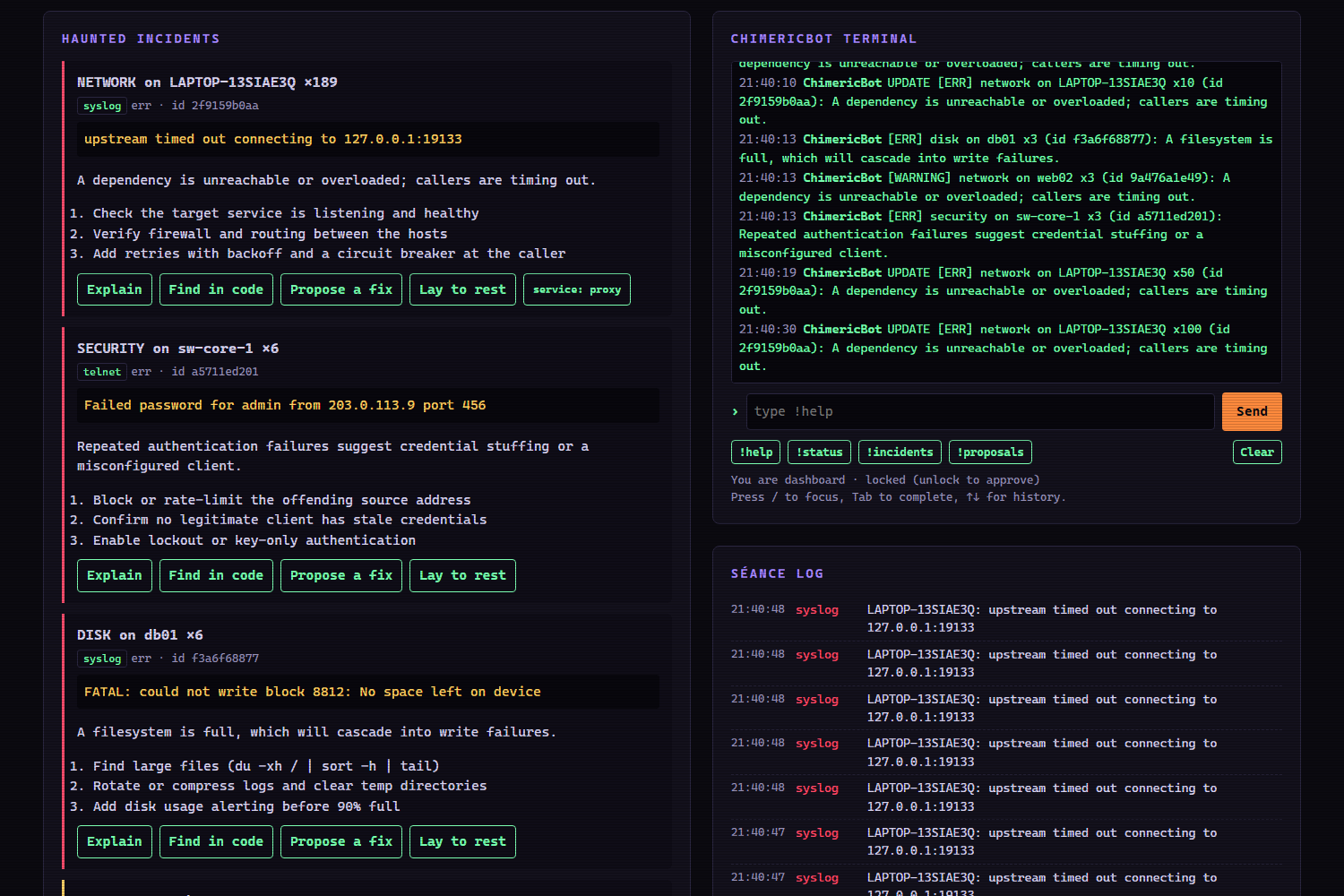
The dashboard has a ChimericBot terminal: a transcript of everything the bot says plus an input line that accepts the same ! commands as IRC (!help, !status, !incidents, !explain <id>, !proposals, !approve, !deny, !resolve). Dashboard buttons just send these commands, so every action appears in the transcript and one authorization check applies everywhere. Replies are also broadcast to IRC.
Web commands run as the fixed nick dashboard; the browser cannot choose a nick. With enforcement on, !approve and !deny in the terminal need the admin token instead of an operator nick (the page asks for it once and keeps it for the tab), so CHIMERICMESH_OPERATORS only governs IRC and !resolve.
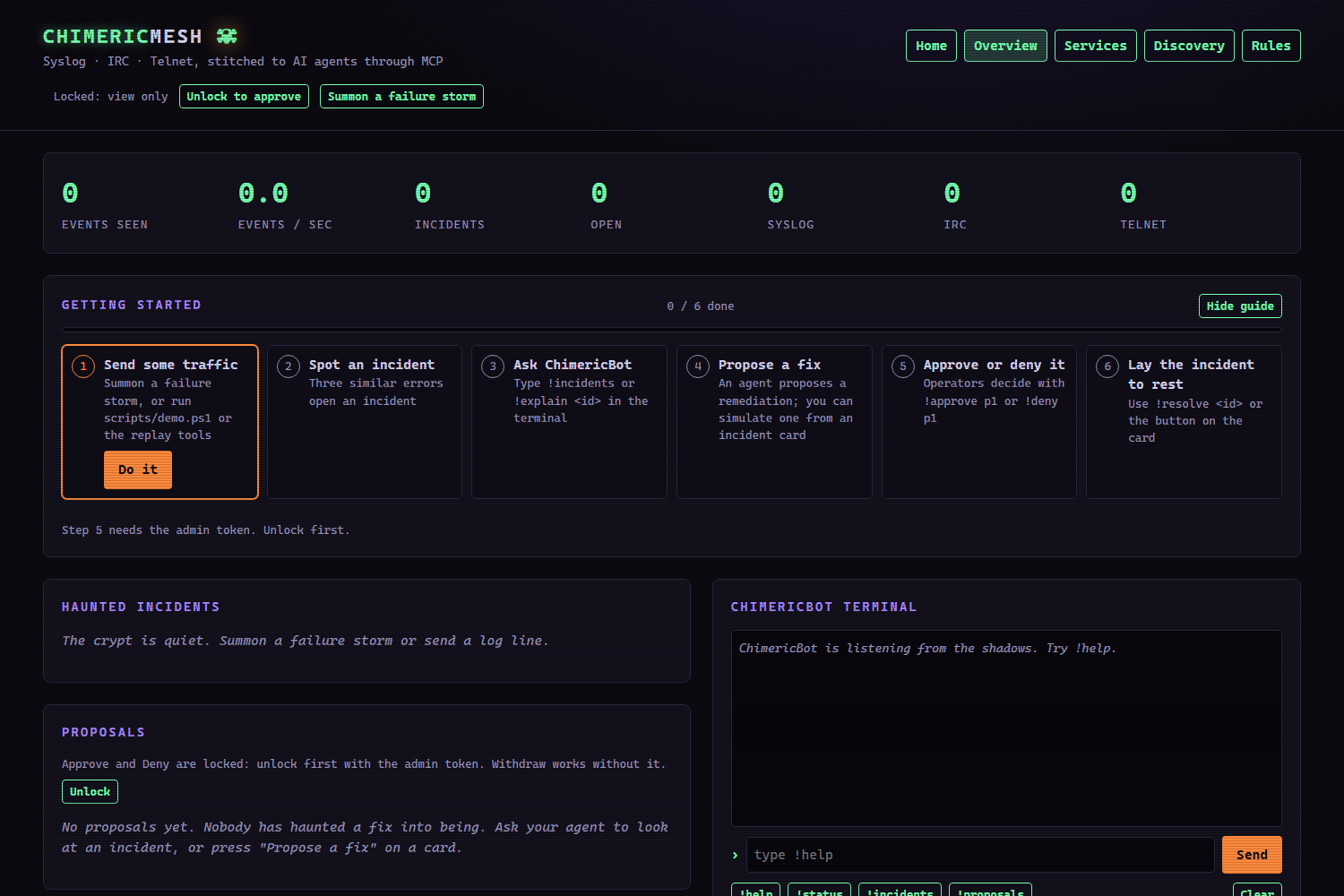
The guided workflow (GET /api/workflow) has six steps:
- Send some traffic (any event ingested)
- Spot an incident
- Ask ChimericBot (run any command)
- Propose a fix
- Approve or deny it
- Lay the incident to rest (resolve)
Endpoints: GET /api/chat?after=&limit=, POST /api/terminal {"text": "!status"}, GET /api/workflow.
Origin check: POST/PUT/PATCH/DELETE requests carrying an Origin header that differs from Host get 403, which blocks other websites from driving a local instance. Clients that send no Origin (curl, scripts, the MCP server) are unaffected.
Security note: IRC nicks are unauthenticated, so CHIMERICMESH_OPERATORS is only a guard on trusted networks, not real authentication.
Dashboard
The page at http://127.0.0.1:8000/ is one static file (src/chimericmesh/web/index.html, no build step, no outside scripts, fonts or images). Five views, chosen with the buttons at the top (the address keeps the choice: #/home, #/overview, #/services, #/discovery, #/rules). An empty address opens Home every time; nothing is remembered about earlier visits:
-
Home: what ChimericMesh is, a diagram of how it fits together, a live strip (events seen, open incidents, services), Try the demo and Connect my apps, and the install commands with a copy button. Open app goes to Overview. On a demo page a banner and the guided tour show here too (see "Try the demo").
-
Overview: the stats, incident cards, proposals, séance log, ChimericBot terminal and guided workflow described above. The proposal cards' Approve and Deny buttons now call
POST /api/proposals/<id>/decideinstead of typing!approveinto the terminal, so they are locked until you unlock the page. The terminal itself is unchanged. -
Services: a card per service (with Mute and Unmute, see "Mute a service") (state, last seen, errors per minute, open incidents, each log source and its status), an add and edit form, and a detail page with the Kiro permissions text, a live log, the service's incidents and its proposals. On a proposal you approved yourself, "Always approve fixes like this" opens a pre-filled rule form and creates the rule only when you confirm.
-
Discovery: "Discover local apps" runs a scan, lists what it found with the candidate log files, and lets you accept (only the checked paths become log sources) or dismiss each suggestion.
-
Rules: the standing approval rules, the Pause all button, per-rule Pause and Revoke, and the audit trail with filters and "Load more". While auto-approval is paused, a banner says so on every view.
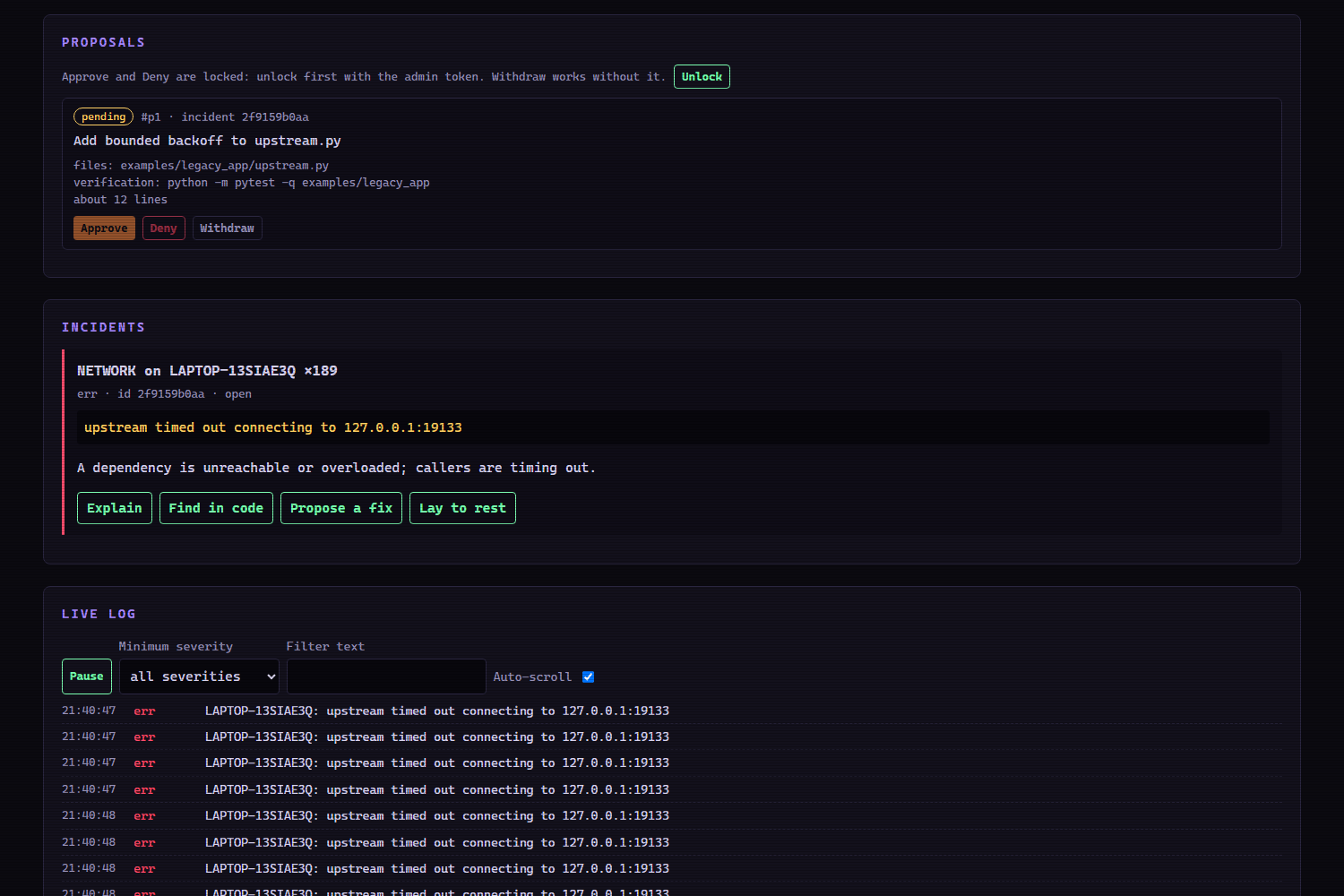
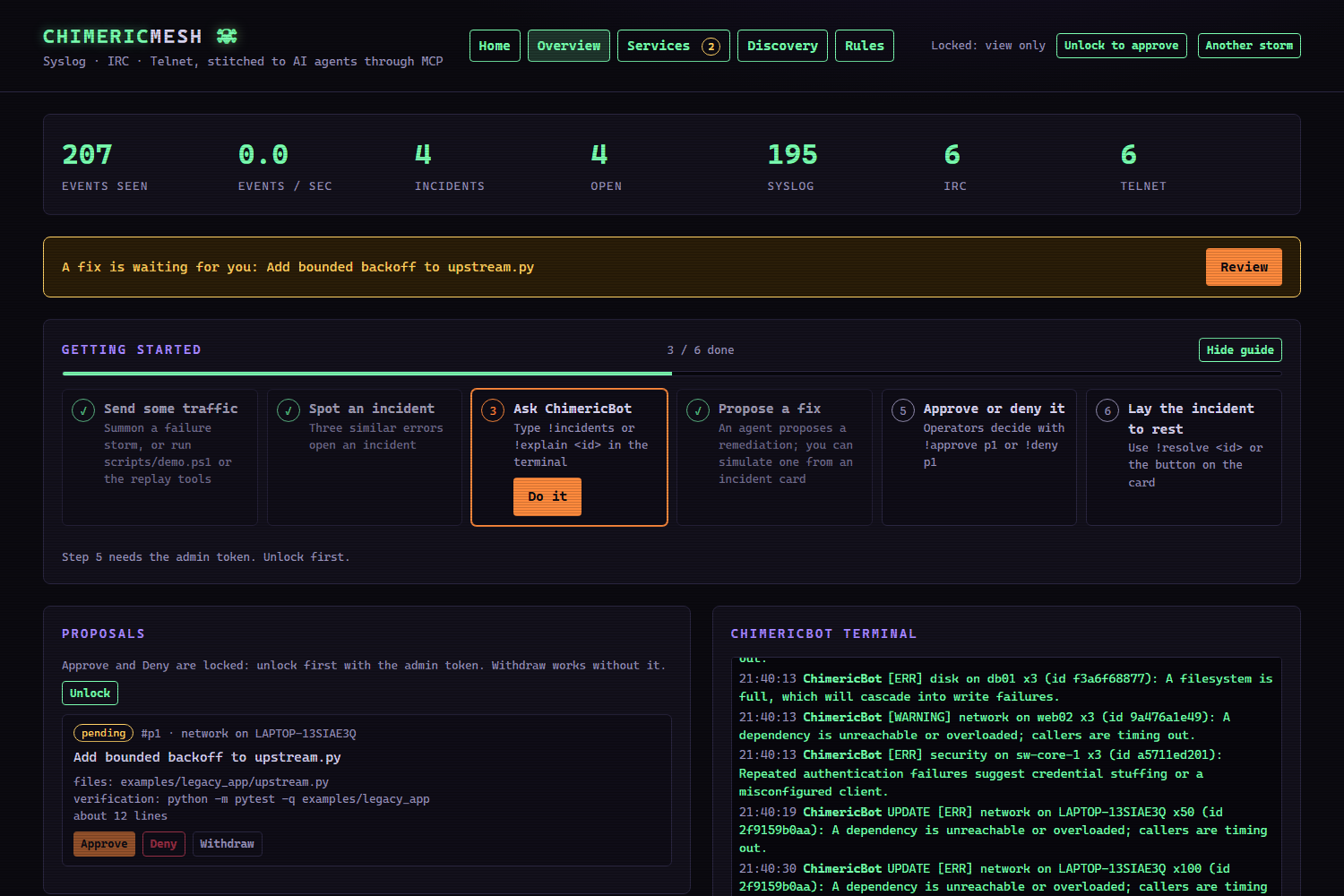
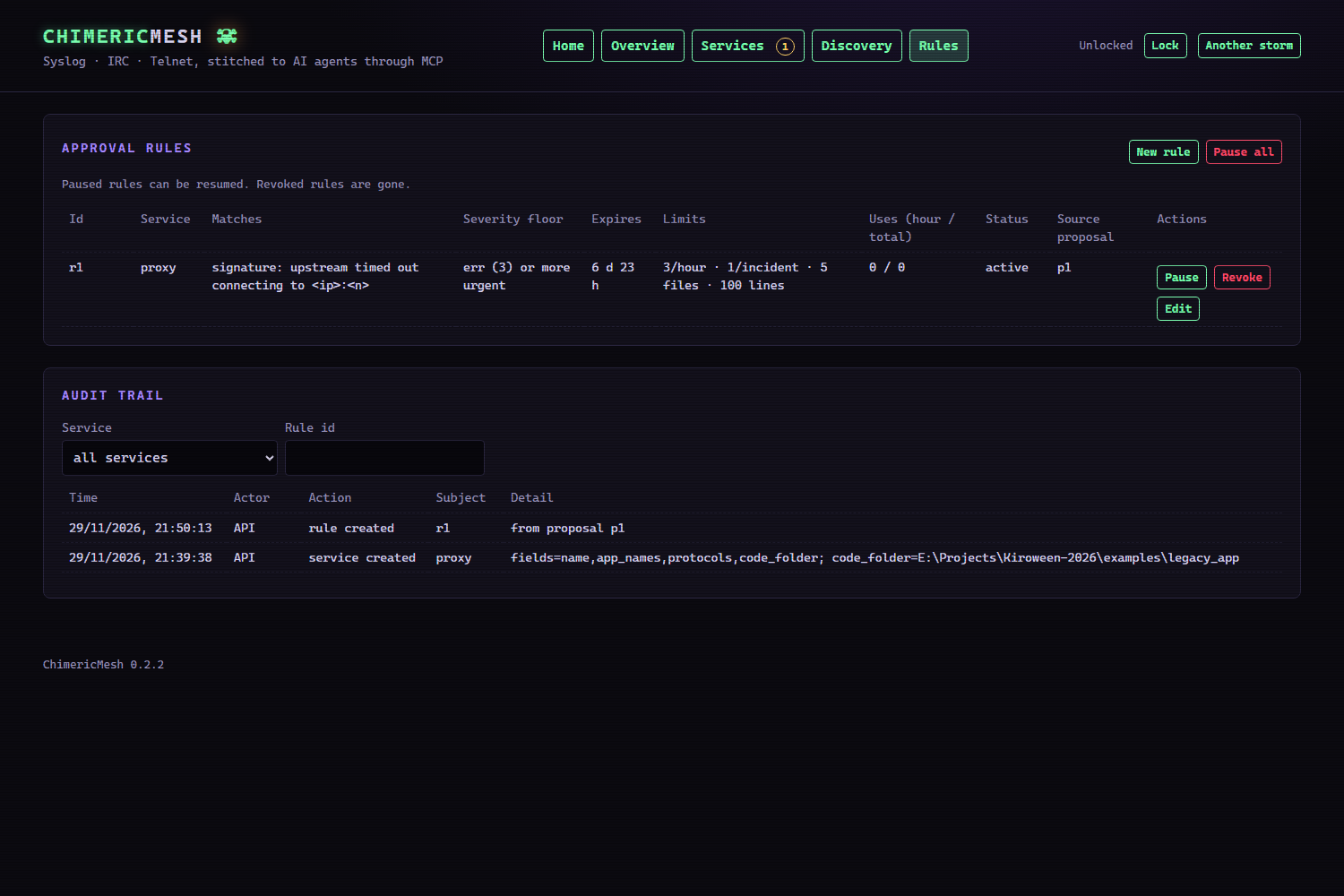
The admin token. With access control on, the page asks for the admin token once per browser session (the Unlock button; the path of the token file is shown there). The token is kept only in sessionStorage (not localStorage), is sent only as the X-Admin-Token header on the routes that need it, and is never shown again, put in a URL or written to the page. While locked, the controls that add or widen things (save a service, scan, accept, approve, deny, create, edit or re-enable a rule, resume) are disabled with the title "unlock first"; pause, revoke and withdraw need no token, so Pause all, per-rule Pause, Revoke and Withdraw stay enabled. A wrong token is cleared and the page says "token rejected".
Residual risk. V1 sends no Content-Security-Policy. Any script that ran in the page's origin could read the token from sessionStorage. The defences are that the page never renders log text as HTML (every log line, host, service name, path and note is written with textContent; a hook and a test scan fail on innerHTML and its relatives) and that it loads nothing from another origin. Do not paste the token into a page you did not get from your own hub.
Live log. The service detail page opens GET /api/services/<id>/stream with Server-Sent Events: it first sends the newest 100 matching events (?tail=100), then new ones, with a heartbeat every 15 seconds. The hub allows 20 streams at once (the 21st gets 429 with Retry-After: 5), ends each after an hour, and resumes from Last-Event-ID or ?after=<id>; the page reconnects with a 1 to 30 second backoff and resumes from the last id it showed. The page keeps at most 500 rows and 500 characters per message ("show more" reveals up to 4096). A browser holds about six connections per origin, so the 20-stream limit cannot be reached from browser tabs. Check it with a script:
1..20 | ForEach-Object { Start-Process curl.exe -ArgumentList '-N','-s','-o','NUL','http://127.0.0.1:8000/api/services/unassigned/stream' -WindowStyle Hidden }
Start-Sleep 2
curl.exe -s -i -m 3 http://127.0.0.1:8000/api/services/unassigned/stream     # HTTP/1.1 429 ... Retry-After: 5
Get-Process curl | Stop-Process                                              # frees the 20 slots
Checks you can run. The page has a built-in self-test of its pure logic. It fetches nothing and writes SELFTEST PASS when every case passes. Edge prints the page only when its output is redirected, so use Start-Process:
$edge = 'C:\Program Files (x86)\Microsoft\Edge\Application\msedge.exe'
$page = (Resolve-Path src/chimericmesh/web/index.html).Path -replace '\\', '/'
Start-Process $edge -ArgumentList '--headless=new','--disable-gpu',"--user-data-dir=$env:TEMP\edge-check",'--virtual-time-budget=5000','--dump-dom',"`"file:///$page#selftest`"" -RedirectStandardOutput "$env:TEMP\dom.txt" -Wait -NoNewWindow
Select-String -Path "$env:TEMP\dom.txt" -Pattern 'SELFTEST (PASS|FAIL)'
Hostile text must stay text. Send <img src=x onerror=alert(1)> as a log line, create a service named <script>x</script>, dump the Services page, and look for the escaped form:
$h = @{ 'content-type' = 'application/json' }
Invoke-RestMethod -Method Post http://127.0.0.1:8000/api/ingest -Headers $h -Body '{"source":"syslog","line":"<img src=x onerror=alert(1)>","host":"web01"}'
Invoke-RestMethod -Method Post http://127.0.0.1:8000/api/services -Headers ($h + @{ 'X-Admin-Token' = (Get-Content ~/.chimericmesh/admin.token -Raw).Trim() }) -Body '{"id":"xss","name":"<script>x</script>"}'
Start-Process $edge -ArgumentList '--headless=new','--disable-gpu',"--user-data-dir=$env:TEMP\edge-check",'--virtual-time-budget=8000','--dump-dom','"http://127.0.0.1:8000/#/services"' -RedirectStandardOutput "$env:TEMP\dom.txt" -Wait -NoNewWindow
Select-String -Path "$env:TEMP\dom.txt" -Pattern '<script>x</script>' # found: shown as text
Select-String -Path "$env:TEMP\dom.txt" -Pattern '<script>x</script>|<img src=x' # no match: no such element
--dump-dom with --virtual-time-budget can hang on a service detail page that has a live stream (the open connection keeps the virtual clock from finishing). The Overview, Services, Discovery and Rules views dump fine. For a detail page take a screenshot instead: --screenshot=out.png --timeout=12000 (use a fresh --user-data-dir, or delete it between runs: Edge caches the page).
(With <img src=x in the Overview's dump for the log line.) The page never starts a scan or an approval when it loads: both need a click, and the scan also needs the token.
1 maintainer

Metadata
1 maintainer
Release files for chimericmesh 0.2.2
For a detailed explanation of source distributions (sdists) and built distributions (wheels), please see the package formats documentation.
Source distribution (sdist)
| File | Size | Uploaded | Provenance | Actions |
|---|---|---|---|---|
| chimericmesh-0.2.2.tar.gz | 330.3 kB | Without provenance | Details for chimericmesh-0.2.2.tar.gz |
Built distribution (wheel)
| File | Interpreter | ABI | Platform | Actions Reset |
|---|---|---|---|---|
| chimericmesh-0.2.2-py3-none-any.whl | Python 3 | none | any | Details for chimericmesh-0.2.2-py3-none-any.whl |
Total release size: 681.0 kB
Release files / chimericmesh-0.2.2.tar.gz
| Download URL | chimericmesh-0.2.2.tar.gz |
|---|---|
| Size | 330.3 kB |
| Tags | Source |
|
SHA-256 checksum How to use checksums |
8a0a85e1f25f14ae32c9f171c2778bf4eac9811345a3a3da01ba7091a2a3d7a6
|
|
BLAKE2b-256 checksum How to use checksums |
cd071411dffe5e2b4431b3245324d8b433ab3914ac8a5246ee78fb44ab4dcd93
|
| Upload date | |
|
Uploaded using Trusted Publishing? What is trusted publishing? |
No |
| Uploaded via |
twine/7.0.0 CPython/3.13.14
|
Release files / chimericmesh-0.2.2-py3-none-any.whl
| Download URL | chimericmesh-0.2.2-py3-none-any.whl |
|---|---|
| Size | 350.7 kB |
| Tags | Python 3 |
|
SHA-256 checksum How to use checksums |
d516b20e3d65e2dd9ed0a965d52b7fa62acf3a787ada141ead50589c6d929ba5
|
|
BLAKE2b-256 checksum How to use checksums |
9ae7ecfb5c04dcdab82a1427f782bf1065bf898a635d02e96789ae98ca3b07b8
|
| Upload date | |
|
Uploaded using Trusted Publishing? What is trusted publishing? |
No |
| Uploaded via |
twine/7.0.0 CPython/3.13.14
|
Security for chimericmesh 0.2.2
Provenance
Provenance describes where a file came from. On PyPI, provenance is shared via attestations, which provide a verifiable record of the build or publishing details. View details, limitations and caveats.
No provenance found
None of the files in this release were uploaded with provenance metadata.
A note on package security
PyPI is a repository for distributing packages, not a service for auditing them. While third-party security researchers and our staff do their best to detect and remove malicious packages, PyPI cannot guarantee the quality, security or suitability of any given package.
To learn more about protecting yourself from malicious actors, visit our package security documentation.













