
A Pythonic interface for generating Chinese calligraphy works

Project description
Chinese Calligraphy (Python API)
A Pythonic interface for composing and rendering traditional Chinese calligraphy works using Pillow. Model whole works like handscrolls with title, main text, colophon, and seals; tune style and brush behavior for organic variation.
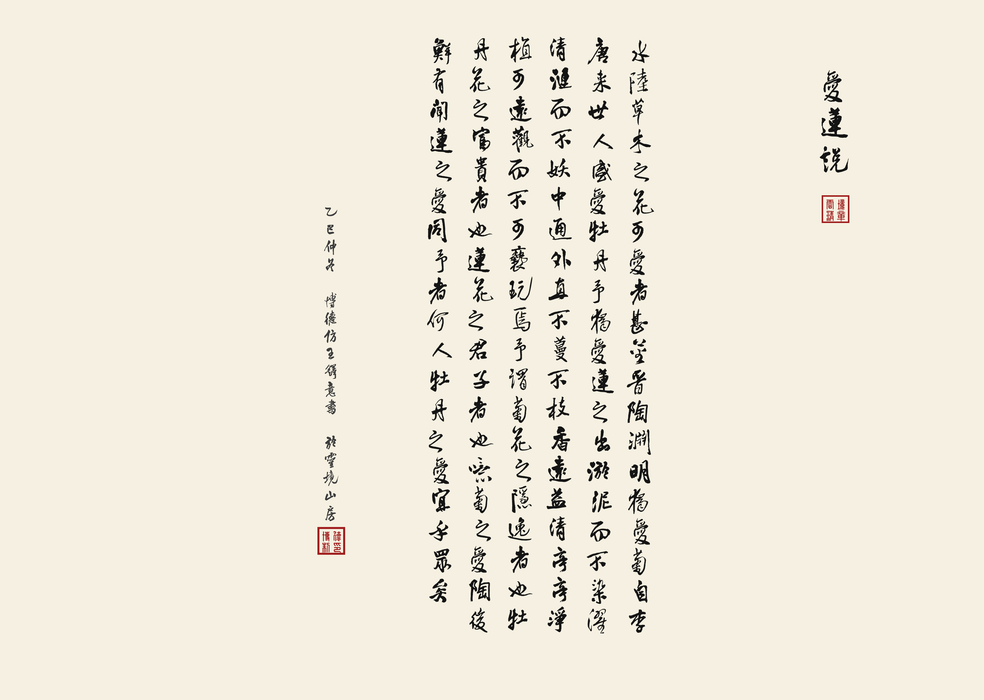
- Components: Title, MainText, Colophon, Seal
- Layout: handscroll canvas, margins, segmentation (columns per segment + inter-segment gap)
- Style: choose font, size, color, inter-character and inter-column spacing
- Brush dynamics: character jitter, segment drift, column inertial drift, contextual micro-variation, and a 3-state model for the character “之”
- Font discovery helper to locate installed fonts by family/name across macOS/Windows/Linux
Installation
Requires Python 3.10+.
-
Core (uses Pillow):
pip install chinese-calligraphy
-
Optional: enable deeper font-name matching via fontTools in the font lookup helper:
pip install "chinese-calligraphy[fonttools]"
Quickstart
Render a simple handscroll image:
from chinese_calligraphy import (
    Style, Brush, ScrollCanvas, Margins, SegmentSpec,
    Title, MainText, Colophon, Seal, Handscroll
)
from chinese_calligraphy.font import find_font_path, require_font_path

# Pick fonts installed on your system (change these names if not available)
FONT_PATH = (
    find_font_path("FZWangDXCJF") or
    find_font_path("PingFang") or
    find_font_path("Songti SC") or
    find_font_path("STSong") or
    find_font_path("SimSun") or
    find_font_path("Noto Serif CJK SC")
)
if not FONT_PATH:
    # As a last resort, require a specific installed family (raises if missing)
    FONT_PATH = require_font_path("FZWangDXCJF")

SEAL_FONT = (
    find_font_path("FZZJ-MZFU") or
    find_font_path("STKaiti") or
    find_font_path("KaiTi") or
    find_font_path("KaiTi_GB2312")
)
if not SEAL_FONT:
    SEAL_FONT = require_font_path("FZZJ-MZFU")

canvas = ScrollCanvas(height=2800, bg=(245, 240, 225))
margins = Margins(top=200, bottom=200, right=250, left=250)

title_style = Style(font_path=FONT_PATH, font_size=132, color=(20, 20, 20), char_spacing=15, col_spacing=240)
main_style  = Style(font_path=FONT_PATH, font_size=110, color=(20, 20, 20), char_spacing=10, col_spacing=160)
sig_style   = Style(font_path=FONT_PATH, font_size=66,  color=(60, 60, 60), char_spacing=5,  col_spacing=160)

title = Title(text="愛蓮說", style=title_style, brush=Brush(seed=1, char_jitter=(1, 1)), extra_gap_after=220)

text = (
    "水陸草木之花可愛者甚蕃晉陶淵明獨愛菊自李唐來世人盛愛牡丹"
    "予獨愛蓮之出淤泥而不染濯清漣而不妖中通外直不蔓不枝香遠益清亭亭淨植可遠觀而不可褻玩焉"
    "予謂菊花之隱逸者也牡丹花之富貴者也蓮花之君子者也噫菊之愛陶後鮮有聞蓮之愛同予者何人牡丹之愛宜乎眾矣"
)
main = MainText(text=text, style=main_style, segment=SegmentSpec(columns_per_segment=14, segment_gap=260))

colophon = Colophon(signature="乙巳仲冬 博德仿王鐸意書 於靈境山房", style=sig_style, brush=Brush(seed=3))

lead_seal = Seal(font_path=SEAL_FONT, border_width=6, text_grid=[("雲",0,0),("境",0,1),("清",1,0),("章",1,1)])
name_seal = Seal(font_path=SEAL_FONT, text_grid=[("博",0,0),("德",0,1),("制",1,0),("印",1,1)])

scroll = Handscroll(
    canvas=canvas,
    margins=margins,
    title=title,
    main=main,
    colophon=colophon,
    lead_seal=lead_seal,
    name_seal=name_seal,
    lead_space=420,
    tail_space=780,
)

scroll.save("handscroll.png")
This produces an image like the preview above.
API overview
-
chinese_calligraphy.Style
- font_path, font_size, color=(R,G,B)
- char_spacing (vertical step), col_spacing (horizontal column pitch)
- font() -> PIL.ImageFont.FreeTypeFont; step_y property = font_size + char_spacing
-
chinese_calligraphy.Brush
- seed for reproducible randomness
- char_jitter=(jx,jy) per-character placement jitter
- segment_drift=(sx,sy) per-segment offset
- col_drift_step=(sx,sy), col_drift_max=(mx,my), col_drift_damping for inertial column drift
- var_rotate_deg, var_shear_x, var_scale for contextual micro-variation
- 3-state model for “之”: zhi_state_probs, zhi_segment_stickiness, zhi_pos_weight, zhi_mirror_prob
-
chinese_calligraphy.layout
- ScrollCanvas(height, bg=(R,G,B)) with new_image(width)
- SegmentSpec(columns_per_segment=14, segment_gap=260)
- Margins(top=200, bottom=200, right=250, left=250)
-
chinese_calligraphy.elements
- Title(text, style, brush=Brush(), extra_gap_after=...)
- MainText(text, style, segment=SegmentSpec(...), brush=default Brush with inertial + 3-state)
- width(content_height) -> total width of main text region
- draw(img, draw, x_right_start, y_top, content_height) -> new x_right
- Colophon(signature, style, brush=Brush())
- draw(draw, x_right, y_top) -> (end_x, end_y)
- Seal(font_path, font_size=50, size=110, color=(160,30,30), ...)
- draw(draw, origin)
-
chinese_calligraphy.works.Handscroll
- canvas: ScrollCanvas; margins: Margins
- title: Title | None; main: MainText; colophon: Colophon | None
- lead_seal/name_seal: Seal | None; lead_space/tail_space
- measure_width() -> total width; render() -> PIL.Image; save(path); save_preview(path, segment_index, preview_width)
Convenience facade imports are exposed at the package top-level for the classes above.
Fonts and the font helper
You must have suitable Chinese fonts installed. The helper chinese_calligraphy.font provides:
- find_font_path(name, extra_dirs=()) -> Optional[str]
- require_font_path(name, extra_dirs=()) -> str # raises if not found
It scans common OS font directories and can optionally use fontTools to match name records for better accuracy. If a font is not found, provide explicit paths or install the font. Example family names to try include:
- macOS: "PingFang", "Songti SC", "Hiragino Sans GB"
- Windows: "SimSun", "KaiTi", "FangSong"
- Linux: depends on installed CJK fonts (e.g., Noto Serif CJK, WenQuanYi)
Examples
A full example is available in examples/handscroll.py in the repository. When installing from PyPI, examples are not included in the wheel; clone the repo to run them locally.
python examples/handscroll.py
The script writes handscroll.png to the current directory.
Compatibility
- Python: 3.10, 3.11, 3.12, 3.13
- OS: macOS, Windows, Linux (Pillow handles platform specifics)
- Dependencies: Pillow>=10.0.0 (runtime), optional fonttools>=4 for improved font lookup
Development
Build and validate the distribution locally:
# using hatch
pip install hatch
hatch build

# or using the build frontend
pip install build twine
python -m build
python -m twine check dist/*
Run the example while developing:
python examples/handscroll.py
License
MIT © 2025 Mingli Yuan
Release history Release notifications | RSS feed


Download files
Download the file for your platform. If you're not sure which to choose, learn more about installing packages.
Source Distribution
Built Distribution
Filter files by name, interpreter, ABI, and platform.
If you're not sure about the file name format, learn more about wheel file names.
Copy a direct link to the current filters
File details
Details for the file chinese_calligraphy-0.1.0.tar.gz.
File metadata
- Download URL: chinese_calligraphy-0.1.0.tar.gz
- Upload date:
- Size: 982.8 kB
- Tags: Source
- Uploaded using Trusted Publishing? No
- Uploaded via: uv/0.9.17 {"installer":{"name":"uv","version":"0.9.17","subcommand":["publish"]},"python":null,"implementation":{"name":null,"version":null},"distro":{"name":"macOS","version":null,"id":null,"libc":null},"system":{"name":null,"release":null},"cpu":null,"openssl_version":null,"setuptools_version":null,"rustc_version":null,"ci":null}
File hashes
| Algorithm | Hash digest | |
|---|---|---|
| SHA256 |
21d8fc34aaf337b0a66cc5d76fb00f92c23f519f1e299965c68df119811767f2
|
|
| MD5 |
fefcf453dfe519b57273048ae4f70287
|
|
| BLAKE2b-256 |
1a047d61bcfb5883e1f90f1461a17b86393f307cd407a7d8c6d340a9fe002d4d
|
File details
Details for the file chinese_calligraphy-0.1.0-py3-none-any.whl.
File metadata
- Download URL: chinese_calligraphy-0.1.0-py3-none-any.whl
- Upload date:
- Size: 23.1 kB
- Tags: Python 3
- Uploaded using Trusted Publishing? No
- Uploaded via: uv/0.9.17 {"installer":{"name":"uv","version":"0.9.17","subcommand":["publish"]},"python":null,"implementation":{"name":null,"version":null},"distro":{"name":"macOS","version":null,"id":null,"libc":null},"system":{"name":null,"release":null},"cpu":null,"openssl_version":null,"setuptools_version":null,"rustc_version":null,"ci":null}
File hashes
| Algorithm | Hash digest | |
|---|---|---|
| SHA256 |
69aef17770daed2b7f505eb9928cf39036c350c3456ec9e92c4d514be9aa757d
|
|
| MD5 |
703fac0b8d67f1f73e690421503ac976
|
|
| BLAKE2b-256 |
31cd603b7e05b26941ee18214b1a7f7377b529454a3d060231a7330eb117945b
|






