
chipping-orchestrator
Autonomous GitHub issue → reviewed PR pipeline for Claude Code, Codex CLI, and Antigravity CLI.



chipping-orchestrator turns GitHub issues into reviewed pull requests with local coding-agent CLIs (codex,
claude, or agy). It plans the work, implements it in an isolated git worktree, reviews the result, and asks a
human to make the final merge decision.
Workflow state lives on the issue itself, so progress stays visible on GitHub and survives process restarts without a separate queue or workflow database.
When to use it
- Use it when: you work solo or on a small team, have an authenticated
codex,claude, oragyCLI, and want issue-to-PR autonomy without running a separate planner, queue, or workflow database. You decide what to merge. - Don't use it when: you need a hosted service or automatic merges, cannot let agents run with the host account as their security boundary, or need issue trackers other than GitHub.
How it works
An issue normally follows this path:
workflow:decomposing → workflow:ready → workflow:implementing
  → workflow:validating → workflow:documenting → in_review
  → done or rejected
The decomposer can split large work into child issues. The implementer commits in a dedicated worktree, the reviewer
requests fixes until the change is ready, and the orchestrator opens or updates the pull request. The reviewer declares
the verification its verdict relies on, which the orchestrator publishes on the pull request before acting on it; an
approval without passing evidence covering every configured VERIFY_COMMANDS command waits for a human. Oversized
changes, conflicts, retries, and human decisions take explicit side paths; pull requests are never merged automatically.
See the state-machine overview for labels and transitions, and the workflow guide for agent roles and session behavior.
Requirements
- Linux, Git, and Python 3.12 or newer. CI tests Python 3.12, 3.13, and 3.14; newer versions are not tested.
- pipx or a dedicated virtual environment for a published package; Poetry 2.5.1 for a source checkout.
- An authenticated CLI for every configured role. Defaults are
claudefor decomposition and implementation, andcodexfor review. Any role can instead use Antigravity (agy). - A GitHub repository and a fine-grained personal access token with read/write access to Contents, Issues, and Pull requests, plus read-only access to Metadata.
Agents run with their approval and sandbox checks disabled, so the host account is the security boundary. Read the security checklist before using the orchestrator on a public or untrusted repository.
Quick start
Install a published package
Choose a version published on PyPI and replace X.Y.Z in the package name and constraints URL below.
The --backend pip flag requires pipx 1.12.0 or newer.
For older pip-only versions, omit this flag.
pipx install --python python3.12 --backend pip \
  --pip-args="--constraint https://github.com/chippingway/chipping-orchestrator/releases/download/vX.Y.Z/constraints.txt" \
  "chipping-orchestrator==X.Y.Z"
Follow the package installation and upgrade instructions to download version-matched .env templates
without cloning and configure ~/.config/chipping-orchestrator/.env.
The same guide covers a dedicated venv and returning to a previous version. Upgrades are operator-initiated.
Run from a source checkout
Install Poetry with pipx install poetry==2.5.1, then clone, install from the lockfile, and copy the basic template
into the checkout's .env:
git clone https://github.com/chippingway/chipping-orchestrator.git
cd chipping-orchestrator
env -u VIRTUAL_ENV -u CONDA_PREFIX poetry sync
cp .env.example .env
Edit .env and set at least:
-
REPOS— the repository to manage, writtenowner/name|target_root|base_branch: its GitHubowner/name, the absolute path to an existing local clone of it, and the branch its pull requests target. For example:REPOS=acme/api|/home/alice/src/acme-api|main
The template explains the two optional trailing fields; several repositories are more entries in the same setting.
-
HITL_HANDLE— GitHub users to notify when human input is needed. -
ALLOWED_ISSUE_AUTHORS— required: the GitHub logins whose issues and comments the orchestrator acts on; it refuses to start while this names nobody. -
DEV_AGENT,REVIEW_AGENT, andDECOMPOSE_AGENT— only when changing the default agent routing.
Nothing from .env.example.advanced is needed: it holds optional operational settings and, in a section of their own,
the developer settings for working on the orchestrator itself.
Store each repository's GitHub token outside the checkout at ~/.config/<owner>/<name>/token, or export one
GITHUB_TOKEN covering every repository in the launch environment. Tokens in .env are deliberately ignored. Ensure
each configured agent is logged in, then run:
./run.sh
On first start, the orchestrator creates its labels and begins polling open issues. Each issue gets its own worktree
under wt-orchestrator, beside the first repository's clone. File a small issue to exercise the workflow; a completed
change stops at in_review for a human to merge.
The configuration reference covers both setups, credentials, agent routing, every setting, and advanced examples. The operations guide covers run modes, running more than one poller on one host, and systemd deployment.
Asking the orchestrator a question
Apply the question label to an open issue for a read-only answer. The configured DECOMPOSE_AGENT replies on the
issue, keeps the same session for follow-up questions, and stops when the issue is closed.
See the question-stage contract and handler behavior.
Discussing an issue's architecture
Apply the discussion label to work through design choices before implementation. The decomposer presents options,
continues the conversation from your replies, and writes only plans/issue-<number>.md after you confirm the design.
The orchestrator then opens a plan pull request for a human to merge, reject, or route into implementation.
See the discussion-stage contract and handler behavior.
Holding and unsticking an issue
Use the control named by the orchestrator's park comment:
| Control | Purpose |
|---|---|
backlog |
Prevent pickup until the label is removed. |
paused |
Freeze an in-flight issue without discarding its state; remove the label to resume. |
/orchestrator continue |
Retry a recoverable stalled run or renew a spent daily retry budget when requested. |
/orchestrator authorize-oversized <commit> |
Allow the exact oversized commit named by the park to publish. |
/orchestrator add-review-rounds N |
Grant more reviewer rounds after the configured cap is reached. |
/orchestrator add-agent-runs N |
Raise the lifetime agent-run allowance for that issue. |
Commands are accepted only in the contexts and formats described by the park comment; ordinary guidance and control commands are intentionally not interchangeable. See the control-label reference and delivery-stage behavior for trust checks, limits, recovery, and exact effects.
Observability
orchestrator.log records process and issue activity, while analytics.jsonl records transitions, timing, agent
outcomes, usage, and cost estimates. Both live under LOG_DIR: <checkout>/logs by default in a source checkout, or
~/.local/state/chipping-orchestrator/logs after package setup. An explicit ANALYTICS_LOG_PATH can
place analytics elsewhere. Optional surfaces add an audit log, a Postgres-backed analytics dashboard, and a
file-backed trajectory viewer without becoming part of workflow state.
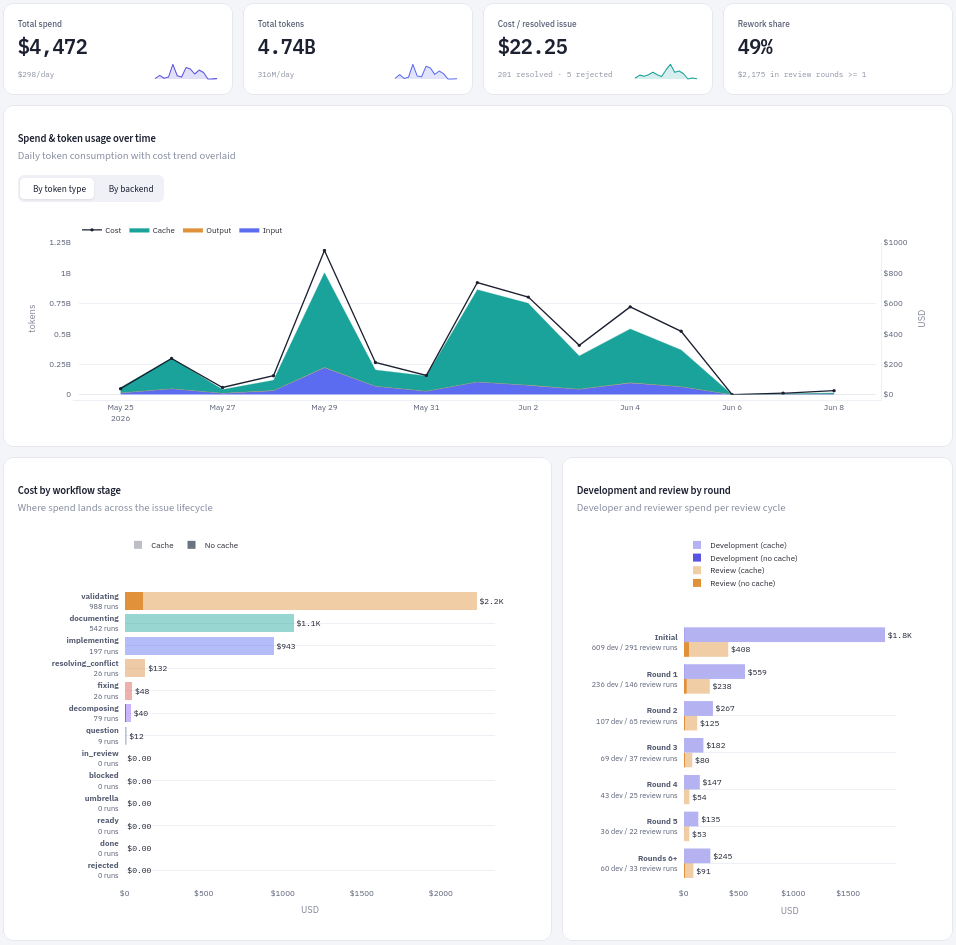
See the observability overview for every surface and the dashboard quickstart for setup commands.
Managing multiple repositories
One process manages several repositories when REPOS carries one entry for each. Separate the entries with ;,
since .env holds each value on a single line:
REPOS=acme/api|/home/alice/src/acme-api|main;acme/web|/home/alice/src/acme-web|master|upstream|2
Every entry names its own local clone and reads its own token file, ~/.config/<owner>/<name>/token, unless one
GITHUB_TOKEN covers them all. The optional fourth and fifth fields set the git remote that points at the repository
(origin by default) and how many of its issues run at once; they are positional, so setting the limit means writing
the remote too. Worktrees and branches are namespaced by repository, and per-repository plus global concurrency limits
keep issues from colliding or overwhelming the host.
See the REPOS syntax and
parallel-processing settings.
Reference documentation
Browse the documentation website or the documentation index for the complete reference set:
| Topic | Covers |
|---|---|
| Architecture | Process model, agent model, push model, and module ownership |
| State machine | Labels, state, stage handlers, and lifecycle |
| Agents | Agent roles, conversation contracts, and command specs |
| Configuration | Environment variables, defaults, and operator runbooks |
| Observability | Logs, analytics, dashboards, trajectories, usage, and cost |
| Security | Deployment checklist and operator-owned controls |
| Release timeline | Dated milestones and functionality added in each published release |
Report suspected vulnerabilities through the private process in SECURITY.md, never through a public issue.
Contributing
See CONTRIBUTING.md for writing issues, setting up a development checkout, running checks, and submitting pull requests.
License
Licensed under the Apache License, Version 2.0. See LICENSE for the full text.
1 maintainer

Metadata
1 maintainer
Release files for chipping-orchestrator 0.13.0
For a detailed explanation of source distributions (sdists) and built distributions (wheels), please see the package formats documentation.
Source distribution (sdist)
| File | Size | Uploaded | |
|---|---|---|---|
| chipping_orchestrator-0.13.0.tar.gz | 2.1 MB | Details |
Built distribution (wheel)
| File | Interpreter | ABI | Platform | Reset |
|---|---|---|---|---|
| chipping_orchestrator-0.13.0-py3-none-any.whl | Python 3 | none | any | Details |
Total release size: 4.9 MB
Release files / chipping_orchestrator-0.13.0.tar.gz
| Download URL | chipping_orchestrator-0.13.0.tar.gz |
|---|---|
| Size | 2.1 MB |
| Tags | Source |
|
SHA-256 checksum How to use checksums |
beb2a3d9fb636d514c0a38b6673c453d5174f31238795d67a882edb166ad4a8f
|
|
BLAKE2b-256 checksum How to use checksums |
5fbfe7b0834e1611cbb083843022ca3584929b5efa8f4f24c05161e2c4b7d1d6
|
| Upload date | |
|
Uploaded using Trusted Publishing? What is trusted publishing? |
No |
| Uploaded via |
poetry/2.5.1 CPython/3.12.3 Linux/7.0.0-31-generic
|
Release files / chipping_orchestrator-0.13.0-py3-none-any.whl
| Download URL | chipping_orchestrator-0.13.0-py3-none-any.whl |
|---|---|
| Size | 2.8 MB |
| Tags | Python 3 |
|
SHA-256 checksum How to use checksums |
9e2bf15094275fae733017d9d6a5d0f19a53074aabe40fc74edf16e7645dd8ba
|
|
BLAKE2b-256 checksum How to use checksums |
0faaee4dba1ec958fc46ecb49f6924cddfa56f444613cad60ff5bef953ae67e9
|
| Upload date | |
|
Uploaded using Trusted Publishing? What is trusted publishing? |
No |
| Uploaded via |
poetry/2.5.1 CPython/3.12.3 Linux/7.0.0-31-generic
|













