
Color your Terminal with Regex! (Maintained fork of ChromaTerm)

Project description
ChromaTerm2

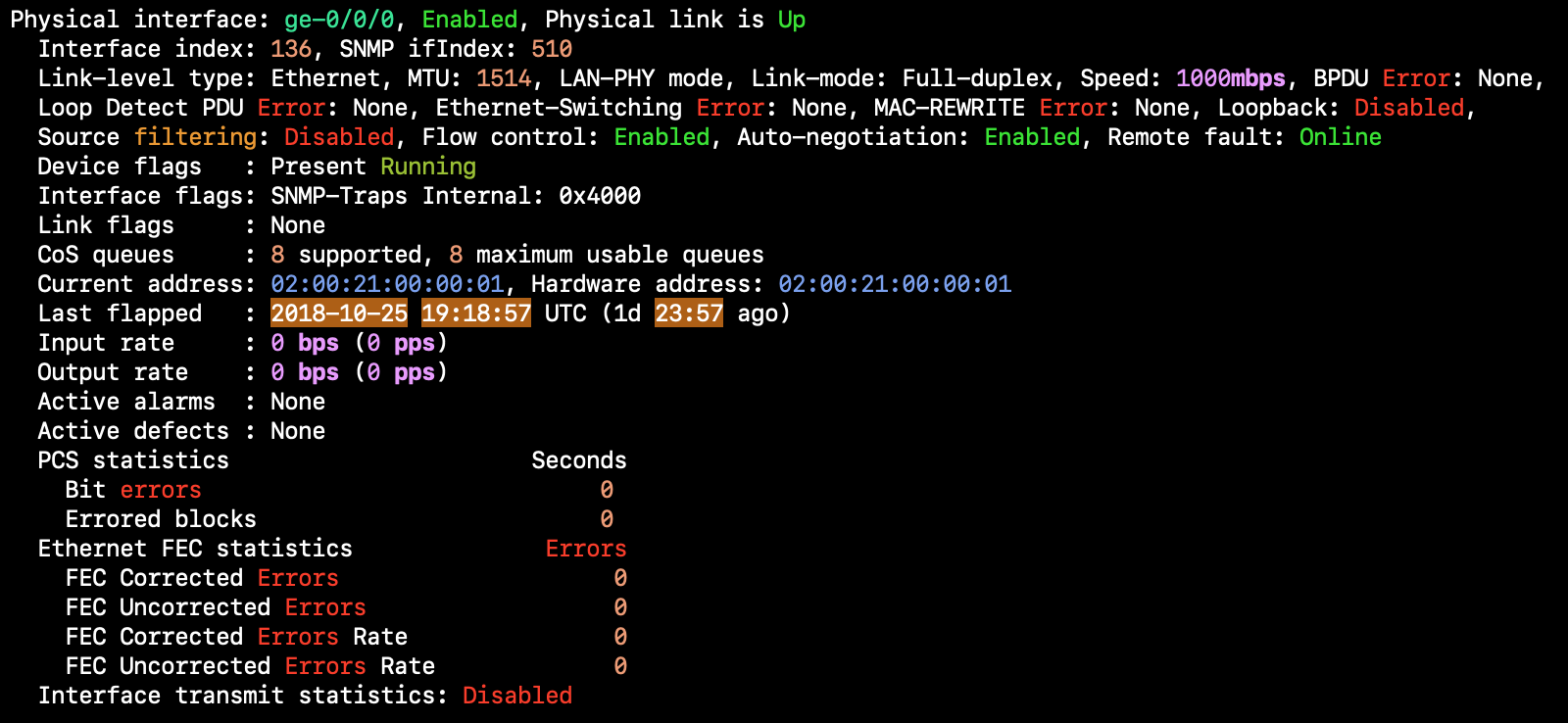
ChromaTerm (ct) is a Python script that colors your terminal's output using
regular expressions. It even works with interactive programs, like SSH.
Original project by hSaria. This is a maintained and refactored version.
Installation
pip3 install chromaterm2
Note: This is a maintained fork of the original ChromaTerm project. The original chromaterm package is archived.
Usage
Prefix your command with ct. It's that simple.
ct ssh somewhere
You can also pipe data into ct, but some programs behave differently when piped,
like less would output the entire file.
echo "Jul 14 12:28:19 Message from 1.2.3.4: Completed successfully" | ct
Persistence
To always highlight a program, set up an alias in your .bash_profile. For
instance, here's one for ssh.
alias ssh="ct ssh"
If you want to highlight your entire terminal, have ChromaTerm spawn your shell by
modifying the shell command in your terminal's settings to /usr/local/bin/ct /bin/bash --login.
Replace /bin/bash with your shell of choice.
Highlight Rules
ChromaTerm reads highlight rules from a YAML configuration file, formatted like so:
rules:
- description: Obligatory "Hello, World"
  regex: Hello,?\s+World
  color: f#ff0000

- description: Spit some facts (emphasize "NOT" so they get it)
  regex: Pineapple does (NOT) belong on pizza
  color:
    0: bold
    1: blink italic underline
The configuration file can be placed in one of the locations below. The first one found is used.
$HOME/.chromaterm.yml$XDG_CONFIG_HOME/chromaterm/chromaterm.yml($XDG_CONFIG_HOMEdefaults to$HOME/.config)/etc/chromaterm/chromaterm.yml
If no file is found, a default one is created in your home directory.
Check out
contrib/rules; it has some topic-specific rules that are not included in the defaults.
Description
Optional. It's purely for your sake.
RegEx
The RegEx engine used is Python's re, but it can be switched to PCRE2 (see relevant section below).
Color
Background and Foreground
The color is a hex string prefixed by b for background (e.g. b#123456) and
f for foreground (e.g. f#abcdef).
Style
In addition to the background and foreground, you can also use blink, bold,
invert, italic, strike, and underline. Though, not all terminals support
those styles; you might not see their effects.
Group
Colors can be applied per RegEx group (see the 2nd example rule). Any group in
the RegEx can be referenced, including group 0 (entire match) and
named groups.
Exclusive
When multiple rules match the same text, ChromaTerm highlights the text with all
of the colors of the matching rules. If you want the text to be highlighted only
by the first rule that matches it, use the exclusive flag.
- regex: hello
  color: bold
  exclusive: true
In the code above, no other rule will highlight hello, unless it comes first
and has the exclusive flag set.
Palette
You can define colors in a palette and reference them by name. For instance:
palette:
  # Created from https://coolors.co/9140f5-bd5df6-e879f6
  purple-1: '#9140f5'
  purple-2: '#bd5df6'
  purple-3: '#e879f6'

rules:
- regex: hello
  color: f.purple-1

- regex: hi
  color: b.purple-3
When referencing a palette color, prefix it with b. for background and f. for
foreground.
PCRE2
If the PCRE2 library is present, you can use it instead of Python's re
engine. When present, an option in ct -h becomes available.
While the performance improvement is significant (~2x), the two RegEx engines have a few differences; use this option only if you have a good understanding of their unique features.
The default rules work on both engines.
Windows Support
ChromaTerm supports Windows natively using ConPTY through direct Windows API calls (Windows 10 build 18362+).
pip install chromaterm2
ct ipconfig
ct cmd /c echo "Test IP: 192.168.1.1"
Help
If you've got any questions or suggestions, please open up an issue (always appreciated).
Changelog
See CHANGELOG.md for detailed information about changes in each version.
Release history Release notifications | RSS feed


Download files
Download the file for your platform. If you're not sure which to choose, learn more about installing packages.
Source Distribution
Built Distribution
Filter files by name, interpreter, ABI, and platform.
If you're not sure about the file name format, learn more about wheel file names.
Copy a direct link to the current filters
File details
Details for the file chromaterm2-2.1.0.tar.gz.
File metadata
- Download URL: chromaterm2-2.1.0.tar.gz
- Upload date:
- Size: 38.5 kB
- Tags: Source
- Uploaded using Trusted Publishing? No
- Uploaded via: twine/6.1.0 CPython/3.13.11
File hashes
| Algorithm | Hash digest | |
|---|---|---|
| SHA256 |
61a75d45f839da3c667087d3d4b9989218a6fd5e343b9f923abe2814c58faf4e
|
|
| MD5 |
accb76f419d0db3b9233eea0343bbafd
|
|
| BLAKE2b-256 |
b354570c90683fd9ed0c67b498c3d343de992c21e4c1b07544c86f14afa23021
|
File details
Details for the file chromaterm2-2.1.0-py3-none-any.whl.
File metadata
- Download URL: chromaterm2-2.1.0-py3-none-any.whl
- Upload date:
- Size: 39.7 kB
- Tags: Python 3
- Uploaded using Trusted Publishing? No
- Uploaded via: twine/6.1.0 CPython/3.13.11
File hashes
| Algorithm | Hash digest | |
|---|---|---|
| SHA256 |
da2111ee3212631d7162c51b0e0dc73513e4299739c939cabcd7efd815358c13
|
|
| MD5 |
7bc6727faa5e26a67a11a45237fe4e89
|
|
| BLAKE2b-256 |
a2cb55874ed38277d75eb8acf311dc9159bc3da15692f14cb56505b35a0276f3
|






