
Desktop app for ChronoCatalog photo and video archives
Verified details
These details have been verified by PyPIProject links
GitHub Statistics
Maintainers

Project description
ChronoCatalog Desktop


The desktop app for photo and video archives that can prove their own integrity: import memory cards, check the archive's health, fix names, undo anything — every action a preview first.
ChronoCatalog names every photo and video after an identity derived purely from the file itself — the capture time plus a fingerprint of the content:
20260703_150727_9b677b64.nef
└──────┬──────┘ └──┬───┘
  capture time    hash
There is no database to maintain or lose: the files carry their own catalog. Names sort chronologically across every camera and phone, duplicates identify themselves, and the whole archive can be re-checked at any time — corruption told apart from ordinary edits — with any tool that can hash a file, decades from now.
The app covers the whole workflow:
- Import copies a card into the archive, names every file on arrival, and re-hashes every copy at its destination. It ends in a verdict, not a guess: safe to format appears only when every file on the card is accounted for.
- Organize triages a messy folder — what each file would become, what is already archived, what needs your eyes first — and never renames anything.
- Verify recomputes every name from metadata and content and explains disagreements in plain language, worst first.
- Rename brings names in line after edits, whole groups (RAW, sidecars, derivatives) at a time. Masters managed by Lightroom Classic are handed off through a rename token, never touched behind the catalog's back.
- History lists every applied change with Undo, and Resume for interrupted runs.
- Settings edits the archive configuration with validation before every save; the naming pattern editor previews an example name as you type.
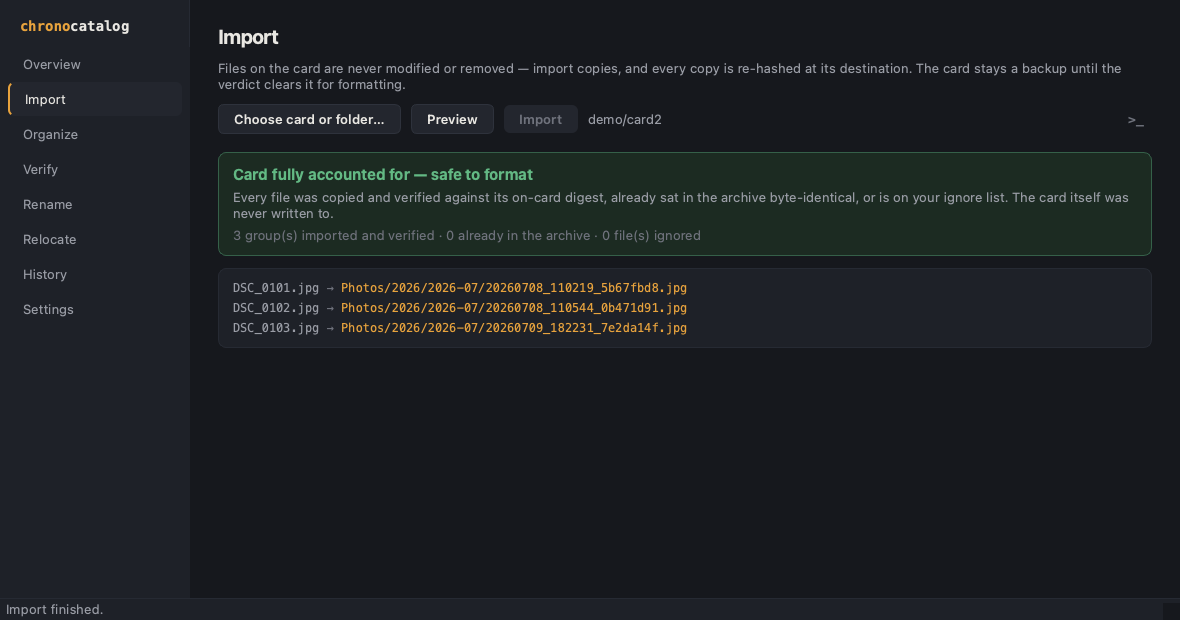
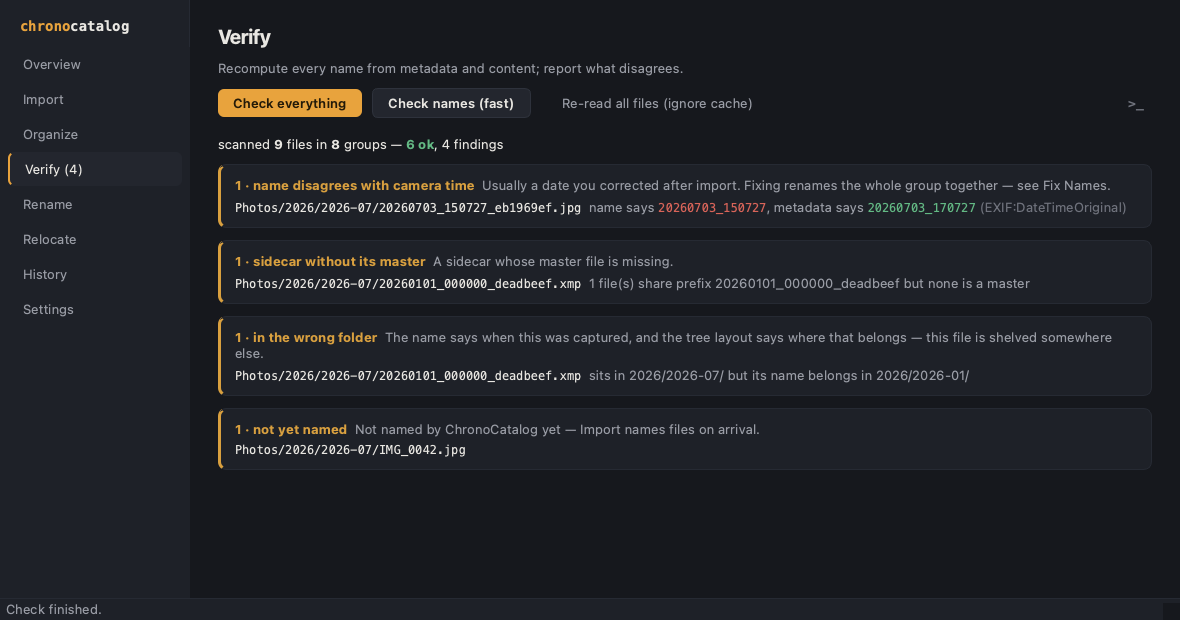
The app adds no behavior of its own: every view renders the plans and
reports of the chronocatalog
library — the same engine behind the CLI — and every change goes
through its validated, write-ahead-journaled apply. The exact terminal
equivalent of any action is one click away, behind the quiet >_
toggle.
Install
macOS (Apple Silicon): download ChronoCatalog-<version>-arm64.dmg
from Releases
and drag the app to Applications. The build is not yet signed with an
Apple Developer ID, so the first launch is blocked: open System
Settings → Privacy & Security, scroll to Security and click
Open Anyway. This is needed once.
Any platform (Python 3.11+):
$ uv tool install chronocatalog-desktop
or pipx install chronocatalog-desktop. Either way you also need
ExifTool on PATH (macOS:
brew install exiftool).
Run
$ chronocatalog-desktop [archive.toml]
Without an argument the app asks for an archive configuration and remembers it — or creates a new archive from scratch. Everything is a dry run until Apply, which confirms first; every applied change lands in History with Undo.
Run from this repository
With uv:
$ git clone https://github.com/chronocatalog/chronocatalog-desktop.git
$ cd chronocatalog-desktop
$ uv run chronocatalog-desktop
With plain pip:
$ python3 -m venv .venv
$ .venv/bin/pip install -e .
$ .venv/bin/chronocatalog-desktop
For a tour that touches none of your own files, generate the demo
archive (macOS only — it leans on sips): a small throwaway archive
imported through the real engine, then seeded with a date edit, an
unnamed file and an orphan sidecar so every view has something to
show:
$ uv run python demo/make_demo.py
$ uv run chronocatalog-desktop demo/demo.toml
Development setup, checks and expectations: CONTRIBUTING.md.
Requirements
- Python 3.11+ (the macOS app bundles its own)
- ExifTool on
PATH
License
Project details
Verified details
These details have been verified by PyPIProject links
GitHub Statistics
Maintainers
Release history Release notifications | RSS feed


Download files
Download the file for your platform. If you're not sure which to choose, learn more about installing packages.
Source Distribution
Built Distribution
Filter files by name, interpreter, ABI, and platform.
If you're not sure about the file name format, learn more about wheel file names.
Copy a direct link to the current filters
File details
Details for the file chronocatalog_desktop-0.2.0.tar.gz.
File metadata
- Download URL: chronocatalog_desktop-0.2.0.tar.gz
- Upload date:
- Size: 238.3 kB
- Tags: Source
- Uploaded using Trusted Publishing? Yes
- Uploaded via: twine/6.1.0 CPython/3.13.13
File hashes
| Algorithm | Hash digest | |
|---|---|---|
| SHA256 |
db22577fc304dea4370fb593e6a5d5f2376dab4b894b31ceeb70d21dab565c23
|
|
| MD5 |
aa362a18bc0f15279b035c80ed0ee228
|
|
| BLAKE2b-256 |
9577b17ed198f74803b10281700759ca01633e171dfdbf4b5a4c157f647885bf
|
Provenance
The following attestation bundles were made for chronocatalog_desktop-0.2.0.tar.gz:
Publisher:
release.yml on chronocatalog/chronocatalog-desktop
-
Statement:
-
Statement type:
https://in-toto.io/Statement/v1 -
Predicate type:
https://docs.pypi.org/attestations/publish/v1 -
Subject name:
chronocatalog_desktop-0.2.0.tar.gz -
Subject digest:
db22577fc304dea4370fb593e6a5d5f2376dab4b894b31ceeb70d21dab565c23 - Sigstore transparency entry: 2139760887
- Sigstore integration time:
-
Permalink:
chronocatalog/chronocatalog-desktop@4a91304974b5c87f88efe89bdf1c68329890a25c -
Branch / Tag:
refs/tags/v0.2.0 - Owner: https://github.com/chronocatalog
-
Access:
public
-
Token Issuer:
https://token.actions.githubusercontent.com -
Runner Environment:
github-hosted -
Publication workflow:
release.yml@4a91304974b5c87f88efe89bdf1c68329890a25c -
Trigger Event:
push
-
Statement type:
File details
Details for the file chronocatalog_desktop-0.2.0-py3-none-any.whl.
File metadata
- Download URL: chronocatalog_desktop-0.2.0-py3-none-any.whl
- Upload date:
- Size: 63.8 kB
- Tags: Python 3
- Uploaded using Trusted Publishing? Yes
- Uploaded via: twine/6.1.0 CPython/3.13.13
File hashes
| Algorithm | Hash digest | |
|---|---|---|
| SHA256 |
fa6a32b915d028caa5e4a727bbe5999a1d67a6464a6e8af5ae76cbb305c970cd
|
|
| MD5 |
9c228e32f1150ca0d2f9b601005cbccf
|
|
| BLAKE2b-256 |
82e5376a4b99f0fecbe8415c5d679e738d979eb01819e0c40c6e714d2e15f754
|
Provenance
The following attestation bundles were made for chronocatalog_desktop-0.2.0-py3-none-any.whl:
Publisher:
release.yml on chronocatalog/chronocatalog-desktop
-
Statement:
-
Statement type:
https://in-toto.io/Statement/v1 -
Predicate type:
https://docs.pypi.org/attestations/publish/v1 -
Subject name:
chronocatalog_desktop-0.2.0-py3-none-any.whl -
Subject digest:
fa6a32b915d028caa5e4a727bbe5999a1d67a6464a6e8af5ae76cbb305c970cd - Sigstore transparency entry: 2139760911
- Sigstore integration time:
-
Permalink:
chronocatalog/chronocatalog-desktop@4a91304974b5c87f88efe89bdf1c68329890a25c -
Branch / Tag:
refs/tags/v0.2.0 - Owner: https://github.com/chronocatalog
-
Access:
public
-
Token Issuer:
https://token.actions.githubusercontent.com -
Runner Environment:
github-hosted -
Publication workflow:
release.yml@4a91304974b5c87f88efe89bdf1c68329890a25c -
Trigger Event:
push
-
Statement type:






