
Chronon
Chronon is local version control for text documents that AI agents edit, especially Markdown. Every file gets its own linear, immutable history, and every commit carries a message explaining why it changed. It works alongside Git but neither calls nor replaces it.
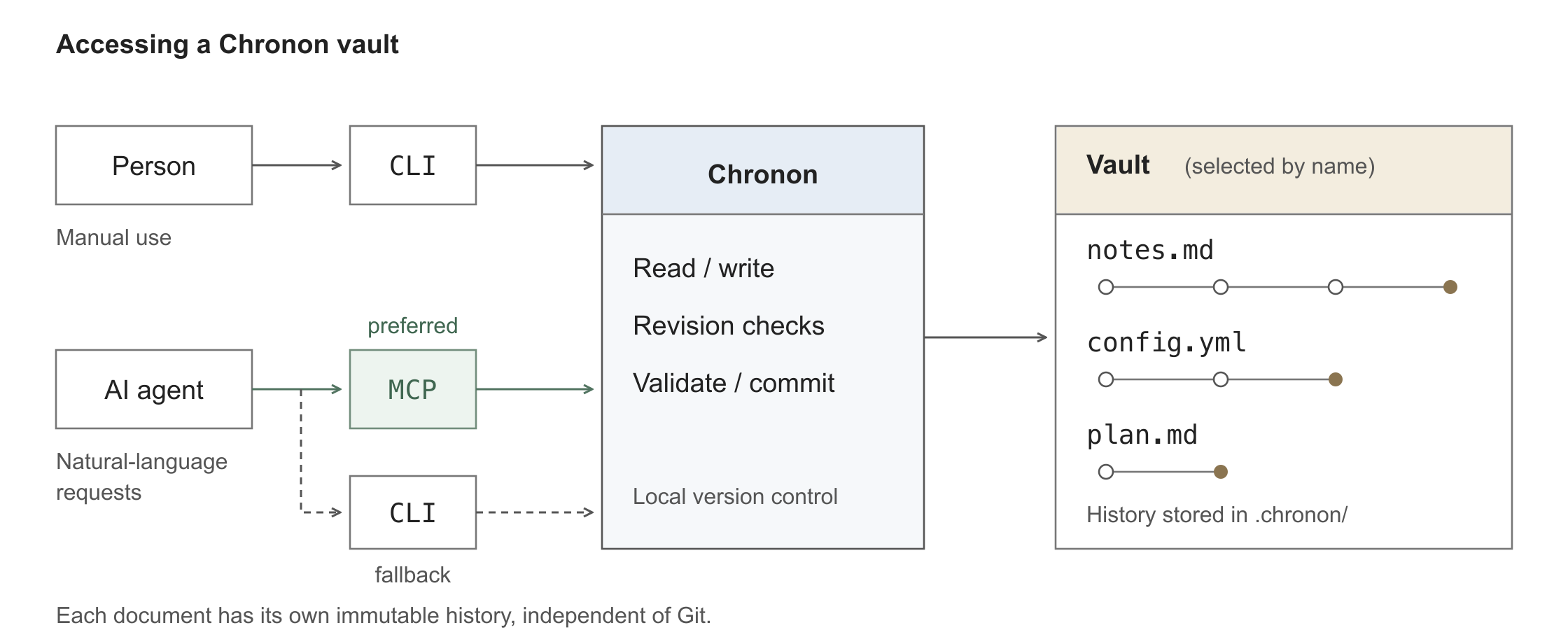
- Vault: a named collection of managed files, such as
knowledgeorresearch. People and agents refer to it by name from any directory. - People use the
chrononCLI. - Agents follow a generated
CHRONON.mdand use thechronon-mcpserver (recommended) or the CLI. They never edit vault files directly.
Status: alpha. Manual commit mode only. Chronon history is local and not pushed with Git, so see Data and backups.
Install
Requires Python 3.11+ on macOS, Linux, WSL2, or Windows.
uv tool install chronon-vcs # or: pipx install chronon-vcs
See docs/installation.md for GitHub tags, platform setup, and uninstalling.
Quick start
Create and register a vault:
mkdir -p ~/Documents/knowledge
chronon init ~/Documents/knowledge --register knowledge
Use it yourself
chronon -v knowledge write first-note.md --content 'The pilot launches in October.' -m "add first note"
chronon -v knowledge read first-note.md
chronon -v knowledge log first-note.md
Editing, diffs, and recovery are covered in the CLI guide.
Let an agent use it
In the workspace where you run your agent (it does not need to be the vault):
chronon agent-setup --vault knowledge
claude mcp add --transport stdio chronon -- "$(command -v chronon-mcp)"
# Codex: codex mcp add chronon -- "$(command -v chronon-mcp)"
Then ask in plain language. There is no need to mention Chronon:
Save these meeting notes in the knowledge vault as meeting-notes.md:
The pilot launches in October. Mina owns testing; Jae owns documentation.
Skip the MCP step and the agent falls back to the CLI. Re-run agent-setup
after upgrading Chronon to refresh the guidance.
How it works
- One file, one history. Commits are per file, need a message, and are never
rewritten.
rollbackadds a new commit. - Safe concurrent edits. Writes take the last-read
working_revision(--if-match/expected_revision) and fail if the file changed since. - Outside edits are caught. A change made in a normal editor shows up as
foreignand is neither lost nor silently accepted. - Structured diffs. YAML and JSON diff by value, and
set/path-historywork on individual keys. Optional JSON Schema validation runs before each write. - Time-based lookup. Revisions can be
3,latest~2,2026-08-01, or7d ago.
Documentation
- CLI guide: editing workflow, file states, revisions, vault registry, command reference
- Agents and MCP:
agent-setup, permissions, MCP configuration, and expected agent behavior - Installation
- Contributing: development setup and tests
Data and backups
History lives in each vault's .chronon/ directory, which Chronon adds to
.gitignore. It is not pushed with Git. Back up the working files and
.chronon/ together. Content is not encrypted. Writes are atomic and locked
across processes, but there is no multi-file transaction.
License
1 maintainer

Release files for chronon-vcs 0.2.5
For a detailed explanation of source distributions (sdists) and built distributions (wheels), please see the package formats documentation.
Source distribution (sdist)
| File | Size | Uploaded | |
|---|---|---|---|
| chronon_vcs-0.2.5.tar.gz | 70.3 kB | Details |
Built distribution (wheel)
| File | Interpreter | ABI | Platform | Reset |
|---|---|---|---|---|
| chronon_vcs-0.2.5-py3-none-any.whl | Python 3 | none | any | Details |
Total release size: 124.6 kB
Release files / chronon_vcs-0.2.5.tar.gz
| Download URL | chronon_vcs-0.2.5.tar.gz |
|---|---|
| Size | 70.3 kB |
| Tags | Source |
|
SHA-256 checksum How to use checksums |
3bc09690205e4f894487f8fd544144445e34c8411d2ebcd8bfb9966b6c51265a
|
|
BLAKE2b-256 checksum How to use checksums |
e44f75cb9409e426fdeacf3a167198f28ba76fdb98fbea641416bb5426910ded
|
| Upload date | |
|
Uploaded using Trusted Publishing? What is trusted publishing? |
Yes |
| Uploaded via |
twine/7.0.0 CPython/3.13.14
|
Provenance
Provenance describes where a file came from. On PyPI, provenance is shared via attestations, which provide a verifiable record of the build or publishing details. View details, limitations and caveats.


PyPI Publish Attestation
PyPI verified that this artifact, at this checksum, originated from the publisher listed below.
Signed by GitHub Actions, verified by PyPI on Sep 27, 2026.
Transparency logRelease files / chronon_vcs-0.2.5-py3-none-any.whl
| Download URL | chronon_vcs-0.2.5-py3-none-any.whl |
|---|---|
| Size | 54.4 kB |
| Tags | Python 3 |
|
SHA-256 checksum How to use checksums |
f5a93b4cdd6b1ccaea10d7d3dc44ab9e39d1b509cddd46e3d978fae29bb19a97
|
|
BLAKE2b-256 checksum How to use checksums |
d66df68ebc7942563b5b27f635414875f8fe10cc5ca4a7b921371d44533afc23
|
| Upload date | |
|
Uploaded using Trusted Publishing? What is trusted publishing? |
Yes |
| Uploaded via |
twine/7.0.0 CPython/3.13.14
|
Provenance
Provenance describes where a file came from. On PyPI, provenance is shared via attestations, which provide a verifiable record of the build or publishing details. View details, limitations and caveats.
PyPI Publish Attestation
PyPI verified that this artifact, at this checksum, originated from the publisher listed below.
Signed by GitHub Actions, verified by PyPI on Sep 27, 2026.
Transparency log













