

Chronulus SDK for Python
AI Forecasting & Prediction Agents
Install
pip install chronulus
Example Usage
Import packages
# python imports
from typing import List
from pydantic import BaseModel, Field
from datetime import datetime
from matplotlib import pyplot as plt

# chronulus sdk imports
from chronulus import Session
from chronulus.estimator import NormalizedForecaster
from chronulus_core.types.attribute import ImageFromUrl
Describe the Use Case
chronulus_session = Session(
    name="ASIN Prediction",
    situation="""Amazon is the largest ecommerce retailer with extensive forecasting capability, but it does not yet have
    the ability to forecast demand for new products that lack a sufficient history of sales.
    """,
    task="""We would like to forecast the demand for an ASIN, which is Amazon's name for a SKU. A unique ASIN is assigned
    to individual products, to product variants, and to product bundles. We would like to predict seasonal demand for
    an ASIN in the US Marketplace.
    """,
    env=dict(
        CHRONULUS_API_KEY="<YOUR-CHRONULUS-API-KEY>",
    )
)
Describe a prediction input
class ASIN(BaseModel):
    brand: str = Field(description="The brand of the product")
    product_name: str = Field(description="The name of the product. This may include the brand and other descriptive info")
    product_details: str = Field(description="A long form description of the product and its characteristics / features")
    price: float = Field(description="The price of the ASIN in USD")
    product_images: List[ImageFromUrl] = Field(default=[], description="A list of image urls associated with this product")
Create a forecasting agent
nf_agent = NormalizedForecaster(
    session=chronulus_session,
    input_type=ASIN
)
Get a prediction for an Item
Let's try this box of Ferrero Rocher chocolates as an example.
Below, we will fill in the product info by hand. Of course, if we worked at Amazon, we could do this all programmatically.
item_chocolate = ASIN(
    brand="Ferrero Rocher",
    product_name="Ferrero Rocher, 16 Count, Gourmet Milk Chocolate Hazelnut, Valentine's Chocolate, Individually Wrapped, 6.2 oz",
    product_details="""
    - GOURMET CHOCOLATE GIFT BOX: Share the indulgent taste of Ferrero Rocher with this 16-count heart-shaped gift box of individually wrapped chocolates for Valentine's Day gifting that they're sure to love
    -MILK CHOCOLATE HAZELNUT: A tempting combination made with a whole crunchy hazelnut dipped in delicious, creamy chocolate hazelnut filling and covered with milk chocolate, crispy wafers and gently roasted hazelnut pieces
    -CELEBRATE THE MOMENT: Share special moments with your family and friends, or take a moment just for you. Ferrero chocolates make indulgent treats that are great for unwinding after a long day
    -PREMIUM CHOCOLATE: Expertly crafted from premium gourmet chocolate, these timeless classics deliver decadent taste one exquisite bite at a time
    -THE PERFECT VALENTINE: These luxury chocolates make the perfect romantic gift for her or him this Valentine's Day
    """,
    price=10.49,
    product_images=[
        ImageFromUrl(url='https://m.media-amazon.com/images/I/91QLXefin2L._SX569_.jpg'),
        ImageFromUrl(url='https://m.media-amazon.com/images/I/91AOFusWGeL._SX569_.jpg'),
        ImageFromUrl(url='https://m.media-amazon.com/images/I/81EOAzOaNSL._SL1500_.jpg'),
    ]
)
We have included a few of the product image url as inputs for our forecasting agent to read and use:



Predict Weekly
forecast_start_date = datetime(2025, 1, 9)
req = nf_agent.queue(item_chocolate, start_dt=forecast_start_date, weeks=52, note_length=(5, 7))
predictions = nf_agent.get_predictions(req.request_id)
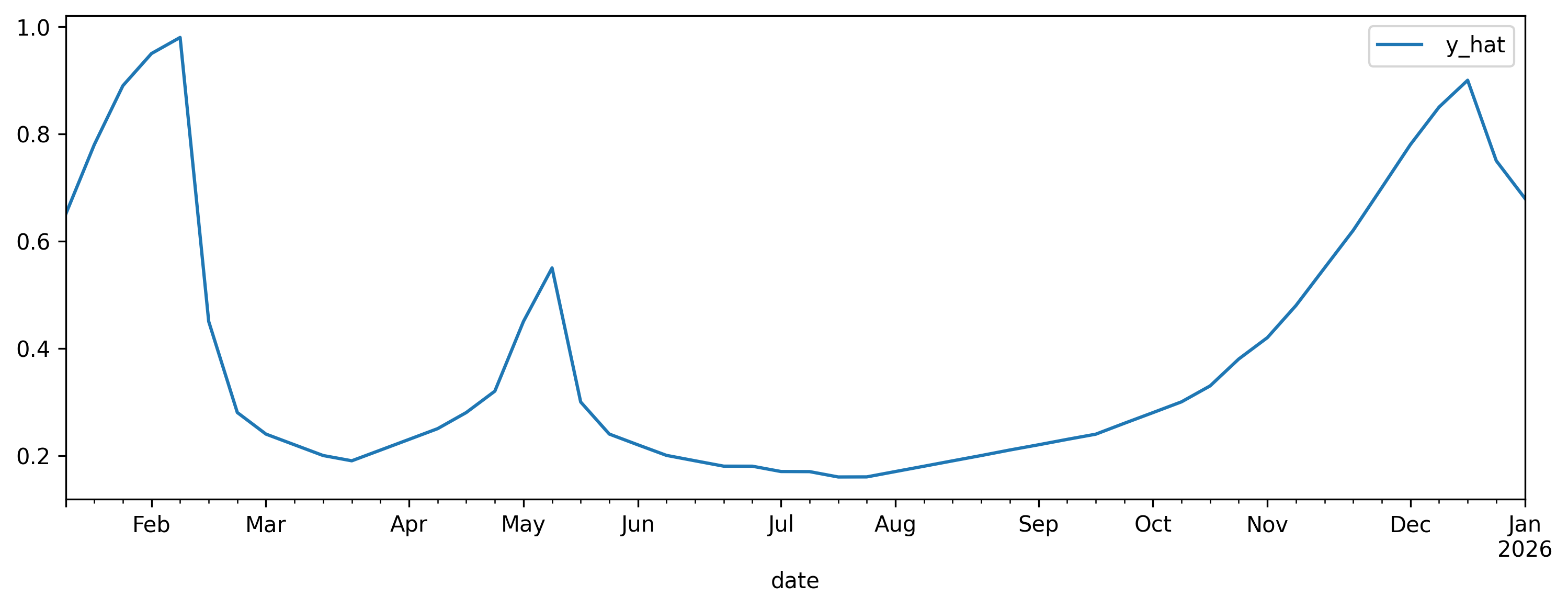
> predictions[0].df

         date     y_hat
0  2025-01-12  0.649931
1  2025-01-19  0.779941
2  2025-01-26  0.890004
3  2025-02-02  0.950051
4  2025-02-09  0.980053
...
47 2025-12-07  0.780181
48 2025-12-14  0.850078
49 2025-12-21  0.900191
50 2025-12-28  0.750021
51 2026-01-04  0.679949
> fig, ax = plt.subplots(1,1, figsize=(12, 4))
> predictions[0].df.set_index('date').plot(ax=ax)
Explanation for weekly predictions
> predictions[0].text
Ferrero Rocher's premium chocolate gift box shows strong seasonal demand patterns centered around key romantic and holiday occasions. The Valentine's Day theme and heart-shaped packaging make this a particularly strong seller in the weeks leading up to February 14th, with peak demand occurring 1-2 weeks before the holiday. Secondary peaks occur during the winter holiday season (November-December) and Mother's Day period. The premium positioning and reasonable price point ($10.49) make it an attractive gift option, while the 16-count size is ideal for romantic gifting. The brand's strong reputation and product quality support consistent baseline demand throughout the year, though significantly lower than seasonal peaks. The individually wrapped format and luxury presentation also drive gift-giving during other special occasions and celebrations throughout the year.
Predict Daily
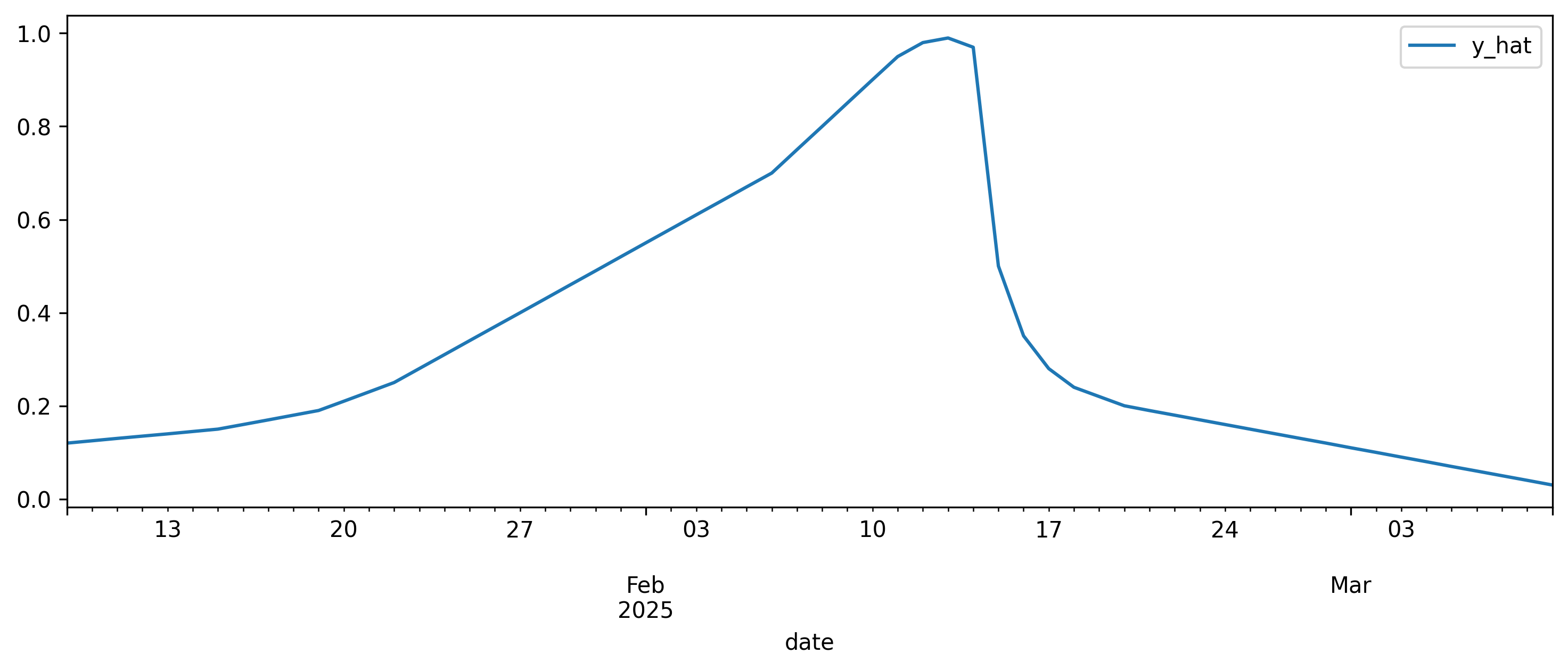
> predictions[0].df

         date     y_hat
0  2025-01-09  0.119964
1  2025-01-10  0.125001
2  2025-01-11  0.130098
3  2025-01-12  0.134989
4  2025-01-13  0.139822
...
55 2025-03-05  0.069831
56 2025-03-06  0.059999
57 2025-03-07  0.050010
58 2025-03-08  0.040116
59 2025-03-09  0.030057
> fig, ax = plt.subplots(1,1, figsize=(12, 4))
> predictions[0].df.set_index('date').plot(ax=ax)
Explanation for daily predictions
> predictions[0].text
Ferrero Rocher's heart-shaped Valentine's gift box traditionally experiences strong seasonal demand leading up to Valentine's Day. Based on its premium positioning and romantic gift appeal, we expect demand to start building gradually from early January, with acceleration beginning around January 20th. Peak demand should occur 3-5 days before Valentine's Day as consumers make their romantic gift purchases. The product's moderate price point of $10.49 makes it an accessible luxury gift option. After Valentine's Day, demand will decline sharply but maintain some baseline as the chocolates remain desirable for general consumption and small gifts. The heart-shaped packaging may limit post-Valentine's appeal, leading to lower sustained demand in late February and early March.
1 maintainer

Metadata
1 maintainer
Release files for chronulus 0.0.5.post14
For a detailed explanation of source distributions (sdists) and built distributions (wheels), please see the package formats documentation.
Source distribution (sdist)
| File | Size | Uploaded | |
|---|---|---|---|
| chronulus-0.0.5.post14.tar.gz | 10.6 kB | Details |
Built distribution (wheel)
| File | Interpreter | ABI | Platform | Reset |
|---|---|---|---|---|
| chronulus-0.0.5.post14-py3-none-any.whl | Python 3 | none | any | Details |
Total release size: 19.2 kB
Release files / chronulus-0.0.5.post14.tar.gz
| Download URL | chronulus-0.0.5.post14.tar.gz |
|---|---|
| Size | 10.6 kB |
| Tags | Source |
|
SHA-256 checksum How to use checksums |
0c37b8a2ed7a7eccff7bb04715da6b876d637e176fe1bf0b9bb9330b8d97e2fd
|
|
BLAKE2b-256 checksum How to use checksums |
51e87fd6ae1252ee2eb32f7432bce2ab7ee9982c890285358686855ae58ac615
|
| Upload date | |
|
Uploaded using Trusted Publishing? What is trusted publishing? |
No |
| Uploaded via |
twine/5.1.1 CPython/3.10.12
|
Release files / chronulus-0.0.5.post14-py3-none-any.whl
| Download URL | chronulus-0.0.5.post14-py3-none-any.whl |
|---|---|
| Size | 8.6 kB |
| Tags | Python 3 |
|
SHA-256 checksum How to use checksums |
e501efdce12361c5636848b4926ef2e5514a057d567e7949c3ca21e07327e663
|
|
BLAKE2b-256 checksum How to use checksums |
554c34813780c6f49c002cc8a35aa1155b788d42e7884b0358e220f951b169cc
|
| Upload date | |
|
Uploaded using Trusted Publishing? What is trusted publishing? |
No |
| Uploaded via |
twine/5.1.1 CPython/3.10.12
|














