
chuja


Separate a song into its stems — vocals, drums, bass, other — from a local audio file, or (opt-in) from a YouTube / SoundCloud / direct URL. One command, portable output, cross-platform.
The
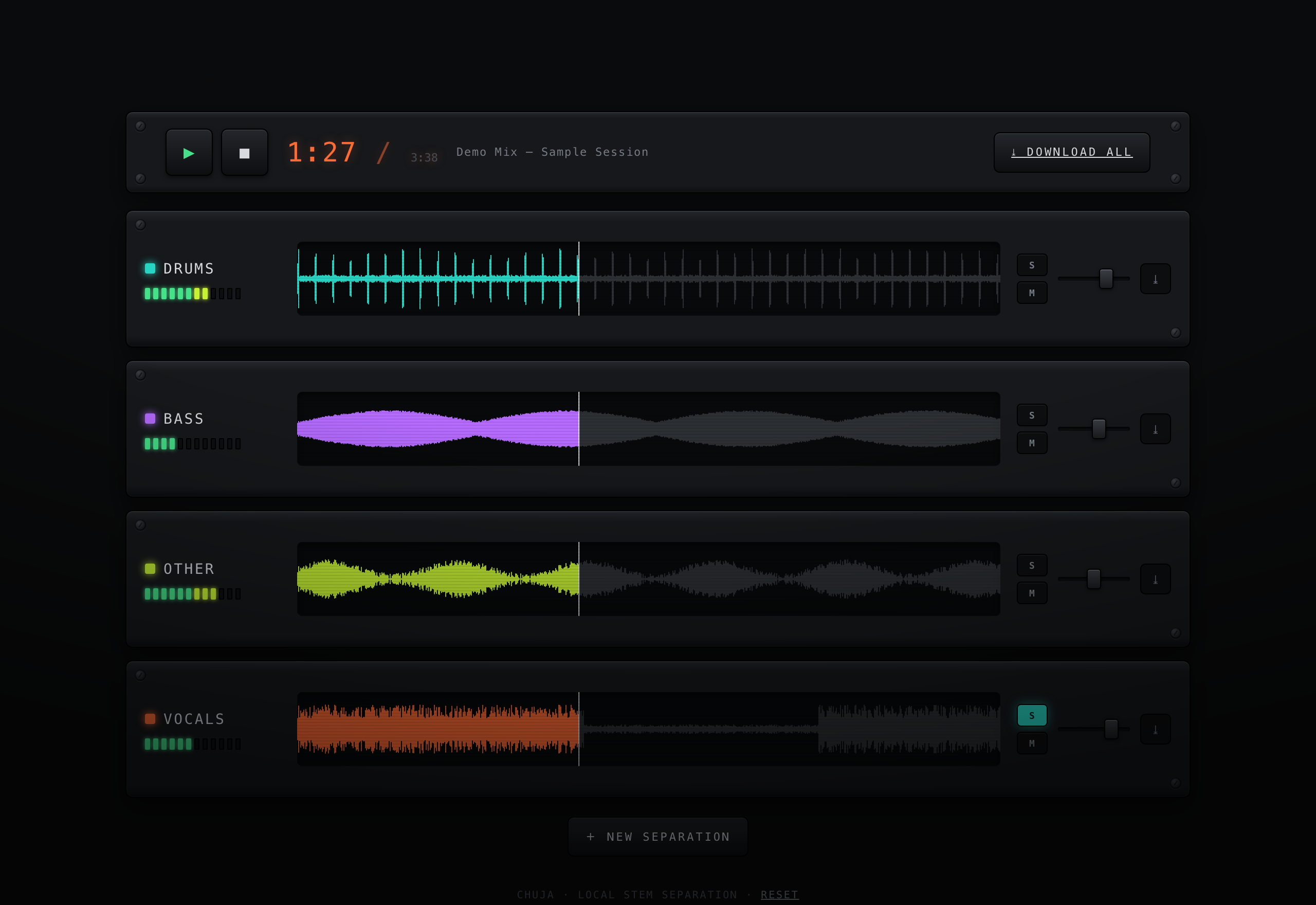
chuja servemixing console — one channel strip per stem with a live waveform, solo/mute, faders, and sample-accurate synced playback.
chuja is a thin, friendly wrapper around two excellent open-source engines:
- Demucs (Meta) — state-of-the-art neural source separation.
- yt-dlp — used only for the optional URL-fetching feature.
It does not reinvent either. What it adds is the glue: one pipeline from a source to clean, named, downloadable stem files, with sensible defaults and a polished CLI + Python API.
Screenshots
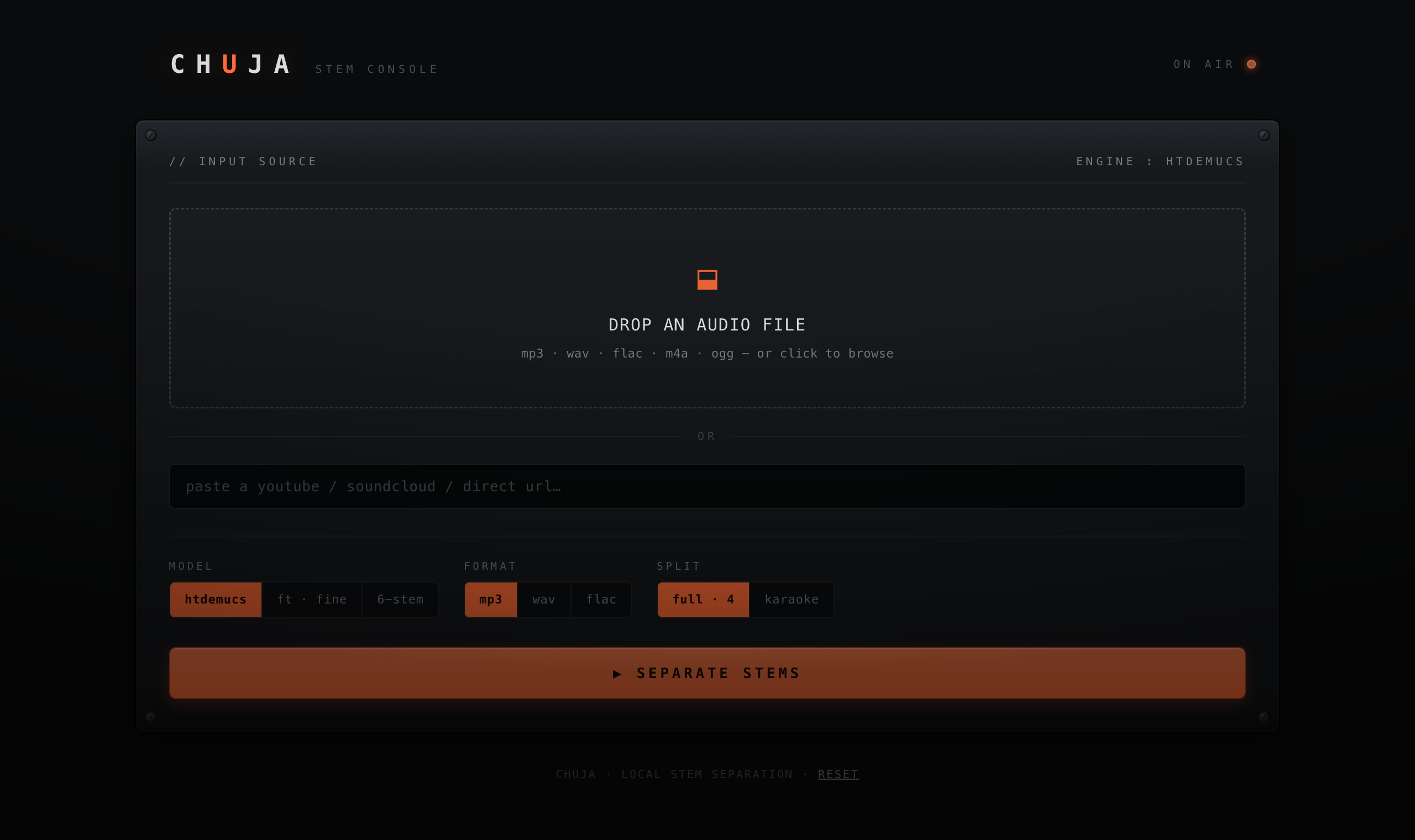
Intake — drop a file or paste a URL, pick a model / format / split:
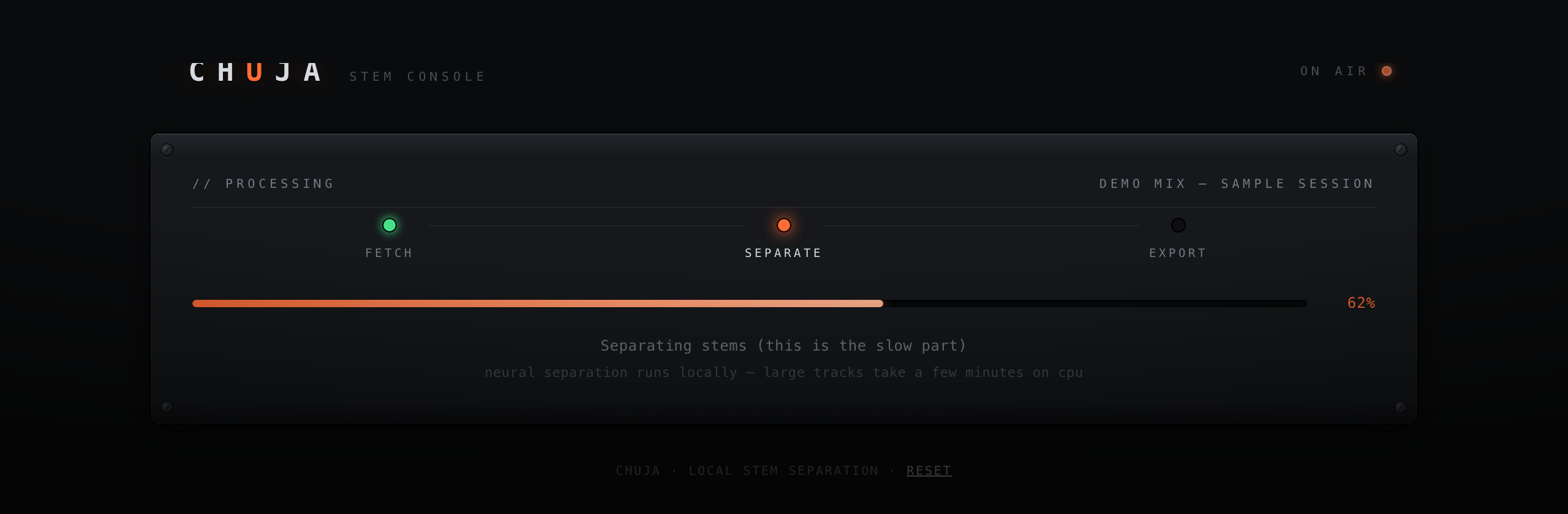
Progress — a real, per-chunk separation progress bar (not a fake spinner):
Console — the per-stem mixing board shown at the top of this README.
Install
# Core: separate LOCAL files. Pulls in Demucs (PyTorch).
pip install chuja

# Optional: add URL ingestion (YouTube/SoundCloud/etc.)
pip install 'chuja[url]'
Install globally (run chuja from anywhere)
./install.sh
If this project already has a .venv, the installer just symlinks its chuja
onto your PATH (~/.local/bin by default) — instant, nothing re-downloaded.
With no .venv, it falls back to an isolated pipx
install. Override the link location with CHUJA_BIN=/usr/local/bin ./install.sh.
Prefer to do it by hand? pipx install '.[url]' from the project root, or
pip install --user '.[url]'.
Requirements
Requires Python 3.9+ and ffmpeg on your PATH:
| Platform | Install ffmpeg |
|---|---|
| macOS | brew install ffmpeg |
| Ubuntu/Debian | sudo apt install ffmpeg |
| Windows | winget install Gyan.FFmpeg |
The first separation downloads the model weights (~150 MB) once and caches them.
Usage (CLI)
# Local file → 4 stems as WAV under ./stems/<track>/
chuja separate song.mp3

# Pick a format and bundle into a portable zip
chuja separate song.flac --format mp3 --zip -o ~/Desktop/stems

# Karaoke / acapella split: one stem + everything else
chuja separate song.mp3 --two-stems vocals

# From a URL (requires the [url] extra)
chuja separate "https://www.youtube.com/watch?v=..." --format mp3

# Best-quality (slower) model, force a device
chuja separate song.wav --model htdemucs_ft --device cpu

# List available models
chuja models
Usage (library)
import chuja

result = chuja.separate(
    "song.mp3",
    out_dir="stems",
    fmt="mp3",
    two_stems=None,        # or "vocals" for a 2-stem split
    zip_output=True,
)
print(result.track)        # "song"
print(result.stems)        # {"vocals": Path(...), "drums": Path(...), ...}
print(result.archive)      # Path("stems/song.zip")
Models
| Model | Stems | Notes |
|---|---|---|
htdemucs (default) |
4 | Best balance of speed and quality |
htdemucs_ft |
4 | Fine-tuned — best quality, ~4× slower |
htdemucs_6s |
6 | Adds piano + guitar (experimental) |
mdx_extra |
4 | Alternative MDX-challenge model |
A note on quality
Separation quality is bounded by your source quality. Demucs is excellent,
but it cannot recover information that lossy compression already discarded — a
128 kbps MP3 in means audible artifacts in the stems out. Feed it the highest-
fidelity source you have (WAV/FLAC > 320 kbps MP3 > a low-bitrate stream) for
the cleanest results. chuja deliberately does not transcode before
separation, so it never throws away quality you started with.
Performance: separation is compute-heavy. It runs on CPU everywhere, and uses your GPU automatically when available — CUDA (NVIDIA) or MPS (Apple Silicon). GPU is many times faster than CPU for full songs.
Platform note: real separation is verified on macOS (CPU + Apple Silicon/MPS), Linux, and Windows (CPU) via the separation smoke test, which runs Demucs end-to-end on each OS.
Responsible use
The optional URL feature uses yt-dlp. Downloading content from YouTube,
SoundCloud, and similar platforms may violate their Terms of Service, and the
audio is almost always copyrighted. You are solely responsible for ensuring
you have the right to download and process any audio you give to chuja
(e.g. your own recordings, public-domain works, or content you are licensed to
use). The core install ships without this capability for exactly this reason.
Releasing (maintainers)
Releases publish to PyPI via Trusted Publishing (OIDC) — no API token is ever stored. One-time setup on PyPI (Publishing settings → add a pending publisher):
| Field | Value |
|---|---|
| PyPI project name | chuja |
| Owner | Dnakitare |
| Repository name | chuja |
| Workflow name | release.yml |
| Environment name | pypi |
Then publish a version by cutting a GitHub Release (e.g. tag v0.1.0). The
release.yml workflow builds the sdist + wheel and uploads them automatically.
License
MIT.
1 maintainer

Metadata
1 maintainer
Release files for chuja 0.1.2
For a detailed explanation of source distributions (sdists) and built distributions (wheels), please see the package formats documentation.
Source distribution (sdist)
| File | Size | Uploaded | |
|---|---|---|---|
| chuja-0.1.2.tar.gz | 636.2 kB | Details |
Built distribution (wheel)
| File | Interpreter | ABI | Platform | Reset |
|---|---|---|---|---|
| chuja-0.1.2-py3-none-any.whl | Python 3 | none | any | Details |
Total release size: 670.5 kB
Release files / chuja-0.1.2.tar.gz
| Download URL | chuja-0.1.2.tar.gz |
|---|---|
| Size | 636.2 kB |
| Tags | Source |
|
SHA-256 checksum How to use checksums |
7689540131b8449db7043fdfb8da64e50ea426d4a6fca24bb55394bb68659a64
|
|
BLAKE2b-256 checksum How to use checksums |
2a53d0b64e35f929c25823ddbc3c612f60a4a86f50d16013fa90201a9b34ac53
|
| Upload date | |
|
Uploaded using Trusted Publishing? What is trusted publishing? |
Yes |
| Uploaded via |
twine/6.1.0 CPython/3.13.12
|
Provenance
Provenance describes where a file came from. On PyPI, provenance is shared via attestations, which provide a verifiable record of the build or publishing details. View details, limitations and caveats.


PyPI Publish Attestation
PyPI verified that this artifact, at this checksum, originated from the publisher listed below.
Signed by GitHub Actions, verified by PyPI on Jun 15, 2026.
Transparency logRelease files / chuja-0.1.2-py3-none-any.whl
| Download URL | chuja-0.1.2-py3-none-any.whl |
|---|---|
| Size | 34.3 kB |
| Tags | Python 3 |
|
SHA-256 checksum How to use checksums |
0edff6da09820374e525fcd07f706ddaefa7aec5a4fc9765c63da889f6f1401e
|
|
BLAKE2b-256 checksum How to use checksums |
54c6f6bb1bfc7510673cbc541920f5ddbdce8c8a29deccccb15ba35e8461ed0d
|
| Upload date | |
|
Uploaded using Trusted Publishing? What is trusted publishing? |
Yes |
| Uploaded via |
twine/6.1.0 CPython/3.13.12
|
Provenance
Provenance describes where a file came from. On PyPI, provenance is shared via attestations, which provide a verifiable record of the build or publishing details. View details, limitations and caveats.
PyPI Publish Attestation
PyPI verified that this artifact, at this checksum, originated from the publisher listed below.
Signed by GitHub Actions, verified by PyPI on Jun 15, 2026.
Transparency log













