
Chuy






Set alias to long commands and speed up your workflow, inspired in tools like yarn and npm.
Although Chuy is written in Python, it can be used for projects of any language, and even folders that are not projects!
Note: this tool is actively used by its primary author. He's happy to review pull requests / respond to issues you may discover.
Install
You can install Chuy from PyPI like any other package:
pip install chuy
To get the last version:
pip install git+https:/github.com/UltiRequiem/chuy
If you use Linux, you may need to install this with sudo to be able to access the command throughout your system.
Example Configuration file
Using JSON format:
{
  "format": "poetry run black .",
  "lint": "poetry run pylint chuy tests",
  "tests": "poetry run pytest",
  "package": "poetry build && poetry publish"
}
Example:
chuy.json
Using TOML format:
[chuy]
format = "poetry run black ."
lint = "poetry run pylint chuy tests"
tests = "poetry run pytest"
package = "poetry build && poetry publish"
Example:
chuy.toml
Using pyproject.toml file:
[tool.chuy]
format = "poetry run black ."
lint = "poetry run pylint chuy tests"
tests = "poetry run pytest"
package = "poetry build && poetry publish"
Example:
pyproject.toml
Usually the configuration file goes in the root of your project but it can really go anywhere.
Usage
After having defined the commands in the chuy.json file, you can now execute them as follows:
chuy format
 $ poetry run black .
 ....
This varies depending on the commands you have written in the chuy file.
chuy lint
 $ poetry run pylint chuy tests
 ....
You can also pass multiple commands:
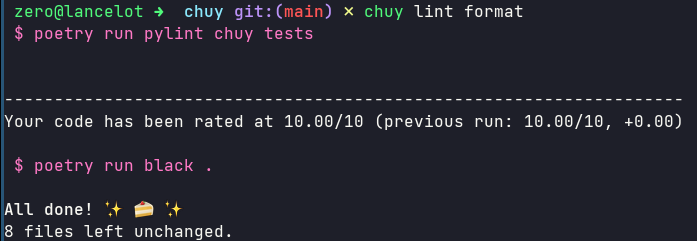
chuy lint format tests
 $ poetry run pylint chuy tests
 ....

 $ poetry run black .
 ....

 $ poetry run pytest
 ....
Tricks
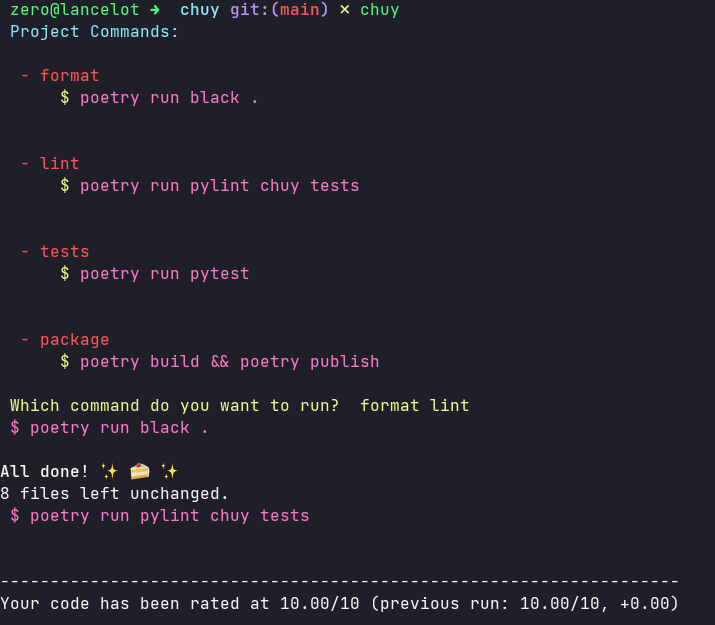
If you do not pass any command, you will get a menu with all the available commands, then you will be asked which of them you want to execute, here you can pass more than one command if you want.
If you want to integrate this tool with Poetry, try: UltiRequiem/poetry-chuy-plugin
Screenshots
Normal usage:
And if you don't pass any command:
License
Chuy is licensed under the MIT License.
1 maintainer

Metadata
1 maintainer
Release files for chuy 1.4.0
For a detailed explanation of source distributions (sdists) and built distributions (wheels), please see the package formats documentation.
Source distribution (sdist)
| File | Size | Uploaded | Provenance | |
|---|---|---|---|---|
| chuy-1.4.0.tar.gz | 4.9 kB | Without provenance | Details |
Built distribution (wheel)
| File | Interpreter | ABI | Platform | Reset |
|---|---|---|---|---|
| chuy-1.4.0-py3-none-any.whl | Python 3 | none | any | Details |
Total release size: 11.1 kB
Release files / chuy-1.4.0.tar.gz
| Download URL | chuy-1.4.0.tar.gz |
|---|---|
| Size | 4.9 kB |
| Tags | Source |
|
SHA-256 checksum How to use checksums |
203e646b20fe8eb1029a11596323f4595e6869c3ec01a1782fd7abb702e36abc
|
|
BLAKE2b-256 checksum How to use checksums |
b7fc80486a757119dedc6819f023baf8545912210a6f56df2d7b9a6d66ce6b8b
|
| Upload date | |
|
Uploaded using Trusted Publishing? What is trusted publishing? |
No |
| Uploaded via |
poetry/1.1.8 CPython/3.9.6 Linux/5.13.13-arch1-1
|
Release files / chuy-1.4.0-py3-none-any.whl
| Download URL | chuy-1.4.0-py3-none-any.whl |
|---|---|
| Size | 6.2 kB |
| Tags | Python 3 |
|
SHA-256 checksum How to use checksums |
2fe7948f8f90c101bcfddc52e7e1ab873fca63024ad31defd5aeb39ad0d284dd
|
|
BLAKE2b-256 checksum How to use checksums |
d297dbc35a43f646f98077476eb240f900ebb02ff990110cee0ad36fdf307b4b
|
| Upload date | |
|
Uploaded using Trusted Publishing? What is trusted publishing? |
No |
| Uploaded via |
poetry/1.1.8 CPython/3.9.6 Linux/5.13.13-arch1-1
|
Security for chuy 1.4.0
Provenance
Provenance describes where a file came from. On PyPI, provenance is shared via attestations, which provide a verifiable record of the build or publishing details. View details, limitations and caveats.
No provenance found
None of the files in this release were uploaded with provenance metadata.
A note on package security
PyPI is a repository for distributing packages, not a service for auditing them. While third-party security researchers and our staff do their best to detect and remove malicious packages, PyPI cannot guarantee the quality, security or suitability of any given package.














