
ci-why
Your CI failed. 400 lines of logs. This tells you why in seconds.




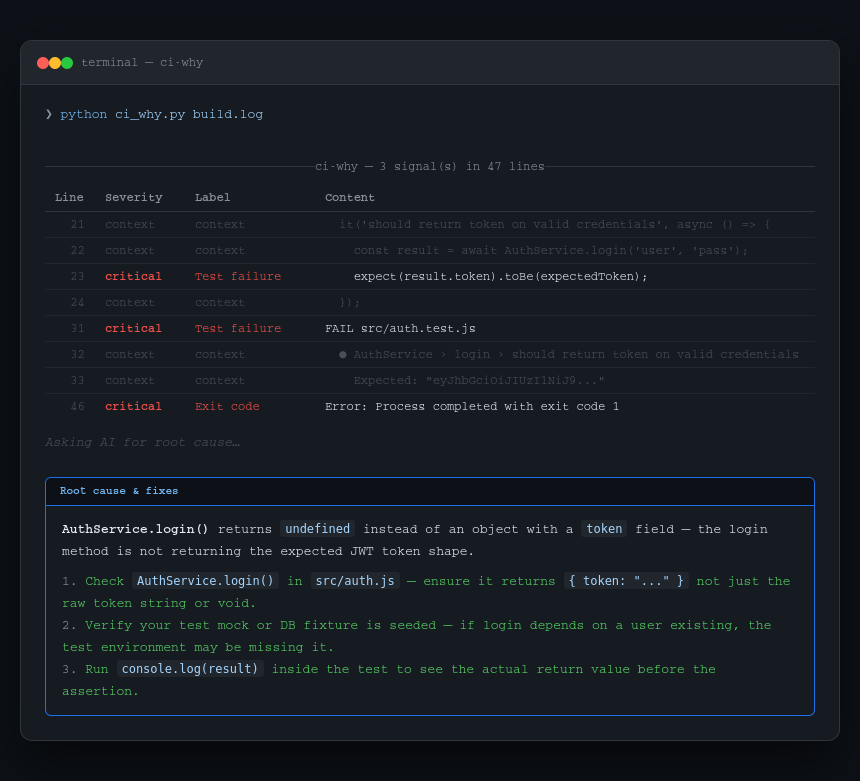
CI logs are noisy. A failed GitHub Actions run gives you hundreds of lines of downloading, copying, grouping, and progress output — and somewhere buried in it is the 3 lines that actually matter.
ci-why strips the noise, extracts the signal lines with context, and optionally asks Claude to explain the root cause and give you concrete fix steps.
No CI platform lock-in. Works on any log you can pipe or point at a file.
Install
pip install ci-why
Or with pipx (recommended for CLI tools — keeps it isolated):
pipx install ci-why
Usage
# From a log file
ci-why build.log

# Pipe directly from GitHub CLI
gh run view --log | ci-why -

# Pattern analysis only — no API call
ci-why build.log --no-ai

# Just the raw extracted failure lines (great for piping)
ci-why build.log --raw

# More context lines around each failure
ci-why build.log --context 5

# Scan only the last N lines (for huge logs)
ci-why build.log --max-lines 10000
AI explanation
Set your Anthropic API key to get plain-English root cause analysis and fix steps:
export ANTHROPIC_API_KEY=sk-ant-...
ci-why build.log
Without the key, ci-why still works — it shows the extracted failure lines using pattern matching only. The AI explanation is additive, not required.
What it recognises
ci-why detects failure signals across Python, Node, Go, Rust, and generic CI output:
| Signal | Examples |
|---|---|
| Test failures | FAIL, AssertionError, Jest ●, pytest FAILED |
| Errors & tracebacks | Traceback (most recent call last), panic:, fatal error |
| Exit codes | Process completed with exit code 1 |
| Missing modules | ModuleNotFoundError, Cannot find module |
| Build errors | Build failed, SyntaxError, compilation error |
| Dependency errors | npm ERR!, yarn error, pip error, ERESOLVE |
| Network / timeout | Connection refused, ECONNREFUSED, timed out |
| Lint / type errors | ESLint, mypy, ruff, TypeScript TS2345: |
| Permission errors | Permission denied, EACCES |
Noise filtered out: download progress, [debug] lines, file copy progress, GHA group markers, already-installed notices.
All options
Arguments:
  SOURCE        CI log file path, or '-' to read from stdin.

Options:
  --no-ai       Skip AI explanation; show pattern matches only.
  --raw         Print extracted failure lines as plain text and exit.
  -c, --context Lines of context around each failure (default: 2, max: 10).
  --max-lines   Truncate log to this many lines before scanning (default: 50000).
  --help        Show this message and exit.
Examples
GitHub Actions log via CLI:
gh run view 1234567890 --log | ci-why -
GitLab CI — download job log and analyse:
curl -H "PRIVATE-TOKEN: $GITLAB_TOKEN" \
  "https://gitlab.com/api/v4/projects/123/jobs/456/trace" | ci-why -
Save just the failure lines to a file:
ci-why build.log --raw > failures.txt
Use in a script — exit code reflects whether failures were found:
ci-why build.log --no-ai --raw || echo "Failures detected"
Development
git clone https://github.com/gitwingo/ci-why
cd ci-why
pip install -e .
Support
If sniff-schema has been useful to you, consider supporting its development:

Connect
- GitHub: @gitwingo
- Reddit: u/gitwingo
- X / Twitter: @gitwingo
License
MIT © gitwingo
1 maintainer

Metadata
1 maintainer
Release files for ci-why 0.1.1
For a detailed explanation of source distributions (sdists) and built distributions (wheels), please see the package formats documentation.
Source distribution (sdist)
| File | Size | Uploaded | |
|---|---|---|---|
| ci_why-0.1.1.tar.gz | 101.0 kB | Details |
Built distribution (wheel)
| File | Interpreter | ABI | Platform | Reset |
|---|---|---|---|---|
| ci_why-0.1.1-py3-none-any.whl | Python 3 | none | any | Details |
Total release size: 109.3 kB
Release files / ci_why-0.1.1.tar.gz
| Download URL | ci_why-0.1.1.tar.gz |
|---|---|
| Size | 101.0 kB |
| Tags | Source |
|
SHA-256 checksum How to use checksums |
6c243fedd2e61eadfcaddbd977471e0a4c45bc10031119bc49b4ce716d8ba3bd
|
|
BLAKE2b-256 checksum How to use checksums |
76b128e90436681a187f46c99664d3347c182ed262ba4fd4f91f93997609dd3f
|
| Upload date | |
|
Uploaded using Trusted Publishing? What is trusted publishing? |
Yes |
| Uploaded via |
twine/6.1.0 CPython/3.13.12
|
Provenance
Provenance describes where a file came from. On PyPI, provenance is shared via attestations, which provide a verifiable record of the build or publishing details. View details, limitations and caveats.


PyPI Publish Attestation
PyPI verified that this artifact, at this checksum, originated from the publisher listed below.
Signed by GitHub Actions, verified by PyPI on May 3, 2026.
Transparency logRelease files / ci_why-0.1.1-py3-none-any.whl
| Download URL | ci_why-0.1.1-py3-none-any.whl |
|---|---|
| Size | 8.3 kB |
| Tags | Python 3 |
|
SHA-256 checksum How to use checksums |
328a707c8edf569230f08f2727a51967693bb63bd9f0e03843f2064ca9d0440d
|
|
BLAKE2b-256 checksum How to use checksums |
bf3ce63efbe34be50189840c8fbbf1a6be2cff2167109ddc8c2efc5bd5c6168e
|
| Upload date | |
|
Uploaded using Trusted Publishing? What is trusted publishing? |
Yes |
| Uploaded via |
twine/6.1.0 CPython/3.13.12
|
Provenance
Provenance describes where a file came from. On PyPI, provenance is shared via attestations, which provide a verifiable record of the build or publishing details. View details, limitations and caveats.
PyPI Publish Attestation
PyPI verified that this artifact, at this checksum, originated from the publisher listed below.
Signed by GitHub Actions, verified by PyPI on May 3, 2026.
Transparency log













