

Open-source visual ETL and data pipeline builder that exports the pandas and Polars code you'd write by hand.
Build data and ML pipelines on a canvas, preview every step, then export readable pandas, Polars, or lazy Polars code with no proprietary runtime. What you keep is real, reviewable Python you can run and version anywhere.
Docs · Quick Start · Plugins · Discussions · Contributing · Good first issues










Try it
Opens the editor with the demo project in your browser. It runs on your free GitHub Codespaces hours, with nothing to install.
Or run it locally: python -m pip install ciaren && ciaren serve
If Ciaren is useful to you, a star on GitHub helps other people find it.

What Is Ciaren?
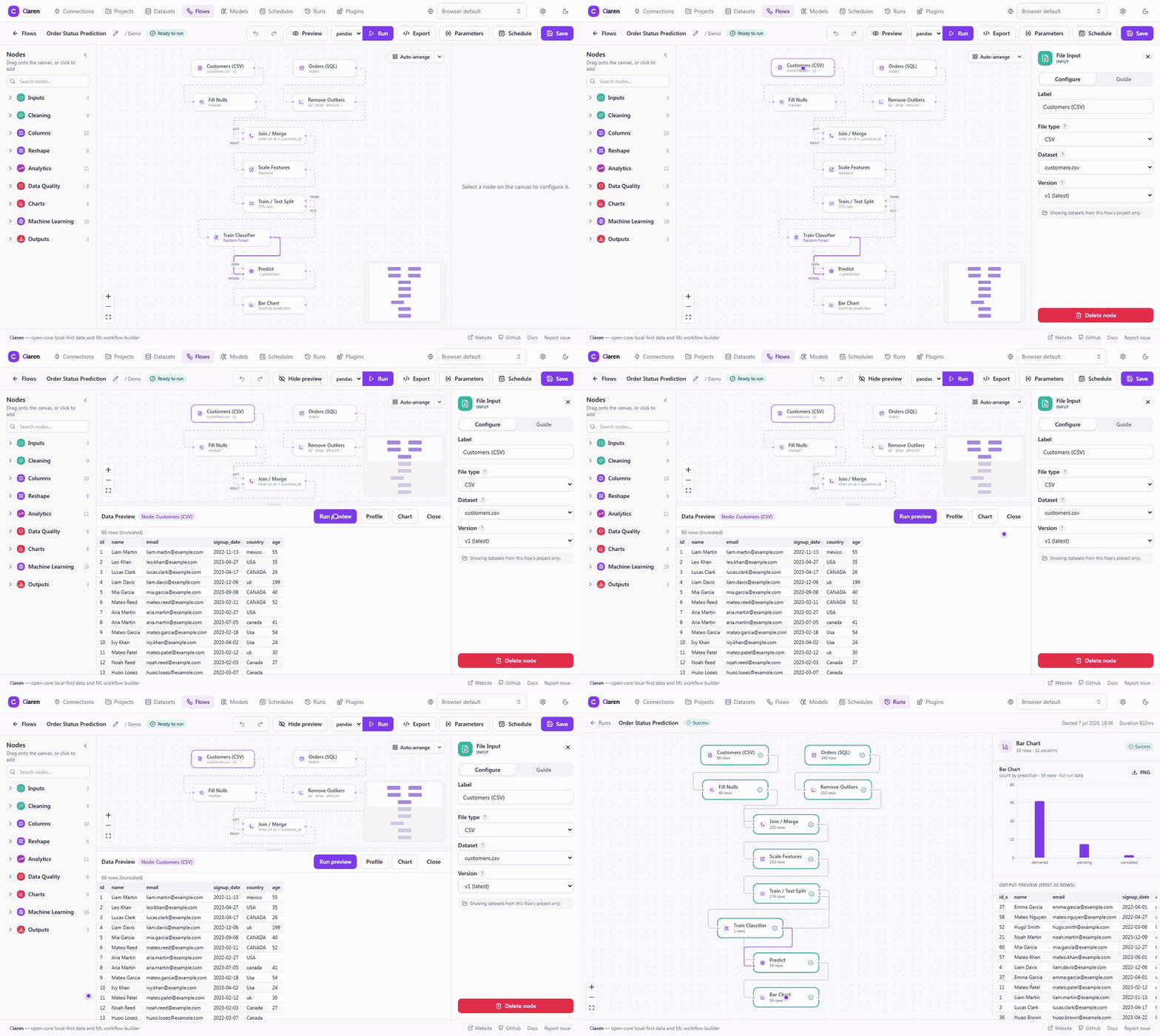
Ciaren is an open-source, local-first visual ETL tool and low-code data pipeline builder for Python. You drag and drop nodes to load, clean, join, validate, and transform data, train lightweight machine-learning models, and schedule runs. Then you export the pandas or Polars code you'd write by hand — no proprietary runtime, no lock-in.
The canvas is there for speed: build on it, preview every step, then keep the same clean, ordinary Python whether you run it inside Ciaren or take it somewhere else.
python -m pip install ciaren
ciaren serve
Open http://localhost:8055. The PyPI wheel bundles the React editor, so users
do not install a separate frontend package. One install starts the API,
scheduler, and web UI.
Alpha software. Ciaren is under active development. APIs, workflow formats, generated code, plugin interfaces, and internal data models may change before
1.0.0. Use it for learning, prototypes, and controlled internal workflows before relying on it for critical production jobs.
Why It Feels Different
| You get | Why it matters |
|---|---|
| Visual workflow building | Design pipelines faster than writing every dataframe step by hand. |
| Live node previews | Inspect data samples and schema changes before running the full flow. |
| Clean Python export | Generate standalone pandas, Polars, or lazy Polars scripts you can review and run outside Ciaren. |
| Local-first execution | SQLite works out of the box, and your data does not need to leave your machine. |
| Data engineering + ML | Ingest, clean, validate, engineer features, train, evaluate, predict, and export from one canvas. |
| Plugin-first architecture | Add custom nodes, connectors, and ML model types outside core. Engine, exporter, and validator extension points are defined for later releases. |
Ciaren is not a hosted no-code black box. Every node maps to understandable dataframe behavior, every run leaves inspectable results, and every flow can become code.
Quickstart
Install From PyPI
python -m pip install --upgrade pip
python -m pip install ciaren
ciaren serve
Open http://localhost:8055, then open Projects -> Demo. The first start
seeds sample datasets and working example flows, so you can preview, run, and
export something real before uploading your own data.
For repeatable evaluation, pin the release version:
python -m pip install "ciaren==0.3.0"
Run With Docker
git clone https://github.com/ciaren-labs/Ciaren.git
cd Ciaren
docker compose up --build
Open http://localhost:8055.
Run From Source
Use this path when contributing to the backend, frontend, docs, or plugin SDK.
Requirements: Python 3.12+, Node.js 20+, and Git.
git clone https://github.com/ciaren-labs/Ciaren.git
cd Ciaren/backend

python -m venv .venv
source .venv/bin/activate        # Windows: .venv\Scripts\activate

pip install -e .
ciaren serve
In a second terminal:
cd Ciaren/frontend
npm install
npm run dev
Open http://localhost:5173 for the live development frontend. The backend API
and Swagger docs stay on http://localhost:8055.
What You Can Build
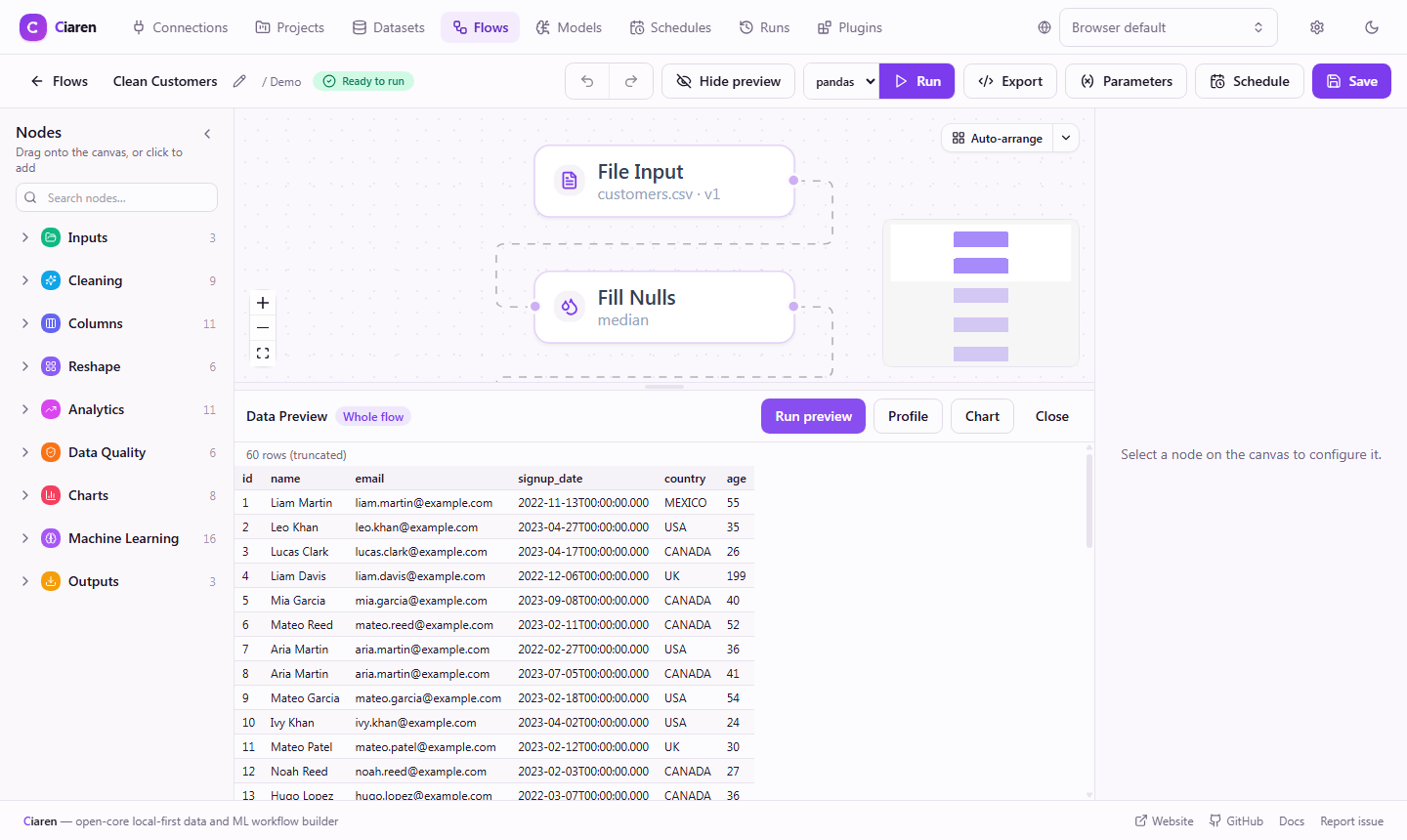
- Input and output: CSV, TSV, Excel, Parquet, JSON/JSONL, text, SQL databases, S3, GCS, and Azure Blob.
- Cleaning: drop/fill nulls, remove duplicates, rename/select/drop columns, cast types, replace values.
- Transformation: filters, joins, group by, aggregate, calculated columns, maps, pivots, windows, sorting, sampling.
- Data quality: assert not-null, unique, value ranges, row count, expressions, and allowed values.
- Machine learning: split, train, cross-validate, predict, evaluate, feature engineering, importance, and MLflow tracking.
- Operations: run history, scheduling, REST API, CLI, webhook trigger, and Python SDK.
Exported Code Is the Escape Hatch
Every flow exports to a standalone Python script — pandas, eager Polars, or lazy Polars — so the visual pipeline never traps your logic.
A simple read -> clean -> aggregate -> write flow can export to code like this:
import polars as pl

df_1 = pl.read_csv("sales.csv")
df_1 = df_1.drop_nulls(subset=["amount"])
df_1 = df_1.group_by(["region"]).agg([pl.col("amount").sum().alias("amount")])
df_1.write_csv("summary.csv")
The same flow can also export pandas or lazy Polars variants where supported,
and each variant can be downloaded as a Jupyter notebook (.ipynb). That makes Ciaren useful for prototyping, teaching, code review, and migration
from visual exploration into normal Python projects.
How It Compares
| If you use… | Ciaren gives you… |
|---|---|
| Jupyter notebooks or pandas scripts | The same dataframe code, but built as a repeatable, previewable, schedulable flow. |
| Visual ETL / data-prep tools (for example KNIME, Alteryx, Orange) | A drag-and-drop canvas whose output is plain pandas or Polars Python, not a proprietary workflow format. |
| Airflow, dbt, or Spark | A lightweight, single-machine option for small and medium datasets — no cluster or warehouse to set up. Ciaren does not replace these tools at scale. |
Read the full comparison with notebooks, orchestrators, and visual ETL tools.
Built for Extension
Ciaren's open core stays focused on the shared workflow platform. Specialized integrations should usually be plugins, not one-off patches to core.
| Extension point | Examples |
|---|---|
| Nodes | Custom transforms, validators, AI-assisted steps, domain-specific operations |
| Connectors and storage | Internal APIs, SaaS tools, warehouses, object stores, document databases |
| Model providers | Local models, scikit-learn estimators, organization-specific training logic |
| Execution engines | Alternative dataframe engines and future runtime targets |
| Exporters | Code targets, deployment bundles, validation reports |
Plugins can be packaged as .ciarenplugin files, signed, inspected, installed,
enabled, disabled, and distributed independently.
Start here:
Who It Is For
- Data analysts: clean, reshape, validate, and export datasets without writing every step by hand.
- Data engineers: prototype repeatable local pipelines, inspect generated code, then automate with CLI/API/SDK workflows.
- Python learners: see how visual dataframe operations become pandas and Polars code.
- ML practitioners: try lightweight ML flows with local MLflow tracking.
- Plugin authors: ship custom nodes, connectors, and ML model types without maintaining a fork.
- Open-source contributors: help polish the editor, execution engine, transformations, docs, tests, and plugin SDK.
Documentation
- Installation - PyPI, Docker, source installs, extras, and troubleshooting.
- Quick Start - build your first flow in five minutes.
- Demo Project & Tutorials - walk through the seeded example flows.
- Examples - end-to-end workflow walkthroughs.
- Machine Learning Quick Start - train and evaluate a model on the canvas.
- Plugin Guide - build your first plugin.
- Roadmap
- Security
- Contributing
Optional Extras
The base install includes the core app, pandas, Polars, scikit-learn models, MLflow tracking, and the bundled web UI.
Install extras only when you need specific drivers or optional model families:
python -m pip install "ciaren[postgres]"
python -m pip install "ciaren[s3]"
python -m pip install "ciaren[ml]"        # XGBoost and LightGBM choices
python -m pip install "ciaren[keyring]"   # recommended: store connection secrets in the OS keychain
python -m pip install "ciaren[signing]"   # plugin signing support
On a desktop install, ciaren[keyring] is the recommended way to hold
database and API secrets: the connection form (and the ciaren secret set
command) stores the value in your OS keychain — Windows Credential Manager,
macOS Keychain, or Secret Service on Linux — and the connection keeps only a
keyring:NAME reference. Ciaren never writes the secret to its database.
Without the extra, connections still work with environment-variable
(env:/PG_PASSWORD) or secret-file (file:/run/secrets/...) references.
The separate ciaren-client package is only for scripts that need to call a
running Ciaren server. It is not required to use the visual app.
Contributing
Ciaren is early, and useful contributions are welcome: reproducible bugs, example flows, docs improvements, transformation nodes, plugin SDK improvements, frontend workflow polish, tests, and focused core fixes.
The open core is intentionally lightweight. New niche databases, SaaS products, internal APIs, proprietary storage systems, and organization-specific model logic should normally be built as plugins. If the SDK blocks that work, open an SDK-focused issue or discussion.
Start with CONTRIBUTING.md, then pick a good first issue or a help wanted issue — each one lists the files to touch and the acceptance criteria. Questions and ideas can go to GitHub Discussions, and reproducible bugs or focused feature requests can go to GitHub Issues.
Security
Review exported Python code, test flows before using important data, and add appropriate operational controls before using Ciaren in sensitive or critical environments.
Please report vulnerabilities using the process in SECURITY.md.
Licensing
- Ciaren Core: AGPL-3.0-only.
- Public Plugin API / SDK: Apache-2.0.
- Plugins: may use their own compatible license, depending on the plugin author and distribution model.
- Future cloud or hosted services: not necessarily covered by this open source repository license.
In plain language: using Ciaren — locally or self-hosted inside your organization — does not obligate you to open-source anything, your flows and exported Python are yours, and the Apache-2.0 SDK means plugin authors choose their own license. And a standing commitment: capabilities that ship in the open core stay in the open core — commercial offerings, if they ever exist, add on top rather than carving features out.
See LICENSE, NOTICE, and LICENSES/ for the complete license texts and notices, and the licensing FAQ for common questions.
Citation
If Ciaren is useful in your research, teaching, or writing, please cite it using the metadata in CITATION.cff (GitHub's "Cite this repository" button on the repo sidebar generates APA/BibTeX from the same file):
@software{ciaren,
  author  = {Arenas, Rodrigo},
  title   = {Ciaren},
  url     = {https://github.com/ciaren-labs/Ciaren},
  license = {AGPL-3.0-only},
  version = {0.3.0},
  date    = {2026-09-25}
}
Project Status
- Current stage: Alpha (pre-1.0) — the API and data model may change
before
1.0.0. Pin a version for production use. - Latest release:
0.3.0(first public release was0.1.0) — see the CHANGELOG for what's included and for breaking changes. - Breaking changes are expected before
1.0.0
Made for data practitioners who value local workflows, transparent execution, and Python they can actually read.
1 maintainer

Release files for ciaren 0.3.0
For a detailed explanation of source distributions (sdists) and built distributions (wheels), please see the package formats documentation.
Source distribution (sdist)
| File | Size | Uploaded | |
|---|---|---|---|
| ciaren-0.3.0.tar.gz | 1.4 MB | Details |
Built distribution (wheel)
| File | Interpreter | ABI | Platform | Reset |
|---|---|---|---|---|
| ciaren-0.3.0-py3-none-any.whl | Python 3 | none | any | Details |
Total release size: 2.6 MB
Release files / ciaren-0.3.0.tar.gz
| Download URL | ciaren-0.3.0.tar.gz |
|---|---|
| Size | 1.4 MB |
| Tags | Source |
|
SHA-256 checksum How to use checksums |
67068133866d4905ccecd9ac814df8412907a7fdc919da92a4128208a13186df
|
|
BLAKE2b-256 checksum How to use checksums |
f7dc2b2573dc4b69a186b6f3a25b0749d2a1500b15358012f2ab4945d97fa689
|
| Upload date | |
|
Uploaded using Trusted Publishing? What is trusted publishing? |
Yes |
| Uploaded via |
twine/7.0.0 CPython/3.13.14
|
Provenance
Provenance describes where a file came from. On PyPI, provenance is shared via attestations, which provide a verifiable record of the build or publishing details. View details, limitations and caveats.


PyPI Publish Attestation
PyPI verified that this artifact, at this checksum, originated from the publisher listed below.
Signed by GitHub Actions, verified by PyPI on Sep 25, 2026.
Transparency logRelease files / ciaren-0.3.0-py3-none-any.whl
| Download URL | ciaren-0.3.0-py3-none-any.whl |
|---|---|
| Size | 1.1 MB |
| Tags | Python 3 |
|
SHA-256 checksum How to use checksums |
4fcd8200a5dacd22a8404da24114e0a3a040aceaba50dc7592bc91ad63ef78a3
|
|
BLAKE2b-256 checksum How to use checksums |
dc28d3b8f20e9674dbd2994a3fc18b4b863d2af640c37daf30fe5f03a9d9338e
|
| Upload date | |
|
Uploaded using Trusted Publishing? What is trusted publishing? |
Yes |
| Uploaded via |
twine/7.0.0 CPython/3.13.14
|
Provenance
Provenance describes where a file came from. On PyPI, provenance is shared via attestations, which provide a verifiable record of the build or publishing details. View details, limitations and caveats.
PyPI Publish Attestation
PyPI verified that this artifact, at this checksum, originated from the publisher listed below.
Signed by GitHub Actions, verified by PyPI on Sep 25, 2026.
Transparency log













