



cig_bench is the official inference library accompanying the paper
"CIG-Bench: A Comprehensive Survey and Benchmark for AI-Driven Subsurface Imaging Understanding".
It provides ready-to-use, pretrained deep-learning baselines for the five core seismic-interpretation
tasks of CIG-Bench: fault segmentation (FaultPredictor), relative geologic time / RGT
estimation (RGTPredictor), channel segmentation (ChannelPredictor), karst-cave
segmentation (KarstPredictor), and property modeling — Vp / density / impedance / GR /
lithology, etc. — (PropertyPredictor). All five baselines share the same HRNet backbone
(skip-connection, optimized variant).
All five predictors share a uniform API and load weights automatically from
ModelScope on first use. Benchmark datasets
(Structure, Geobody) can also be downloaded with a single line of code.
📄 Paper / project page: https://douyimin.github.io/CIG-bench 💻 Source code: https://github.com/douyimin/CIG-bench
🚧 CIG-Bench is under active construction and continuously updated. As a living, community-maintained benchmark, we are progressively adding new baselines, datasets, evaluation protocols, and tasks. Contributions and feedback are welcome — stay tuned for updates.
Table of Contents
- Installation
- Quick start
- Datasets
- Using local weights or a custom repo
- Project layout
- Requirements
- Citation
- License
Installation
From PyPI:
pip install cig_bench
From source:
git clone https://github.com/douyimin/CIG-bench.git
cd CIG-bench
pip install .
For development (editable install with dev extras):
pip install -e ".[dev]"
You will additionally need the weight / dataset backend:
pip install modelscope
Quick start
The first time you build a predictor, the corresponding .pth checkpoint is downloaded into a local
cache. Subsequent constructions of the same predictor reuse the cached weights. Every predictor
returns the result together with the preprocessed seismic that was actually fed to the network, so
the paired (used, result) tensors can be passed straight into the built-in visualize(...) helper.
Fault segmentation
The fault model predicts a probability volume that is thresholded into a fault mask. Anisotropic
rescaling (scale_t, scale_h, scale_w) adapts the model to surveys with non-square spatial
sampling. The optional rank and chunk_size arguments split inference along the depth axis
to keep GPU memory bounded on large field volumes.
from cig_bench.predictor.fault import FaultPredictor

fault_predictor = FaultPredictor(device="cuda")
prob, used = fault_predictor.predict(
    seis,                        # (tline,iline,xline)
    rank=4, chunk_size=64,       # memory-bounded chunked inference
    threshold=0.5,
    scale_t=0.5, scale_h=0.85, scale_w=0.85,
    resize_back=True,            # return result at the original (T, H, W)
)
fault_predictor.visualize(used, prob)
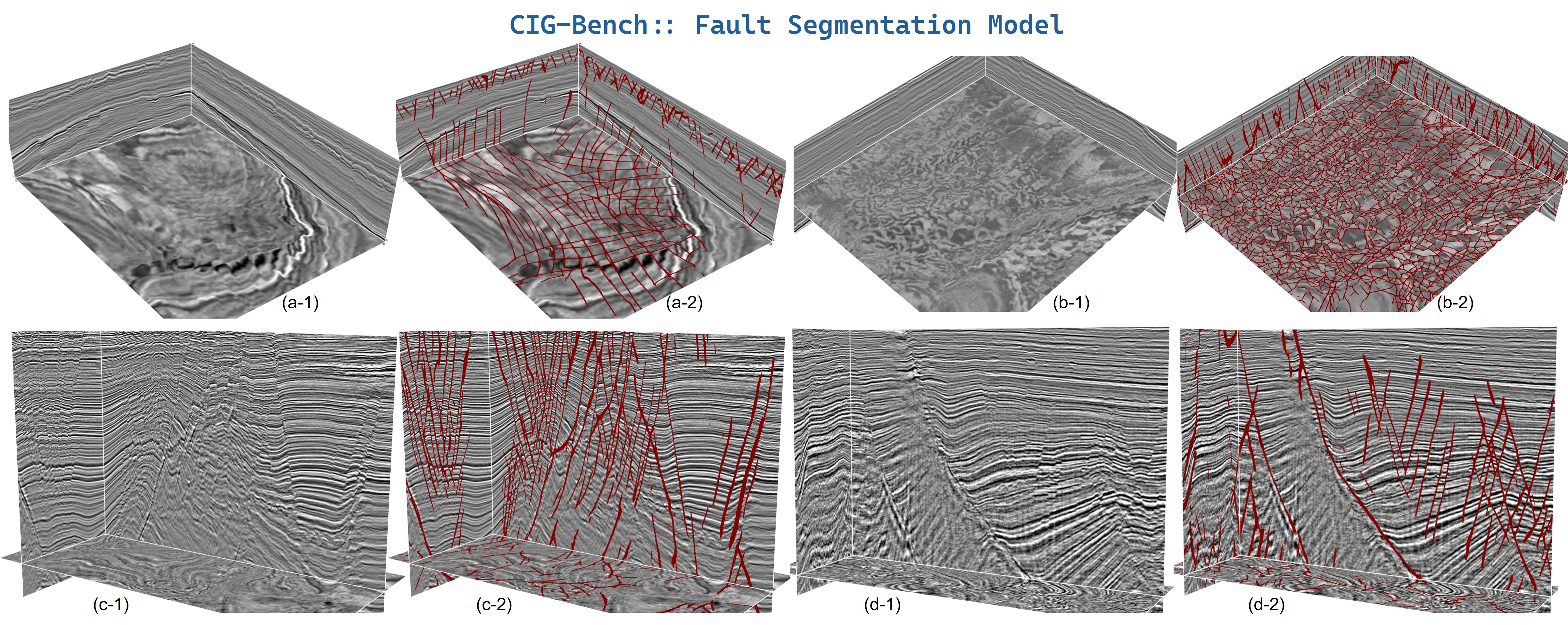
Fault segmentation on four field surveys (a–d). For each example: the input seismic (columns
*-1) and the predicted faults rendered in red over the seismic (columns *-2),
shown on both crossline-style cubes (a, b) and inline sections (c, d).
RGT estimation
The RGT model regresses a smooth relative-geologic-time volume; horizons are then extracted as
iso-surfaces of that volume. Optional sparse horizon annotations may be passed as two auxiliary
channels (horizon_rgt, horizon_mask) to constrain the prediction. Inference runs on a fixed
(400, 512, 512) grid: an input of any other size is automatically resized to this grid and the
predicted RGT is resized back to the original shape (changing the grid is discouraged — see the
in-code warning).
from cig_bench.predictor.rgt import RGTPredictor

rgt_predictor = RGTPredictor(device="cuda")
rgt_vol, used = rgt_predictor.predict(seis)  # (tline,iline,xline)
horizons      = rgt_predictor.extract_horizons(rgt_vol, n_horizons=100)
rgt_predictor.visualize(used, rgt_vol, horizons)
# visualize() also auto-traces horizons when none are passed:
# rgt_predictor.visualize(used, rgt_vol)
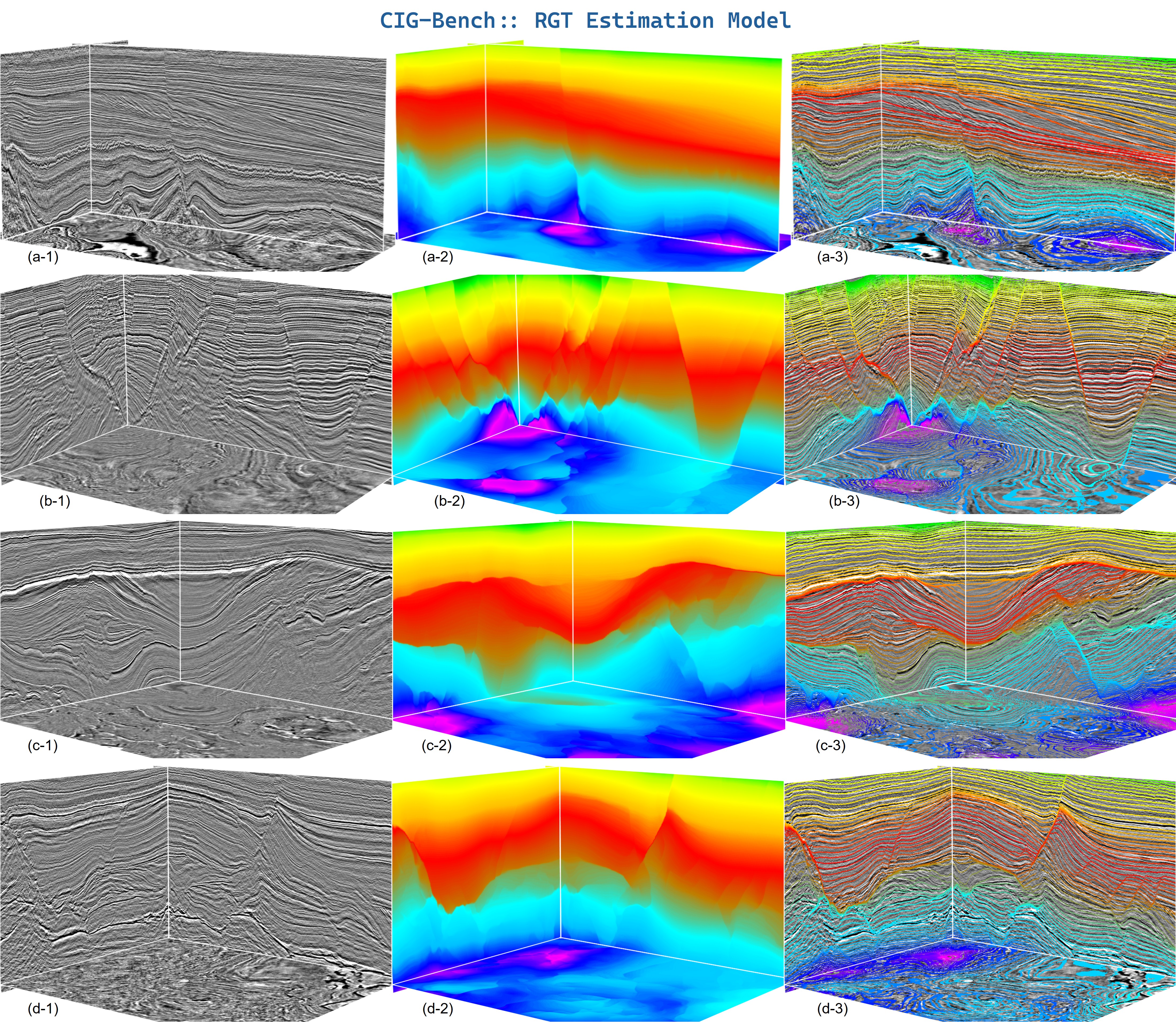
RGT estimation on four field surveys (a–d). Columns: input seismic (
*-1), the
regressed relative-geologic-time volume (*-2), and the RGT co-rendered with the seismic so
that iso-time horizons follow the reflectors (*-3).
Geobody segmentation (channel / karst)
Both geobody predictors share the same multi-scale ensemble strategy. By default inference is run at several spatial scales (from 0.25× to 1.5× the input size) and the resulting probability volumes are accumulated. A configurable post-processing step removes small connected components.
from cig_bench.predictor.channel import ChannelPredictor

channel_predictor = ChannelPredictor(device="cuda")
scores, used = channel_predictor.predict(
    seis,                                 # (tline,iline,xline)
    scales=[0.5, 0.75, 1.0, 1.25, 1.5],   # custom scale set
    accumulate="sum",
)
mask = channel_predictor.postprocess(scores, threshold=0.75, min_size=50000)
channel_predictor.visualize(used, scores, mask)
The karst predictor is used identically — only the checkpoint changes:
from cig_bench.predictor.karst import KarstPredictor

karst_predictor = KarstPredictor(device="cuda")
scores, used = karst_predictor.predict(seis)  # (tline,iline,xline)
mask = karst_predictor.postprocess(scores, threshold=0.75)
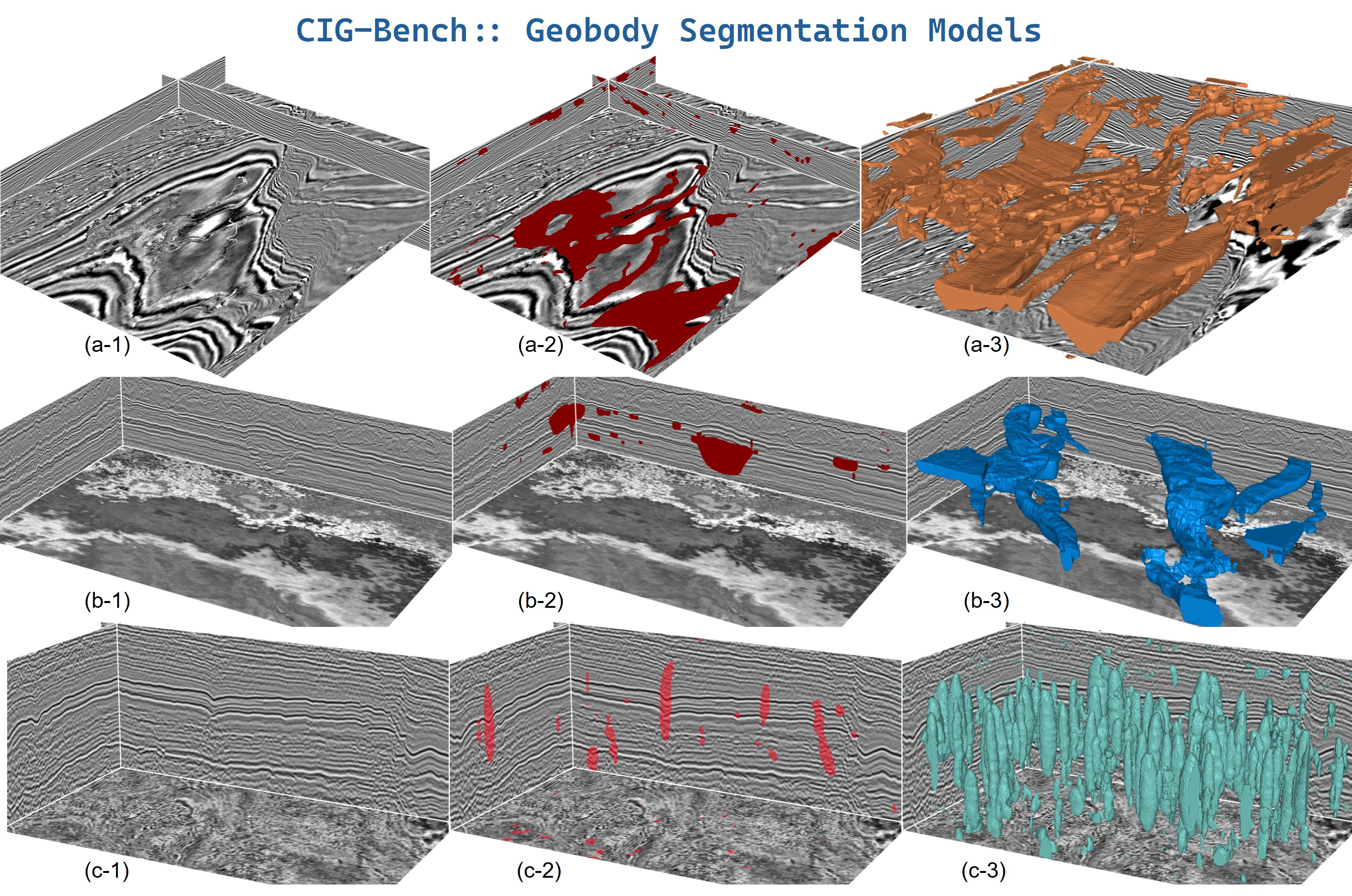
Geobody segmentation on three different body types (rows a–c). Columns: input seismic (
*-1), the predicted probability overlaid on the seismic (*-2), and the
extracted 3D geobody surface (*-3) after thresholding and connected-component cleanup.
Property modeling
The property predictor follows the GEM-style conditional paradigm: it takes a seismic volume and
a sparse well-log property volume (zeros where no well is present) and outputs a dense 3D
property volume. Internally it stacks three channels — seismic, sparse property, binary well mask —
and feeds them to the HRNet backbone. The number and location of wells are not fixed; passing
more wells generally improves accuracy. predict(...) returns (prop_vol, used, well_info), where
well_info records the conditioning well positions and values for visualization.
import numpy as np
from cig_bench.predictor.property import PropertyPredictor

prop_predictor = PropertyPredictor(device="cuda")
vp_vol, used, wells = prop_predictor.predict(
    seis, vp_log,                              # (tline,iline,xline)
    infer_shape=(640, 512, 512),
)
prop_predictor.visualize(used, vp_vol, wells)
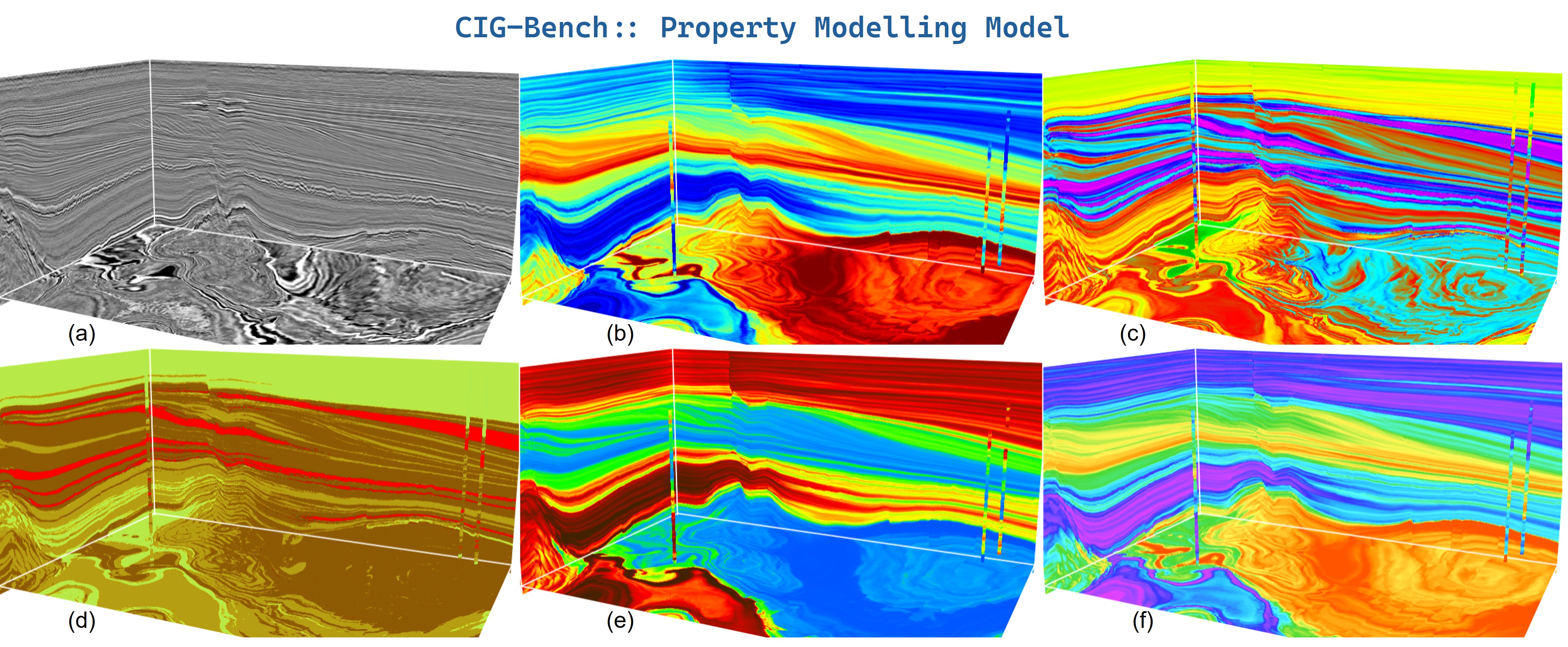
Property modeling on a single survey. (a) input seismic; (b–f) dense property volumes predicted from the seismic conditioned on sparse well logs (the thin vertical strips are the conditioning wells). Different panels correspond to different modeled properties / colormaps.
Datasets
The benchmark datasets are hosted on ModelScope
(douyimin/CIG-Bench-Dataset)
and can be downloaded with a single line of code. Two subsets are currently
available: Structure (structural interpretation) and Geobody (geobody
identification).
from cig_bench.dataset import cig_structureData
from cig_bench.dataset import cig_geobodyData

# Each call downloads the subset into a directory you control and
# returns the local directory path.
#
# Default download directory is ./CIG-Bench-Dataset
structure_dir = cig_structureData()   # -> ./CIG-Bench-Dataset/Structure
geobody_dir   = cig_geobodyData()     # -> ./CIG-Bench-Dataset/Geobody
Force a specific download directory by passing it as the first argument (the subset name is appended automatically):
structure_dir = cig_structureData("/data/seis")            # -> /data/seis/Structure
geobody_dir   = cig_geobodyData(download_dir="./my_data")  # -> ./my_data/Geobody
Data is written as real files under the directory you specify (not into
ModelScope's hidden ~/.cache/modelscope cache), so you always know where it is.
Pretrained weights are likewise pulled automatically from ModelScope
(repo douyimin/CIG-Bench) the first time you build a predictor; subsequent
constructions reuse the local cache.
Using local weights or a custom repo
# 1) Use a local checkpoint (no download)
predictor = FaultPredictor("/path/to/fault.pth", device="cuda")

# 2) Override the default repo / filename / cache directory
predictor = FaultPredictor(
    model_id="your-group/CIG-Benchmark",
    file_path="fault.pth",
    cache_dir="./weights_cache",
    device="cuda",
)
To change the default repository ID, edit MODELSCOPE_DEFAULT_MODEL_ID
(or the per-task entries) in
cig_bench/predictor/_download.py.
Project layout
cig_bench/
├── __init__.py
├── networks/                       # HRNet variants
│   ├── __init__.py
│   ├── hrnet.py
│   ├── hrnet_skipconect.py
│   └── hrnet_skipconect_opt.py
├── dataset/                        # One-line dataset downloads
│   ├── __init__.py
│   └── _download.py                # Auto-download datasets from ModelScope
└── predictor/                      # Inference pipelines
    ├── __init__.py
    ├── _download.py                # Auto-download weights from ModelScope
    ├── channel.py
    ├── fault.py
    ├── karst.py
    ├── property.py
    ├── rgt.py
    └── utils.py
A runnable script per task is provided under demo/ (demo_fault.py, demo_rgt.py,
demo_channel.py, demo_karst.py, demo_property.py, demo_dataset.py).
Requirements
- Python ≥ 3.8
numpy ≥ 1.20,scipy ≥ 1.6torch ≥ 1.10(GPU recommended; the predictors exposerank/chunk_sizeto bound memory)cigvis(for built-invisualize(...)methods)modelscope(for automatic weight & dataset downloads)
Citation
If you use cig_bench in your research, please cite the accompanying survey & benchmark paper:
@article{dou2026cigbench,
  title         = {CIG-Bench: A Comprehensive Survey and Benchmark for AI-Driven Subsurface Imaging Understanding},
  author        = {Yimin Dou, Xinming Wu, Hui Gao, Mingliang Liu, Tao Zhao, Zhi Zhong, Haibin Di, Min Jun Park, Robert G. Clapp, Zhixiang Guo, Long Han, Sergey Fomel},
  journal       = {arXiv preprint arXiv:2606.09094},
  year          = {2026},
  eprint        = {2606.09094},
  archivePrefix = {arXiv},
  doi           = {10.48550/arXiv.2606.09094},
  url           = {https://arxiv.org/abs/2606.09094}
}
License
This project is released under the MIT License.
1 maintainer

Download files
Download the file for your platform. If you're not sure which to choose, learn more about installing packages.
Source Distribution
Built Distribution
Filter files by name, interpreter, ABI, and platform.
If you're not sure about the file name format, learn more about wheel file names.
Copy a direct link to the current filters
File details
Details for the file cig_bench-0.2.0.tar.gz.
File metadata
- Download URL: cig_bench-0.2.0.tar.gz
- Upload date:
- Size: 46.0 kB
- Tags: Source
- Uploaded using Trusted Publishing? No
- Uploaded via:
twine/6.2.0 CPython/3.13.11
File hashes
| Algorithm | Hash digest | |
|---|---|---|
| SHA256 |
746b29b8b136853e2404c92b5b88f0fc40ad7e9e3d85157c6adba8425567d1e4
|
|
| MD5 |
7023f4cf601623c53577d57ed9de8ea6
|
|
| BLAKE2b-256 |
31dbdcc2996e419f0250fec910b65f4e6285613e1fe5cc5babbc4ac7ccf0a0a4
|
File details
Details for the file cig_bench-0.2.0-py3-none-any.whl.
File metadata
- Download URL: cig_bench-0.2.0-py3-none-any.whl
- Upload date:
- Size: 53.9 kB
- Tags: Python 3
- Uploaded using Trusted Publishing? No
- Uploaded via:
twine/6.2.0 CPython/3.13.11
File hashes
| Algorithm | Hash digest | |
|---|---|---|
| SHA256 |
cfb9d3b2ad989a10639fa832686dcac76a98cb6c0055c02af56921d7dcc332fa
|
|
| MD5 |
926f42685068cf8568baee059adb7c77
|
|
| BLAKE2b-256 |
f166cc82596305729532ca2411d0111e73698cfad49528d10e3a5cb897710dc5
|














