
CIMantic Graphs Library













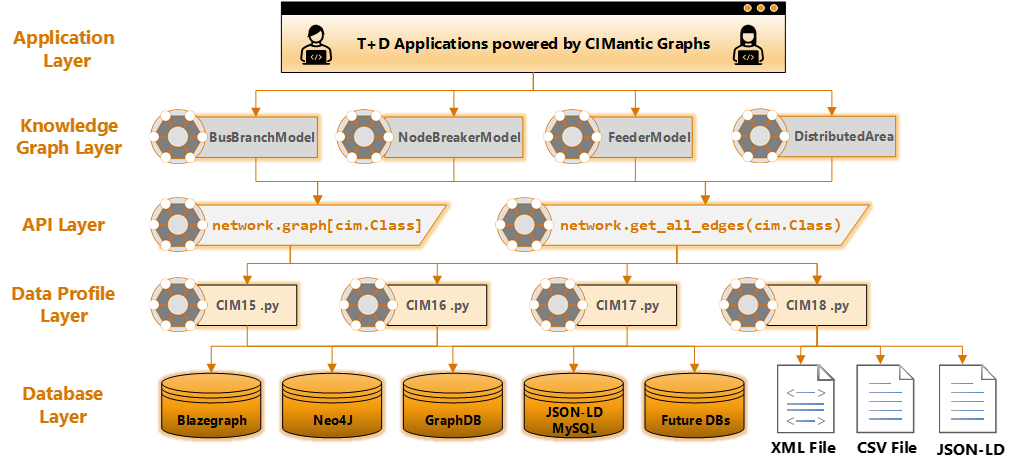
CIMantic Graphs is an open-source library for for creating, parsing, and editing CIM power system models using in-memory knowledge graphs to reduce the burden and learning curve associated with using the Common Information Model.
Key features:
- Single API method to obtain data for any CIM class. No more custom database queries.
- Single API method to obtain data for EMS node-breaker transmission models, bus-branch planning models, and distribution feeder models.
- Singe API method for both centralized and distributed architectures.
- Support for multiple databases and query languages with no changes to upper-level graph data or API calls. Only need to change host/port specified in environment variables.
- Ability to create CIM models "from scratch".
- Open-source data engineering tool for management of CIM models.
- Knowledge graph approach based on semantic understanding of CIM.
- Object-oriented data structure with enforcement of CIM Schema.
- Data profiles generated directly from Enterprise Architect UML.
- Support for custom profiles using CIMTool or Schema Composer.
- Support for direct creation / editing / parsing of CIM XML, JSON-LD.
- API support for centralized/distributed transmission + distribution models.
Requirements
CIM-Graph requires a python version >=3.10 and <4. No testing has been done with other versions.
Support is currently offered for opening XML, JSON-LD, and CSV files
Support is currently offered for GridAPPS-D, Blazegraph, Neo4J, GraphDB, and MySQL databases using the CIMTool SQL schema. More databases will be added in the future.
Installation
pip install cim-graph
The CIM profiles ship in the separate cimprofiles
package, installed automatically. XML and JSON-LD files need nothing else; database connections
need their driver extra:
| Extra | Installs | For |
|---|---|---|
sparql |
SPARQLWrapper | BlazegraphConnection, GraphDBConnection |
neo4j |
neo4j | Neo4jConnection |
mysql |
mysql-connector-python | MySQLConnection |
gridappsd |
gridappsd-python | GridappsdConnection |
rdflib |
rdflib, oxrdflib | RDFlibConnection |
all |
all of the above |
pip install "cim-graph[neo4j]"
Specifying the CIM Profile
The CIM profile is set via the CIMG_CIM_PROFILE environment variable. cim-graph ships with several
built-in profiles (from the cimprofiles package) and supports custom profiles generated by CIMTool or
Enterprise Architect Schema Composer.
Single profile
Point to a module under cimprofiles:
export CIMG_CIM_PROFILE="cimhub_2023"
# or fully-qualified:
export CIMG_CIM_PROFILE="cimprofiles.cim17.cimhub_2023"
The pre-0.6 prefix (cimgraph.data_profile.cimhub_2023) still works, with a DeprecationWarning.
Merged (multi-profile) — new in 0.5
Comma-separated module paths trigger a runtime merge. cim-graph builds a single synthetic profile module that contains the union of all classes and fields across every listed sub-profile. No hand-maintained canonical file is required.
export CIMG_CIM_PROFILE="cimprofiles.cim18.cim18gmdm.connectivity,\
cimprofiles.cim18.cim18gmdm.electrical,\
cimprofiles.cim18.cim18gmdm.asset"
After setting the variable, the rest of your code is unchanged:
from cimgraph.databases import XMLFile
from cimgraph.models import FeederModel
from cimgraph import utils

# Works with a single file or a .cimx multi-part metadata header.
file    = XMLFile(filename='model.xml')
network = FeederModel(container=None, connection=file)

# file.cim and network.cim are guaranteed to be the same object —
# graph key lookup works correctly even across independently-created
# connections and models.
assert file.cim is network.cim
The merge is memoised: calling get_cim_profile() with the same spec string always returns the
identical module object, so class identity is maintained across connections, models, and helper
functions within one process.
Loading split exports via IEC 61970-552 metadata
A .cimx metadata header lists each part file as a dcat:Distribution. Pass it to XMLFile and all
parts are loaded into one graph automatically:
# 9500node.cimx lists connectivity.xml, electrical.xml, asset.xml, …
file    = XMLFile(metadata='profile_parts/9500node.cimx')
network = FeederModel(container=None, connection=file)
utils.write_xml(network=network, filename='round_trip.xml')
See the cimprofiles README for the full list of available profiles and sub-profiles.
Environment Variables
IMPORTANT: As of v0.3+, the ConnectionParameters class has been deprecated. Use the environment variables below.
Required:
| Variable | Description |
|---|---|
CIMG_CIM_PROFILE |
Profile module path, or comma-separated list for a merged profile (see above) |
Optional (defaults are in example.env):
| Variable | Default | Description |
|---|---|---|
CIMG_NAMESPACE |
http://iec.ch/TC57/CIM100# |
RDF namespace prefix for CIM classes |
CIMG_IEC61970_552 |
552-NEW |
Identifier style for writing and querying. 552-NEW: rdf:about="urn:uuid:<uuid>", mRID <uuid>. 552-LEGACY: rdf:ID="_<uuid>", references #_<uuid>, mRID _<uuid>. CGMES: rdf:ID="_<uuid>", references #_<uuid>, mRID <uuid>. A non-UUID mRID is always written as-is |
CIMG_MODEL_AUTHORITY |
https://github.com/PNNL-CIM-Tools/CIM-Graph |
Model authority URI (e.g. a utility's). uuid5(NAMESPACE_URL, authority) is the namespace of every UUID seeded from names or non-UUID mRIDs, and the identifier of the ModelAuthority written in exported file headers |
CIMG_MODEL_NAME |
'' |
Stable model identifier within the authority (e.g. a feeder) mixed into seeded UUIDs |
CIMG_VALIDATION_LOG_LEVEL |
WARNING |
Log level for schema-mismatch warnings during XML parse |
CIMG_URL |
Blazegraph default | Full database URL |
CIMG_HOST |
localhost |
Database host |
CIMG_PORT |
61613 |
Database port |
CIMG_DATABASE |
powergridmodel |
Database name |
CIMG_USERNAME |
none (required) | Database username for Neo4j, MySQL and GridAPPS-D |
CIMG_PASSWORD |
none (required) | Database password for Neo4j, MySQL and GridAPPS-D |
Not all variables are required — each connection driver uses only the subset it needs.
Graph Model Classes
Model Initialization
The CIM-Graph library creates object instances populated with the attributes of mRID for all nodes, terminals, and conducting equipment in the centralized netork or each distributed area. All other attributes are None or [] by default until queried for using .get_all_edges(cim.ClassName).
Transmission Node-Breaker Models
from cimgraph.models import NodeBreakerModel

geo_region_id = "_EE4C60AE-550D-4599-92F4-022DF3118B3C" #Maple 10 bus
geo_region = cim.GeographicalRegion(mRID = geo_region_id)
network = NodeBreakerModel(connection=database, container=geo_region, distributed=True)
Transmission Bus-Branch Models
from cimgraph.models import BusBranchModel

model_mrid = "1783D2A8-1204-4781-A0B4-7A73A2FA6038" #IEEE 118 Bus"
container = cim.ConnectivityNodeContainer(mRID = model_mrid)
network = BusBranchModel(connection=database, container=container, distributed=False)
Distribution Feeder Models
from cimgraph.models import FeederModel

feeder_mrid = "49AD8E07-3BF9-A4E2-CB8F-C3722F837B62"
feeder = cim.Feeder(mRID = feeder_mrid)
network = FeederModel(connection=database, container=feeder, distributed=False)
Centralized vs Distributed Models
If the distributed flag is set to False, then all equipment are contained within a single knowledge graph. If set to True, a DistributedArea graph model is created for each topological area inside the power system model.
network = FeederModel(connection=rdf, container=feeder, distributed=True)
for switch_area in network.distributed_areas:
    switch_area.get_all_edges(cim.ACLineSegement)

    for secondary_area in switch_area.distributed_areas:
         secondary_area.get_all_edges(cim.ACLineSegement)
Usage with GridAPPS-D Context Manager
If an application is built using the GridAPPS-D Context Manager and Field Interface in gridappsd-python, initialization of the FeederModel and DistributedArea graphs is performed automatically.
Internally, the GridAPPS-D Context Manager initializes distributed areas as dist_network = FeederModel(connection=gapps, container=feeder, distributed=True, topology_message=topo_msg).
Core Library Methods
.get_all_edges(cim.ClassName)
The CIM power system model can then be parsed by invoking the .get_all_edges(cim.ClassName) method. The method populates all available attributes of the given class and creates default instances of all associated class object instances that are one association away in the CIM UML. Associated default instances are only populated with mRID attribute. The .get_all_edges method must be invoked in sequential order following the inheritance hierarchy in the CIM UML, starting with the particular equiment class (e.g. ACLineSegment) and then each child class inheriting from the previous class.
.graph[cim.ClassName]
The Python object instances can be accessed using the graph dictionary of each distributed area class instance. The typed catalog is organized by the class type and then mRID of each object. The attributes of each class can be accessed directly or through any associated class. These two calls are equivalent:
bus_name = network.graph[cim.ConnectivityNode][node_mrid].name
bus_name = network.graph[cim.ACLineSegment][line_mrid].Terminals[0].ConnectivityNode.name
Note that all classes and attributes are case sensitive and follow the CIM UML conventions for each class.
pprint
Printing of individual CIM objects using default print() is now supported. Individual objects can be pretty-printed using the
line = cim.ACLineSegment(name = 'new_line', r=0.002, x=0.050, b=0.003)
line.pprint()
All instances of all given CIM class within the network graph can be printed .pprint(cim.ClassName) method:
network.pprint(cim.ACLineSegment)
Additional examples of usage are available on ReadTheDocs.
Developer Install
We use UV as the package manager and build tool. UV is an extremely fast Python package installer and resolver written in Rust.
Install UV
Linux, macOS, and WSL2:
curl -LsSf https://astral.sh/uv/install.sh | sh
Windows PowerShell:
powershell -ExecutionPolicy ByPass -c "irm https://astral.sh/uv/install.ps1 | iex"
Alternative (using pip):
pip install uv
Install from Source
Clone the repository and install with UV:
git clone https://github.com/PNNL-CIM-Tools/CIM-Profiles.git
git clone https://github.com/PNNL-CIM-Tools/CIM-Graph.git
cd CIM-Graph
uv sync --all-extras
This creates a virtual environment in .venv/ with every database driver and the development
tools (pytest, pre-commit). Until the 1.0 release, CIM-Graph is built against the CIM-Profiles
checkout next to it.
Run the tests that need no database with uv run pytest -m "not integration". Tests marked
integration are skipped when their database is not running. To run them against Blazegraph,
GraphDB and Neo4j:
docker compose up -d --wait
uv run python tests/seed_databases.py   # loads tests/test_models/ieee13.xml into each
uv run pytest -m integration
docker compose down
The GridAPPS-D tests need the GridAPPS-D platform instead, and the MySQL tests a
tier5_ieee13 database.
Activate the virtual environment:
# Linux/macOS/WSL2
source .venv/bin/activate

# Windows PowerShell
.venv\Scripts\Activate.ps1
Build Package
To build distribution packages:
uv build
This creates wheel and source distributions in the dist/ directory.
Attribution and Disclaimer
This software was created under a project sponsored by the U.S. Department of Energy’s Office of Electricity, an agency of the United States Government. Neither the United States Government nor the United States Department of Energy, nor Battelle, nor any of their employees, nor any jurisdiction or organization that has cooperated in the development of these materials, makes any warranty, express or implied, or assumes any legal liability or responsibility for the accuracy, completeness, or usefulness or any information, apparatus, product, software, or process disclosed, or represents that its use would not infringe privately owned rights.
Reference herein to any specific commercial product, process, or service by trade name, trademark, manufacturer, or otherwise does not necessarily constitute or imply its endorsement, recommendation, or favoring by the United States Government or any agency thereof, or Battelle Memorial Institute. The views and opinions of authors expressed herein do not necessarily state or reflect those of the United States Government or any agency thereof.
PACIFIC NORTHWEST NATIONAL LABORATORY operated by BATTELLE for the UNITED STATES DEPARTMENT OF ENERGY under Contract DE-AC05-76RL01830


Release files for cim-graph 0.6.0
For a detailed explanation of source distributions (sdists) and built distributions (wheels), please see the package formats documentation.
Source distribution (sdist)
| File | Size | Uploaded | Provenance | Actions |
|---|---|---|---|---|
| cim_graph-0.6.0.tar.gz | 76.3 kB | Without provenance | Details for cim_graph-0.6.0.tar.gz |
Built distribution (wheel)
| File | Interpreter | ABI | Platform | Actions Reset |
|---|---|---|---|---|
| cim_graph-0.6.0-py3-none-any.whl | Python 3 | none | any | Details for cim_graph-0.6.0-py3-none-any.whl |
Total release size: 189.5 kB
Release files / cim_graph-0.6.0.tar.gz
| Download URL | cim_graph-0.6.0.tar.gz |
|---|---|
| Size | 76.3 kB |
| Tags | Source |
|
SHA-256 checksum How to use checksums |
69b9d5e36e4f949f7ae2f8159812234ef02cdc61a451b4889f44ffec50491981
|
|
BLAKE2b-256 checksum How to use checksums |
5f9cd20395eeeb1d1fd42ae42a7a531ba71fa97620be8fd4feb9d1d4262a5ede
|
| Upload date | |
|
Uploaded using Trusted Publishing? What is trusted publishing? |
Yes |
| Uploaded via |
uv/0.13.7 {"installer":{"name":"uv","version":"0.13.7","subcommand":["publish"]},"python":null,"implementation":{"name":null,"version":null},"distro":{"name":"Ubuntu","version":"26.04","id":"resolute","libc":null},"system":{"name":null,"release":null},"cpu":null,"openssl_version":null,"setuptools_version":null,"rustc_version":null,"ci":true}
|
Release files / cim_graph-0.6.0-py3-none-any.whl
| Download URL | cim_graph-0.6.0-py3-none-any.whl |
|---|---|
| Size | 113.2 kB |
| Tags | Python 3 |
|
SHA-256 checksum How to use checksums |
69ee9dfa0fe098da31fe9434148980d4df1ac83242c698133c3f3a924d5b78ba
|
|
BLAKE2b-256 checksum How to use checksums |
b3f7db7da18a4524ae90f9d0c1de1433cf5b42a2fef47a22c570be9accacdebd
|
| Upload date | |
|
Uploaded using Trusted Publishing? What is trusted publishing? |
Yes |
| Uploaded via |
uv/0.13.7 {"installer":{"name":"uv","version":"0.13.7","subcommand":["publish"]},"python":null,"implementation":{"name":null,"version":null},"distro":{"name":"Ubuntu","version":"26.04","id":"resolute","libc":null},"system":{"name":null,"release":null},"cpu":null,"openssl_version":null,"setuptools_version":null,"rustc_version":null,"ci":true}
|
Security for cim-graph 0.6.0
Provenance
Provenance describes where a file came from. On PyPI, provenance is shared via attestations, which provide a verifiable record of the build or publishing details. View details, limitations and caveats.
No provenance found
None of the files in this release were uploaded with provenance metadata.
A note on package security
PyPI is a repository for distributing packages, not a service for auditing them. While third-party security researchers and our staff do their best to detect and remove malicious packages, PyPI cannot guarantee the quality, security or suitability of any given package.
To learn more about protecting yourself from malicious actors, visit our package security documentation.














