

cimd is about collecting and sharing structured metadata of CI/CD processes.
cimd is an acronym for Continuous Integration Meta Data.
🤓 Motivation ··· 🚀 Features ··· ⚙️ Installation
🐍 Development ··· 📄 Specification ··· ℹ️ Similar Project
Badges























Motivation
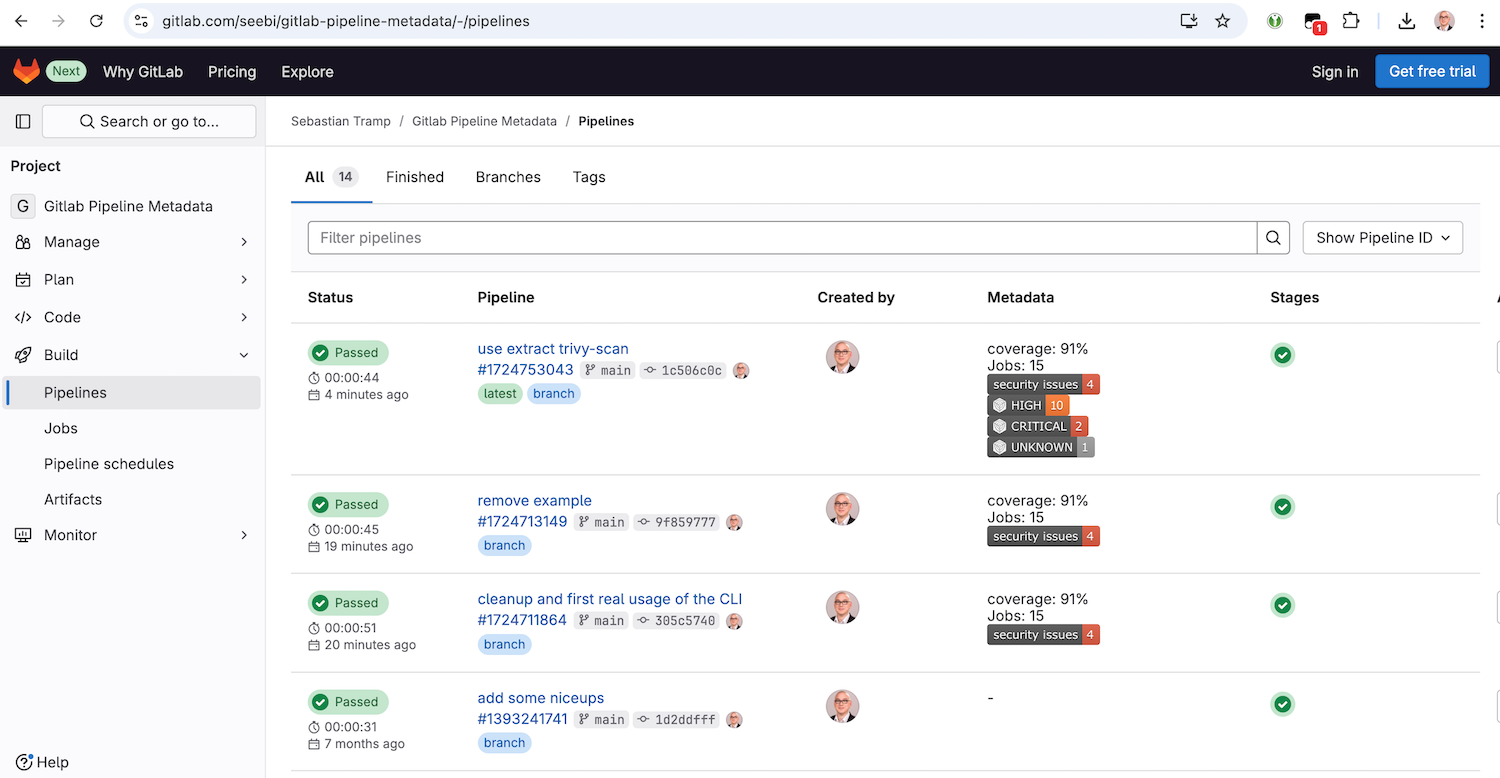
To enable a fast overview of recent pipelines and their metadata in a GitLab-managed repository, this project provides the backend and frontend capabilities to extend the GitLab pipeline list with a custom metadata column.
GitLab already has some metadata mechanisms (e.g. coverage patterns), but they are limited to a specific scope.
The basic idea of this project is to prepare and provide extensible metadata artefacts on a well-known position, which can be easily fetched and parsed by a custom user script to extend the pipeline list with metadata item representations.
Features
cimd contains of a command line tool (CLI) and a frontend user script.
Frontend
The frontend is available as a single JavaScript file in the js folder.
It is currently tested with Tampermonkey on Google Chrome only 🙈.
Once activated, it will extend the pipeline view of your 
Command Line Tool
The CLI is used to prepare and manipulate metadata items in a __metadata__.json document.
It has the following features:
- commands for basic CRUD operations:
add- add a metadata itemdelete- delete metadata itemsget- get data of a metadata itemlist- list metadata items
extractcommand group, which collects commands to extract metadata items from different sources:coverage-xml- extract metadata from a Coverage XML output filesjunit-xml- extract metadata from JUnit XML output filespipeline-logs- extract metadata from gitlab pipeline job logstrivy-scan- extract metadata from Trivy scan JSON output files
extendcommand group, which collects commands to extend metadata items in a special way:gitlab-link- extend metadata items with a raw gitlab artifact linkshields-badge- extend metadata items with a shields.io badge
Installation
Frontend
To install the frontend userscript with a user script manager such as Tampermonkey, you have the following options:
- Recommended: Go to the greasyfork.org entry of cimd and click the install button.
- Create a new script entry and copy/paste the content of the script from the js folder.
After installation, feel free to go to the example pipeline list at gitlab.com/seebi/gitlab-pipeline-metadata.
Command Line Tool
To install and use the cimd command line interface, you have all the options the python ecosystem provides:
-
Recommended ... via pipx
pipx install cimd
-
The cool way ... via uv
uvx cimd -
There is also a docker image ...
docker run -i -t --rm -v $(pwd):/data seebi/cimd
Development
- Run task to see all major development tasks.
- Use pre-commit to avoid errors before commit.
- This repository was created with this copier template.
Specification
This section describes the details about the JSON data artifact (__metadata__.json) which holds your pipeline metadata.
Location
In your pipeline description, create a job which provides a JSON artifact adhering to the schema at the path __metadata__.json.
An example .gitlab-ci.yml, which creates some basic metadata items, is available at gitlab.com/seebi/gitlab-pipeline-metadata.
Content
The content of the __metadata__.json is a simple structure to describe separate metadata items.
{
    "items": {
        "coverage": {
            "value": "87%"
        }
    }
}
In addition to that, the following optional keys can be used for a metadata item: label, description, image, link and comment.
{
    "items": {
        "coverage": {
            "value": "87",
            "comment": "'value' is the only mandatory key of a metadata item."
        },
        "jobs": {
            "value": "15",
            "label": "Jobs",
            "description": "Number of overall jobs executed in the pipeline.",
            "comment": "'label' and 'description' can be used to enhance the UI."
        },
        "security_issues": {
            "value": "4",
            "image": "https://img.shields.io/badge/security%20issues-4-red",
            "link": "https://example.org/security_issues",
            "comment": "We all love badges - and clickable badges are even better."
        }
    }
}
Hereinafter you will find some comments on the optional field:
label- A human readable label for a metadata item. If present, it should be used by the frontend instead of the item identifier.description- A description of the metadata item. If present, can be used as on-hover text in the frontend for an item.image- An optional link to an image representation of the item (e.g. a shields.io image). If present, it should be used instead of the ID/Label/Value representation of the item. Images should be rendered with max-height/width.link- If present, the metadata item representation is click-able.comment- will be ignored by the frontend, for debugging only.
Schema
The proposed JSON structure is formalized as a JSON Schema which is available at schema/schema.json or can be visualized in the json-schema-viewer@vercel.app.
Similar Projects
💬 Drop me a note if you miss a project here ...
- github-action-benchmark - is a GitHub Action for continuous benchmarking to keep performance
1 maintainer

Metadata
1 maintainer
Release files for cimd 0.11.1
For a detailed explanation of source distributions (sdists) and built distributions (wheels), please see the package formats documentation.
Source distribution (sdist)
| File | Size | Uploaded | |
|---|---|---|---|
| cimd-0.11.1.tar.gz | 21.9 kB | Details |
Built distribution (wheel)
| File | Interpreter | ABI | Platform | Reset |
|---|---|---|---|---|
| cimd-0.11.1-py3-none-any.whl | Python 3 | none | any | Details |
Total release size: 45.6 kB
Release files / cimd-0.11.1.tar.gz
| Download URL | cimd-0.11.1.tar.gz |
|---|---|
| Size | 21.9 kB |
| Tags | Source |
|
SHA-256 checksum How to use checksums |
122024082b0875eafaa6e4d478193400c29c7c1183d80dfbf7c94a1ccdec7797
|
|
BLAKE2b-256 checksum How to use checksums |
2a50ace21e8dfeacf56f41069a4e39cc944d3e6ffb118db6aca395b1c09df573
|
| Upload date | |
|
Uploaded using Trusted Publishing? What is trusted publishing? |
No |
| Uploaded via |
poetry/2.1.1 CPython/3.11.11 Linux/6.8.0-1021-azure
|
Release files / cimd-0.11.1-py3-none-any.whl
| Download URL | cimd-0.11.1-py3-none-any.whl |
|---|---|
| Size | 23.7 kB |
| Tags | Python 3 |
|
SHA-256 checksum How to use checksums |
09340882fe9cac6f1cc875e914a45a517a7921c096881bde94579645b292af4e
|
|
BLAKE2b-256 checksum How to use checksums |
9c18d7d886266a7566bda32ac145531cb4c4638723d2956ae2e281b658cc782f
|
| Upload date | |
|
Uploaded using Trusted Publishing? What is trusted publishing? |
No |
| Uploaded via |
poetry/2.1.1 CPython/3.11.11 Linux/6.8.0-1021-azure
|














