
Introduction



An embedded library for Python to control LEDs. It uses a non-blocking approach and can control LEDs in simple (on/off) and complex (blinking, breathing and more) ways in a time-driven manner.
This is a pure Python port of my JLed C++ library.
Features
non-blocking
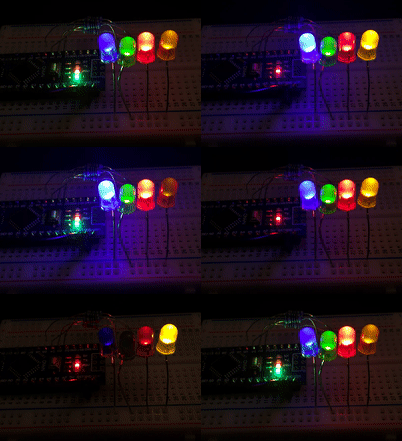
effects: simple on/off, breathe, blink, candle, fade, user-defined
supports inverted polarity of LED
easy configuration using fluent interface
can control groups of LEDs sequentially or in parallel
supports CircuitPython and MicroPython
Usage Example
Test JLed interactively in a CircuitPython REPL:
Adafruit CircuitPython 7.3.3 on 2022-08-29; Raspberry Pi Pico with rp2040
>>> import board
>>> from jled import JLed
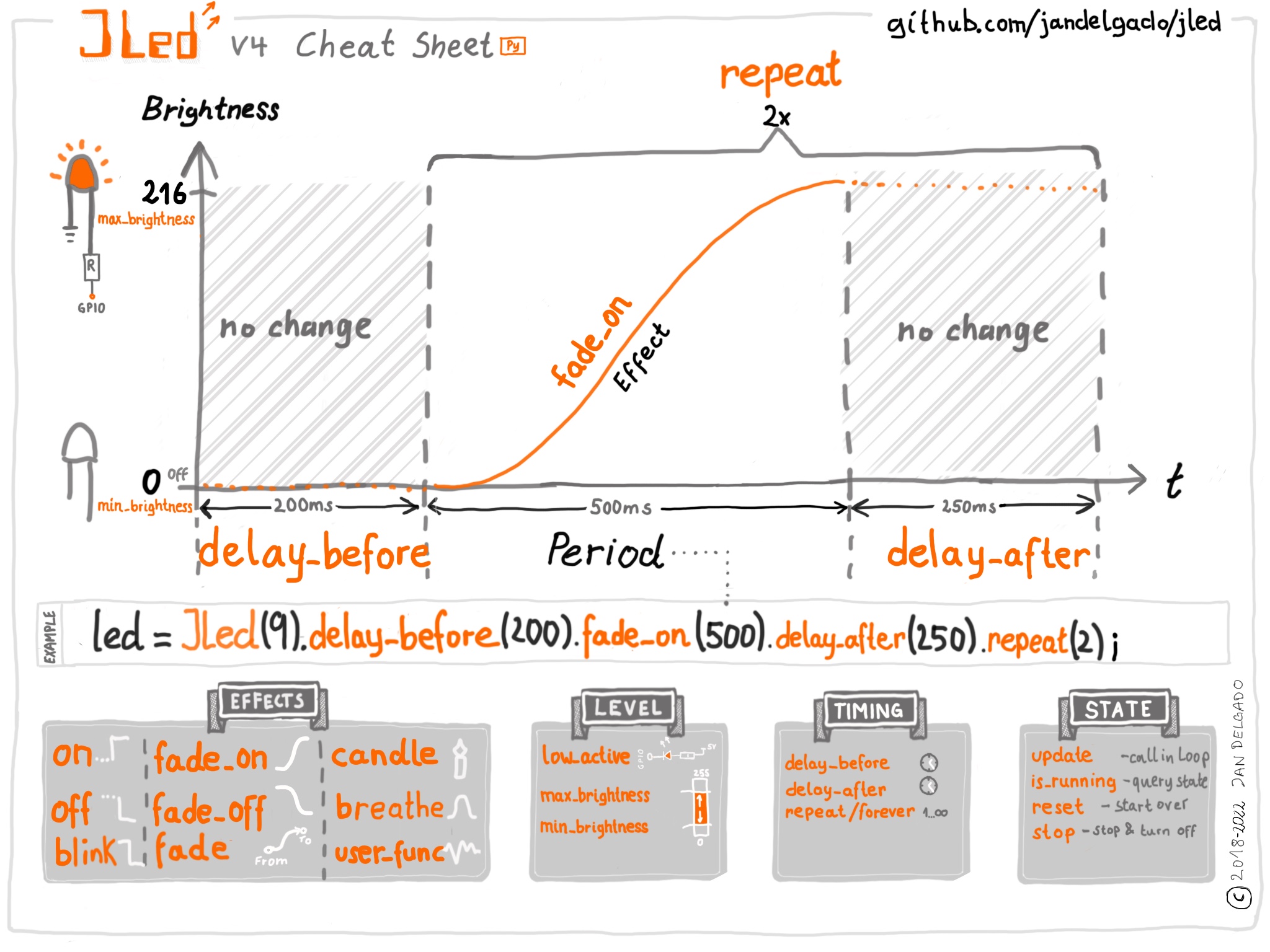
>>> led=JLed(board.LED).breathe(500).delay_after(250).repeat(5)
>>> while led.update(): pass
This creates a JLed object connected to the builtin LED (board.LED), with a breathe effect that is repeated 5 times. Each iteration is followed by a delay of 250 ms, before starting again. By calling led.update() periodically, the LED gets physically updated. Alternatively play(led) can be call in the REPL as a shortcut. Once finished, call led.reset() before playing the effect again.
Cheat Sheet
Installation
On supported GNU/Linux systems like the Raspberry Pi (with Adafruit-Blinka), you can install the lib locally from PyPI. To install for current user:
pip3 install circuitpython-jledTo install system-wide (this may be required in some cases):
sudo pip3 install circuitpython-jledTo install in a virtual environment in your current project:
mkdir project-name && cd project-name
python3 -m venv .venv
source .env/bin/activate
pip3 install circuitpython-jled
Installing to a Connected CircuitPython Device with Circup
JLed is available in the Circuitpython Community Bundle and can easily installed with circup by running:
$ circup install jled
Optionally copy also one of the example as code.py to the root of the filesystem.
Installing on a MicroPython device
Create a directory called jled on the device and copy the following files into this directory: jled.py, jled_sequence.py hal_pwm_micropython.py, hal_time_micropython.py, play.py, __init__.py`. Optionally also copy one of the example as main.py to the root of the filesystem. The overall structure is:
/
├─ main.py
└─ jled
    ├─ __init__.[m]py
    ├─ hal_pwm_micropython.[m]py
    ├─ hal_time_micropython.[m]py
    ├─ jled.[m]py
    ├─ jled_sequence.[m]py
    └─ play.[m]py
To reduce memory consumption, Python source files can be compiled to binary mpy format using the mpy-cross tool. For convenience, a script to compile and copy jled to a connected device is provided here (see scripts/install_mp.sh).
Documentation
API documentation for this library can be found on here.
Rebuild the documentation with sphinx-build -E -W -b html . _build/html in the docs directory. Run pip install ".[optional]" before to install build-time dependency Sphinx
Tests
Unit tests (using https://docs.pytest.org) are provided, run the tests with:
$ pip install ".[optional]"
$ pytest
To run the pre-commit-hook locally, run pre-commit run --all-files
Tip
Instead of installing the various tools like circup, mp-remote, mpy-cross etc. you can easily run the tools using uv:
uv tool run circup list, uv tool run circup update --all
uv tool run mpremote to start a REPL on the micro controller
uv tool run --with pytest-cov pytest to run the unit tests
uv tool run --from sphinx sphinx-build -E -W -b html . build/html to build the documentation using sphinx (run inside docs/)
1 maintainer

Release files for circuitpython-jled 1.0.5
For a detailed explanation of source distributions (sdists) and built distributions (wheels), please see the package formats documentation.
Source distribution (sdist)
| File | Size | Uploaded | |
|---|---|---|---|
| circuitpython_jled-1.0.5.tar.gz | 1.0 MB | Details |
Built distribution (wheel)
| File | Interpreter | ABI | Platform | Reset |
|---|---|---|---|---|
| circuitpython_jled-1.0.5-py3-none-any.whl | Python 3 | none | any | Details |
Total release size: 1.0 MB
Release files / circuitpython_jled-1.0.5.tar.gz
| Download URL | circuitpython_jled-1.0.5.tar.gz |
|---|---|
| Size | 1.0 MB |
| Tags | Source |
|
SHA-256 checksum How to use checksums |
77135974ef1468a0eac031edb3bed4c33424c45a303a6d985a1d446fd1881cb6
|
|
BLAKE2b-256 checksum How to use checksums |
ba44c12692939c2952e65618afec0a619caf3d3e8063df29cf48e949e236f61f
|
| Upload date | |
|
Uploaded using Trusted Publishing? What is trusted publishing? |
No |
| Uploaded via |
twine/6.1.0 CPython/3.13.5
|
Release files / circuitpython_jled-1.0.5-py3-none-any.whl
| Download URL | circuitpython_jled-1.0.5-py3-none-any.whl |
|---|---|
| Size | 16.6 kB |
| Tags | Python 3 |
|
SHA-256 checksum How to use checksums |
a1d23ab435f7b1ff92da257489c0f20763c9becb7d38c39d5579dd6433d0d7fa
|
|
BLAKE2b-256 checksum How to use checksums |
0314f75cdaed3eb2e3d0a847a923250b30246c8b685503f23813153e0eef3468
|
| Upload date | |
|
Uploaded using Trusted Publishing? What is trusted publishing? |
No |
| Uploaded via |
twine/6.1.0 CPython/3.13.5
|














