
CISAP
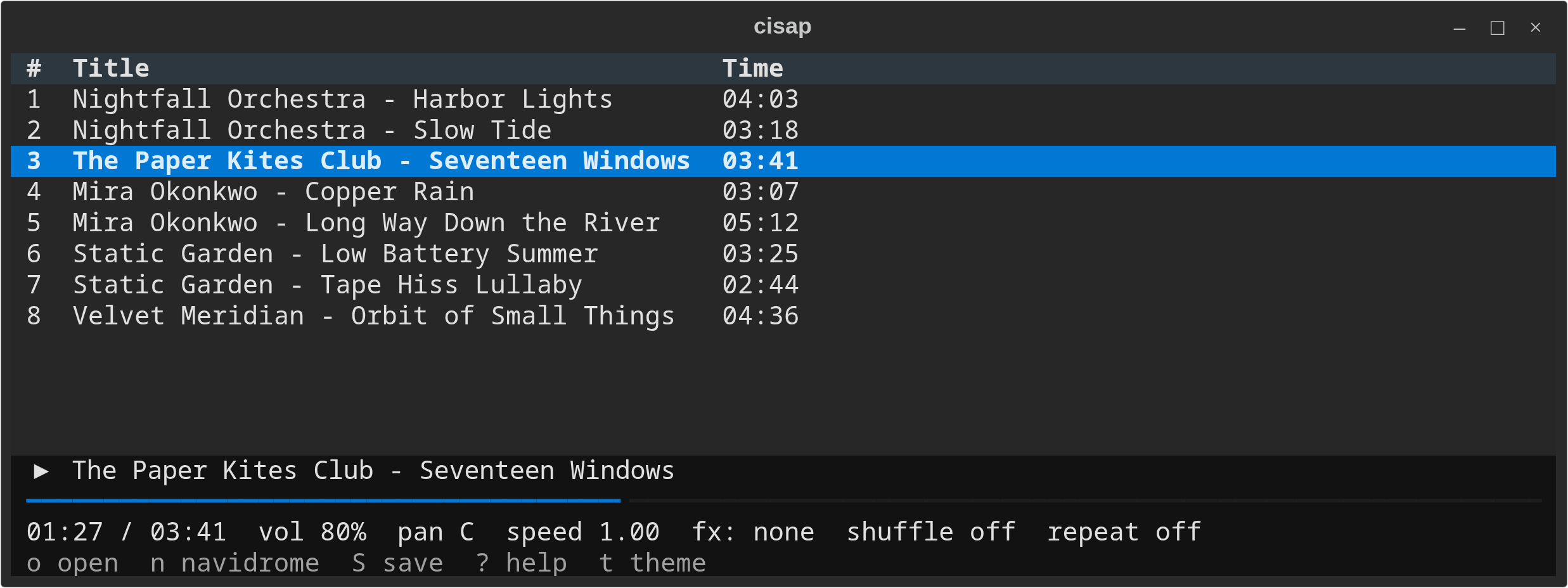
CISAP Is Simple Audio Player: a terminal audio player for local files, playlists, network streams and Navidrome servers. Started in 2012 as a C program, now Python with Textual and libmpv.
Requirements
- Linux, OpenBSD or FreeBSD (see Notes)
- Python 3.11+
- mpv / libmpv from your OS (CISAP decodes audio with it)
Installation
Quick install (recommended)
Install mpv and pipx for your OS, then CISAP:
$ pacman -S mpv python-pipx           # Arch
$ apt install libmpv2 pipx            # Debian 12+, Ubuntu 24.04+
$ pkg_add mpv py3-pipx                # OpenBSD
$ pkg install mpv py311-pipx          # FreeBSD
$ pipx install cisap
Or with pip:
$ pip install cisap
Then run:
$ cisap
From source
$ git clone https://github.com/kasramp/CISAP
$ cd CISAP
$ python -m venv .venv && source .venv/bin/activate
$ pip install .
$ cisap
First run
cisap abc.mp3 starts playing at once. cisap alone restores the queue saved at the last quit (~/.local/state/cisap/queue.m3u) with the cursor on the last-played song and waits for Space; the first time it starts empty: press o to browse local files or n for Navidrome. The theme and your Navidrome servers are saved in ~/.config/cisap/config.toml (mode 600).
Usage
cisap [--shuffle] [--loop N] [PATH|DIR|FILE.m3u|URL ...]
cisap --help | --version | --man | --install-man
All arguments go into one queue, in order, and the first starts playing. A directory adds its audio files recursively, an .m3u adds its entries and an http(s):// URL is streamed. --shuffle shuffles the items given (not a restored queue), --loop N plays the queue N times (-1 forever).
| Key | Action |
|---|---|
> l / < h |
Next / previous track |
+ / - |
Volume up / down |
m |
Mute |
[ / ] |
Pan left / right |
p |
Centre pan |
{ / } |
Slower / faster, tape style |
f |
Reset speed |
← / → |
Seek -/+10 s |
↓ / ↑ |
Seek -/+1 min |
Shift+↓ / Shift+↑ |
Seek -/+10 min (PgDn / PgUp in v0.2) |
Space |
Pause / continue; when stopped, play the selected entry |
q, Ctrl+C |
Quit |
1-7 |
Toggle effects |
o |
Local file browser |
n |
Navidrome browser |
s / r |
Shuffle / repeat (off, all, one) |
S |
Save the queue as .m3u |
C |
Clear the queue |
Del |
Remove the selected entry |
J / K |
Move the selected entry down / up |
j / k, Enter |
Move in the queue / play the selected entry |
g / G, PgUp / PgDn |
Queue top / bottom, page up / down |
/ |
Search the queue: Enter next match, Esc closes |
. |
Jump to the playing entry (the cursor follows playback while it is on it) |
t |
Theme picker |
? |
Help screen |
Esc |
Close the open browser or dialog; never quits |
Local files
Press o for the file browser.
| Key (in the browser) | Action |
|---|---|
Enter |
Open a folder / add a file (an .m3u adds its entries) |
Space |
Mark / unmark |
a |
Add the marked entries, or the highlighted file or folder (recursively) |
A |
Add every folder (recursively) and audio file in the current folder; playlists are skipped |
Backspace |
Go up |
Esc |
Close the browser |
Navidrome
Press n, add a server (name, URL, user, password; it is tested before it is saved) and open it. A URL without a scheme tries https:// first, then http://.
| Key (in the browser) | Action |
|---|---|
Enter, Backspace |
Open / go up (Enter on a song plays it; on an album's ▶ Play album row plays the album) |
a |
Add the song, album or artist to the queue |
d |
Download the song, album or artist (asks first when more than one album is involved) |
A / D |
Add / download every artist (D asks first) |
/ |
Search |
Songs stream from the server. Downloads go to ~/Music/Navidrome/<server>/<song path from the server>; files already there are skipped.
Saved playlists (S, default folder ~/Music/Playlists/) are extended m3u files. A downloaded song is saved as its local path, any other Navidrome song as navidrome://<server name>/<song id>, so no address or password is ever written to a playlist. Other players will not understand those lines.
Man pages
$ cisap --man              # read cisap(1) without installing it
$ cisap --install-man      # install cisap(1) and cisap.conf(5) system-wide
History
- v0.1 (2012-2014): C on FMOD Ex 4.40. Branches
masterandv0.1. - v0.2 (2016-2018): C++ on FMOD 1.07 and ncurses, lyrics, man page, shuffle. Branch
v0.2(testing-c++). Screenshot of v0.2. - v0.3 (2026): Python, Textual and libmpv, so it runs on Linux, OpenBSD and FreeBSD. Navidrome added, effects 1-7 restored, lyrics removed. The old keys keep their meaning, except the 10 min seek.
The old --playlist FILE and --stream URL options are still accepted.
Notes
- Linux is what CISAP is developed and tested on. OpenBSD and FreeBSD support comes from documentation (the packages above and the BSD
mantools); it has not been tested on real BSD machines yet. - Lyrics (
w) were removed in v0.3. - The 10 min seek keys moved to
Shift+↓/Shift+↑becausePgUp/PgDnnow page the queue.
Contact
License
CISAP is free software; you can redistribute it and/or modify it under the terms of the GNU General Public License as published by the Free Software Foundation, either version 3 of the License, or (at your option) any later version.
CISAP is distributed in the hope that it will be useful, but WITHOUT ANY WARRANTY; without even the implied warranty of MERCHANTABILITY or FITNESS FOR A PARTICULAR PURPOSE. See the GNU General Public License for more details. http://www.gnu.org/licenses/
Author(s):
© 2012-2026 Kasra Madadipouya kasra@madadipouya.com
1 maintainer

Metadata
1 maintainer
Release files for cisap 0.3.0
For a detailed explanation of source distributions (sdists) and built distributions (wheels), please see the package formats documentation.
Source distribution (sdist)
| File | Size | Uploaded | Provenance | Actions |
|---|---|---|---|---|
| cisap-0.3.0.tar.gz | 72.4 kB | Without provenance | Details for cisap-0.3.0.tar.gz |
Built distribution (wheel)
| File | Interpreter | ABI | Platform | Actions Reset |
|---|---|---|---|---|
| cisap-0.3.0-py3-none-any.whl | Python 3 | none | any | Details for cisap-0.3.0-py3-none-any.whl |
Total release size: 124.2 kB
Release files / cisap-0.3.0.tar.gz
| Download URL | cisap-0.3.0.tar.gz |
|---|---|
| Size | 72.4 kB |
| Tags | Source |
|
SHA-256 checksum How to use checksums |
8e67c3de70851a44ebe6f4e95b5fb6a72d63fab19f2e6f1050c7d7b13bc2959e
|
|
BLAKE2b-256 checksum How to use checksums |
0f7859ea23dc1ad779acb05424a6c9149654a9d7e6c5d5301a1b63ea932a6b6d
|
| Upload date | |
|
Uploaded using Trusted Publishing? What is trusted publishing? |
No |
| Uploaded via |
twine/7.0.0 CPython/3.14.9
|
Release files / cisap-0.3.0-py3-none-any.whl
| Download URL | cisap-0.3.0-py3-none-any.whl |
|---|---|
| Size | 51.7 kB |
| Tags | Python 3 |
|
SHA-256 checksum How to use checksums |
62af11ec69fca2724ef077597c1dd7c573b7097d948d5e42fe60eec3c76bb9f9
|
|
BLAKE2b-256 checksum How to use checksums |
ffde5068fe983f62f4b37ec4b2eafdc66e2499578e90be123ba9c2f2da6a39cb
|
| Upload date | |
|
Uploaded using Trusted Publishing? What is trusted publishing? |
No |
| Uploaded via |
twine/7.0.0 CPython/3.14.9
|
Security for cisap 0.3.0
Provenance
Provenance describes where a file came from. On PyPI, provenance is shared via attestations, which provide a verifiable record of the build or publishing details. View details, limitations and caveats.
No provenance found
None of the files in this release were uploaded with provenance metadata.
A note on package security
PyPI is a repository for distributing packages, not a service for auditing them. While third-party security researchers and our staff do their best to detect and remove malicious packages, PyPI cannot guarantee the quality, security or suitability of any given package.
To learn more about protecting yourself from malicious actors, visit our package security documentation.














