
cisco-pt-mcp
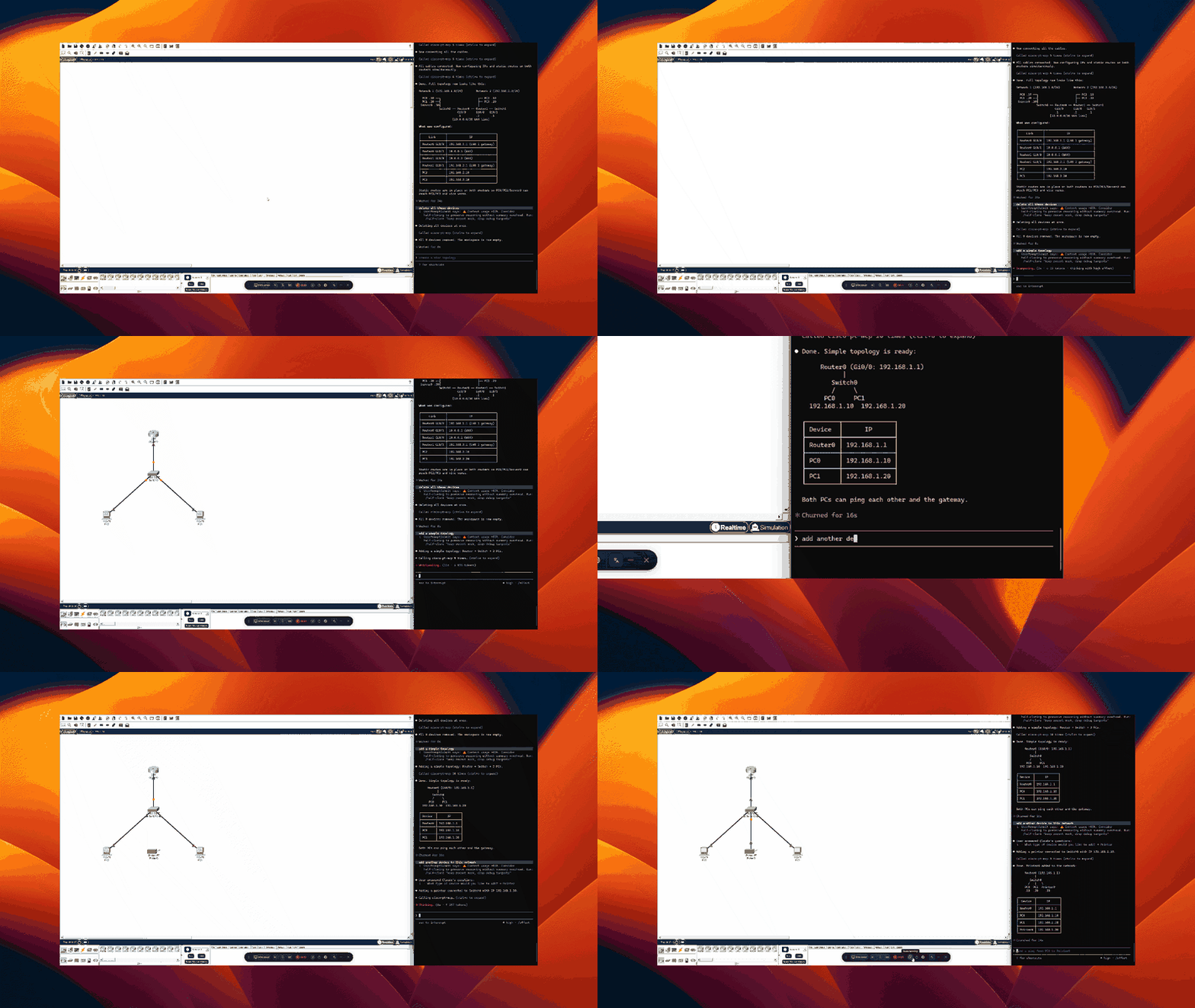
Let AI clients control a running Cisco Packet Tracer instance. Open source.
Install
Two components. Five minutes.
1. MCP Server
Install uv if you don't have it, then register with your client:
Claude Code
claude mcp add cisco-pt-mcp --scope user -- uvx cisco-pt-mcp
Cursor (~/.cursor/mcp.json or .cursor/mcp.json per project)
{
  "mcpServers": {
    "cisco-pt-mcp": { "command": "uvx", "args": ["cisco-pt-mcp"] }
  }
}
VS Code (.vscode/mcp.json)
{
  "servers": {
    "cisco-pt-mcp": {
      "type": "stdio",
      "command": "uvx",
      "args": ["cisco-pt-mcp"]
    }
  }
}
Codex CLI (~/.codex/config.toml)
[mcp_servers.cisco-pt-mcp]
command = "uvx"
args = ["cisco-pt-mcp"]
2. Packet Tracer Extension
- Open Packet Tracer.
- Go to Extensions → Scripting → Configure PT Script Modules…
- Click Add and select
cisco-pt-mcp.pts. - Restart Packet Tracer.
3. Run
Click Extensions → Packet Tracer MCP to open the bridge window, then start your MCP client. The status pill flips to connected within a second. Start prompting.
Tools
| Tool | Description |
|---|---|
addDevice |
Drop a router, switch, or PC onto the canvas |
addModule |
Install an interface module into a device slot |
addLink |
Connect two devices with a cable |
removeDevice |
Delete one or more devices |
removeLink |
Delete one or more cables |
renameDevice |
Rename an existing device |
moveDevice |
Reposition a device on the canvas |
setPower |
Power a device on or off |
configurePcIp |
Set IP, subnet, gateway, DNS, or enable DHCP on a PC |
configureIosDevice |
Run IOS CLI commands on a router or switch |
getNetwork |
Snapshot of all devices, interfaces, and cables |
getDeviceInfo |
Detailed view of a single device |
setSimulationMode |
Switch between simulation and realtime mode |
getSimulationStatus |
Query simulation state and frame count |
stepSimulation |
Step the simulation forward, backward, or reset |
sendPdu |
Add an ICMP ping PDU between two devices |
getPduResults |
Read PDU outcomes after stepping the simulation |
getCommandLog |
Read the IOS command history logged by Packet Tracer |
License
MIT
1 maintainer

Metadata
1 maintainer
Release files for cisco-pt-mcp 0.1.6
For a detailed explanation of source distributions (sdists) and built distributions (wheels), please see the package formats documentation.
Source distribution (sdist)
| File | Size | Uploaded | Provenance | Actions |
|---|---|---|---|---|
| cisco_pt_mcp-0.1.6.tar.gz | 11.6 kB | With provenance | Details for cisco_pt_mcp-0.1.6.tar.gz |
Built distribution (wheel)
| File | Interpreter | ABI | Platform | Actions Reset |
|---|---|---|---|---|
| cisco_pt_mcp-0.1.6-py3-none-any.whl | Python 3 | none | any | Details for cisco_pt_mcp-0.1.6-py3-none-any.whl |
Total release size: 23.3 kB
Release files / cisco_pt_mcp-0.1.6.tar.gz
| Download URL | cisco_pt_mcp-0.1.6.tar.gz |
|---|---|
| Size | 11.6 kB |
| Tags | Source |
|
SHA-256 checksum How to use checksums |
e51c9c817a8cec05cc2e9ab82d40794f48f19f4c71c4779fb5c4625f912e32c0
|
|
BLAKE2b-256 checksum How to use checksums |
de6bdca740e803e4e2fb28f487f999ded084e6c841553355016df9d8bc6b4e40
|
| Upload date | |
|
Uploaded using Trusted Publishing? What is trusted publishing? |
Yes |
| Uploaded via |
twine/7.0.0 CPython/3.13.14
|
Provenance
Provenance describes where a file came from. On PyPI, provenance is shared via attestations, which provide a verifiable record of the build or publishing details. View details, limitations and caveats.


PyPI Publish Attestation
PyPI verified that this artifact, at this checksum, originated from the publisher listed below.
Signed by GitHub Actions, verified by PyPI on Aug 12, 2026.
Transparency logRelease files / cisco_pt_mcp-0.1.6-py3-none-any.whl
| Download URL | cisco_pt_mcp-0.1.6-py3-none-any.whl |
|---|---|
| Size | 11.7 kB |
| Tags | Python 3 |
|
SHA-256 checksum How to use checksums |
18e73828f0819241287974a0a67ef00f483166aff9f44c36b9f458cf696e3ab5
|
|
BLAKE2b-256 checksum How to use checksums |
2d5bfc8b9b33442b831a827a61dcbc8e011834dcef594783342cbcdf3fbaaa11
|
| Upload date | |
|
Uploaded using Trusted Publishing? What is trusted publishing? |
Yes |
| Uploaded via |
twine/7.0.0 CPython/3.13.14
|
Provenance
Provenance describes where a file came from. On PyPI, provenance is shared via attestations, which provide a verifiable record of the build or publishing details. View details, limitations and caveats.
PyPI Publish Attestation
PyPI verified that this artifact, at this checksum, originated from the publisher listed below.
Signed by GitHub Actions, verified by PyPI on Aug 12, 2026.
Transparency logSecurity for cisco-pt-mcp 0.1.6
Provenance
Provenance describes where a file came from. On PyPI, provenance is shared via attestations, which provide a verifiable record of the build or publishing details. View details, limitations and caveats.
Full provenance
All 2 files in this release have been uploaded with provenance metadata.
Attestation for cisco_pt_mcp-0.1.6.tar.gz
PyPI Publish Attestation
PyPI verified that this artifact, at this checksum, originated from the publisher listed below.
Signed by GitHub Actions, verified by PyPI on Aug 12, 2026.
Transparency logA note on package security
PyPI is a repository for distributing packages, not a service for auditing them. While third-party security researchers and our staff do their best to detect and remove malicious packages, PyPI cannot guarantee the quality, security or suitability of any given package.
To learn more about protecting yourself from malicious actors, visit our package security documentation.














