
Parse, Audit, Query, Build, and Modify Cisco IOS-style and JunOS-style configurations

Project description




Introduction: What is ciscoconfparse?
Short answer: ciscoconfparse is a Python library that helps you quickly answer questions like these about your configurations:
What interfaces are shutdown?
Which interfaces are in trunk mode?
What address and subnet mask is assigned to each interface?
Which interfaces are missing a critical command?
Is this configuration missing a standard config line?
It can help you:
Audit existing router / switch / firewall / wlc configurations
Modify existing configurations
Build new configurations
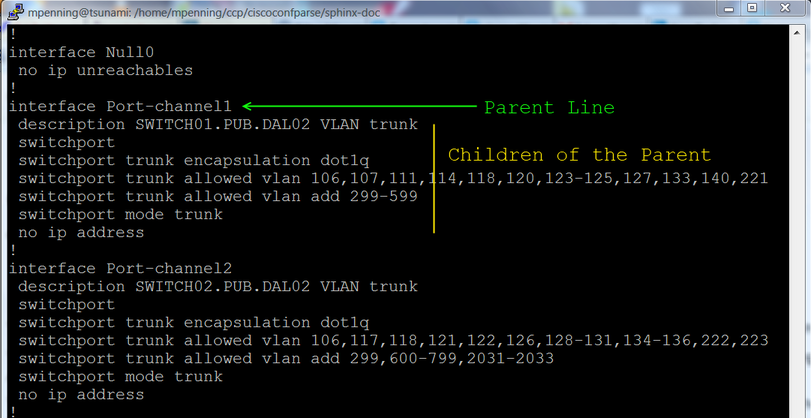
Speaking generally, the library examines an IOS-style config and breaks it into a set of linked parent / child relationships. You can perform complex queries about these relationships.
Usage
The following code will parse a configuration stored in ‘exampleswitch.conf’ and select interfaces that are shutdown.
from ciscoconfparse import CiscoConfParse

parse = CiscoConfParse('exampleswitch.conf', syntax='ios')

for intf_obj in parse.find_objects_w_child('^interface', '^\s+shutdown'):
    print("Shutdown: " + intf_obj.text)
The next example will find the IP address assigned to interfaces.
from ciscoconfparse import CiscoConfParse

parse = CiscoConfParse('exampleswitch.conf', syntax='ios')

for intf_obj in parse.find_objects('^interface'):

    intf_name = intf_obj.re_match_typed('^interface\s+(\S.+?)$')

    # Search children of all interfaces for a regex match and return
    # the value matched in regex match group 1.  If there is no match,
    # return a default value: ''
    intf_ip_addr = intf_obj.re_match_iter_typed(
        r'ip\saddress\s(\d+\.\d+\.\d+\.\d+)\s', result_type=str,
        group=1, default='')
    print("{0}: {1}".format(intf_name, intf_ip_addr))
What if we don’t use Cisco?
Don’t let that stop you.
As of CiscoConfParse 1.2.4, you can parse brace-delimited configurations into a Cisco IOS style (see Github Issue #17), which means that CiscoConfParse can parse these configurations:
Juniper Networks Junos
Palo Alto Networks Firewall configurations
F5 Networks configurations
CiscoConfParse also handles anything that has a Cisco IOS style of configuration, which includes:
Cisco IOS, Cisco Nexus, Cisco IOS-XR, Cisco IOS-XE, Aironet OS, Cisco ASA, Cisco CatOS
Arista EOS
Brocade
HP Switches
Force 10 Switches
Dell PowerConnect Switches
Extreme Networks
Enterasys
Screenos
Docs
The latest copy of the docs are archived on the web
There is also a CiscoConfParse Tutorial
Building the Package
cd into the root ciscoconfparse directory
Edit the version number in pyproject.toml (as required)
git commit all pending changes
make test
make repo-push
make pypi
Pre-requisites
ciscoconfparse requires Python versions 3.5+ (note: version 3.7.0 has a bug - ref Github issue #117, but version 3.7.1 works); the OS should not matter.
Installation and Downloads
Use poetry for Python3.x…
python -m pip install ciscoconfparse
If you’re interested in the source, you can always pull from the github repo:
From github source download:
git clone git://github.com/mpenning/ciscoconfparse
cd ciscoconfparse/
python -m pip install .
Other Resources
Dive into Python3 is a good way to learn Python
Team CYMRU has a Secure IOS Template, which is especially useful for external-facing routers / switches
Center for Internet Security Benchmarks (An email address, cookies, and javascript are required)
Bug Tracker and Support
Please report any suggestions, bug reports, or annoyances with ciscoconfparse through the github bug tracker.
If you’re having problems with general python issues, consider searching for a solution on Stack Overflow. If you can’t find a solution for your problem or need more help, you can ask a question.
If you’re having problems with your Cisco devices, you can open a case with Cisco TAC; if you prefer crowd-sourcing, you can ask on the Stack Exchange Network Engineering site.
Unit-Tests
Github workflow tests ciscoconfparse on Python versions 3.6 and higher, as well as a pypy JIT executable.
Click the image below for details; the current build status is:
License and Copyright
ciscoconfparse is licensed GPLv3
Copyright (C) 2021 David Michael Pennington
Copyright (C) 2020-2021 David Michael Pennington at Cisco Systems
Copyright (C) 2019 David Michael Pennington at ThousandEyes
Copyright (C) 2012-2019 David Michael Pennington at Samsung Data Services
Copyright (C) 2011-2012 David Michael Pennington at Dell Computer Corp
Copyright (C) 2007-2011 David Michael Pennington
The word “Cisco” is a registered trademark of Cisco Systems
Release history Release notifications | RSS feed


Download files
Download the file for your platform. If you're not sure which to choose, learn more about installing packages.
Source Distribution
Built Distribution
Filter files by name, interpreter, ABI, and platform.
If you're not sure about the file name format, learn more about wheel file names.
Copy a direct link to the current filters
File details
Details for the file ciscoconfparse-1.6.26.tar.gz.
File metadata
- Download URL: ciscoconfparse-1.6.26.tar.gz
- Upload date:
- Size: 112.5 kB
- Tags: Source
- Uploaded using Trusted Publishing? No
- Uploaded via: poetry/1.1.11 CPython/3.7.0 Linux/5.10.0-9-amd64
File hashes
| Algorithm | Hash digest | |
|---|---|---|
| SHA256 |
e8775cc34ac88e9093c761bc487bee94b57fb2c485baa8686c60cde897098c06
|
|
| MD5 |
d9bcf69a56d9337cada43b41b96b0158
|
|
| BLAKE2b-256 |
d2f10ac7d1bda3fca91a0eaea700f98bbb0b902f410a4a958e28d270a53c14e7
|
File details
Details for the file ciscoconfparse-1.6.26-py3-none-any.whl.
File metadata
- Download URL: ciscoconfparse-1.6.26-py3-none-any.whl
- Upload date:
- Size: 118.9 kB
- Tags: Python 3
- Uploaded using Trusted Publishing? No
- Uploaded via: poetry/1.1.11 CPython/3.7.0 Linux/5.10.0-9-amd64
File hashes
| Algorithm | Hash digest | |
|---|---|---|
| SHA256 |
646aaef365392babf5c92fee735ef4d95101eefbb441fb1a2d31130449977d5e
|
|
| MD5 |
47bc2d672e8fe5ad0037a897b801bcf5
|
|
| BLAKE2b-256 |
4538f216270bbada0fca343334a065cfc2339e82a73b14dbe96a3c6ea9714c58
|






