
Cista Web Storage
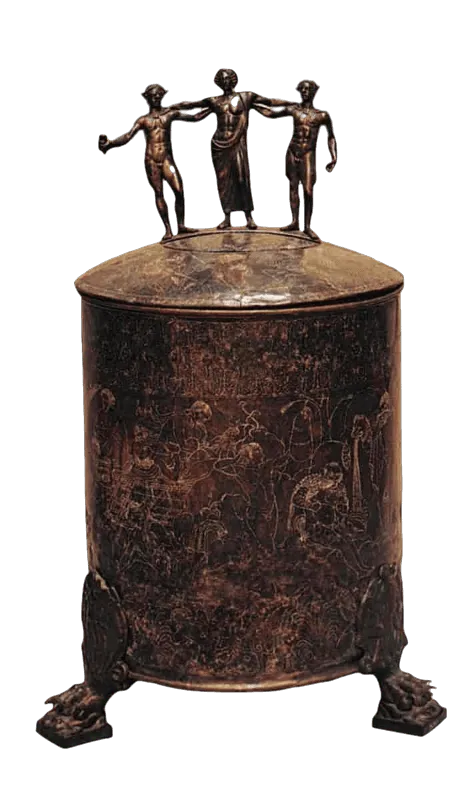
Cista takes its name from the ancient cistae, metal containers used by Greeks and Egyptians to safeguard valuable items. This modern application provides a browser interface for secure and accessible file storage, echoing the trust and reliability of its historical namesake.
This is a cutting-edge file and document server designed for speed, efficiency, and unparalleled ease of use. Experience lightning-fast browsing, thanks to the file list maintained directly in your browser and updated from server filesystem events, coupled with our highly optimized code. Fully keyboard-navigable and with a responsive layout, Cista flawlessly adapts to your devices, providing a seamless experience wherever you are. Our powerful instant search means you're always just a few keystrokes away from finding exactly what you need. Press 1/2/3 to switch ordering, navigate with all four arrow keys (+Shift to select). Or click your way around on breadcrumbs that remember where you were.
Built-in document and media previews let you quickly view files without downloading them. Cista shows PDF and other documents, video and image thumbnails, with HDR10 support video previews and image formats, including HEIC and AVIF. It also has a player for music and video files.
The Cista project started as an inevitable remake of Droppy which was not being developed at the time. Now they have picked up pace too, feel free to try both and compare.
All of this is wrapped in an intuitive interface with automatic light and dark themes, making Cista Storage the ideal choice for anyone seeking a reliable, versatile, and quick file storage solution. Quickly setup your own Cista where your files are just a click away, safe, and always accessible.
Experience Cista by visiting Cista Demo for a test run and perhaps upload something...
Getting Started
Running the Server
We recommend using UV to directly run Cista:
Try it out locally at http://localhost:8000 (serves the current directory):
uvx cista
Create an account: (otherwise the server is public for all)
uvx cista --user yourname --privileged
Serve your files at http://localhost:8000:
uvx cista -l :8000 /path/to/files
Alternatively, you can install with pip or uv pip. This enables using the cista command directly without uvx or uv run.
pip install cista --break-system-packages
The server remembers its settings in the config folder (default ~/.local/share/cista/), including the listen port and directory, for future runs without arguments.
Authentication
Cista supports two authentication modes, each supporting ordinary and privileged users. Either one can be combined with the public mode.
Public Mode
In public mode, anyone can read, send and even delete files without without logging in. Users entering the service won't be asked to authenticate. Privileged users can still log in via the menu to access admin settings, from where the public mode can be toggled on or off.
Built-in Password Authentication (default)
User accounts are managed directly by Cista. Create users with the --user flag:
uvx cista --user admin --privileged  # Create admin user
uvx cista --user guest               # Create regular user
Privileged users can manage other users and change settings via the Admin Settings menu.
Passkey Authentication and SSO
For centralized authentication, Cista can integrate with Paskia SSO server. This allows user account and permission management at the corporate level, without bothering Cista with it.
Set the PASKIA_BACKEND_URL environment variable:
PASKIA_BACKEND_URL=http://localhost:4401 uvx cista
Run the Paskia backend on the same machine (to use that default URL):
uvx paskia
In Paskia mode:
- All
/auth/*requests are proxied to the Paskia backend - Cista backend verifies access by
/auth/api/validateendpoint and shows a login dialog if needed - Users with
cista:loginpermission can access files - Users with
cista:adminpermission get privileged access (Admin Settings)
WebDAV Access
Cista supports WebDAV, so you can mount it as a network drive or browse it directly from your operating system's file manager.
Connect to https://cista.example.com/files/.
Authentication
- Standard users: Use your username and password with Basic auth.
- API tokens: For scripts, backup tools, or when your client requires NTLM (e.g. Windows File Explorer), create a token in the web interface via 🔑 API Tokens. Authenticate with username
tokenand the token secret as the password.
Supported clients
| Client | Setup |
|---|---|
| Windows File Explorer | Map Network Drive → https://cista.example.com/files/ (or Add a network location). Windows may try NTLM first; API tokens are recommended. |
| macOS Finder | Go → Connect to Server (⌘K) → https://cista.example.com/files/ |
| Linux (GNOME/KDE) | Enter davs://cista.example.com/files/ or webdavs://cista.example.com/files/ in the location bar |
| Android — Solid Explorer | Tap + → New Cloud Connection → WebDAV → enter https://cista.example.com/files/ and your credentials. |
| Android — CX File Explorer | Open the Network tab → New location → WebDAV → enter https://cista.example.com/files/ and your credentials. |
| Cyberduck, WinSCP, rclone | Standard WebDAV profile with Basic auth |
Note on Windows NTLM: Windows WebDAV clients often require NTLM authentication, which is incompatible with Cista's Argon2 password hashes. API tokens solve this — Cista uses the token secret as the NTLM password.
Internet Access
Most admins find the Caddy web server convenient for its auto TLS certificates and all. A proxy also allows running multiple web services or Cista instances on the same IP address but different (sub)domains.
/etc/caddy/Caddyfile:
cista.example.com {
    reverse_proxy :8000
}
Nxing or other proxy may be similarly used, or alternatively you can place cert and key in cista config dir and run cista -l cista.example.com
System Deployment
This setup allows easy addition of storages, each with its own domain, configuration, and files.
Assuming a restricted user account storage for serving files and that UV is installed system-wide or on this account. Only UV is required: this does not use git or javascript runtimes.
Create (edit) a systemd unit:
sudo systemctl edit --force --full cista@.service
Paste the following:
[Unit]
Description=Cista storage %i

[Service]
User=storage
ExecStart=uvx cista -c /srv/cista/%i -l /srv/cista/%i/socket /media/storage/%i
Restart=always
#Environment=PASKIA_BACKEND_URL=http://localhost:4401

[Install]
WantedBy=multi-user.target
This setup supports multiple storages, each under /media/storage/<domain> for files and /srv/cista/<domain>/ for configuration. UNIX sockets are used instead of numeric ports for convenience.
systemctl daemon-reload
systemctl enable --now cista@foo.example.com
systemctl enable --now cista@bar.example.com
Public exposure is easiest using the Caddy web server.
/etc/caddy/Caddyfile:
foo.example.com, bar.example.com {
    reverse_proxy unix//srv/cista/{host}/socket
}
Development setup
For rapid development, we use the Vite development server for the Vue frontend, while running the backend on port 8000 that Vite proxies backend requests to. Each server live reloads whenever its code or configuration are modified.
Make sure you have git, uv and bun (or npm) installed.
Backend (Python) – setup and run:
git clone https://git.zi.fi/Vasanko/cista-storage.git
cd cista-storage
uv sync --dev
uv run cista --dev -l :8000 /path/to/files
Frontend (Vue/Vite) – run the dev server in another terminal:
cd frontend
bun install
bun run dev
Building the package for release (frontend + Python wheel/sdist):
uv build
Vue is used to build files in cista/frontend-build, included prebuilt in the Python package. uv build runs the project build hooks to bundle the frontend and produce a NodeJS-independent Python package.
1 maintainer

Download files
Download the file for your platform. If you're not sure which to choose, learn more about installing packages.
Source Distribution
Built Distribution
Filter files by name, interpreter, ABI, and platform.
If you're not sure about the file name format, learn more about wheel file names.
Copy a direct link to the current filters
File details
Details for the file cista-1.9.15.tar.gz.
File metadata
- Download URL: cista-1.9.15.tar.gz
- Upload date:
- Size: 754.1 kB
- Tags: Source
- Uploaded using Trusted Publishing? No
- Uploaded via:
uv/0.9.21 {"installer":{"name":"uv","version":"0.9.21","subcommand":["publish"]},"python":null,"implementation":{"name":null,"version":null},"distro":{"name":"Ubuntu","version":"24.04","id":"noble","libc":null},"system":{"name":null,"release":null},"cpu":null,"openssl_version":null,"setuptools_version":null,"rustc_version":null,"ci":null}
File hashes
| Algorithm | Hash digest | |
|---|---|---|
| SHA256 |
5eb63f41104cc9ece7562f461b33638ad49b8d8973b756db37786adf62529bf0
|
|
| MD5 |
29819788976567b46f87143c98c62265
|
|
| BLAKE2b-256 |
bce6f3b96d872e18150a776fc92c44ab4a684577da9dd4c54c5b2da05ead3253
|
File details
Details for the file cista-1.9.15-py3-none-any.whl.
File metadata
- Download URL: cista-1.9.15-py3-none-any.whl
- Upload date:
- Size: 814.2 kB
- Tags: Python 3
- Uploaded using Trusted Publishing? No
- Uploaded via:
uv/0.9.21 {"installer":{"name":"uv","version":"0.9.21","subcommand":["publish"]},"python":null,"implementation":{"name":null,"version":null},"distro":{"name":"Ubuntu","version":"24.04","id":"noble","libc":null},"system":{"name":null,"release":null},"cpu":null,"openssl_version":null,"setuptools_version":null,"rustc_version":null,"ci":null}
File hashes
| Algorithm | Hash digest | |
|---|---|---|
| SHA256 |
07936cbc0a1b6723d125c86ee11b2787f2de3e3ed7aaa68c35c33d528be020e0
|
|
| MD5 |
57e57b2e5915211cce67c9d541ea3a01
|
|
| BLAKE2b-256 |
83c5c36aa0af2778f1c3ff0a856aa97d8d1a97dc6447af347f763f9e9304c5a8
|














