
IntroductionPrograming-library: citam_pydraw
Overview
千葉工業大学 先進工学部 知能メディア工学科の第2セメスター「プログラミング言語基礎」及び第3セメスター「プロジェクト1」において使用される、Pythonの図形描画ライブラリです。 tkinterのWrapperで、Processingライクに動作させることを目指して作成されました。
Requirement
必要環境
- MacOS
- Windowsでも使用可能ですが、非推奨かつサポート範囲外です
- 詳細な動作確認はしておらず、対応予定もありません
- Linux環境は一応ですが対応しています
- Docker環境の用意があります -> IPが導入されるPython環境(Docker版)
- Windowsでも使用可能ですが、非推奨かつサポート範囲外です
- Python >3.10.5
- 動作確認済み >=3.12.2
- MacのSystem DefaultのPython環境にはライブラリを入れることができないため注意してください
- 必要なライブラリ
- tkinter 8.6以上
- Pillow 11.2以上
- just-playback 0.1.8以上
- brew + pyenv環境の場合、対応したpython-tkが必要です
開発・動作確認環境
- MacOS Ventura以降
- Docker環境
- Python
- brew + pyenv
- 3.10.5 <
- <= 3.12.2
- ライブラリ
- Python標準
- tkinter 8.6
- Pillow 11.2.1
- just-playback 0.1.8
Usage
PyPIから
pip install citam_pydraw
gitから
クローン
git clone https://github.com/aais-lab/citam_pydraw.git
ライブラリのフォルダへ移動して、pip install
cd citam_pydraw
pip install .
Successfully installed citam_pydraw-x.x.xと表示されれば導入完了です。
環境構築の既知トラブル
MacOSかつpython3.10系の場合
tkinter8.5がデフォルトで入っているようですが、Pythonとtcl/tkの対応問題によって実行時にWindowが黒く表示される不具合が発生します。
import tkinter
tkinter.Tcl().eval('info patchlevel')
上記をPythonで実行するとtkinterのバージョンを確認することが可能です。
開発・動作確認環境と同様にbrew + pyenv環境の場合は
pyenv uninstall 3.10.x
brew install python-tk@3.10
pyenv install 3.10.x
でおおよその場合解決します。
実行時にImportErrorが出て、エラー箇所がImport _tkinterの場合
tkinterがうまく読み込めていません。 Python Build時にtkinterのリンクがちゃんといってない?詳細な原因は不明です。 開発・動作確認環境と同様にbrew + pyenv環境の場合は
pyenv uninstall 3.x.x
brew install python-tk@3.x
pyenv install 3.x.x
でおおよその場合解決します。
brew install python-tk@3.x
の際は、python-tkのバージョンをインストールしたいPythonのバージョンに合わせて指定してください。
import IP 実行時にModuleNotFoundErrorが出て、エラー箇所がimport IP.IPの場合(旧)
他にも以下パターンは同様の原因です。
ModuleNotFoundError: No module named "IP.mouse"
ModuleNotFoundError: No module named "IP.keyboard"
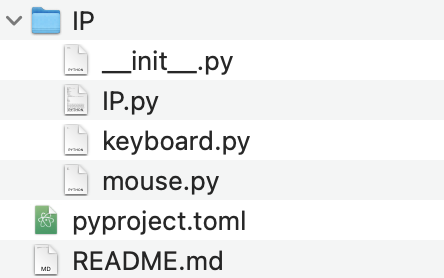
パッケージのダウンロードもしくは展開時(zipでダウンロードした場合)にライブラリ内のIP.py等が欠損したことが原因です。 ダウンロードもしくは展開をやり直して、以下のファイルが全てあることを確認してください。
Reference
関数・クラス等の詳細はWikiを参照してください。
関数等のリファレンス(旧) IntroductionPrograming-Reference
Author
Licence
3-Clause BSD
1 maintainer

Metadata
1 maintainer
Release files for citam_pydraw 3.2.2
For a detailed explanation of source distributions (sdists) and built distributions (wheels), please see the package formats documentation.
Source distribution (sdist)
| File | Size | Uploaded | Provenance | Actions |
|---|---|---|---|---|
| citam_pydraw-3.2.2.tar.gz | 15.3 kB | Without provenance | Details for citam_pydraw-3.2.2.tar.gz |
Built distribution (wheel)
| File | Interpreter | ABI | Platform | Actions Reset |
|---|---|---|---|---|
| citam_pydraw-3.2.2-py3-none-any.whl | Python 3 | none | any | Details for citam_pydraw-3.2.2-py3-none-any.whl |
Total release size: 28.9 kB
Release files / citam_pydraw-3.2.2.tar.gz
| Download URL | citam_pydraw-3.2.2.tar.gz |
|---|---|
| Size | 15.3 kB |
| Tags | Source |
|
SHA-256 checksum How to use checksums |
138973c07feb41320fd94b3d0a090366c6f0e487ead9e0cb7a2a3c1700fbc6d5
|
|
BLAKE2b-256 checksum How to use checksums |
59aaa6810ca58b60eaf4c14122151271125fa1890259ecde57c259412d5d0f8d
|
| Upload date | |
|
Uploaded using Trusted Publishing? What is trusted publishing? |
No |
| Uploaded via |
python-requests/2.32.5
|
Release files / citam_pydraw-3.2.2-py3-none-any.whl
| Download URL | citam_pydraw-3.2.2-py3-none-any.whl |
|---|---|
| Size | 13.6 kB |
| Tags | Python 3 |
|
SHA-256 checksum How to use checksums |
3c65cc2d50e0d367b50f6649fc5298b2b7169f859c7f00cb8a89b129e85dbfef
|
|
BLAKE2b-256 checksum How to use checksums |
627c8b947cd2f60918082fd983915de9b750feca8f4fa3f2f53b8e6bec13ccca
|
| Upload date | |
|
Uploaded using Trusted Publishing? What is trusted publishing? |
No |
| Uploaded via |
python-requests/2.32.5
|
Security for citam_pydraw 3.2.2
Provenance
Provenance describes where a file came from. On PyPI, provenance is shared via attestations, which provide a verifiable record of the build or publishing details. View details, limitations and caveats.
No provenance found
None of the files in this release were uploaded with provenance metadata.
A note on package security
PyPI is a repository for distributing packages, not a service for auditing them. While third-party security researchers and our staff do their best to detect and remove malicious packages, PyPI cannot guarantee the quality, security or suitability of any given package.
To learn more about protecting yourself from malicious actors, visit our package security documentation.














