
CIT-AM Introduction Programming class lib

Project description
IntroductionPrograming-library: citam_pydraw
Overview
千葉工業大学 先進工学部 知能メディア工学科の第2セメスター「プログラミング言語基礎」及び第3セメスター「プロジェクト1」において使用される、Pythonの図形描画ライブラリです。 tkinterのWrapperで、Processingライクに動作させることを目指して作成されました。
Requirement
必要環境
- MacOS
- Windowsでも使用可能ですが、非推奨かつサポート範囲外です
- 詳細な動作確認はしておらず、対応予定もありません
- Linux環境は一応ですが対応しています
- Docker環境の用意があります -> IPが導入されるPython環境(Docker版)
- Windowsでも使用可能ですが、非推奨かつサポート範囲外です
- Python >3.10.5
- 動作確認済み >=3.12.2
- MacのSystem DefaultのPython環境にはライブラリを入れることができないため注意してください
- 必要なライブラリ
- tkinter 8.6以上
- Pillow 11.2以上
- just-playback 0.1.8以上
- brew + pyenv環境の場合、対応したpython-tkが必要です
開発・動作確認環境
- MacOS Ventura以降
- Docker環境
- Python
- brew + pyenv
- 3.10.5 <
- <= 3.12.2
- ライブラリ
- Python標準
- tkinter 8.6
- Pillow 11.2.1
- just-playback 0.1.8
Usage
PyPIから
pip install citam_pydraw
gitから
クローン
git clone https://github.com/aais-lab/citam_pydraw.git
ライブラリのフォルダへ移動して、pip install
cd citam_pydraw
pip install .
Successfully installed citam_pydraw-x.x.xと表示されれば導入完了です。
環境構築の既知トラブル
MacOSかつpython3.10系の場合
tkinter8.5がデフォルトで入っているようですが、Pythonとtcl/tkの対応問題によって実行時にWindowが黒く表示される不具合が発生します。
import tkinter
tkinter.Tcl().eval('info patchlevel')
上記をPythonで実行するとtkinterのバージョンを確認することが可能です。
開発・動作確認環境と同様にbrew + pyenv環境の場合は
pyenv uninstall 3.10.x
brew install python-tk@3.10
pyenv install 3.10.x
でおおよその場合解決します。
実行時にImportErrorが出て、エラー箇所がImport _tkinterの場合
tkinterがうまく読み込めていません。 Python Build時にtkinterのリンクがちゃんといってない?詳細な原因は不明です。 開発・動作確認環境と同様にbrew + pyenv環境の場合は
pyenv uninstall 3.x.x
brew install python-tk@3.x
pyenv install 3.x.x
でおおよその場合解決します。
brew install python-tk@3.x
の際は、python-tkのバージョンをインストールしたいPythonのバージョンに合わせて指定してください。
import IP 実行時にModuleNotFoundErrorが出て、エラー箇所がimport IP.IPの場合(旧)
他にも以下パターンは同様の原因です。
ModuleNotFoundError: No module named "IP.mouse"
ModuleNotFoundError: No module named "IP.keyboard"
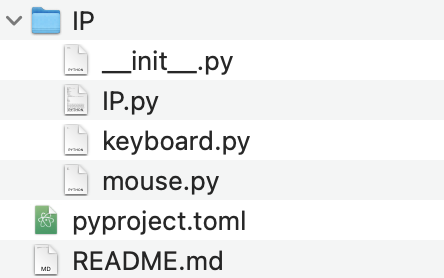
パッケージのダウンロードもしくは展開時(zipでダウンロードした場合)にライブラリ内のIP.py等が欠損したことが原因です。 ダウンロードもしくは展開をやり直して、以下のファイルが全てあることを確認してください。
Reference
関数・クラス等の詳細はWikiを参照してください。
関数等のリファレンス(旧) IntroductionPrograming-Reference
Author
Licence
3-Clause BSD


Download files
Download the file for your platform. If you're not sure which to choose, learn more about installing packages.
Source Distribution
Built Distribution
Filter files by name, interpreter, ABI, and platform.
If you're not sure about the file name format, learn more about wheel file names.
Copy a direct link to the current filters
File details
Details for the file citam_pydraw-3.2.1.tar.gz.
File metadata
- Download URL: citam_pydraw-3.2.1.tar.gz
- Upload date:
- Size: 15.3 kB
- Tags: Source
- Uploaded using Trusted Publishing? No
- Uploaded via: python-requests/2.32.5
File hashes
| Algorithm | Hash digest | |
|---|---|---|
| SHA256 |
12594c22225e5a81a427673f3474ff53b296e6374bb75df14760dcc151535fe1
|
|
| MD5 |
66fda7a9d5029672f6cbfb4d93688caf
|
|
| BLAKE2b-256 |
78978f2a815d8eae74e1e396ca9aa301be91843663ba9479e2fef21314109c0f
|
File details
Details for the file citam_pydraw-3.2.1-py3-none-any.whl.
File metadata
- Download URL: citam_pydraw-3.2.1-py3-none-any.whl
- Upload date:
- Size: 13.6 kB
- Tags: Python 3
- Uploaded using Trusted Publishing? No
- Uploaded via: python-requests/2.32.5
File hashes
| Algorithm | Hash digest | |
|---|---|---|
| SHA256 |
f3827c93d102646a602d2873172710d126267c9e2051bb89d1336506797b6bf2
|
|
| MD5 |
1a5248038e6fbe3457115ef9ce7a12c4
|
|
| BLAKE2b-256 |
cfae4315ba4a115d6388edbe3e70855ab2dcc2d6be922c91a7c65c61d2aaf9c2
|






