
CiteVahti
Does the cited paper actually support the claim? Check every citation in your manuscript — before a reviewer does.
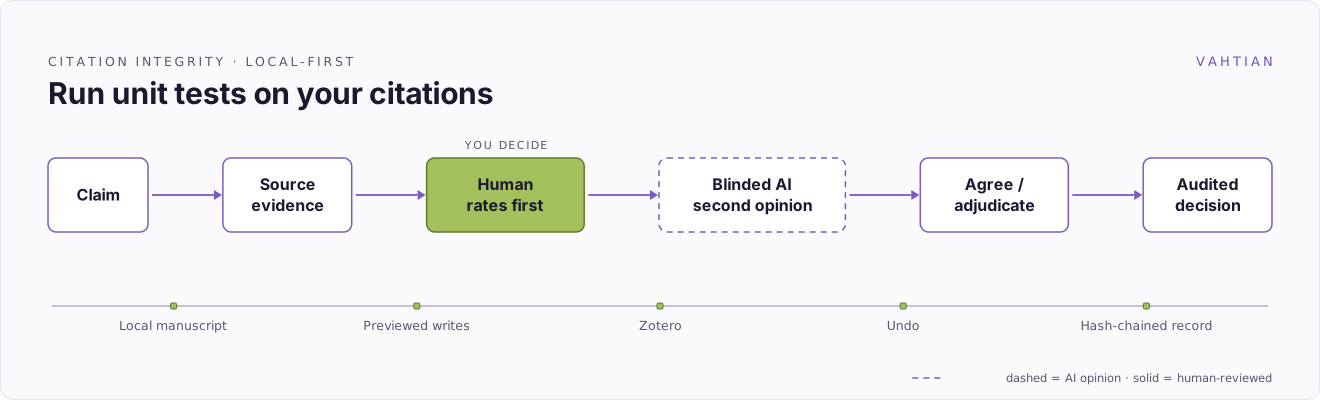
CiteVahti walks you through your manuscript one claim at a time. You decide whether each cited source really backs the sentence; an optional AI gives a blinded second opinion (you rate first, it can never overrule you); and every decision is saved as a timestamped, tamper-evident record on your own computer.
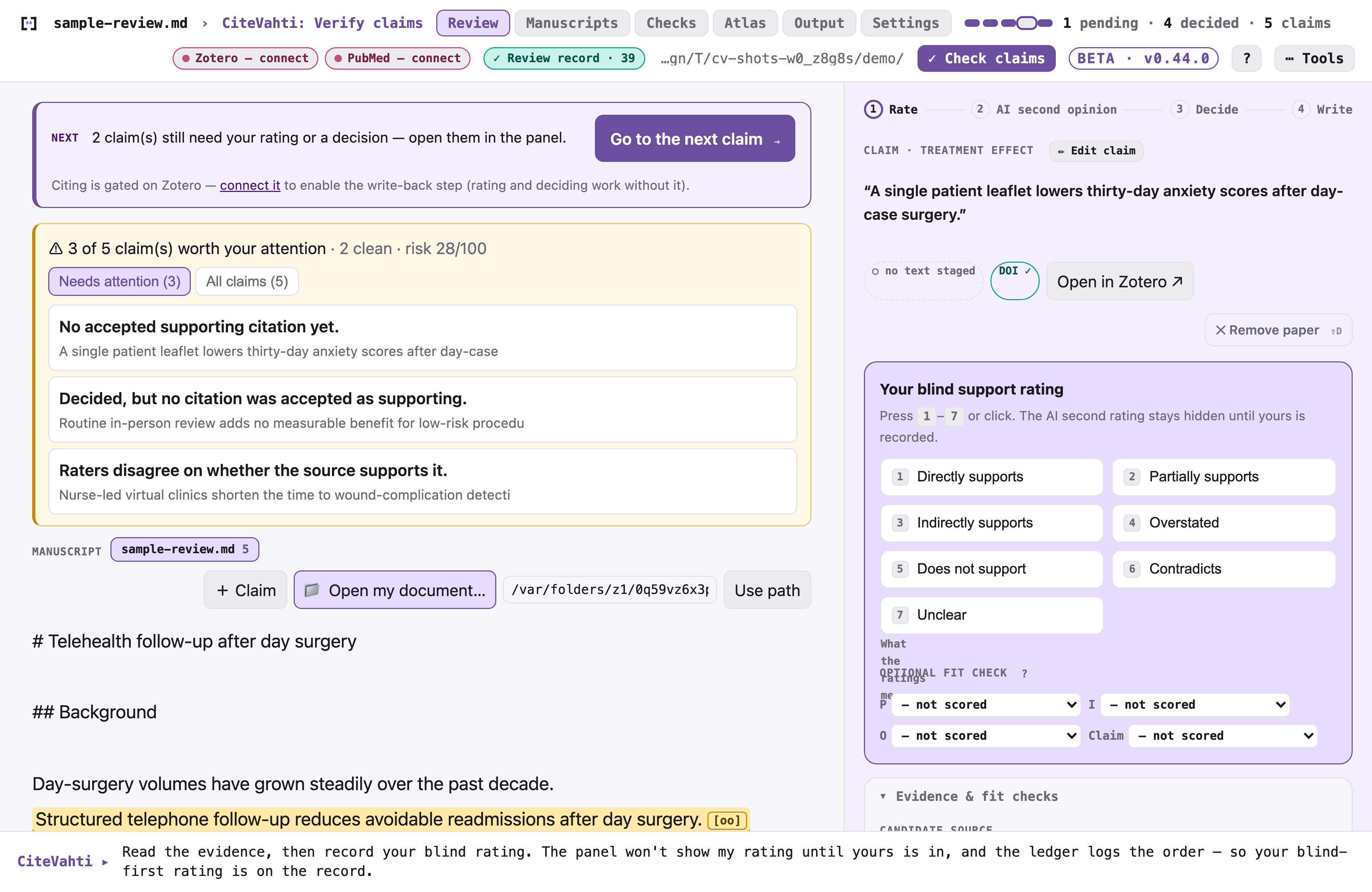
Free while in beta. CiteVahti is local-first: your manuscript stays on your device unless you choose to turn on an external AI model. No account. Nothing uploaded.
What beta means here: the review workflow and your data format are stable, but the tool is young and your feedback still shapes it. The app does not update itself yet — when a new version ships you replace it yourself (steps under Updating, below; the panel can check for a newer version, but only if you turn that on). If something is confusing or judged wrong, say so — beta reports are how it improves.
Who it's for
Researchers, clinicians, and students who write papers and want to be sure every citation holds up — without learning new software or touching a command line. If you can open a file on your computer, you can use CiteVahti.
What it does for you
- Catches citations that don't support the sentence they're attached to — the kind a reviewer or editor will flag.
- Keeps you in charge. You make every call; the AI is only ever a second opinion, shown after you've decided.
- Leaves a clean paper trail — a timestamped record of what you checked and concluded, ready for a supervisor, co-author, journal, or registry.
- Builds a reusable evidence map so you don't re-do the same checks next project.
- Stays private by default — everything lives in a folder on your Mac or PC.
Get started in 2 minutes — no terminal, ever
On a Mac, use the desktop app. It's a normal app: download it, open it, review.
- Download
citevahti-<version>-macos-arm64.app.zipfrom the latest release. - Unzip it and drag
CiteVahti.appinto your Applications folder, then open it like any other app. (It's signed and notarized — it opens with no security warnings.) - Choose a folder to keep your reviews in when it asks.
- Drag your manuscript (
.docxor.md) onto the window. The panel walks you through the rest, one step at a time — there's nothing to memorise.
Want an AI assistant to help pre-screen citations? Whenever you're ready, click the CiteVahti menu-bar icon → Start Agent Server. CiteVahti first explains exactly what an assistant can and cannot do — and either way, you rate every claim yourself and make every final call.
Or: use it inside Claude Desktop
If you already work in Claude, install CiteVahti as a one-click extension and drive the review by chatting. (This is also the path on Windows and Linux, where the desktop app isn't available yet.)
- Download the extension for your computer from the
latest release:
- macOS (Apple Silicon) —
citevahti-<version>-macos-arm64.mcpb(signed + notarized) - Windows —
citevahti-<version>-windows-x64.mcpb - Linux —
citevahti-<version>-linux-x64.mcpb
- macOS (Apple Silicon) —
- Double-click the downloaded file to add it to Claude Desktop.
- Choose a folder for your reviews when asked.
- Tell your assistant: "Check the claims in my manuscript using CiteVahti."
First time on macOS you may see a one-time security prompt — the extension is a zip, which macOS can't pre-stamp even though the app inside is signed and notarized. If it appears: right-click the file → Open, or go to System Settings → Privacy & Security → "Open Anyway". After that it installs and runs normally.
First time on Windows you may see a SmartScreen warning ("Windows protected your PC") — the Windows build is unsigned, so Windows can't check who published it. If it appears: click More info, then Run anyway. After that it installs and runs normally.
Updating — your review data is never touched; only the program is replaced
- Desktop app: quit
CiteVahti.app, download the newestcitevahti-<version>-macos-arm64.app.zipfrom the latest release, and replace the oldCiteVahti.appin Applications with it. Your reviews live in the project folder you chose, not inside the app, so nothing is lost. - Claude Desktop extension: remove the existing CiteVahti extension, fully quit and reopen
Claude Desktop, then add the newest
.mcpbfrom the latest release. Ask your assistant to run thestatustool to confirm the running version. (macOS Intel: install viapip install "citevahti[mcp]", or run the Apple-Silicon.mcpbunder Rosetta.) - pip:
pip install --no-cache-dir --upgrade "citevahti[mcp]", thenpip show citevahtito confirm the version.
For developers & technical readers — pip, CLI, architecture, security
Everything below assumes a terminal; none of it is needed to use the app.
Try it on synthetic data (nothing of yours touched — builds an invented ledger and opens the panel showing every claim state):
pip install "citevahti[mcp]"
citevahti demo
Run the review panel from the terminal:
pip install "citevahti[mcp]"
citevahti run
CiteVahti opens the review panel on your machine at 127.0.0.1 and tells you the one next
thing to do.
Run the desktop app from source (the same supervised shell as the packaged .app):
pip install "citevahti[app]"
citevahti-app
What the app actually runs: CiteVahti.app is a thin shell supervising two local
processes — the review panel engine (for you) and an optional MCP agent server (for a chat
client; it can suggest and stage, but it can never rate for you, see your rating first, or
make the final call). Both bind only to 127.0.0.1, write rotating logs (menu-bar icon →
Open Logs Folder), exit on their own if the app dies, and shut down cleanly when you quit.
The agent server is off until you enable it and can be stopped anytime from the menu bar.
Deeper reading:
How it works
CiteVahti always tells you the one next thing to do — there's no command to remember and nothing to set up.
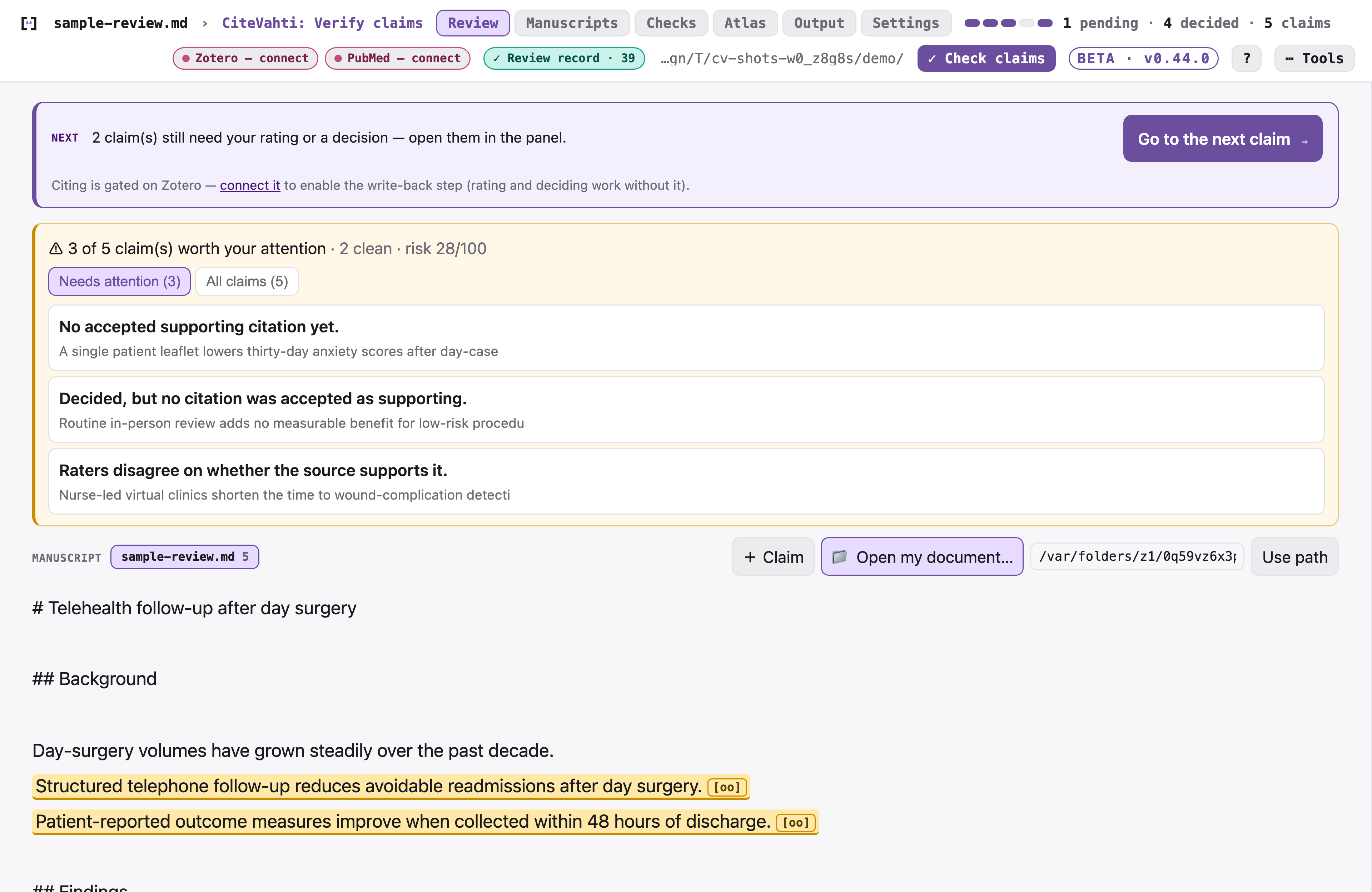
You start by adding your manuscript — choose a Word or Markdown file, drag it onto the window, or paste the text. Nothing is uploaded.
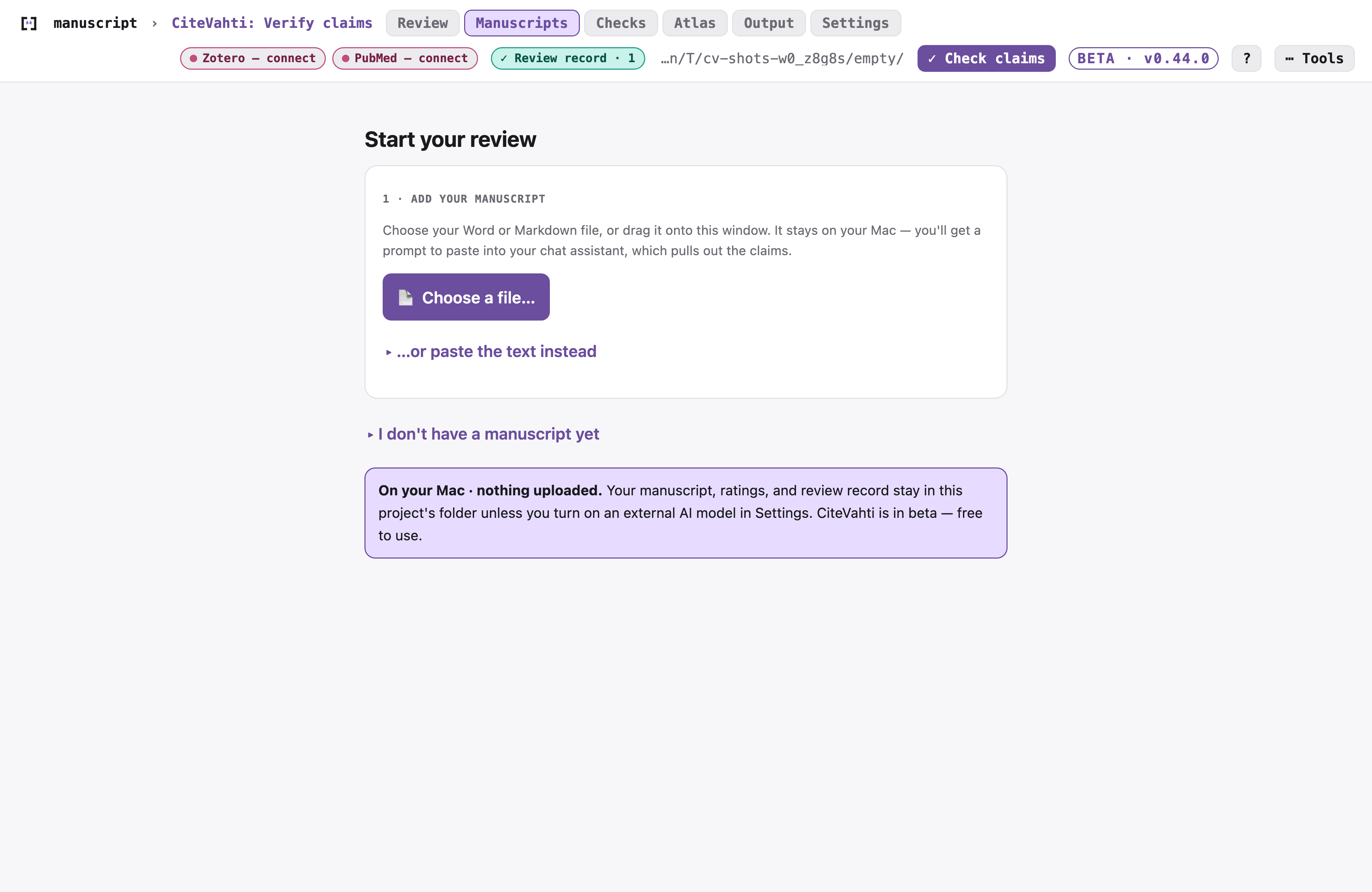
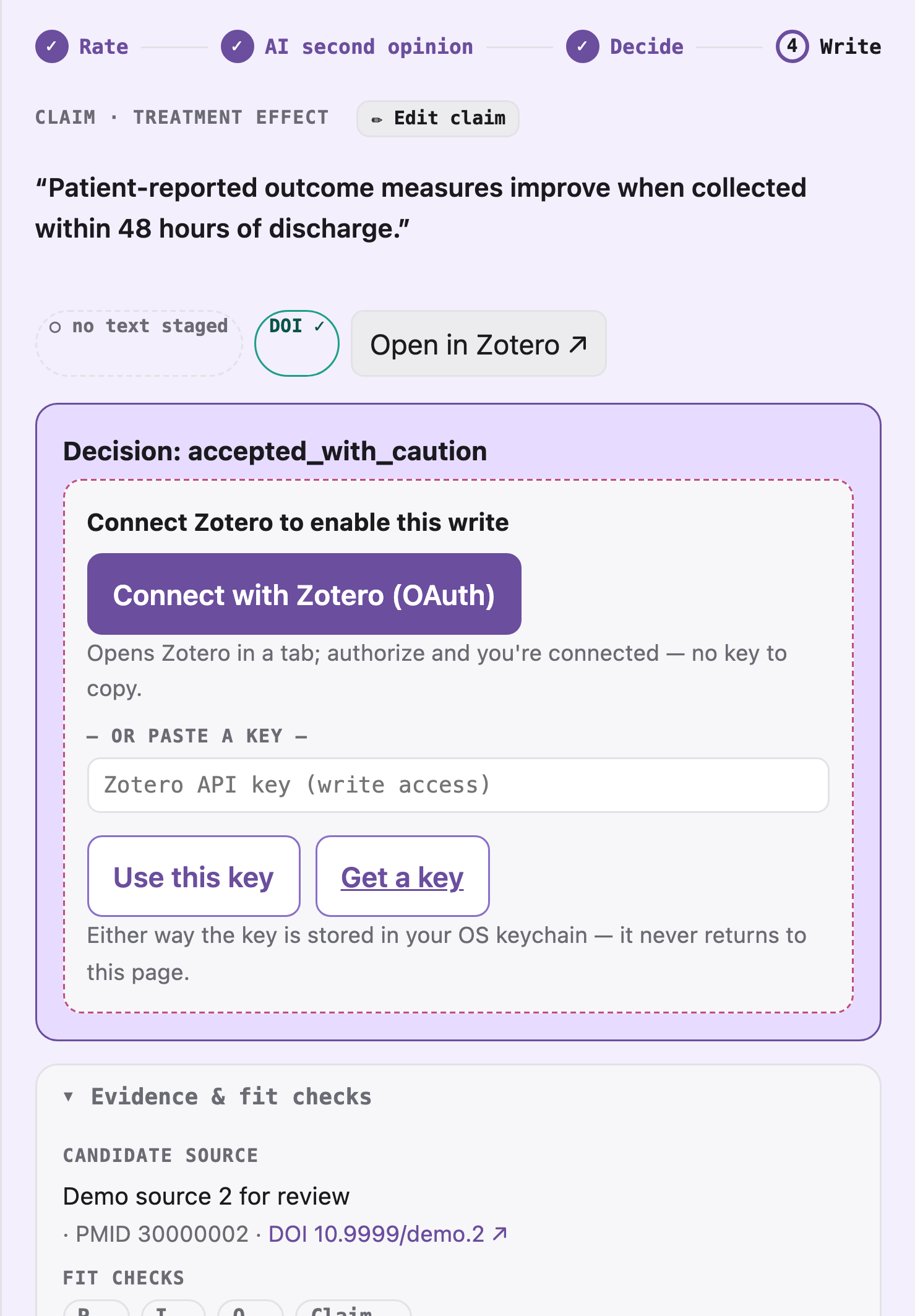
Then you work through each claim on a simple card that walks a visible Rate → Reveal → Decide → Write path, so you always know where you are:
- Rate — you judge whether the cited paper supports the claim.
- Reveal — now the optional AI second opinion appears (never before).
- Decide — accept, caution, review, or reject. The decision is yours.
- Write — optionally update your manuscript or Zotero, always after a preview.
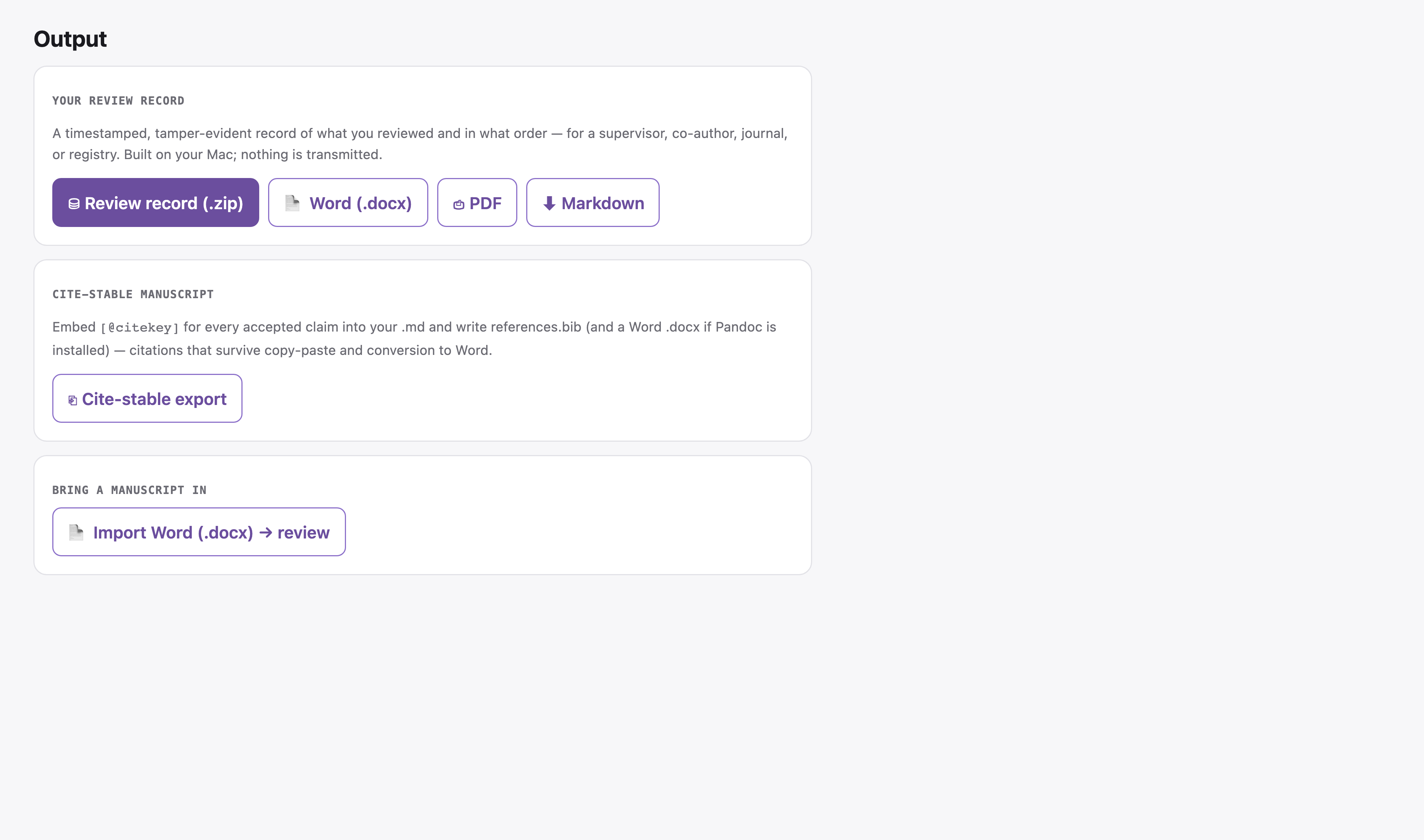
A record you can hand to anyone
Every decision is saved to a timestamped, tamper-evident review record — a plain-language
log of what you reviewed and in what order. Export it as a Word document, a print-ready report,
or a review-packet .zip (which even includes an auto-filled methods paragraph with your
review's real numbers) for a methods section, a co-author, a supervisor, or a journal.
Build an evidence map you can reuse
Stop losing evidence work after each project. Most citation checks vanish after one manuscript or one deadline. Every claim you assess in CiteVahti is saved to your own private evidence map, so next time you work on the same topic you don't start from zero — pull back earlier judgments, see what you already checked, and spot where the literature is thin, contradictory, or overclaimed.
It stays on your machine. Sharing into the wider, de-identified community evidence map is a separate, opt-in step, and you preview the exact payload before anything is sent — never your manuscript, search history, patient data, registry data, or private project identifiers.
The AI is a second opinion — never the judge
You always rate first. CiteVahti can then show a second rating from an AI, and compare the two — but the AI value stays hidden until your rating is in, and the final decision is always yours. There's no hidden AI subscription: pick the mode you want, or leave AI off entirely.
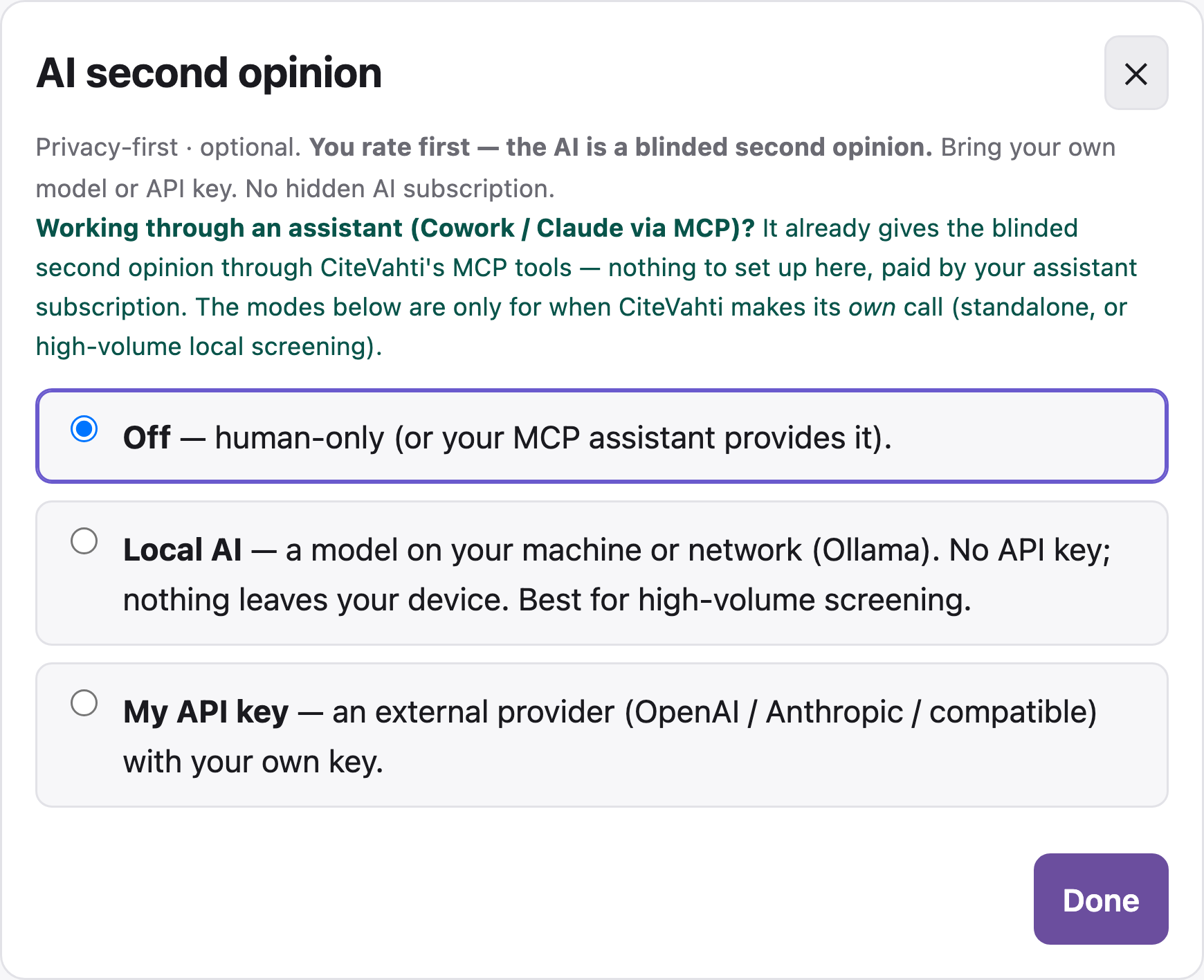
You can get the second opinion from:
- your MCP assistant (e.g. Claude Desktop),
- a local model on your own computer (free, fully private — see below), or
- your own OpenAI/Anthropic-compatible API key.
Run the AI on your own machine (free, nothing leaves your device)
- Install Ollama (macOS:
brew install ollama). - Pull a model —
qwen2.5is recommended for claim checking:ollama pull qwen2.5
(Pick a smaller tag if your machine is tight on memory, e.g.ollama pull qwen2.5:3b.) - In the panel, open Settings → AI second opinion → Local AI. CiteVahti detects the installed model and pins its exact version so the rating stays auditable.
To update later, re-pull the same name (ollama pull qwen2.5).
Privacy Policy
CiteVahti is local-first. Full policy: https://vahtian.com/citevahti/privacy
(source: docs/PRIVACY.md). In short:
- No telemetry, no analytics, no account — CiteVahti collects nothing about you and nothing for us, and never phones home.
- Your manuscript, ratings, and review record stay in a folder on your computer.
- The panel runs only on your own machine (loopback,
127.0.0.1). - AI is optional and blinded; local and bring-your-own-key modes are supported.
- Changes to Zotero or your manuscript always require a preview and your confirmation, and can be undone.
- Outbound calls are enumerated, not hidden. The main ones: the literature services you
choose to search (PubMed, OpenAlex, Semantic Scholar, Crossref), your Zotero if you connect
it, the optional AI second opinion (off by default; API mode sends the claim plus the paper's
title and abstract to the provider you configure), a user-initiated check to PyPI for a
newer version, a one-time Pandoc download if you ask for a Word export without Pandoc
installed, and opt-in RFC 3161 timestamping (audit-head hash only). The complete table —
destination, payload, trigger, default — is in
docs/PRIVACY.md.
What CiteVahti writes
CiteVahti never silently changes Zotero or your manuscript. Every write follows the same gate:
Preview → Confirm → Audit → Undo available
What it does and does not check
CiteVahti checks citation support, not the truth of the underlying claims. It tests whether the cited paper backs the sentence — it does not certify that every claim in the manuscript was entered, and it is not a clinical or scientific oracle. Blinding is enforced by the workflow (the AI value is withheld until you rate) and recorded in the review record with timestamps, so the order is auditable, not assumed.
Responsibility & disclosure
CiteVahti is a local-first citation-support audit tool for manuscript claims — it helps authors test whether the cited evidence supports each claim before submission.
Using CiteVahti does not certify scientific truth, manuscript quality, publication suitability, or the absence of citation problems. It provides structured decision support and an audit trail; final responsibility remains with the human author, reviewer, editor, or institution. CiteVahti is developed by the author — any publication, review, teaching, or evaluation that uses it should disclose the tool use and the developer relationship where relevant. Ready-to-adapt disclosure text and the full statement are in docs/DISCLOSURE.md.
Learn more
- Quickstart — your first citation check, step by step
- Writing good (atomic) claims
- Reporting in your methods section
- Known limitations
- Responsibility, disclosure & conflict of interest
- Contributor privacy
Technical documentation (architecture, CLI, safety invariants, SBOM) lives under the "For developers" toggle above and in docs/.
Feedback & support
CiteVahti is a free beta and your feedback shapes it.
- Found a bug, or a citation judged wrong? Open an issue — there are quick forms for a bug and for a wrong support judgment.
- Have an idea? Request a feature.
- Anything private or security-related? Email privacy@vahtian.com — please don't open a public issue.
New here? Open the app and drag a manuscript in — or follow the Quickstart step by step.
Companion: FullVahti
FullVahti is a sibling Zotero plugin that finds free, legal open-access PDFs for your references and writes CiteVahti's check results back as tags — so the citation check and the full text live in one place. See the FullVahti README to install (a two-click Zotero plugin, no terminal).
License
1 maintainer

Release files for citevahti 0.46.0
For a detailed explanation of source distributions (sdists) and built distributions (wheels), please see the package formats documentation.
Source distribution (sdist)
| File | Size | Uploaded | |
|---|---|---|---|
| citevahti-0.46.0.tar.gz | 525.2 kB | Details |
Built distribution (wheel)
| File | Interpreter | ABI | Platform | Reset |
|---|---|---|---|---|
| citevahti-0.46.0-py3-none-any.whl | Python 3 | none | any | Details |
Total release size: 1.1 MB
Release files / citevahti-0.46.0.tar.gz
| Download URL | citevahti-0.46.0.tar.gz |
|---|---|
| Size | 525.2 kB |
| Tags | Source |
|
SHA-256 checksum How to use checksums |
4d0135332c9552aa4df3198bdbf1fbc1e7f48d44db966837ebfe9f4cb67deb49
|
|
BLAKE2b-256 checksum How to use checksums |
5d038b894bd598748ca74b9d43d21117e09ccf6ec0f511f928c48afb0301dfff
|
| Upload date | |
|
Uploaded using Trusted Publishing? What is trusted publishing? |
Yes |
| Uploaded via |
twine/6.1.0 CPython/3.13.13
|
Provenance
Provenance describes where a file came from. On PyPI, provenance is shared via attestations, which provide a verifiable record of the build or publishing details. View details, limitations and caveats.


PyPI Publish Attestation
PyPI verified that this artifact, at this checksum, originated from the publisher listed below.
Signed by GitHub Actions, verified by PyPI on Aug 3, 2026.
Transparency logRelease files / citevahti-0.46.0-py3-none-any.whl
| Download URL | citevahti-0.46.0-py3-none-any.whl |
|---|---|
| Size | 562.7 kB |
| Tags | Python 3 |
|
SHA-256 checksum How to use checksums |
4c7c1e5c82f5452d717f5a1d730d3ba23cc22e65c5080869a29faa39f41040d8
|
|
BLAKE2b-256 checksum How to use checksums |
9dc4a2d6a9f2f68ddbbb7eb1dac55d439aab9ce51f47f7baac985e95d7980b34
|
| Upload date | |
|
Uploaded using Trusted Publishing? What is trusted publishing? |
Yes |
| Uploaded via |
twine/6.1.0 CPython/3.13.13
|
Provenance
Provenance describes where a file came from. On PyPI, provenance is shared via attestations, which provide a verifiable record of the build or publishing details. View details, limitations and caveats.
PyPI Publish Attestation
PyPI verified that this artifact, at this checksum, originated from the publisher listed below.
Signed by GitHub Actions, verified by PyPI on Aug 3, 2026.
Transparency log













