
Trace citation chains for any keyword across research papers.

Project description

citracer
https://github.com/user-attachments/assets/36855b62-a9ab-4404-90c3-9ac7f418899c
📝 Description
A paper cites 50+ references, but which ones actually discuss the concept you care about? And which papers those cite? And the ones after that?
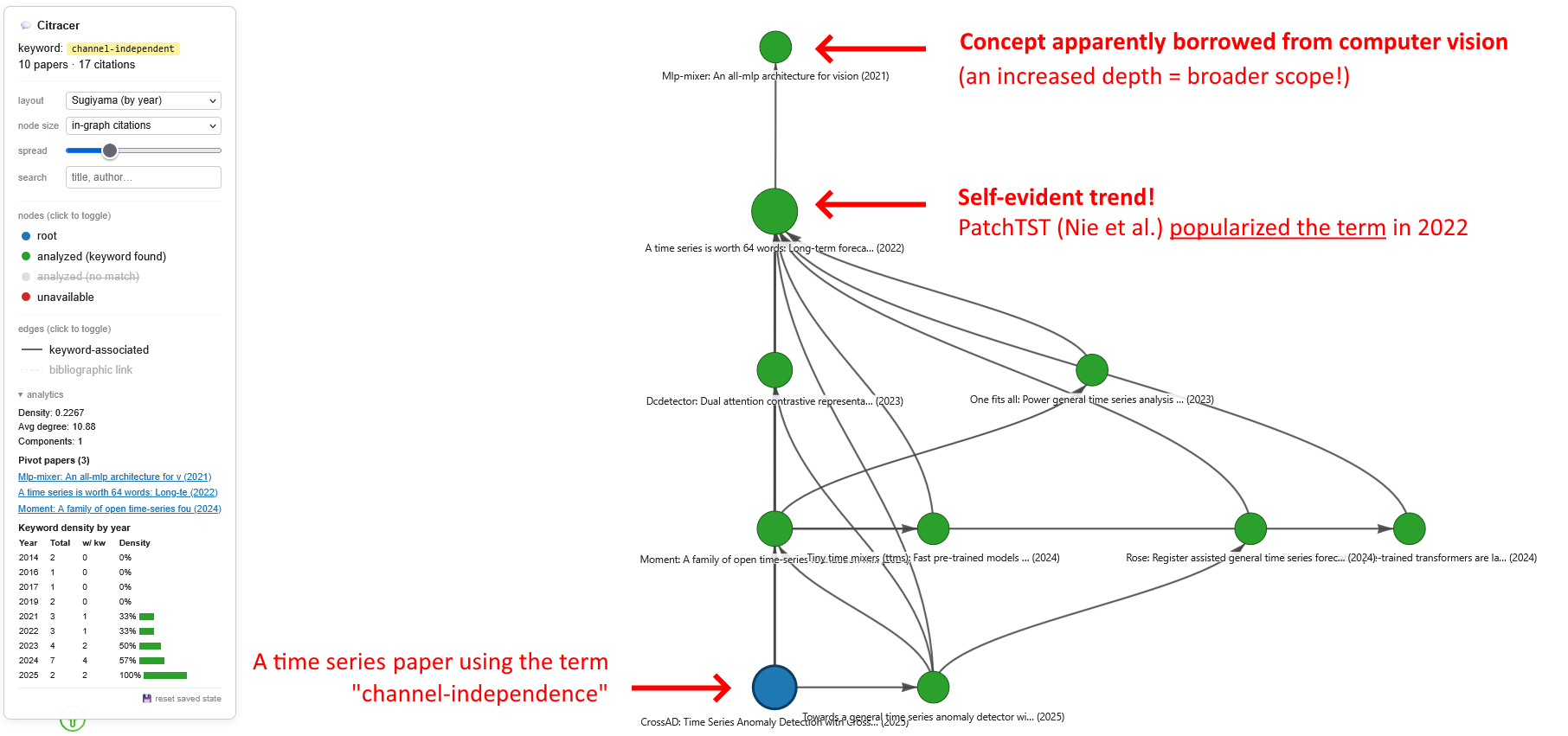
citracer answers this recursively. Give it a PDF and a keyword: it finds every sentence where the keyword appears, identifies the references cited nearby, downloads those papers, and repeats the process N levels deep. The output is an interactive citation graph you can explore in your browser. A 5-depth trace starting from a single paper typically surfaces 50-150 relevant papers in minutes.
With --semantic, matching goes beyond literal keywords: a sentence-transformer embedding model catches passages that express the same concept with different vocabulary (e.g. "univariate processing" matches a trace for "channel-independent").
With --reverse, citracer walks the other direction: "which papers cite this paper while mentioning a given concept?" This is useful for tracing how an idea spread forward through the literature.
Supported sources. citracer resolves cited papers through arXiv, Semantic Scholar, OpenReview, Sci-Hub, and Semantic Scholar's open-access PDF links (which cover PMC, publisher OA pages, and more). Preprint servers bioRxiv, medRxiv, ChemRxiv, SSRN, PsyArXiv, AgriXiv, and engrXiv are also supported. Papers that still can't be downloaded appear as
unavailablenodes, but can be enriched with metadata via OpenAlex using the--enrichflag.
[!TIP] Full documentation available at marcpinet.fr/citracer with detailed guides for each feature, export formats, and the pipeline internals.
⚙️ Installation
Requirements: Python 3.10+ and Docker.
From PyPI (recommended)
pip install citracer
docker pull lfoppiano/grobid:0.9.0
docker run --rm -p 8070:8070 lfoppiano/grobid:0.9.0

# Optional: enable semantic matching (adds ~500MB for sentence-transformers + PyTorch)
pip install citracer[semantic]
After pip install citracer, the citracer command is available globally on your PATH. You can then run it from anywhere in your terminal:
citracer --pdf paper.pdf --keyword "your keyword"
From source (for development)
git clone https://github.com/marcpinet/citracer
cd citracer
pip install -e .
docker run --rm -p 8070:8070 lfoppiano/grobid:0.9.0
GROBID must be reachable on http://localhost:8070. Verify with curl http://localhost:8070/api/isalive.
[!IMPORTANT] A Semantic Scholar API key is optional but recommended. Without one the public endpoint is throttled to ~3.5s between calls. With a key, the throttle drops to ~1.1s. Get a free key at semanticscholar.org/product/api.
The key can be provided in three ways, in order of precedence:
-
--s2-api-key <key>as a CLI flag -
S2_API_KEYenvironment variable in your shell -
A persistent user config at
~/.citracer/config.json, set once via:citracer config set-s2-key <your-key>
Other config commands:
citracer config show,citracer config get-s2-key(masked),citracer config clear-s2-key,citracer config path. The file is created with mode600on POSIX so other local users can't read it. -
A
.envfile at the project root (copy.env.exampleand fill it in):S2_API_KEY=your_key_hereThe
.envfile is git-ignored.
If none of these are set, the unauthenticated public endpoint is used as fallback (much slower, frequent 429 backoffs).
[!NOTE] Without an API key, deep traces (depth 4+) can take 10-20 minutes due to rate limiting. With a key, the same trace typically completes 3-5x faster.
An OpenAlex email is optional but recommended when using --enrich. It activates the polite pool (10 req/s vs 1 req/s anonymous). Set it once via:
citracer config set-email your@email.com
Or pass it via --email or the OPENALEX_EMAIL environment variable.
🚀 Usage
After pip install citracer the citracer command is on your PATH. The examples below use it directly. If you cloned the repo instead, use python -m citracer in place of citracer.
# From a local PDF
citracer --pdf test_data/crossad.pdf --keyword "channel-independent" --depth 5

# From an arXiv id (auto-downloads the root PDF)
citracer --arxiv 2211.14730 --keyword "self-attention"

# From a DOI or URL (arXiv, OpenReview, bioRxiv, medRxiv, SSRN)
citracer --doi 10.48550/arxiv.2211.14730 --keyword "patching"
citracer --doi 10.1016/j.isci.2018.09.017 --keyword "attention"
citracer --url https://openreview.net/forum?id=cGDAkQo1C0p --keyword "instance normalization"
citracer --url https://www.biorxiv.org/content/10.1101/2024.01.01.123456v1 --keyword "CRISPR"

# Multi-keyword tracing (union by default, --match-mode all for intersection)
citracer --pdf paper.pdf --keyword "channel-independent" --keyword "patching"

# Reverse trace: find papers that cite the source while mentioning the keyword
# in their citation context. No PDF downloads, pure S2 metadata. Limit is optional.
citracer --arxiv 2211.14730 --keyword "channel-independent" --reverse --reverse-limit 500

# Enrich unavailable nodes with metadata (abstract, citation count) via OpenAlex
citracer --pdf paper.pdf --keyword "attention" --enrich --email your@email.com

# Supply a local PDF for a node that citracer couldn't download
citracer --pdf paper.pdf --keyword "attention" --supply-pdf "doi:10.1234/foo=~/papers/foo.pdf"

# Export the graph for downstream analysis
citracer --pdf paper.pdf --keyword "..." --export out/graph.json --export out/graph.graphml

# Diff against a previous trace to highlight new papers (orange nodes)
citracer --pdf paper.pdf --keyword "attention" --diff output/old_graph.json
citracer --pdf paper.pdf --keyword "attention" --diff output/old_graph.json --since 2025
citracer --pdf paper.pdf --keyword "attention" --since 2025-06

# Semantic matching: catch conceptual matches the regex misses
# (requires: pip install citracer[semantic])
citracer --pdf paper.pdf --keyword "channel-independent" --semantic
citracer --pdf paper.pdf --keyword "attention" --semantic --semantic-threshold 0.55
Source (exactly one required)
| Flag | Description |
|---|---|
--pdf |
Path to a local source PDF |
--doi |
DOI of the source paper (e.g. 10.48550/arxiv.2211.14730). Resolved via S2 + Sci-Hub + OA links + preprint servers |
--arxiv |
arXiv id of the source paper (e.g. 2211.14730). Downloaded directly from arxiv.org |
--url |
URL of the source paper (arxiv.org, doi.org, openreview.net, biorxiv.org, medrxiv.org, ssrn.com) |
Trace options
| Flag | Default | Description |
|---|---|---|
--keyword |
required | Term (or concept) to trace through citations. By default, matches morphological variants via regex (e.g. "independent" also matches "independence", "independently"). With --semantic, also matches passages that express the same concept in different words. Repeat to trace multiple keywords at once |
--match-mode |
any |
In multi-keyword mode, any marks a paper as matched if at least one keyword is found (regex or semantic); all requires every keyword to match at least once |
--depth |
3 |
Maximum recursion depth |
--context-window |
sentence-based | If set, fall back to a ±N character window for ref association instead of sentence-based |
--consolidate |
off | Ask GROBID to consolidate each bibliographic reference against CrossRef (more accurate titles/DOIs but ~2-5s extra per PDF) |
--grobid-workers |
4 |
Number of concurrent GROBID parse requests per BFS level |
--grobid-url |
http://localhost:8070 |
GROBID service URL |
--s2-api-key |
none | Semantic Scholar API key (see Installation for priority order) |
--reverse |
off | Reverse trace: instead of walking down the source paper's bibliography, walk UP to papers that cite it. Filters citations by matching the keyword against Semantic Scholar citation contexts (the 1-2 sentences around each citation), so no PDFs are downloaded. Default --depth remains 1 in this mode |
--reverse-limit |
500 |
Max number of citing papers to fetch per level in reverse mode. Protects against runaway expansion on papers with thousands of citations |
--enrich |
off | Enable metadata enrichment via OpenAlex for nodes missing abstract, citation count, or year. Anonymous mode (1 req/s); combine with --email for 10x faster lookups |
--email |
none | Email for OpenAlex polite pool (10 req/s). Implies --enrich. Can also be set via OPENALEX_EMAIL env var or citracer config set-email |
--supply-pdf |
none | Supply a local PDF for a specific node. Format: ID=PATH where ID is the paper_id from a previous graph export (e.g. doi:10.1234/foo=paper.pdf). Repeat for multiple papers |
--diff |
none | Compare against a previous citracer JSON export and highlight new nodes (papers not in the baseline) in orange. Useful for monitoring how a citation graph evolves over time |
--since |
none | Highlight nodes published on or after this date (YYYY or YYYY-MM). Works alone (date filter) or with --diff (intersection: new AND recent). Uses S2 publicationDate for month precision when available, falls back to year |
--semantic |
off | Enable semantic matching: after the regex pass, scan remaining sentences with a sentence-transformer embedding model to catch conceptual matches the regex missed (e.g. "univariate processing" for the keyword "channel-independent"). Requires pip install citracer[semantic] |
--semantic-model |
all-mpnet-base-v2 |
Sentence-transformer model name for --semantic. Implies --semantic |
--semantic-threshold |
0.40 |
Cosine similarity threshold for semantic matching (0.0-1.0). Lower = more recall, higher = more precision. Implies --semantic |
Output
| Flag | Default | Description |
|---|---|---|
--output |
./output/graph.html |
Output HTML file |
--export |
none | Export the graph to a file. Format is derived from the extension: .json for the citracer JSON format, .graphml for the standard GraphML (Gephi, networkx, yEd). Repeat to export multiple formats |
--details |
off | Show passages directly in node tooltips |
--cache-dir |
./cache |
Local cache for PDFs and metadata (SQLite) |
--no-open |
off | Do not open the result in a browser |
-v, --verbose |
off | Verbose logging |
🎨 Output
Nodes are colored by status:
| Color | Status | Meaning |
|---|---|---|
| blue | root |
The source PDF |
| green | analyzed |
PDF retrieved and the keyword (or concept, with --semantic) was found in its text |
| gray | analyzed (no match) |
PDF retrieved and parsed, but the keyword was not found (neither by regex nor semantic matching) |
| red | unavailable |
PDF could not be retrieved |
| orange | new |
Paper not present in the --diff baseline and/or published after the --since date. Only appears when --diff or --since is used |
Edges come in two flavors:
| Style | Type | Meaning |
|---|---|---|
| solid dark | keyword-associated | Paper A cites paper B in the same sentence (or the next) as a keyword match (regex or semantic) |
| dashed blue | bibliographic link | Paper A's bibliography also references paper B, independently of any keyword match. Hidden by default, toggle via the legend |
Interactive controls
A control panel in the top-left corner of the graph lets you tune the view on the fly:
| Control | Options | Effect |
|---|---|---|
| layout | Sugiyama (by year) (default) Sugiyama (by depth) Force-directed (BarnesHut) Fruchterman-Reingold (approx) |
Switches the layout algorithm. Sugiyama-by-year places the oldest papers at the top, making it easy to spot which paper first introduced the concept |
| node size | in-graph citations (default) keyword hits PageRank betweenness |
in-graph citations scales node size with the number of incoming edges visible in the graph. keyword hits scales by the count of keyword matches (regex + semantic). PageRank and betweenness use the corresponding centrality metric computed on the citation graph |
| spread | slider (0.3× to 3.0×) | Rescales all node positions from the graph's centroid, stretching or compressing the layout without deforming it. Works with any layout mode |
| curved edges | checkbox (on by default) | Toggle between curved (cubicBezier/curvedCW) and straight edge rendering |
| Export PNG | button + scale selector (2x/3x/4x) | Export the current view as a high-resolution PNG. At 3x on a 1080p display, the output is 5760x3240 |
| Export SVG | button | Export as a vector SVG file (lossless zoom, ideal for LaTeX figures) |
| nodes (legend) | click rows to toggle | Hide/show nodes by status. When --diff or --since is used, an orange new row appears to toggle new papers |
| edges (legend) | click rows to toggle | Hide/show edges by type (keyword-associated vs. bibliographic link) |
Other interactive features:
- Hover any node → side panel updates live with title, authors, year, citation count, status, centrality metrics (PageRank, betweenness, in/out degree), a PIVOT badge for pivot papers, keyword hits (regex matches are highlighted; semantic matches show a purple SEM badge with the note "conceptual match") and a collapsible abstract section when available
- Search box in the control panel → fuzzy match by title or author, click a result to focus-and-pin the matching node
- Click a node → pins the panel; a blue border is drawn around the node to show the pinned state. The pin survives clicks on the empty canvas, hover on other nodes, and pan/zoom. It's only released by clicking the same node again, pressing the × close button on the info panel, or picking Unpin from the right-click menu
- Right-click any node → context menu with Hide (permanently hides the node until you click the "show N manually hidden" banner in the legend), Pin/Unpin, and Open link (opens the arxiv/OpenReview/DOI page in a new tab)
- Drag any node anywhere. After initial placement the layout is released, so nothing snaps back
show N morein a panel with many hits → expands the full list- LaTeX math in passages is rendered with KaTeX (
$...$,$$...$$,\(...\),\[...\]) - Automatic state persistence. Node positions, filters, pin state, dropdowns, spread slider and manually hidden nodes are all saved to
localStoragekeyed on a hash of the node-id set. A browser refresh restores the exact view you had. A new trace with a different paper set gets a fresh slate. The reset saved state link at the bottom of the legend clears everything and reloads. A 💾 icon appears next to the reset link while state is present
Bibliometric analytics
Every trace automatically computes quantitative metrics on the citation graph:
| Metric | Scope | Description |
|---|---|---|
| PageRank | per-node | Importance of a paper relative to the citation structure |
| Betweenness centrality | per-node | Identifies "bridge" papers that connect different clusters |
| In/out degree | per-node | Number of incoming/outgoing edges in the graph |
| Pivot detection | per-node | Flags the earliest keyword-matched paper (regex or semantic) in each connected component, plus high-betweenness papers with the keyword |
| Graph density | global | Ratio of actual edges to maximum possible edges |
| Avg degree | global | Mean number of connections per node |
| Connected components | global | Number of weakly connected subgraphs |
| Keyword density timeline | global | Per-year breakdown: total papers, papers with keyword, usage density |
The analytics collapsible section in the control panel shows global metrics, a clickable list of pivot papers (clicking focuses the node), and a keyword density timeline table with mini bar charts. Per-node metrics appear in the info panel when hovering or clicking a node.
All analytics are included in the JSON export ("analytics" key), the GraphML export (betweenness, pagerank, is_pivot as node attributes), and the reproducibility manifest.
Reproducibility
Every trace generates a manifest.json alongside the graph output, encoding everything needed to reproduce the exact same graph:
- citracer version, timestamp, full CLI command
- Source paper: type (pdf/doi/arxiv/url), raw input value, resolved title/DOI/arXiv ID
- Parameters: keywords, match mode, depth, context window, consolidate, reverse, enrich, GROBID URL
- Environment: Python version, platform, GROBID availability, API key/email status
- Results: node/edge counts, status breakdown, analytics summary (global metrics, timeline, pivot papers)
This allows anyone receiving a citracer graph to re-run the trace with identical settings. The manifest is also embedded in JSON exports under the "metadata" key.
🔍 How it works
-
PDF parsing. GROBID processes the PDF and returns TEI XML. citracer walks the
<body>to reconstruct the plain text while recording the character offset of every inline<ref type="bibr">citation. The bibliography is extracted from<listBibl>. Figure-diagram paragraphs (detected by their density of mathematical Unicode characters) are skipped to avoid polluting the keyword matcher. Paragraphs that GROBID splits mid-sentence around narrative citations (a common pattern around"Since Smith et al. (2020) and Jones et al. (2021) have shown...") are glued back together with a length-preserving regex so sentence-based matching still sees the refs and the keyword together. -
Inline ref recovery. GROBID occasionally misses narrative citations like
DLinear Zeng et al. (2023), especially when the author name isn't preceded by a parenthesis. A supplementary pass scans the text for canonical author-year patterns (Surname et al. (Year),Surname & Other (Year),Surname (Year)) and adds them as inline refs whenever the(surname, year)signature matches a unique bibliography entry. In typical ML papers this recovers dozens of refs per document. -
Keyword matching (regex + optional semantic). The keyword is first compiled to a flexible regex that handles morphological variants (e.g.
channel-independentmatcheschannel-independence,channel independently,channelindependence). The body is segmented into sentences with pysbd, and each occurrence of the keyword is associated with the references cited in the same sentence or the immediately following one. When--semanticis enabled, a second pass scans every sentence the regex didn't match using a sentence-transformer embedding model: sentences whose embedding is close enough to the keyword (cosine similarity above the threshold) are added as additional hits. This catches conceptual matches where the idea is expressed with entirely different vocabulary (for example, tracing "channel-independent" also surfaces passages about "decoupled cross-channel correlations" or "per-variate processing"). Regex hits and semantic hits are unioned, so--semanticonly adds recall without losing any existing matches. -
Reference resolution. Each cited paper is resolved through the following cascade:
- If GROBID extracted a DOI or arXiv ID, use it directly.
- Otherwise, search arXiv by title (phrase first, then keyword fallback, with rapidfuzz validation).
- If arXiv has nothing, query Semantic Scholar with 429-aware backoff (also retrieves citation count and open-access PDF URL).
- As a last resort, search OpenReview (covers ICLR/TMLR papers not on arXiv).
- If
--enrichis set, query OpenAlex for missing metadata (abstract, citation count, OA URL).
PDF download cascade (in order): user-supplied PDF (
--supply-pdf) > arXiv > OpenReview > Sci-Hub (by DOI, tries multiple mirrors) > S2 open-access URL (covers PMC, publisher OA, bioRxiv, medRxiv, etc.) > preprint-specific download (bioRxiv, medRxiv, ChemRxiv, SSRN, PsyArXiv, AgriXiv, engrXiv).All resolved PDFs and metadata are cached in
./cache/. -
Recursion. The tracer is a BFS that processes papers in queue order. Each level's PDFs are parsed in parallel via a thread pool (
--grobid-workers, default 4), and the reference resolves inside a single paper are also parallelized. Deduplication uses a canonical ID (DOI > arXiv > OpenReview > title hash). When the same PDF is reached via a second path, the new edge is added without re-parsing. Years from bibliography entries can backfill a node's year when older (e.g. a preprint v1 2022 takes precedence over a publication year 2023), but only within a ±2 year window of the first year we ever saw for that node. This prevents cascading from parser mistakes. -
Cross-graph bibliographic links. After the recursive trace is complete, a post-processing pass scans every parsed paper's bibliography against every other node in the graph and adds dashed "bibliographic link" edges for pairs that cite each other but not in the keyword's neighborhood. Matching is exact on DOI/arXiv IDs and fuzzy (rapidfuzz, threshold 88) on titles. No external API calls are needed: everything runs on the already-in-memory graph, so the cost is negligible.
-
Bibliometric analytics. After the trace completes, citracer computes per-node centrality metrics (PageRank, betweenness) and graph-wide statistics (density, connected components, keyword density timeline) using networkx. Pivot papers (the earliest keyword-matched paper in each connected component, plus high-betweenness nodes with the keyword) are automatically flagged. A reproducibility manifest (
manifest.json) is written alongside the graph, encoding the full trace parameters, environment, and results. -
Rendering. The graph is serialized to an interactive HTML page using pyvis, with a custom overlay providing the layout/size/spread controls, the legend filters, the side info panel, keyword highlighting, and KaTeX math.
Reverse trace mode (--reverse)
The forward algorithm walks DOWN from a root paper into its bibliography. --reverse walks UP: "who cites this paper, and which of them mention the keyword in their citation context?".
The key trick is that Semantic Scholar's /paper/{id}/citations endpoint returns a contexts field for each citing paper: an array of 1-2 sentence snippets around every place that paper cites the source. We apply the same morphological keyword regex to those snippets locally. A paper whose citation contexts don't contain the keyword is rejected without downloading anything. A paper with a matching context is added to the graph with the snippet as its keyword_hits, plus its title/authors/year/arxiv-id from S2 metadata. No GROBID call, no arXiv download. (--semantic is not available in reverse mode because the snippets are too short for reliable embedding-based matching.)
For a paper with 2000+ citations, this runs in ~10-30 seconds and typically surfaces 20-100 relevant papers, depending on how specific the keyword is.
[!WARNING] Deep recursion (
--depth > 2) in reverse mode can expand combinatorially. Each level multiplies the number of S2 API calls. Use--reverse-limitto cap growth.
Caveats: reverse trace depends entirely on S2 being reachable and having indexed the citation contexts (they come from S2's own PDF processing pipeline). Papers S2 doesn't know about won't appear. The resulting graph has no cross-graph bibliographic links because we never parse the citing papers' bibliographies.
Semantic matching (--semantic)
The default regex handles morphological variants (e.g. channel-independent matches channel-independence, channel independently) but misses papers that express the same concept with different vocabulary: "univariate processing", "per-channel modeling", "decoupled channel correlations".
--semantic adds a second pass after the regex: every sentence the regex didn't already match is embedded with a sentence-transformer model (default: all-mpnet-base-v2, ~420MB) and compared to the keyword by cosine similarity. Sentences above the threshold (default 0.40) are added as additional hits. The result is a union: all regex matches plus any conceptual matches the embedding caught.
pip install citracer[semantic]
citracer --pdf paper.pdf --keyword "channel-independent" --semantic
Semantic hits appear in the info panel with a purple SEM badge labeled "conceptual match", so the user can distinguish them from regex hits at a glance. The header also shows a breakdown (e.g. "7 keyword hit(s) (5 regex + 2 semantic)").
--semantic-model NAME switches to a different model (e.g. all-MiniLM-L6-v2 for a lighter 80MB alternative). --semantic-threshold T tunes the similarity cutoff. Both flags imply --semantic.
[!CAUTION]
--semanticadds ~500MB of dependencies (sentence-transformers + PyTorch). The first model load takes 5-10 seconds, then stays cached in memory. Not available in reverse trace mode.
Literature monitoring (--diff / --since)
Citracer can compare a new trace against a previous one to highlight what changed. This turns a one-shot snapshot into a monitoring workflow:
# Initial trace - export a baseline
citracer --pdf paper.pdf --keyword "attention" --depth 3 --export baseline.json

# Months later - re-run the same trace and diff
citracer --pdf paper.pdf --keyword "attention" --depth 3 --diff baseline.json
Nodes that weren't in baseline.json are colored orange and labeled NEW in the info panel. Their original status (analyzed, no match, unavailable) is preserved; the orange overlay is purely visual. The legend gains a clickable new (since last run) row to toggle them on/off.
--since YYYY or --since YYYY-MM highlights nodes published on or after a date. When combined with --diff, both conditions must be met (intersection): the paper must be absent from the baseline and published after the given date.
Month-level precision uses the publicationDate field from Semantic Scholar (YYYY-MM-DD) when available. When only the publication year is known, --since 2024-06 falls back to a year-only comparison (year >= 2024). Nodes with no known date are skipped and a warning is logged.
Both is_new flags (on nodes and edges) are included in JSON and GraphML exports, so downstream scripts can consume the diff without re-running citracer.
[!WARNING]
paper_idis not fully stable across runs. If a paper was resolved by title hash in one run and by DOI in another, it may falsely appear as "new". Re-running both traces from the same cache directory minimizes this.
📁 Project structure
citracer/
├── cli.py                  # argparse entry point + GROBID health check + .env loader
├── pdf_parser.py           # GROBID + TEI walking + figure-noise filter + paragraph merge + narrative ref supplementation + pymupdf fallback
├── keyword_matcher.py      # morphological regex + sentence-based ref association (pysbd)
├── reference_resolver.py   # arXiv-first cascade resolver (arxiv → S2 → OpenReview → Sci-Hub → OA → preprints) with SQLite cache
├── source_resolver.py      # routes --pdf / --doi / --arxiv / --url inputs to a local PDF path
├── preprint_resolver.py    # maps DOIs to preprint server PDF URLs (bioRxiv, medRxiv, ChemRxiv, SSRN, PsyArXiv, AgriXiv, engrXiv)
├── metadata_enrichment.py  # OpenAlex API client for enriching nodes with abstract, citation count, and OA URLs
├── metadata_cache.py       # SQLite-backed key/value store for resolver metadata, thread-safe
├── analytics.py            # bibliometric metrics: PageRank, betweenness, pivot detection, timeline
├── cross_citation.py       # post-trace pass that adds dashed bibliographic-only edges between graph nodes
├── diff.py                 # --diff / --since: compare against a previous trace, mark new nodes/edges
├── tracer.py               # BFS recursion with parallel parsing, deduplication, year anchoring
├── visualizer.py           # pyvis rendering pipeline
├── exporter.py             # GraphML / JSON export (includes analytics and manifest)
├── manifest.py             # reproducibility manifest generation
├── models.py               # dataclasses
├── api_types.py            # TypedDicts for arxiv / Semantic Scholar / OpenReview / OpenAlex payloads
├── constants.py            # every tunable threshold and timeout, in one place
├── user_config.py          # persistent user-level config (~/.citracer/config.json)
├── utils.py                # ID normalization, hashing, tqdm-safe logging setup
└── templates/
    └── overlay.html.tmpl   # the interactive control panel (HTML/CSS/JS) injected into the pyvis output
🧩 Dependencies
| Package | Used for |
|---|---|
| GROBID | PDF structural parsing (external service) |
| lxml | TEI XML processing |
| pymupdf | PDF text extraction (parser fallback) |
| arxiv | arXiv search and download |
| pysbd | Sentence boundary detection |
| pyvis | Interactive HTML graph rendering |
| rapidfuzz | Fuzzy title matching |
| networkx | Graph analytics (centrality, components, PageRank) |
| requests | HTTP client |
| tqdm | Progress bar |
| python-dotenv | Loading the Semantic Scholar key from a .env file |
| sentence-transformers | Semantic matching via sentence embeddings (optional: pip install citracer[semantic]) |
| KaTeX | LaTeX math rendering in the HTML output (CDN) |
| vis-network | Interactive network rendering (via pyvis, CDN) |
External APIs:
- arXiv API
- Semantic Scholar Graph API
- OpenReview API
- OpenAlex API (metadata enrichment, opt-in via
--enrich) - Sci-Hub (paywall bypass for PDF download)
- Preprint servers: bioRxiv, medRxiv, ChemRxiv, SSRN, PsyArXiv, AgriXiv, engrXiv (PDF download via DOI detection)
⚠️ Limitations
- GROBID misclassifies a small fraction of references, in particular sub-citations with letter suffixes like
Liu et al., 2024b, which the supplementation pass can't disambiguate. These are silently dropped. - The narrative-citation supplementation pass skips ambiguous
(surname, year)signatures (e.g. two different Zhou 2022 papers in the bibliography). These missed cases are rare but do happen in survey-heavy papers. - pysbd handles most academic abbreviations but can occasionally split mid-sentence; falling back to
--context-window 300is sometimes useful. - arXiv enforces ~3 seconds between requests, so the first run on a deep trace can take several minutes. The local cache makes subsequent runs fast.
- Papers that cannot be resolved through any source in the download cascade (arXiv, OpenReview, Sci-Hub, S2 open-access, preprint servers) appear as
unavailablered nodes. Books and some workshop proceedings are typically not retrievable. Use--supply-pdfto provide PDFs manually for these nodes. - The "Fruchterman-Reingold" layout option is implemented via vis.js's
forceAtlas2Basedsolver, which is the closest approximation available natively. A proper Kamada-Kawai implementation isn't offered because vis.js doesn't ship one. --semanticmatching depends on the quality of the sentence-transformer model. The defaultall-mpnet-base-v2was benchmarked at F1=0.93 on academic citation text (vs 0.86 forall-MiniLM-L6-v2). Domain-specific keywords may benefit from threshold tuning. Semantic matching is not available in reverse trace mode.
🧪 Development
pip install -r requirements-dev.txt
pytest tests/ -v
The test suite is hermetic, with no GROBID and no network. GROBID output is
exercised via a pre-baked TEI fixture in tests/fixtures/sample.tei.xml,
and every external API (arXiv, Semantic Scholar, OpenReview, PDF downloads)
is mocked. Runs in under a second.
CI runs the suite on Python 3.10 / 3.11 / 3.12 via GitHub Actions on every
push to main, every pull request, and on manual dispatch from the Actions
tab. See .github/workflows/tests.yml.
📖 Citation
If you use citracer in your research, please cite it as:
@software{pinet2026citracer,
  author       = {Pinet, Marc},
  title        = {citracer: Keyword and Concept-Driven Citation Graph Tracer},
  year         = {2026},
  url          = {https://github.com/marcpinet/citracer},
  note         = {Python package available at \url{https://pypi.org/project/citracer/}}
}
✍️ Authors
- Marc Pinet - Initial work - marcpinet
Release history Release notifications | RSS feed


Download files
Download the file for your platform. If you're not sure which to choose, learn more about installing packages.
Source Distribution
Built Distribution
Filter files by name, interpreter, ABI, and platform.
If you're not sure about the file name format, learn more about wheel file names.
Copy a direct link to the current filters
File details
Details for the file citracer-1.5.0.tar.gz.
File metadata
- Download URL: citracer-1.5.0.tar.gz
- Upload date:
- Size: 134.5 kB
- Tags: Source
- Uploaded using Trusted Publishing? No
- Uploaded via: twine/6.2.0 CPython/3.10.20
File hashes
| Algorithm | Hash digest | |
|---|---|---|
| SHA256 |
893341f067bc4734e77f0f450848b2b569694b1d8636a0a1d07d1e40458e7bca
|
|
| MD5 |
1e7f880bc6d09c616e8430232ebe1582
|
|
| BLAKE2b-256 |
93a9fc421fc5664807a1ee0f83ec21820ca87338f39f81ebb3bfbed512ff82ff
|
File details
Details for the file citracer-1.5.0-py3-none-any.whl.
File metadata
- Download URL: citracer-1.5.0-py3-none-any.whl
- Upload date:
- Size: 98.2 kB
- Tags: Python 3
- Uploaded using Trusted Publishing? No
- Uploaded via: twine/6.2.0 CPython/3.10.20
File hashes
| Algorithm | Hash digest | |
|---|---|---|
| SHA256 |
2ccdadec18402a82a80c734e533baf74b097fc9346b6bb041123f2224c5e900a
|
|
| MD5 |
26370636a7c389cf2bc0300885df97d5
|
|
| BLAKE2b-256 |
ec4d7cc4f659a015cf767eb47fa8714bcdb048082e4f458218be7344ed833a23
|






