
Citronella


webdriver extension with a page object wrapper.

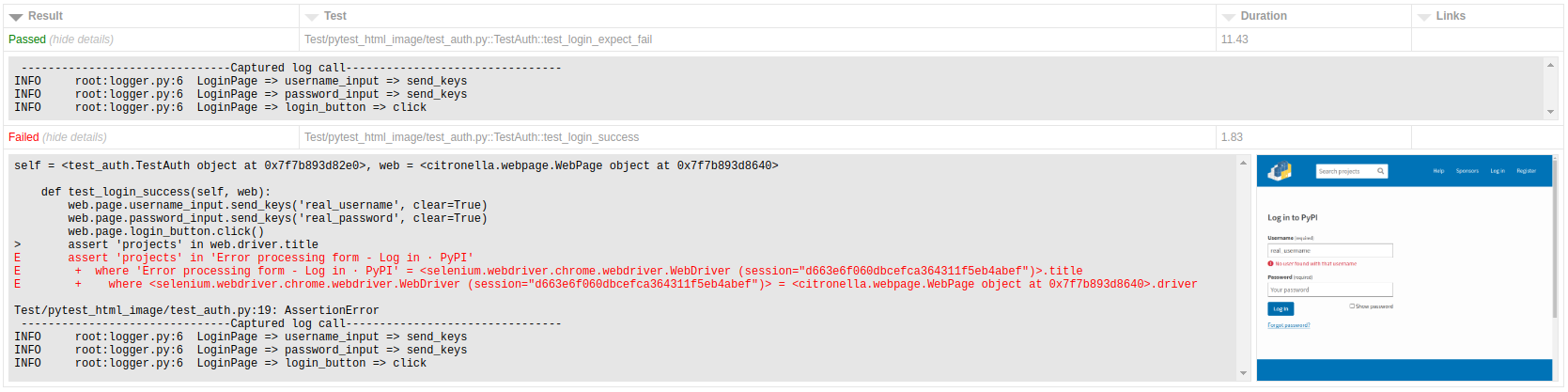
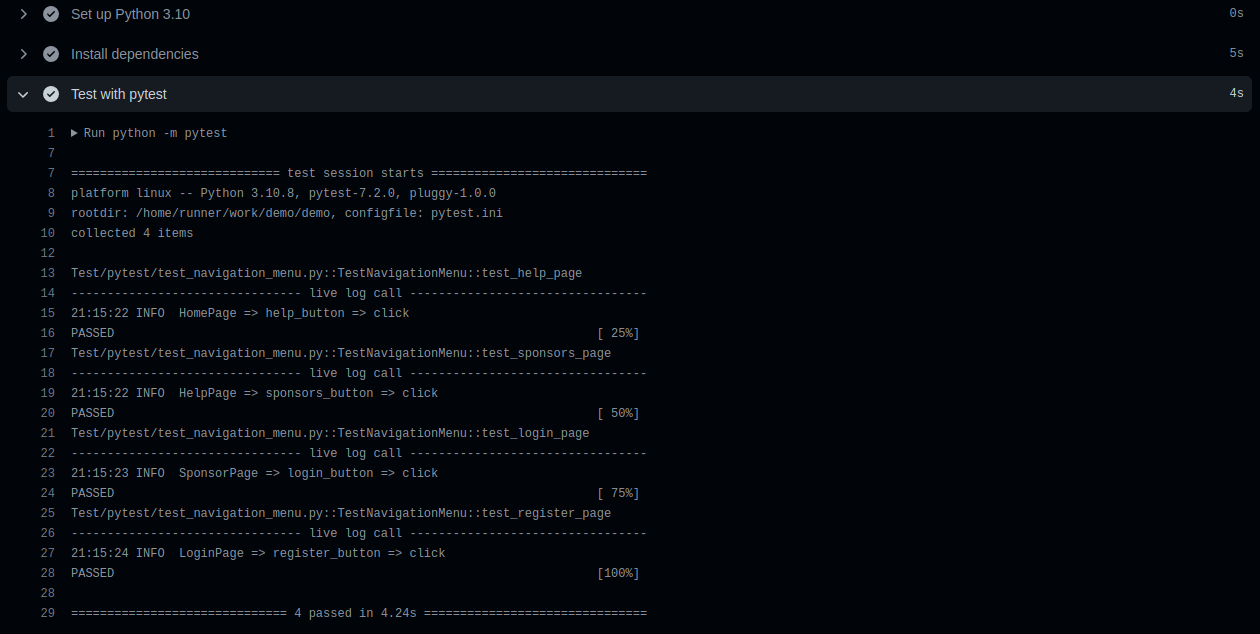
Example Tests
Selenium
import pytest
from Pages.contents_page import ContentsPage


class TestNavigationMenu:

    def test_help_page(self, web):
        web.driver.get('https://pypi.org/')
        web.page = ContentsPage

        web.page.home_page.help_button.click()
        assert 'Help' in web.driver.title

    def test_sponsors_page(self, web):
        web.page.help_page.sponsors_button.click()
        assert 'Sponsors' in web.driver.title

    def test_login_page(self, web):
        web.page.sponsors_page.login_button.click()
        assert 'Log' in web.driver.title

    def test_register_page(self, web):
        web.page.login_page.register_button.click()
        assert 'Create' in web.driver.title
Appium
import pytest
from Pages.contents_page import ContentsPage


class TestInput:

    def test_input(self, web):
        web.page = ContentsPage
        web.page.home_page.gallery_button.click()
        web.page.gallery_page.text_input.send_keys('citronella')
        web.page.gallery_page.add_button.click()
        elements = web.page.gallery_page.text_lists.get_elements()
        assert 'citronella' in [x.text for x in elements]
Even though this module is mainly designed for the page object model, it can also be used without it for quick prototyping or mockups, etc.
from selenium import webdriver
from selenium.webdriver.common.by import By
from citronella import WebPage


driver = webdriver.Chrome()

web = WebPage(driver, webdriver_wait=20, logger=False)
web.driver.get('https://pypi.org/')

web.locate(By.ID, 'search').get_element().send_keys('citronella')
web.locate(By.XPATH, '//button[@type="submit"]/i').get_element().click()

elements = web.locate(By.XPATH, '//span[@class="package-snippet__name"]')
if elements.ec_visibility_of_all_elements_located():
    results = elements.get_elements()
    text_lists = [x.text for x in results]
Install Package
pip install citronella
Documentation
There are only two modules import in this package:
- The first module is for conftest.py.
Selenium
import pytest
from selenium import webdriver
from citronella import WebPage


@pytest.fixture(autouse=True, scope='class')
def web(request):
    driver = webdriver.Chrome()
    yield WebPage(driver)
    driver.quit()
Appium
import pytest
import os
from appium import webdriver
from appium.options.android import UiAutomator2Options
from citronella import WebPage


@pytest.fixture(autouse='true', scope='class')
def web(request):
    options = UiAutomator2Options()
    options.platformName = 'Android'
    options.app = os.getcwd() + '/APK/ApiDemos-debug.apk.zip'
    driver = webdriver.Remote('http://127.0.0.1:4723/wd/hub', options=options)
    yield WebPage(driver)
    driver.quit()
- The second module are for the page object model.
Selenium
from selenium.webdriver.common.by import By
from citronella import ui
from Pages.components import Header


class HomePage(Header):

    def some_button(self):
        return ui(By.XPATH, '//a[@name="foo"]')

    def search_input(self):
        return ui(By.ID, 'search')

    def search_button(self):
        return ui(By.NAME, 'search-button')
Appium
from appium.webdriver.common.appiumby import AppiumBy
from citronella import ui
from Pages.components import Header


class HomePage(Header):

    def some_button(self):
        return ui(AppiumBy.XPATH, '//a[@name="foo"]')

    def search_input(self):
        return ui(AppiumBy.ACCESSIBILITY_ID, 'search')

    def search_button(self):
        return ui(AppiumBy.ID, 'search-button')
Page Object Design / Strategy
There's a two ways to create a page object for WebPage:
- Straightforward approach: This method requires importing the page object for each test.
from selenium import webdriver
from selenium.webdriver.common.by import By
from citronella import WebPage, ui


class HomePage:
    def auth_buton(self):
        return ui(By.XPATH, '//a[@name="foo"]')

class LoginPage:
    def email_input(self):
        return ui(By.ID, 'email')

    def password_input(self):
        return ui(By.ID, 'password')

    def login_buton(self):
        return ui(By.ID, 'login')

driver = webdriver.Chrome()
web = WebPage(driver)
web.driver.get('https://foobarbaz.com/')
web.page = HomePage
web.page.auth_button.click()
web.page = LoginPage
web.page.email_input.send_keys('foo')
web.page.password_input.send_keys('bar')
web.page.login_button.click()
- Lazy loading approach: This method is slightly more complex but offers the benefit of lazy loading. see ContentsPage example or this Page object example
from selenium import webdriver
from selenium.webdriver.common.by import By
from citronella import WebPage, ui


class ContentsPage:
    def home_page(self):
        return HomePage

    def login_page(self):
        return LoginPage

class HomePage:
    def auth_buton(self):
        return ui(By.XPATH, '//a[@name="foo"]')

class LoginPage:
    def email_input(self):
        return ui(By.ID, 'email')

    def password_input(self):
        return ui(By.ID, 'password')

    def login_buton(self):
        return ui(By.ID, 'login')

driver = webdriver.Chrome()
web = WebPage(driver)
web.driver.get('https://foobarbaz.com/')
web.page = ContentsPage
web.page.home_page.auth_button.click()
web.page.login_page.email_input.send_keys('foo')
web.page.login_page.password_input.send_keys('bar')
web.page.login_page.login_button.click()
Usage
citronella.WebPage
Args:
- driver / webdriver
Kwargs (optional):
- webdriver_wait
number(seconds), default value is10 - logger
bool, default value isTrue
Method Lists:
| Method Name | Args* | Kwargs** | Note |
|---|---|---|---|
| driver | - | - | return selenium webdriver object |
| locate | by, value | - | similar asdriver.get_element as input & return citronella.WebUi object |
| page | page object | - | setter |
| page | - | - | getter |
| webdriver_wait | number(sec) | - | |
| ready_state | number(sec) | - | execute javascript document.readyState manually, default timeout is 30 |
| sleep | number(sec) | - |
citronella.ui / citronella.WebUi
Args:
- by
- value
Method Lists:
| Method Name | Args* | Kwargs** | Note |
|---|---|---|---|
| send_keys | text | clear bool, return_key bool |
|
| click | - | - | |
| get_element | - | - | |
| get_elements | - | - | |
| ec_element_to_be_clickable | - | - | wrapper of EC / excpected_condition |
| ec_presence_of_element_located | - | - | wrapper of EC / excpected_condition |
| ec_presence_of_all_elements_located | - | - | wrapper of EC / excpected_condition |
| ec_visibility_of_element_located | - | - | wrapper of EC / excpected_condition |
| ec_visibility_of_all_elements_located | - | - | wrapper of EC / excpected_condition |
| ec_visibility_of_any_elements_located | - | - | wrapper of EC / excpected_condition |
| ec_invisibility_of_element_located | - | - | wrapper of EC / excpected_condition |
| ec_element_located_to_be_selected | - | - | wrapper of EC / excpected_condition |
Testing powered by

1 maintainer

Release files for citronella 1.0.1
For a detailed explanation of source distributions (sdists) and built distributions (wheels), please see the package formats documentation.
Source distribution (sdist)
| File | Size | Uploaded | |
|---|---|---|---|
| citronella-1.0.1.tar.gz | 9.9 kB | Details |
Built distribution (wheel)
| File | Interpreter | ABI | Platform | Reset |
|---|---|---|---|---|
| citronella-1.0.1-py3-none-any.whl | Python 3 | none | any | Details |
Total release size: 22.8 kB
Release files / citronella-1.0.1.tar.gz
| Download URL | citronella-1.0.1.tar.gz |
|---|---|
| Size | 9.9 kB |
| Tags | Source |
|
SHA-256 checksum How to use checksums |
6a0abdd1db01a2c683802d2f2857a7f22a219b92870e5fa26280da854301e209
|
|
BLAKE2b-256 checksum How to use checksums |
b2403808891e6374218157dbb28232177be085c4648dc333a5cf43d22d89f92d
|
| Upload date | |
|
Uploaded using Trusted Publishing? What is trusted publishing? |
No |
| Uploaded via |
twine/4.0.2 CPython/3.11.3
|
Release files / citronella-1.0.1-py3-none-any.whl
| Download URL | citronella-1.0.1-py3-none-any.whl |
|---|---|
| Size | 12.9 kB |
| Tags | Python 3 |
|
SHA-256 checksum How to use checksums |
04ec3fe4355875fb24ac0cd0b4751c50aaad6d3e7f2169b595bee06ede99820a
|
|
BLAKE2b-256 checksum How to use checksums |
138e6d546822917c5cd349482a15301ac4b5d059cfa620c6783c8bb9e5a7fafc
|
| Upload date | |
|
Uploaded using Trusted Publishing? What is trusted publishing? |
No |
| Uploaded via |
twine/4.0.2 CPython/3.11.3
|














