

Citry: a fully typed frontend framework for Python






Citry is a fully typed frontend framework for Python with server events and Alpine.js. One component can own its HTML, browser behavior, CSS, translations, and Python event handlers, so you can build an interactive interface without maintaining a separate frontend application. It is inspired by Vue and Livewire.
Citry works with FastAPI, Django, Flask, Starlette, ASGI, and WSGI applications.
Citry 0.4 is the public beta. It supports Python 3.10 through 3.14.
Read the docs · Try the playground · Explore examples · Install the VS Code extension · Browse Citry UI
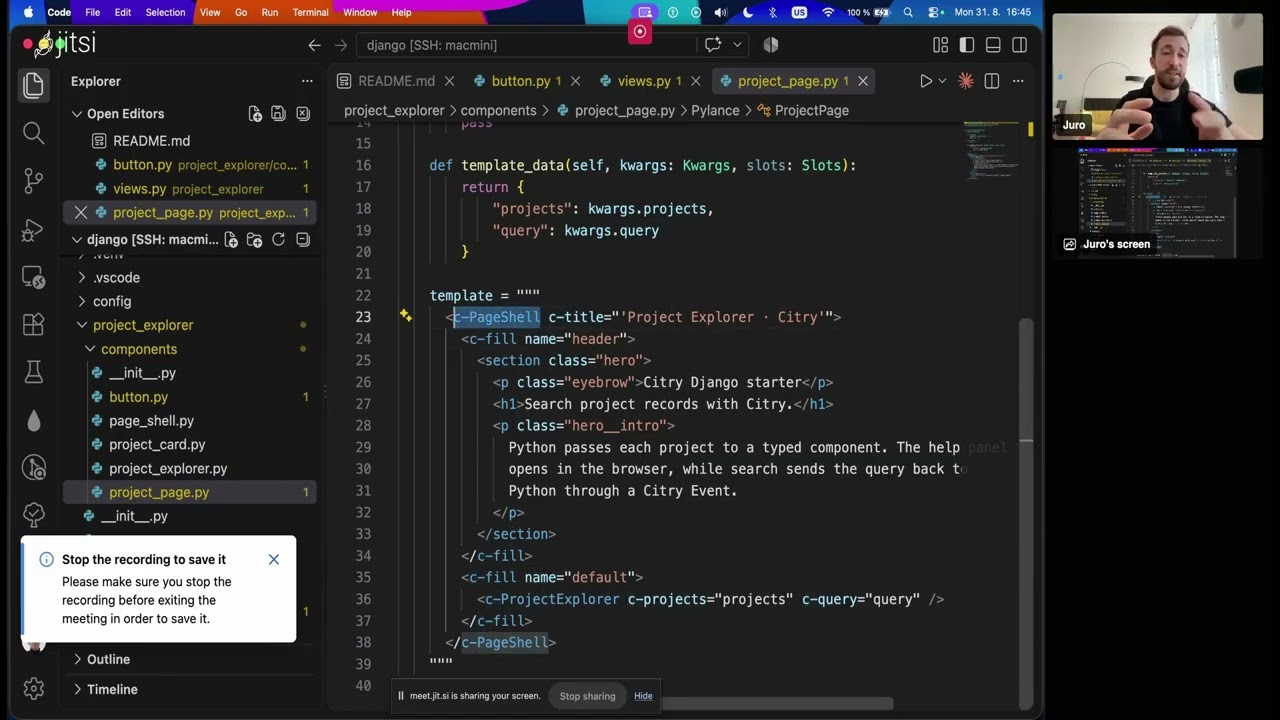
Watch the tutorial:
Start with one component
Install Citry:
python -m pip install citry
Or add it to a uv project:
uv add citry
Define a component in ordinary Python. Typed inputs catch misspellings and
missing values, while template_data() chooses exactly what the template can
read:
from citry import Component


class Welcome(Component):
    class Kwargs:
        name: str
        messages: list[str]

    def template_data(self, kwargs, slots):
        return {
            "name": kwargs.name,
            "messages": kwargs.messages,
        }

    def css_data(self, kwargs, slots):
        return {"accent": "tomato"}

    template = """
      <section class="welcome">
        <h1>Welcome back, {{ name }}!</h1>
        <ul>
          <li c-for="message in messages">
            {{ message }}
          </li>
          <li c-empty>Nothing new yet.</li>
        </ul>
      </section>
    """

    css = """
      .welcome {
        border-top: 3px solid var(--accent);
      }
    """


html = str(
    Welcome(
        name="Ada",
        messages=["Build finished", "Report ready"],
    )
)
Components compose through HTML-like tags. Static inputs look like ordinary
HTML attributes; prefix an input with c- when its value is a Python
expression:
<main>
  <c-Welcome name="Ada" c-messages="user.inbox" />
</main>
That is most of the template language:
<c-Name>renders a component or a built-in control-flow tag.- A
c-attribute evaluates a Python expression.
Continue with the step-by-step tutorial or read the template syntax guide.
Build the whole interface in Python
Citry gives each part of an interface a clear home:
| What you need | What Citry provides |
|---|---|
| Reusable UI | Components, typed inputs, slots, composition, and error boundaries |
| Browser behavior | Alpine expressions, component JavaScript, CSS, and managed assets |
| Python interactions | Server events, forms, persistent State, and targeted HTML updates |
| Internationalization | Fluent catalogs, locale-aware formatting, and server/browser translations |
| Production control | Caching, HTML fragments, strict CSP support, CSRF hooks, and debug tooling |
| Editor help | Highlighting, completion, navigation, diagnostics, and safe formatting |
Learn these features through the component guides, Events documentation, and advanced guides.
Need ready-made application components? Install Citry UI for accessible forms, dialogs, navigation, feedback, data display, theming, and translated default labels:
python -m pip install citry-ui
Connect a web application
Mount Citry on the web framework that already serves your application. For example, with FastAPI or Starlette:
from citry import citry
from citry.contrib.fastapi import mount


mount(app, citry)
citry.initialize()
Citry includes adapters for:
| Host | Integration |
|---|---|
| FastAPI / Starlette | citry.contrib.fastapi.mount() |
| Django | citry.contrib.django.urlpatterns() |
| Flask | citry.contrib.flask.mount() |
| Any ASGI application | citry.contrib.asgi.asgi_app() |
| Any WSGI application | citry.contrib.wsgi.wsgi_app() |
The web-framework guide shows the right startup and routing setup for each host.
Want a complete project instead of an integration excerpt? Copy the FastAPI starter or choose from the standalone, Django, Flask, ASGI, and WSGI starter matrix. The collection also includes complete Project Board and HTMX integration demos. Each project has its own dependencies, lockfile, and tests. Every web starter includes a browser interaction powered by Citry Events. The HTMX demo uses HTMX for every request and page update.
Use the editor and command line
The free Citry extension for VS Code understands the HTML, Python, JavaScript, CSS, and Fluent inside a component. It provides completion, hover help, navigation, references, diagnostics, and safe formatting. The same extension is available from Open VSX.
Citry also installs a command-line checker:
citry check --static
Point it at an application for registered component contracts and template data:
citry --app myproject.app:citry_app check
See the VS Code guide and CLI reference for setup and CI usage.
Work with a coding agent
Point your agent at Citry's documentation index and your project's setup and test commands. The AI coding agents guide includes instructions for existing projects and explains the agent files included in the current starter projects. You do not need to install a Citry skill.
Performance
The current benchmark renders a large project page using Citry's documented performance optimizations:
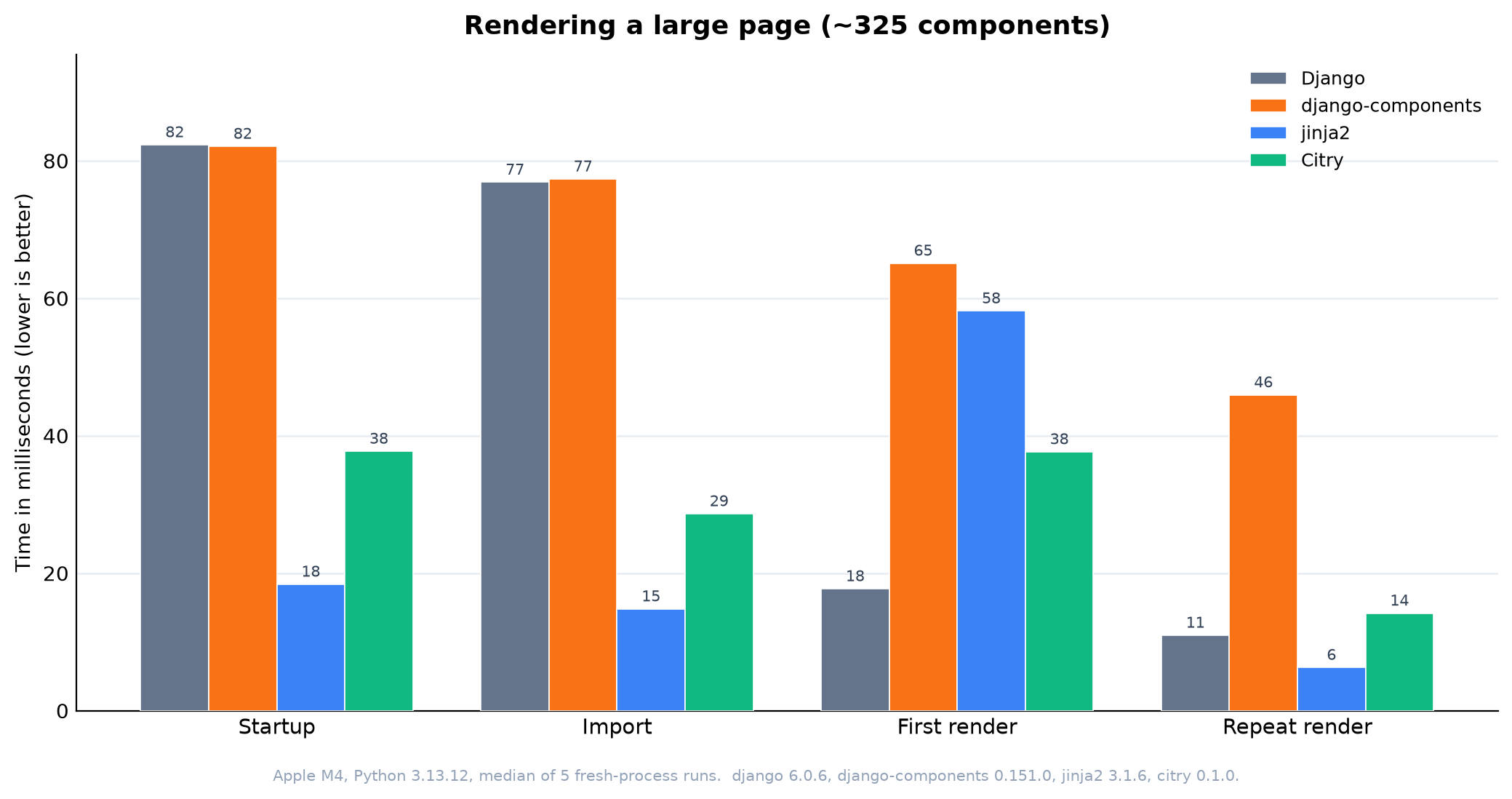
* Citry uses simple and pure optimizations. See the
performance optimization guide.
- Citry takes 24.62 ms warmed, about 55% less time than django-components on this workload.
- Button, Icon and HeroIcon use
simple = True, giving up independent component identity and hooks while keeping their data callbacks live. - Django takes 11.67 ms warmed and Jinja2 7.21 ms. The scenarios emit different output and perform different component and browser-support work.
These are relative results from one machine. Read the published benchmark for the chart and interpretation, or the benchmark repository guide to reproduce it.
Get help and contribute
- Documentation
- Examples
- API reference
- Release notes
- Discord
- GitHub Discussions
- Issue tracker
- Contributing guide
- Sponsor Citry
Citry continues the component work begun in django-components and django-components/djc-core.
License
1 maintainer

Metadata
1 maintainer
Release files for citry 0.5.1
For a detailed explanation of source distributions (sdists) and built distributions (wheels), please see the package formats documentation.
Source distribution (sdist)
| File | Size | Uploaded | |
|---|---|---|---|
| citry-0.5.1.tar.gz | 1.7 MB | Details |
Built distribution (wheel)
| File | Interpreter | ABI | Platform | Reset |
|---|---|---|---|---|
| citry-0.5.1-py3-none-any.whl | Python 3 | none | any | Details |
Total release size: 2.8 MB
Release files / citry-0.5.1.tar.gz
| Download URL | citry-0.5.1.tar.gz |
|---|---|
| Size | 1.7 MB |
| Tags | Source |
|
SHA-256 checksum How to use checksums |
dadabd75aaf4807092557b37caa6aa2dbb709abce9d147bc42545c78d1fc83ef
|
|
BLAKE2b-256 checksum How to use checksums |
4230f87edbeafa8d8675b1a3300b5b54565a4b3b2d8935a57551539f201c9f32
|
| Upload date | |
|
Uploaded using Trusted Publishing? What is trusted publishing? |
Yes |
| Uploaded via |
twine/7.0.0 CPython/3.13.14
|
Provenance
Provenance describes where a file came from. On PyPI, provenance is shared via attestations, which provide a verifiable record of the build or publishing details. View details, limitations and caveats.


PyPI Publish Attestation
PyPI verified that this artifact, at this checksum, originated from the publisher listed below.
Signed by GitHub Actions, verified by PyPI on Sep 11, 2026.
Transparency logRelease files / citry-0.5.1-py3-none-any.whl
| Download URL | citry-0.5.1-py3-none-any.whl |
|---|---|
| Size | 1.1 MB |
| Tags | Python 3 |
|
SHA-256 checksum How to use checksums |
b0562e6bf3ef631a34e0422a7aee7e07f050937a3a66a7759522c3b4aa14de0a
|
|
BLAKE2b-256 checksum How to use checksums |
bce418a81ccc2b895c04ca1703ee2e1d811c690f646549f695a8959a96f0a671
|
| Upload date | |
|
Uploaded using Trusted Publishing? What is trusted publishing? |
Yes |
| Uploaded via |
twine/7.0.0 CPython/3.13.14
|
Provenance
Provenance describes where a file came from. On PyPI, provenance is shared via attestations, which provide a verifiable record of the build or publishing details. View details, limitations and caveats.
PyPI Publish Attestation
PyPI verified that this artifact, at this checksum, originated from the publisher listed below.
Signed by GitHub Actions, verified by PyPI on Sep 11, 2026.
Transparency log













