
A Python library for Geospatial Graph Neural Networks and GeoAI for Urban Analytics with PyTorch Geometric. Convert geospatial data to graphs for spatiotemporal analysis, urban mobility studies, and more.
Verified details
These details have been verified by PyPIProject links
GitHub Statistics
Maintainers

Project description
city2graph: GeoAI with Graph Neural Networks (GNNs) and Spatial Network Analysis
city2graph is a Python library for converting geospatial datasets into graph representations, providing an integrated interface for GeoPandas, NetworkX, and PyTorch Geometric across multiple domains (e.g. streets, transportations, OD matrices, POI proximities, etc.). It enables researchers and practitioners to seamlessly develop advanced GeoAI and geographic data science applications. For more information, please visit the documentation.








Features
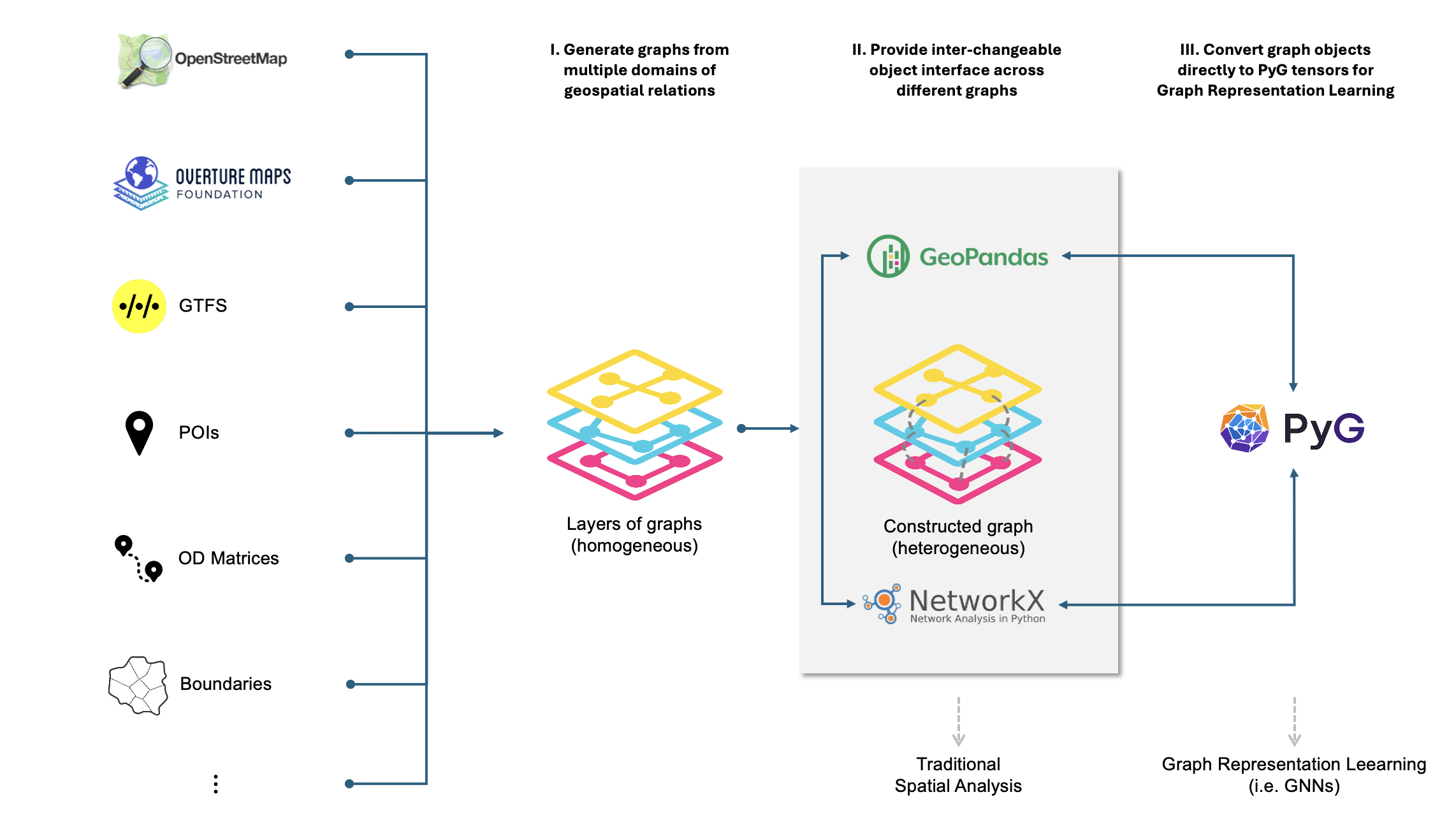
- Graph Construction for GeoAI: Build graphs from diverse urban datasets, including buildings, streets, and land use, to power GeoAI and GNN applications.
- Transportation Network Modeling: Analyze public transport systems (buses, trams, trains) by constructing detailed transportation graphs with support of GTFS format.
- Proximity and Contiguity Analysis: Create graphs based on spatial proximity and adjacency for applications in urban planning and environmental analysis.
- Mobility Flow Analysis: Model and analyze urban mobility patterns from various data sources like bike-sharing, migration, and pedestrian flows.
- PyTorch Geometric Integration: Seamlessly convert geospatial data into PyTorch tensors for GNNs.
Installation
Using pip
Basic Installation
The simplest way to install city2graph is via pip:
pip install city2graph
This installs the core functionality without PyTorch and PyTorch Geometric.
With PyTorch (CPU)
If you need the Graph Neural Networks functionality, install with the cpu option:
pip install "city2graph[cpu]"
This will install PyTorch and PyTorch Geometric with CPU support, suitable for development and small-scale processing.
With PyTorch + CUDA (GPU)
For GPU acceleration, you can install city2graph with a specific CUDA version extra. For example, for CUDA 13.0:
pip install "city2graph[cu130]"
Supported CUDA versions are cu118, cu124, cu126, cu128, and cu130.
Using conda
Basic Installation
You can also install city2graph using conda from conda-forge:
conda install -c conda-forge city2graph
This installs the core functionality without PyTorch and PyTorch Geometric.
With PyTorch (CPU)
To use PyTorch and PyTorch Geometric with city2graph installed from conda-forge, you need to manually add these libraries to your environment:
# Install city2graph
conda install -c conda-forge city2graph

# Then install PyTorch and PyTorch Geometric
conda install -c conda-forge pytorch pytorch_geometric
With PyTorch + CUDA (GPU)
For GPU support, you should select the appropriate PyTorch variant by specifying the version and CUDA build string. For example, to install PyTorch 2.7.1 with CUDA 12.8 support:
# Install city2graph
conda install -c conda-forge city2graph

# Then install PyTorch with CUDA support
conda install -c conda-forge pytorch=2.7.1=*cuda128*
conda install -c conda-forge pytorch_geometric
You can browse available CUDA-enabled builds on the conda-forge PyTorch files page and substitute the desired version and CUDA variant in your install command. Make sure that the versions of PyTorch and PyTorch Geometric you install are compatible with each other and with your system.
⚠️ Important: conda is not officially supported by PyTorch and PyTorch Geometric anymore, and only conda-forge distributions are available for them. We recommend using pip or uv for the most streamlined installation experience if you need PyTorch functionality.
For Development
If you want to contribute to city2graph, you can set up a development environment using uv.
# Install uv if you haven't already done it
curl -LsSf https://astral.sh/uv/install.sh | sh

# Clone the repository
git clone https://github.com/c2g-dev/city2graph.git
cd city2graph

# Install development dependencies with a PyTorch variant (e.g., cpu or cu128)
uv sync --extra cpu --group dev
You can then run commands within the managed environment:
# Add IPython kernel for interactive development
uv run ipython kernel install --name "your-env-name" --user

# Or start Jupyter Notebook
uv run jupyter notebook
Development Environment
The development dependencies include:
ipython: Enhanced interactive Python shell with Jupyter kernel supportjupyterandnotebook: For running Jupyter notebooks with project-specific kernelisort: Code formatting toolspytestandpytest-cov: Testing tools
The Jupyter kernel installation ensures that when you start Jupyter notebooks, you can select the "city2graph" kernel which has access to all your project dependencies in the correct virtual environment.
Using Docker Compose
Before using Docker Compose, ensure you have Docker and Docker Compose installed on your system:
# Check Docker installation
docker --version

# Check Docker Compose installation
docker compose version
If these commands don't work, you need to install Docker first:
- For macOS: Install Docker Desktop
- For Linux: Follow the installation instructions for your specific distribution
- For Windows: Install Docker Desktop
Once Docker is installed, clone the repository and start the containers:
# Clone the repository
git clone https://github.com/yu-ta-sato/city2graph.git
cd city2graph

# Build and run in detached mode
docker compose up -d

# Access Jupyter notebook at http://localhost:8888

# Stop containers when done
docker compose down
You can customize the services in the docker-compose.yml file according to your needs.
Citation
If you use city2graph in your research, please cite it as follows:
@software{sato2025city2graph,
  title = {city2graph: Transform geospatial relations into graphs for spatial network analysis and Graph Neural Networks},
  author = {Sato, Yuta},
  year = {2025},
  url = {https://github.com/c2g-dev/city2graph},
  doi = {10.5281/zenodo.15858845},
}
You can also use the DOI to cite a specific version:
Alternatively, you can find the citation information in the CITATION.cff file in this repository, which follows the Citation File Format standard.
Contributing
We welcome contributions to the city2graph project! To contribute:
-
Fork and clone the repository:
git clone https://github.com/<your-name>/city2graph.git
cd city2graph
git remote add upstream https://github.com/c2g-dev/city2graph.git
-
Set up the development environment:
uv sync --group dev --extra cpu
source .venv/bin/activate  # On Windows: .venv\Scripts\activate
-
Create a feature branch:
git checkout -b feature/your-feature-name
-
Make your changes and test:
# Run pre-commit checks
uv run pre-commit run --all-files

# Run tests
uv run pytest --cov=city2graph --cov-report=html --cov-report=term
-
Submit a pull request with a clear description of your changes.
For detailed contributing guidelines, code style requirements, and documentation standards, please see our Contributing Guide.
Code Quality
We maintain strict code quality standards using:
- Ruff: For linting and formatting
- mypy: For static type checking
- numpydoc: For docstring style validation
All contributions must pass pre-commit checks before being merged.

Project details
Verified details
These details have been verified by PyPIProject links
GitHub Statistics
Maintainers
Release history Release notifications | RSS feed


Download files
Download the file for your platform. If you're not sure which to choose, learn more about installing packages.
Source Distribution
Built Distribution
Filter files by name, interpreter, ABI, and platform.
If you're not sure about the file name format, learn more about wheel file names.
Copy a direct link to the current filters
File details
Details for the file city2graph-0.1.7.tar.gz.
File metadata
- Download URL: city2graph-0.1.7.tar.gz
- Upload date:
- Size: 67.7 MB
- Tags: Source
- Uploaded using Trusted Publishing? Yes
- Uploaded via: uv/0.9.7
File hashes
| Algorithm | Hash digest | |
|---|---|---|
| SHA256 |
986d8197ab0c89c8d3821b0d45fa50e50cc6caa8f424e8f244233419517e367b
|
|
| MD5 |
3c7b52000450e3522bf8207bb7e1f4bd
|
|
| BLAKE2b-256 |
fff0f510daa4820a913a5fef73e1b3a56f9ffc3d083da68ef9555d5409e4dccd
|
File details
Details for the file city2graph-0.1.7-py3-none-any.whl.
File metadata
- Download URL: city2graph-0.1.7-py3-none-any.whl
- Upload date:
- Size: 126.5 kB
- Tags: Python 3
- Uploaded using Trusted Publishing? Yes
- Uploaded via: uv/0.9.7
File hashes
| Algorithm | Hash digest | |
|---|---|---|
| SHA256 |
9acd9f88c48dc03c9f6eefc1f920aa42b20d9dc9e3238651cd2799d231851558
|
|
| MD5 |
7e151df00f11dd5694bc5c5c80d9f3d1
|
|
| BLAKE2b-256 |
866f43b133b8064d07c1b259f9b401359d79e77e893175ef6662d728af58f3e3
|






