
CityBehavEx
CityBehavEx is a scalable, empirically validated, LLM-assisted urban behavior simulation platform. It generates synthetic city-scale mobility trajectories and lets users inspect, replay, debug, and evaluate them against observed mobility, time-use, semantic, transport, and social-network patterns.
This repository accompanies an EACL Demo Track submission:
CityBehavEx: A Scalable and Empirically Validated LLM-Assisted Urban Simulation Platform

The demo focuses on the complete workflow: configure a city scenario, run a simulation, replay agent trajectories, inspect profiles and activity traces, and compare synthetic behavior with empirical validation metrics through the web dashboard.
Why CityBehavEx?
Recent LLM-based urban simulators can produce rich behavior descriptions, but they are often expensive to scale and weakly validated against real mobility patterns. CityBehavEx separates semantic reasoning from trajectory execution:
- Scalable simulation core. A Rust-backed engine simulates large populations with sub-hourly schedules, exploration and preferential return, social ties, transport choices, and micro-activities.
- LLM-assisted, not LLM-per-action. LLMs help generate and calibrate diaries and semantic supervision, while fine-tuned cross-encoders score profile, schedule, POI, vehicle-ownership, and activity compatibility efficiently.
- Empirical validation. The dashboard reports spatial, temporal, semantic, time-use, transport, behavioral-profile, motif, OD, and social-network metrics.
- Inspectable agents. The interface supports trajectory replay, profile inspection, macro-schedules, micro-activities, transport legs, and social encounters.
- Reproducible experiments. Scenarios are configured with YAML files, outputs are stored as parquet/JSON sidecars, and chart payloads are cached.
In the paper experiments, CityBehavEx runs orders of magnitude faster than recent LLM-based urban simulation baselines while matching empirical spatial and temporal mobility distributions more closely.
UI Screenshots:
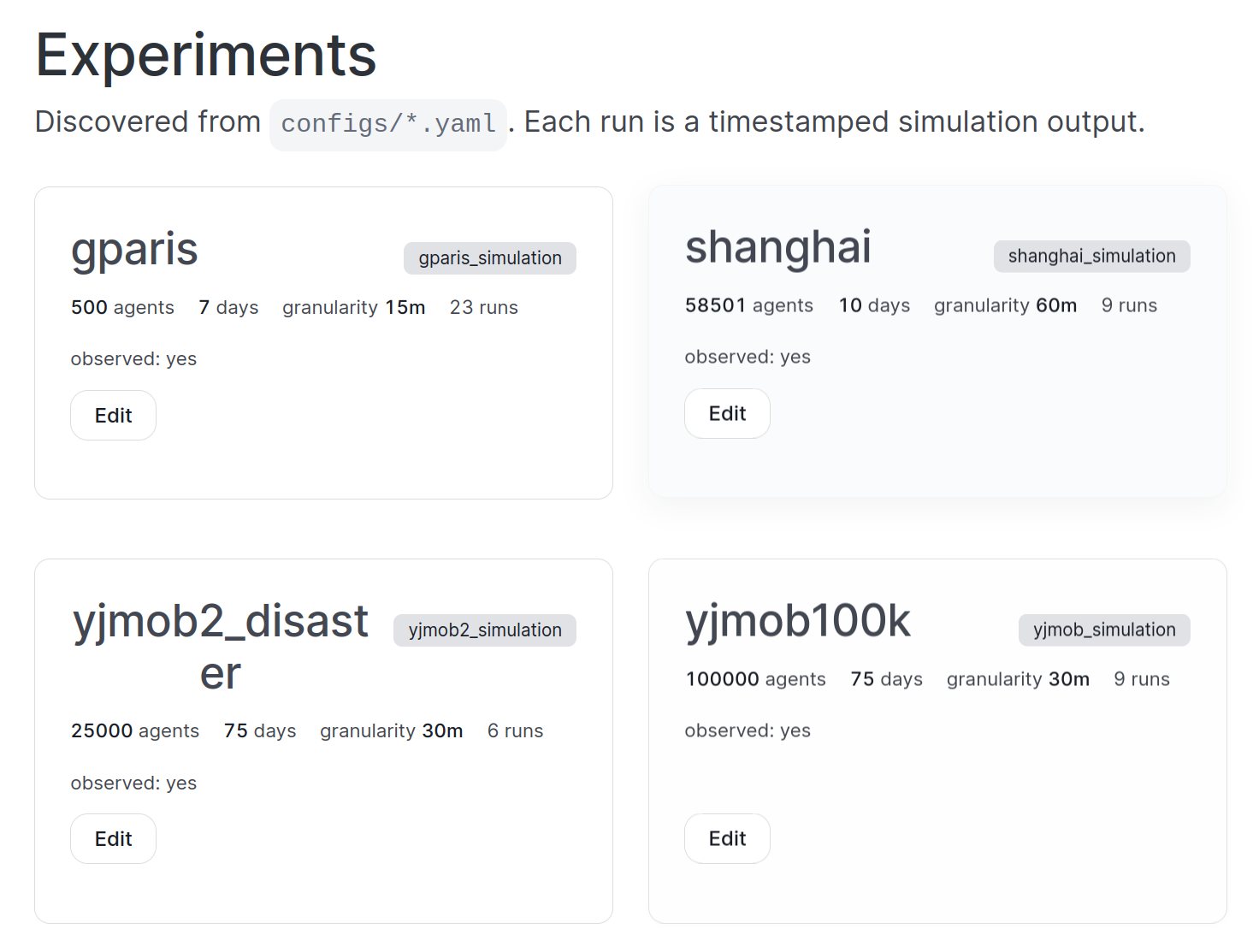
Experiments
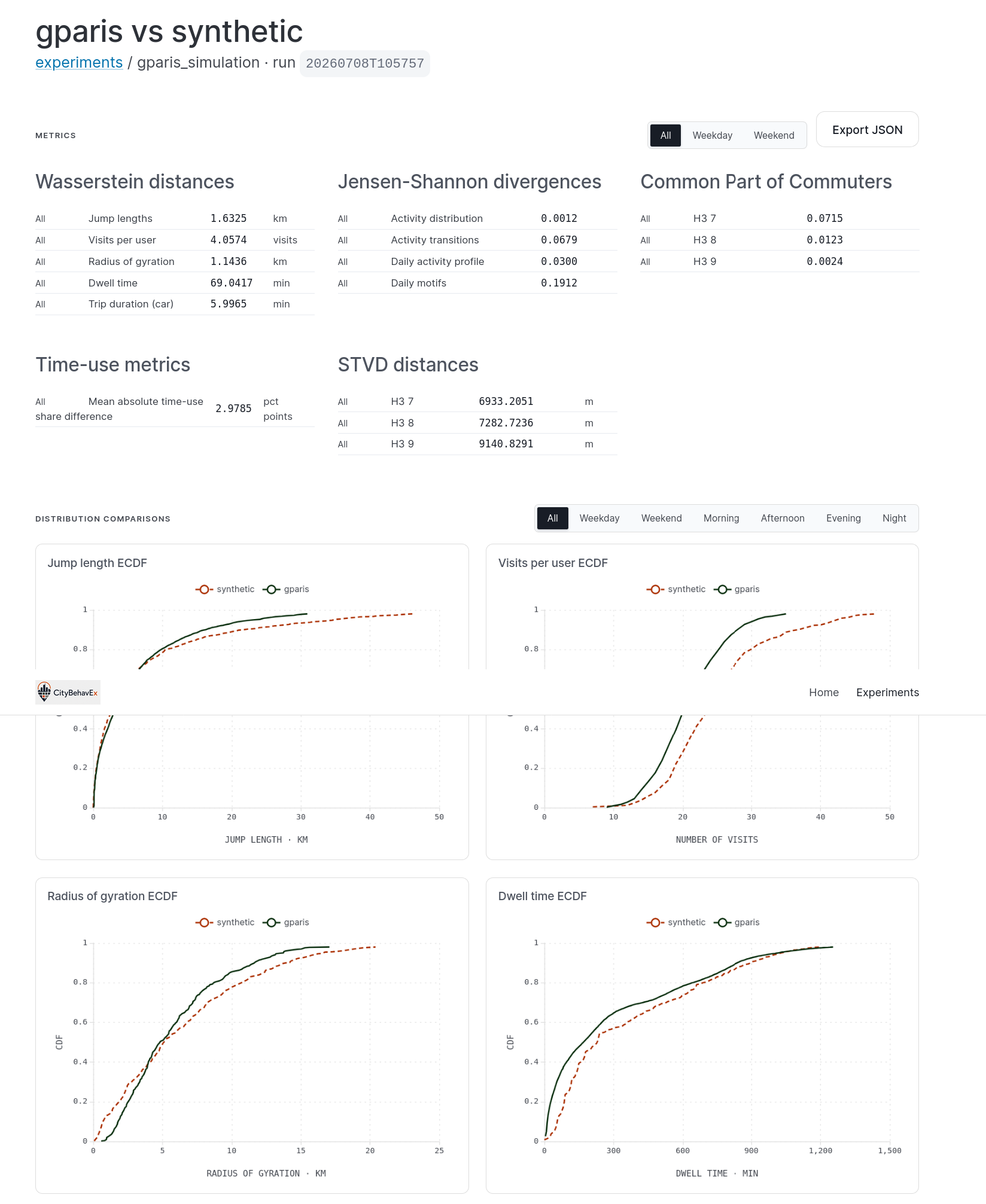
Charts
License
CityBehavEx is released under the GNU Affero General Public License v3.0
(AGPLv3). See LICENSE.
The AGPLv3 license is intentional: it guarantees that improvements to hosted or modified versions of the simulator remain available to the research community.
Repository Overview
citybehavex/                 Python package and report/evaluation logic
citybehavex/aligners/        Packaged local aligner/embedding server (`--start-aligners`)
citybehavex/templates/       `citybehavex init` project scaffold and the YJMOB-1k asset manifest
citybehavex/project.py       `init`/`data download`/`doctor` CLI implementations
citybehavex/services.py      Local aligner process lifecycle helpers used by `simulate`
citybehavex-py/              Rust simulation core exposed as citybehavex._core
configs/                     Reproducible scenario and ablation configurations
scripts/                     Simulation, training, serving, and sweep utilities
web/backend/                 FastAPI backend for experiment discovery and charts
web/frontend/                React/Vite validation and trajectory-replay UI
data/                        Input/output location for scenarios and runs
models/                      Optional fine-tuned alignment models
The simulator reads scenario settings from configs/*.yaml. The web UI discovers
those configs, finds their generated runs, and builds validation views on demand.
The web backend is the FastAPI app in web/backend/app; see
web/README.md for development and deployment commands.
Requirements
Core requirements:
- Python 3.11.4+ (earlier 3.11.x patches lack
tarfile'sfilter=support, whichcitybehavex data downloadrelies on)
Additional requirements for the web dashboard (not needed for the pip-installed CLI on its own):
- Node.js 18+ and npm, for the web frontend
Additional requirements for building from a source checkout (not needed when installing the published wheel):
- Rust toolchain, for the simulation core (
citybehavex._core) uv
Optional requirements:
- A CUDA GPU for embedding, cross-encoder, or LLM serving
- A Mapbox token for the high-performance animated timeline map
- An OpenAI-compatible LLM endpoint when regenerating diaries or training semantic aligners
The published wheel ships a prebuilt Rust extension, so pip install citybehavex needs no Rust toolchain. Building from source uses maturin to
build that extension (the core simulation engine only — the web backend is
pure Python/FastAPI and needs no Rust toolchain either way). CityBehavEx
builds on Fastkit-Mobility:
- Fastkit-Mobility (
fastmobon PyPI) — Rust-accelerated mobility analysis and visualization, available asfastmob==0.2.2. Itsvisualizationextra provides the Rust-backed ECharts visualizations.
Quick Start
Linux only for now.
citybehavex's first PyPI release ships Linux x86_64 wheels + an sdist; macOS/Windows wheels are planned for a follow-up release. On those platformspip installfalls back to building the sdist, which needs a Rust toolchain locally. Contributors building from source can useuv syncfollowed by./scripts/update_local_citybehavex.shinstead.
Install the published wheel:
python -m pip install citybehavex
citybehavex init my-citybehavex-project
citybehavex data download yjmob --project my-citybehavex-project
cd my-citybehavex-project
Validate the project, then run the local temporary aligner service with the simulation:
citybehavex doctor --config configs/yjmob-1k.yaml
citybehavex simulate --config configs/yjmob-1k.yaml --start-aligners
No LLM setup needed for this first run — the project ships with bundled,
pre-generated diaries (data/yjmob-1k/llm_diaries/validated_diaries_*.json),
reused automatically instead of calling an LLM. To regenerate diaries
instead (e.g. after changing diaries.city_profile), set
CITYBEHAVEX_LLM_BASE_URL, CITYBEHAVEX_LLM_API_KEY, and
CITYBEHAVEX_LLM_MODEL to a real OpenAI-compatible endpoint and delete the
corresponding validated_diaries_*.json first.
--start-aligners requires CUDA by default. Use --aligner-device cpu only
when a GPU is unavailable; it is much slower.
The command writes simulation outputs under the paths configured in the YAML
file, typically inside data/.../results/. Existing caches are reused when
available.
No model training required. Every shipped config already points at CityBehavEx's five pretrained ModernBERT aligners, hosted on the Hugging Face Hub and resolved automatically on first use — no local checkpoints or extra setup. See Alignment Services below for the model list and how to serve them locally instead.
Web Demo
Start the FastAPI backend:
uv run uvicorn app.main:app --app-dir web/backend --port 8000
Start the frontend:
cd web/frontend
npm install
npm run dev
Open:
http://localhost:5173
By default the frontend talks directly to the FastAPI backend on port 8000.
The Experiments page is populated from configs/*.yaml. Opening charts for a
run builds the validation payload on first request and caches it under
data/.web_cache/.
The FastAPI app can also single-origin-serve the built frontend (npm run build
in web/frontend/, then restart uvicorn — it serves both the API and the
static SPA whenever web/frontend/dist exists). See
web/README.md for the full endpoint list and deployment
notes.
Timeline Map
The animated timeline uses Mapbox GL. To enable it, create
web/frontend/.env.local:
VITE_MAPBOX_TOKEN=pk.your_token_here
Restart npm run dev after creating or editing this file.
Running the Main Components
Simulation CLI
uv run citybehavex simulate --config configs/yjmob_simulation.yaml
Equivalent module entry point:
uv run python -m citybehavex simulate --config configs/yjmob_simulation.yaml
Override the number of generated candidate diaries:
uv run citybehavex simulate \
  --config configs/yjmob_simulation.yaml \
  --diary-count 20
Validation Dashboard
The dashboard includes:
- ECDFs and fitted mobility laws for travel distance, radius of gyration, trip duration, dwell time, and visitation frequency
- visit-purpose distributions and activity-transition matrices
- daily routines, motifs, mobility profiles, and time-use summaries
- H3 spatio-temporal visit difference maps
- home/work maps, transport summaries, and social-network validation
- animated trajectory replay with agent-level inspection
For metric-by-metric calibration guidance, including config knobs and
fine-tuning levers, see CALIBRATION.md.
Alignment Services
CityBehavEx can run with cached alignment scores, simple fallbacks, or live alignment services. The convention used by the project is:
8081  diary-generation LLM, OpenAI-compatible chat endpoint (a sibling host)
8090  consolidated aligner + embedding server (scripts/serve_aligners.py)
All five ModernBERT CrossEncoder aligners (schedule, activity,
vehicle-ownership, profile-coherence, POI-type) and the diary/profile
embedding model are served by one process on port 8090. It lazily loads
whichever model a request names — the model field every request already
carries, taken directly from each config's *_alignment_model /
embedding.model field — evicts a model after --idle-ttl-s (default 600s)
of no requests, and exposes POST /unload {"model": "..."} for an immediate
evict.
The five pretrained aligners are published on the Hugging Face Hub and are
what every shipped config points at by default — no local checkpoint copy or
extra setup needed, sentence-transformers resolves them straight from the
Hub on first use, same as a local path:
| aligner | Hugging Face repo |
|---|---|
| schedule | gefgu/modernbert-schedule-aligner |
| activity | gefgu/modernbert-activity-aligner |
| vehicle-ownership | gefgu/modernbert-vehicle-ownership-aligner |
| profile-coherence | gefgu/modernbert-profile-coherence-aligner |
| POI-type | gefgu/modernbert-poi-type-aligner |
Start the server with citybehavex's own venv — no separate CUDA/torch
environment needed, pyproject.toml already pins the CUDA 13 wheel index:
uv run python scripts/serve_aligners.py \
  --port 8090 \
  --device cuda \
  --predict-batch-size 128
For a one-off simulation, the equivalent public CLI flow is simply:
citybehavex simulate --config configs/yjmob-1k.yaml --start-aligners
Point every config's *_alignment_base_url and embedding.base_url at this
one port; only the *_alignment_model / embedding.model fields select which
checkpoint gets loaded for a given request — no separate service or port per
aligner. A *_alignment_model field accepts a Hugging Face repo id (the
default) or any local/compatible checkpoint path, selected directly in YAML
without restarting the server:
activities:
  alignment_base_url: http://localhost:8090
  alignment_model: /path/to/my-modernbert-cross-encoder
The fine-tuning scripts expose the corresponding model flags. Use
--base-model to select the ModernBERT (or other compatible) starting model
and --output-model-path to choose where the fine-tuned CrossEncoder is saved.
For example:
.venv/bin/python scripts/train_modernbert_activity_aligner.py \
  --base-model nomic-ai/modernbert-embed-base \
  --output-model-path models/my-activity-aligner
Disable these services in YAML when running without the corresponding models or GPU. The simulator will use configured fallbacks and existing caches where possible.
Configuration
Important scenario files:
configs/gparis_simulation.yaml       Greater Paris scenario
configs/shanghai_simulation.yaml     Shanghai scenario
configs/yjmob_simulation.yaml        YJMOB regular scenario
configs/yjmob2_simulation.yaml       YJMOB disaster/special-event scenario
configs/ablations/                   Module-level ablation configurations
The major configurable modules are:
profiles: synthetic population, home/work assignment, coherence and vehicle ownership alignmentschedule: diary selection, semantic alignment, and exploration parametersactivities: MTUS-grounded micro-schedules and activity alignmenttransport: walking, cycling, road, rail, and fallback travel behaviorsocial: initial friendship formation and co-location-based tie updatesembedding: optional embedding backend and cache behavior
To fix locations while retaining generated demographics, set
profiles.profiles_path to a JSON or Parquet table keyed by one-based uid.
Only supplied, non-null fields override generation. Integer locations are
legacy 0-based tessellation row indices; string locations are matched against
the tessellation's tile_id column, so POI IDs, UUIDs, H3 IDs, and HOME-anchor
IDs can be supplied directly:
[
  {"uid": 1, "home_tile": "home_anchor_17", "work_tile": "88309959d1fffff"},
  {"uid": 2, "home_tile": "home_anchor_42", "work_tile": "aadfd6a4-ba82-46ae-92da-973e3c91aaee"}
]
Tile indices address the runtime tessellation, after any configured residential home anchors are appended.
Data Notes
The paper evaluates CityBehavEx with Greater Paris, Shanghai, and YJMOB mobility datasets. Greater Paris and Shanghai are non-public datasets and cannot be redistributed in this repository. YJMOB is public and is the recommended dataset for artifact reviewers who need to reproduce an end-to-end run without private data access.
Large simulation outputs are intentionally not committed. The repository expects
input and generated files under data/, with exact paths controlled by each YAML
configuration. data/ itself is not part of the repository (it is gitignored) —
create it locally and populate it before running a scenario.
The packaged
citybehavex data download yjmobsample is not this dataset. It ships a small, entirely synthetic comparison baseline (the first 1,000 agents / first 7 days of an already-completed CityBehavEx run) so the pip-installed CLI has zero data-license entanglement. To validate against the real YJMob100K dataset, follow the steps below instead.
Setting up data/ for the YJMOB scenario
- Create the directory:
mkdir -p data/yjmob. - Obtain the YJMob100K dataset (released for the HuMob Challenge) and place its
dataset1CSV asdata/yjmob/yjmob100k-dataset1.csv.gz. - Run the preparation notebooks in order to produce the processed parquet files
that
configs/yjmob_simulation.yamlreads:notebooks/01_yjmob_preparation/01_preprocessing.ipynb, then02_eda.ipynband04_motif_distribution.ipynbas needed for validation baselines. - For the disaster/special-event scenario (
configs/yjmob2_simulation.yaml), runnotebooks/03_yjmob2_preparation/01_preprocessing.ipynbagainst the corresponding YJMob2 release.
Greater Paris and Shanghai configs expect the same data/<city>/... layout, but
since their source datasets are private, they cannot be reproduced from this
repository alone.
Reproducing Paper-Style Experiments
Run a configured experiment:
uv run citybehavex simulate --config configs/yjmob_simulation.yaml
Run module ablations:
./scripts/run_ablation.sh configs/ablations/yjmob/yjmob_no_profile.yaml
./scripts/run_ablation.sh configs/ablations/yjmob/yjmob_no_micro_sched.yaml
./scripts/run_ablation.sh configs/ablations/yjmob/yjmob_no_social.yaml
./scripts/run_ablation.sh configs/ablations/yjmob/yjmob_no_transport.yaml
Aggregate ablation logs:
uv run python scripts/aggregate_ablation_results.py
Then start the web demo and open the corresponding experiment to inspect charts, timeline replay, metrics, and cached comparison payloads.
Troubleshooting
- Rust extension not found (source checkout only): rerun
./scripts/update_local_citybehavex.sh. The published wheel bundles a prebuilt extension and never hits this. fastmobnot found: install the project dependencies withuv sync. The requiredfastmobfeatures, including visualization, are installed from PyPI as extras.- Frontend cannot reach the API: confirm the FastAPI backend is running on
http://localhost:8000and the frontend onhttp://localhost:5173, and thatVITE_API_PROXY_TARGETmatches the backend you started. - Timeline map is blank: set
VITE_MAPBOX_TOKENinweb/frontend/.env.localand restart Vite. - Alignment endpoint errors: either start the configured reranker/LLM service or disable that backend in the YAML config.
- Large chart load is slow: the first request builds and caches payloads; the
next request should reuse
data/.web_cache/.
Citation
If you use CityBehavEx, please cite:
@misc{santos2026citybehavex,
  title     = {CityBehavEx: A Scalable and Empirically Validated LLM-Assisted Urban Simulation Platform},
  author    = {Santos, Gustavo H. and Viana, Aline and Silva, Thiago H.},
  year      = {2026},
  eprint    = {2607.12086},
  archivePrefix = {arXiv},
  primaryClass  = {cs.CL},
  url       = {https://arxiv.org/abs/2607.12086}
}
CityBehavEx depends on Fastkit-Mobility
(fastmob 0.2.2 on PyPI) with its
visualization extra.
1 maintainer

Metadata
1 maintainer
Release files for citybehavex 0.1.1
For a detailed explanation of source distributions (sdists) and built distributions (wheels), please see the package formats documentation.
Source distribution (sdist)
| File | Size | Uploaded | |
|---|---|---|---|
| citybehavex-0.1.1.tar.gz | 221.6 kB | Details |
Built distributions (wheels)
Total release size: 7.3 MB
Release files / citybehavex-0.1.1.tar.gz
| Download URL | citybehavex-0.1.1.tar.gz |
|---|---|
| Size | 221.6 kB |
| Tags | Source |
|
SHA-256 checksum How to use checksums |
e41842d15a6136a4b33409d5b26a5f6e04ea7c8bfdeb597f1ef0772bfd790ef9
|
|
BLAKE2b-256 checksum How to use checksums |
f3477cc2543905f700e44be86b31ed843a5725c85fd13c46657e25ecef8f26db
|
| Upload date | |
|
Uploaded using Trusted Publishing? What is trusted publishing? |
Yes |
| Uploaded via |
twine/7.0.0 CPython/3.13.14
|
Provenance
Provenance describes where a file came from. On PyPI, provenance is shared via attestations, which provide a verifiable record of the build or publishing details. View details, limitations and caveats.


PyPI Publish Attestation
PyPI verified that this artifact, at this checksum, originated from the publisher listed below.
Signed by GitHub Actions, verified by PyPI on Sep 19, 2026.
Transparency logRelease files / citybehavex-0.1.1-cp315-cp315t-manylinux_2_17_x86_64.manylinux2014_x86_64.whl
| Download URL | citybehavex-0.1.1-cp315-cp315t-manylinux_2_17_x86_64.manylinux2014_x86_64.whl |
|---|---|
| Size | 1.0 MB |
| Tags | CPython 3.15 CPython 3.15 free-threading Linux glibc 2.17+ x86-64 |
|
SHA-256 checksum How to use checksums |
15a56d8d51b1b93d691c69cfdcf45f08688cc289cdbc0a71ad1fd197b6ac5fa5
|
|
BLAKE2b-256 checksum How to use checksums |
1a0cbe2559f51a75c73462ad5e92bc8e34f3530dfb3c69bb836ed87e82d4bf9a
|
| Upload date | |
|
Uploaded using Trusted Publishing? What is trusted publishing? |
Yes |
| Uploaded via |
twine/7.0.0 CPython/3.13.14
|
Provenance
Provenance describes where a file came from. On PyPI, provenance is shared via attestations, which provide a verifiable record of the build or publishing details. View details, limitations and caveats.
PyPI Publish Attestation
PyPI verified that this artifact, at this checksum, originated from the publisher listed below.
Signed by GitHub Actions, verified by PyPI on Sep 19, 2026.
Transparency logRelease files / citybehavex-0.1.1-cp315-cp315-manylinux_2_17_x86_64.manylinux2014_x86_64.whl
| Download URL | citybehavex-0.1.1-cp315-cp315-manylinux_2_17_x86_64.manylinux2014_x86_64.whl |
|---|---|
| Size | 1.0 MB |
| Tags | CPython 3.15 Linux glibc 2.17+ x86-64 |
|
SHA-256 checksum How to use checksums |
056648bf6eb33df852b2446fa2c6b294b4fe9555414553d32cfb8e7ac9209299
|
|
BLAKE2b-256 checksum How to use checksums |
6d3202e772c00e10e14822e8aefe5a22b6f6443dcfe85b7fc0c78c28205e7010
|
| Upload date | |
|
Uploaded using Trusted Publishing? What is trusted publishing? |
Yes |
| Uploaded via |
twine/7.0.0 CPython/3.13.14
|
Provenance
Provenance describes where a file came from. On PyPI, provenance is shared via attestations, which provide a verifiable record of the build or publishing details. View details, limitations and caveats.
PyPI Publish Attestation
PyPI verified that this artifact, at this checksum, originated from the publisher listed below.
Signed by GitHub Actions, verified by PyPI on Sep 19, 2026.
Transparency logRelease files / citybehavex-0.1.1-cp314-cp314t-manylinux_2_17_x86_64.manylinux2014_x86_64.whl
| Download URL | citybehavex-0.1.1-cp314-cp314t-manylinux_2_17_x86_64.manylinux2014_x86_64.whl |
|---|---|
| Size | 1.0 MB |
| Tags | CPython 3.14 CPython 3.14 free-threading Linux glibc 2.17+ x86-64 |
|
SHA-256 checksum How to use checksums |
a8e83ab8e98faae8d8c10df0a4c470421ddc552cb9e456925a353ee576835f6c
|
|
BLAKE2b-256 checksum How to use checksums |
21ec08b4ba684cc213879e481c0b2b5861d791ab7bb589f3695ec93bb141ca89
|
| Upload date | |
|
Uploaded using Trusted Publishing? What is trusted publishing? |
Yes |
| Uploaded via |
twine/7.0.0 CPython/3.13.14
|
Provenance
Provenance describes where a file came from. On PyPI, provenance is shared via attestations, which provide a verifiable record of the build or publishing details. View details, limitations and caveats.
PyPI Publish Attestation
PyPI verified that this artifact, at this checksum, originated from the publisher listed below.
Signed by GitHub Actions, verified by PyPI on Sep 19, 2026.
Transparency logRelease files / citybehavex-0.1.1-cp314-cp314-manylinux_2_17_x86_64.manylinux2014_x86_64.whl
| Download URL | citybehavex-0.1.1-cp314-cp314-manylinux_2_17_x86_64.manylinux2014_x86_64.whl |
|---|---|
| Size | 1.0 MB |
| Tags | CPython 3.14 Linux glibc 2.17+ x86-64 |
|
SHA-256 checksum How to use checksums |
6d3582af91f133cb287661517dd9ac97175fc33fc1b46df1fbdcfcb307d1d8c9
|
|
BLAKE2b-256 checksum How to use checksums |
75604b8b9bfcaf2ba4d0d040f93d395f868245e910adc8bad5fb1e639887e681
|
| Upload date | |
|
Uploaded using Trusted Publishing? What is trusted publishing? |
Yes |
| Uploaded via |
twine/7.0.0 CPython/3.13.14
|
Provenance
Provenance describes where a file came from. On PyPI, provenance is shared via attestations, which provide a verifiable record of the build or publishing details. View details, limitations and caveats.
PyPI Publish Attestation
PyPI verified that this artifact, at this checksum, originated from the publisher listed below.
Signed by GitHub Actions, verified by PyPI on Sep 19, 2026.
Transparency logRelease files / citybehavex-0.1.1-cp313-cp313-manylinux_2_17_x86_64.manylinux2014_x86_64.whl
| Download URL | citybehavex-0.1.1-cp313-cp313-manylinux_2_17_x86_64.manylinux2014_x86_64.whl |
|---|---|
| Size | 1.0 MB |
| Tags | CPython 3.13 Linux glibc 2.17+ x86-64 |
|
SHA-256 checksum How to use checksums |
7237b0d5f1b074a45437a30f28422e74974169dd82830b52c89d3e6abd807d4f
|
|
BLAKE2b-256 checksum How to use checksums |
98fc13426a2891992f05383496a95866e81f60f8bb6faeff2c2cf12f32ecc242
|
| Upload date | |
|
Uploaded using Trusted Publishing? What is trusted publishing? |
Yes |
| Uploaded via |
twine/7.0.0 CPython/3.13.14
|
Provenance
Provenance describes where a file came from. On PyPI, provenance is shared via attestations, which provide a verifiable record of the build or publishing details. View details, limitations and caveats.
PyPI Publish Attestation
PyPI verified that this artifact, at this checksum, originated from the publisher listed below.
Signed by GitHub Actions, verified by PyPI on Sep 19, 2026.
Transparency logRelease files / citybehavex-0.1.1-cp312-cp312-manylinux_2_17_x86_64.manylinux2014_x86_64.whl
| Download URL | citybehavex-0.1.1-cp312-cp312-manylinux_2_17_x86_64.manylinux2014_x86_64.whl |
|---|---|
| Size | 1.0 MB |
| Tags | CPython 3.12 Linux glibc 2.17+ x86-64 |
|
SHA-256 checksum How to use checksums |
9a4676fa4f8e9774044a36402e5928fdf05fa853ebba654d3b162ceb668c2287
|
|
BLAKE2b-256 checksum How to use checksums |
532156800b4fb3180d46b1cb899657adb28622f51dd2cb4036e7d1519d83a1ae
|
| Upload date | |
|
Uploaded using Trusted Publishing? What is trusted publishing? |
Yes |
| Uploaded via |
twine/7.0.0 CPython/3.13.14
|
Provenance
Provenance describes where a file came from. On PyPI, provenance is shared via attestations, which provide a verifiable record of the build or publishing details. View details, limitations and caveats.
PyPI Publish Attestation
PyPI verified that this artifact, at this checksum, originated from the publisher listed below.
Signed by GitHub Actions, verified by PyPI on Sep 19, 2026.
Transparency logRelease files / citybehavex-0.1.1-cp311-cp311-manylinux_2_17_x86_64.manylinux2014_x86_64.whl
| Download URL | citybehavex-0.1.1-cp311-cp311-manylinux_2_17_x86_64.manylinux2014_x86_64.whl |
|---|---|
| Size | 1.0 MB |
| Tags | CPython 3.11 Linux glibc 2.17+ x86-64 |
|
SHA-256 checksum How to use checksums |
7114d72a95302348dc21ff38f5651ba0aa546de8eb2bde57160c3a180769d504
|
|
BLAKE2b-256 checksum How to use checksums |
a17bbb20dc804f2573ac8f03c49e81ca2d2f24eba35f2e4fd5ede86813a8770b
|
| Upload date | |
|
Uploaded using Trusted Publishing? What is trusted publishing? |
Yes |
| Uploaded via |
twine/7.0.0 CPython/3.13.14
|
Provenance
Provenance describes where a file came from. On PyPI, provenance is shared via attestations, which provide a verifiable record of the build or publishing details. View details, limitations and caveats.
PyPI Publish Attestation
PyPI verified that this artifact, at this checksum, originated from the publisher listed below.
Signed by GitHub Actions, verified by PyPI on Sep 19, 2026.
Transparency log













