
Python toolkit for empirical research on the Court of Justice of the European Union
Verified details
These details have been verified by PyPIProject links
GitHub Statistics
Maintainers

Project description

A Python toolkit for empirical research on the Court of Justice of the European Union (CJEU).
Collects structured data from the EU's CELLAR endpoint, parses judgment texts, extracts case-law citations, and builds research-ready datasets. Citations can optionally be classified by an LLM.



Why Python
cjeu-py is designed to be idiomatically Pythonic: pip install cjeu-py, a CLI entry point, pandas DataFrames in and out, standard logging, and a flat module structure you can import piecemeal. Data flows through the pipeline as Parquet files and JSONL logs, so each stage is independently inspectable and resumable. LLM classification uses structured JSON output rather than hand-coded labels, making taxonomies easy to extend.
The goal is a toolkit that fits naturally into the workflows that computational social scientists and NLP researchers already use – Jupyter notebooks, pandas, scikit-learn, HuggingFace – without requiring a separate ecosystem.
What it does
| Stage | What | How |
|---|---|---|
| Collect | Case metadata, citation networks, subject matter (4 taxonomies), procedural links, legislation links, AG opinion links, academic citations, referring court details. Configurable document types: judgments, orders, AG opinions, and more via --doc-types |
CELLAR SPARQL endpoint (CDM ontology) |
| Download | Full judgment and AG opinion texts | CELLAR REST API (content negotiation, XHTML) |
| Parse | Court composition, parties, representatives, procedural dates | XHTML header parser (structural, not heuristic) |
| Derive | Judge assignments, case names, operative parts | Flattened from parsed headers |
| Extract | Case-law citations with paragraph-level context | Regex (14 patterns) + italic markers + party name matching |
| Classify (optional) | Precision, use, treatment, topic of each citation | Gemini structured JSON output (requires API key) |
| Validate (optional) | Classification quality | Stratified sample export for human coding |
| Scrape (optional) | Judge biographical data (all current and former members) | Curia.europa.eu + LLM structured extraction (requires API key) |
| Search | Full-text, party, citation graph, topic, legislation, and live CELLAR headnote queries | cjeu-py search text "proportionality" |
| Network | Interactive citation network with centrality metrics, community detection, subject/procedure/year filters | Self-contained HTML (D3.js), GEXF (Gephi / Gephi Lite), D3 JSON |
| Browse | List tables, preview rows, column info, statistics, judgment texts | cjeu-py browse decisions --stats |
| Export | All tables as CSV or Excel | cjeu-py export --format csv |
| GUI | Browser-based interface for all of the above (download, browse, search, network export) | Streamlit (pip install streamlit) |
Interactive citation network
export-network builds a directed citation graph from cached pipeline data (nodes = cases, edges = citing → cited) and exports it in three formats:
- HTML – a self-contained interactive visualisation (D3.js force-directed graph) that opens directly in a browser, with no server or dependencies required
- GEXF – for Gephi desktop and Gephi Lite, with all node attributes (centrality, subjects, formation, procedure) preserved as typed attributes
- D3 JSON – for custom web visualisations or programmatic analysis
Each node carries PageRank, betweenness centrality, in-degree, out-degree, and a Louvain community assignment. The graph includes external cited cases (authorities cited by your downloaded decisions but not part of the downloaded set) to preserve full citation neighbourhoods. External nodes have year and court derived from the CELEX number; run enrich-network (below) to add full metadata.
The HTML export provides:
- Interactive controls – node sizing (by any centrality metric, with user-definable min/max radius), node colouring (community, procedure type, year, court, or formation), edge thickness scaling, toggleable community hull shading
- Filters – year range slider, court checkboxes (CJ/GC/CST), subject matter checkboxes (36 case-law subject codes with human-readable labels, sorted by frequency), procedure type checkboxes, with All/None toggles
- Detail sidebar – click any node to see collapsible sections: case metadata (CELEX, ECLI, date, court, formation, procedure, judge-rapporteur, AG, subjects), centrality metrics, procedural links (joined cases, appeals, interveners, annulled acts), legislation links, academic citations, and citing/cited-by lists. Available sections depend on which metadata tiers have been downloaded
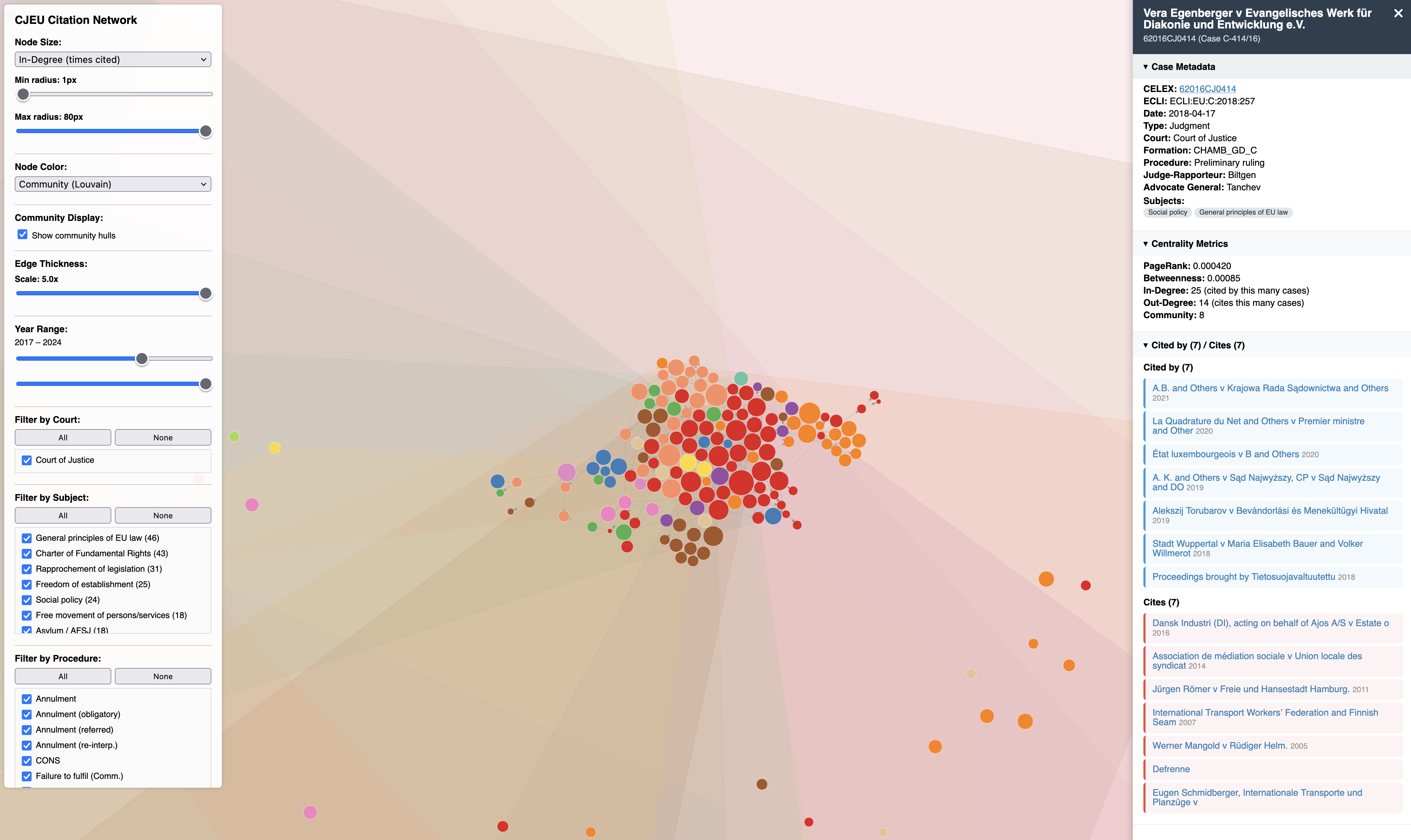
A pre-built example is available at examples/grand_chamber_network.html — download and open in a browser. It contains the 500 most central Grand Chamber cases (by PageRank) plus cases they cite.
Handling external nodes: By default, nodes outside your downloaded set appear with limited metadata. Two options:
# Option 1: Enrich external nodes by fetching their metadata from CELLAR
# (one-time, cached — fetches ECLI, date, court, formation)
cjeu-py enrich-network

# Then export as usual — external nodes now have full metadata
cjeu-py export-network --format html --max-nodes 500

# Option 2: Restrict to downloaded decisions only (no external nodes)
cjeu-py export-network --format html --internal-only
# Full network as interactive HTML
cjeu-py export-network --format html

# Cap at 500 most central cases (PageRank) for fast rendering
cjeu-py export-network --format html --max-nodes 500

# Filter by subject and date
cjeu-py export-network --format html --topic "competition" --date-from 2010-01-01

# GEXF for Gephi
cjeu-py export-network --format gexf --formation GRAND_CH
Networks above 5,000 nodes trigger a performance warning; above 10,000 a stronger warning suggests using --max-nodes or filters. Gephi desktop handles large networks without issue.
Streamlit GUI
A browser-based GUI wraps the entire CLI, so everything is accessible without a terminal. Install Streamlit (pip install streamlit) and launch:
streamlit run gui/app.py
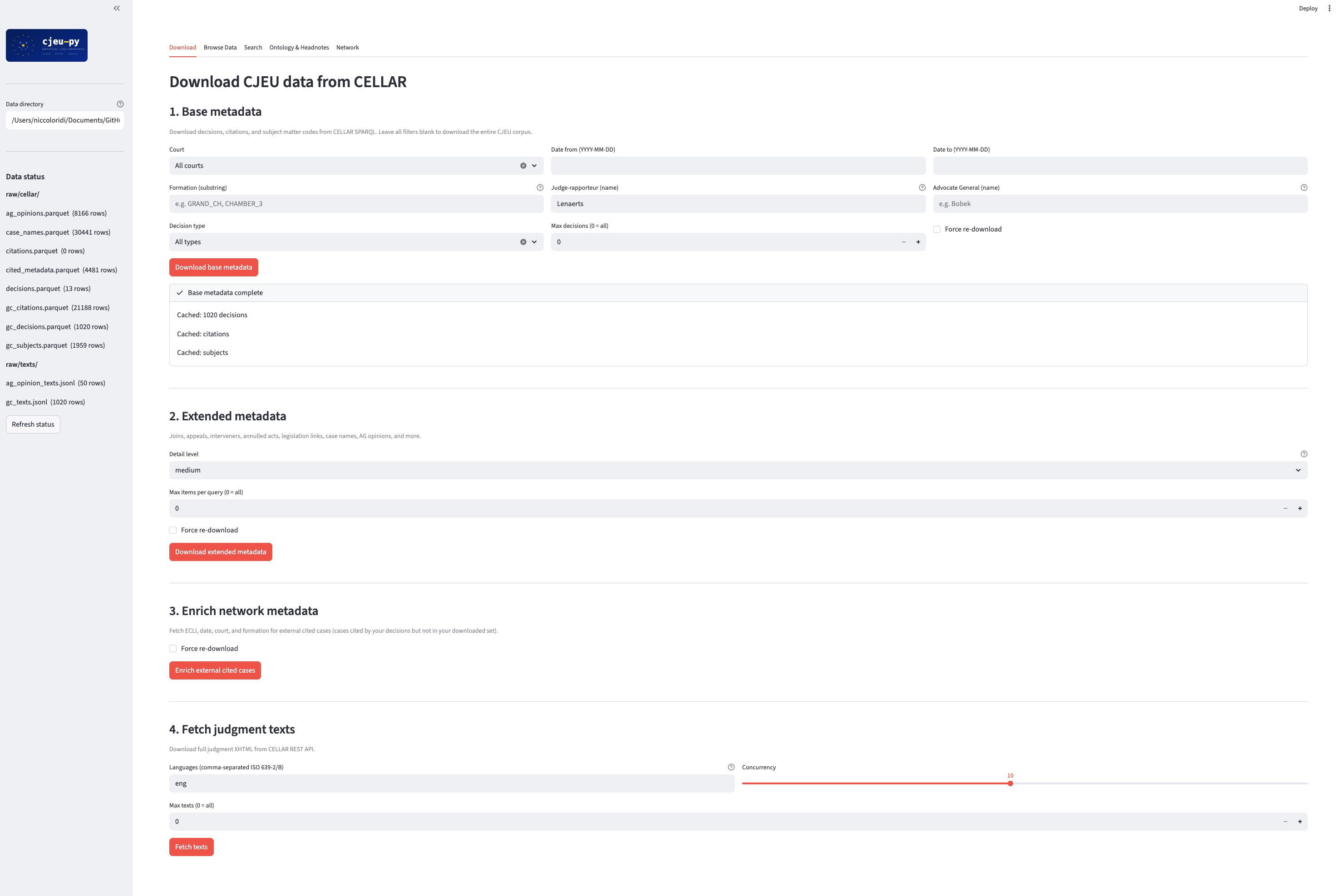
The GUI provides five tabs:
- Download — base and extended metadata from CELLAR, with filters for court, date range, formation, judge-rapporteur, AG, and document types (judgments, orders, AG opinions, and more). Also: network enrichment and text download.
- Browse Data — select any Parquet table, preview it as a dataframe, view descriptive statistics, search judgment texts by CELEX, and download individual tables or all tables as a zip archive (CSV or Excel).
- Search — all 8 search modes (text, headnote, party, citing, cited-by, topic, legislation, list) with result tables and CSV export.
- Ontology & Headnotes — download the CELLAR subject-matter taxonomy, browse/filter it, and search case headnotes live via SPARQL.
- Network — filter and export citation networks as GEXF or interactive HTML, with an embedded preview.
Quick start
# Install from PyPI
pip install cjeu-py

# Or install with all optional dependencies (LLM classification, statistical analysis, visualisation)
pip install cjeu-py[all]

# Set your Gemini API key (only needed for LLM classification)
export GEMINI_API_KEY="your-key-here"

# Download metadata from CELLAR (cached to disk – runs once, then instant)
cjeu-py download-cellar --max-items 100

# Filter by court, formation, judge, date range
cjeu-py download-cellar --court CJ --formation GRAND_CH --date-from 2020-01-01
cjeu-py download-cellar --judge Lenaerts --date-from 2015-01-01 --date-to 2020-12-31

# Download judgments + orders + AG opinions (default: judgments only)
cjeu-py download-cellar --doc-types CJ,TJ,FJ,CO,TO,FO,CC,TC

# Re-download even if local data exists
cjeu-py download-cellar --force

# Download extended metadata (joins, appeals, legislation links, AG opinions, case names, etc.)
cjeu-py download-cellar-meta

# Download only high-value metadata (skip academic citations and referring judgments)
cjeu-py download-cellar-meta --detail high

# Include rare legislation link types
cjeu-py download-cellar-meta --detail all

# Supplementary research data (dossiers, summaries, successor chains, etc.)
cjeu-py download-cellar-meta --detail exhaustive

# Every remaining CDM property (administrative metadata bulk dump)
cjeu-py download-cellar-meta --detail kitchen_sink

# Download judgment texts (20 concurrent connections, resumable)
cjeu-py fetch-texts --max-items 50

# Download with language fallback (try English, then French)
cjeu-py fetch-texts --lang eng,fra

# Parse judgment headers (composition, parties, representatives)
cjeu-py parse-headers data/texts/xhtml/

# Extract citations
cjeu-py extract-citations

# Merge data sources
cjeu-py merge

# Classify citations via LLM (5 concurrent workers, safe for free tier)
cjeu-py classify --max-items 20

# Use higher concurrency with a Tier 2 Gemini API key
cjeu-py classify --max-workers 50

# Export sample for human validation
cjeu-py validate --sample-size 50

# Scrape judge biographical data from Curia
cjeu-py scrape-judges --cache-dir data/raw/judges/cache/

# Extract structured bios via LLM
cjeu-py extract-judge-bios --max-items 10

# Export citation network as interactive HTML (see section above)
cjeu-py export-network --format html --max-nodes 500

# Export all pipeline data as CSV
cjeu-py export --format csv

# Generate variable codebook
cjeu-py codebook

# Download CELLAR subject-matter taxonomy
cjeu-py download-taxonomy

# Browse downloaded data in the terminal
cjeu-py browse                          # list all tables with row counts
cjeu-py browse decisions                # preview first 20 rows
cjeu-py browse decisions --stats        # descriptive statistics
cjeu-py browse decisions --columns      # column names, types, nulls
cjeu-py browse text 62019CJ0311        # read a judgment text
All variable definitions are documented in CODEBOOK.md. For full argument details on every command, see the CLI reference.
Data directory
By default, all downloaded data is stored in ~/.cjeu-py/data/. You can override this with the CJEU_DATA_DIR environment variable or the --data-dir flag on any command:
# Use a custom directory
export CJEU_DATA_DIR="/path/to/my/data"

# Or per-command
cjeu-py download-cellar --data-dir ./my-project/data
Optional dependencies
The base install (pip install cjeu-py) includes everything needed for data collection, text extraction, citation parsing, network export, and search. Optional extras:
| Extra | What it adds | Install |
|---|---|---|
llm |
Gemini classification | pip install 'cjeu-py[llm]' |
openai-llm |
OpenAI-compatible classification (Ollama, vLLM, etc.) | pip install 'cjeu-py[openai-llm]' |
analysis |
scipy, scikit-learn, statsmodels | pip install 'cjeu-py[analysis]' |
viz |
matplotlib, seaborn | pip install 'cjeu-py[viz]' |
all |
Everything above | pip install 'cjeu-py[all]' |
The Streamlit GUI requires pip install streamlit (not included in any extras group — install it separately if you want the browser interface).
Local model support
Classification works with any OpenAI-compatible API -- including Ollama, vLLM, llama.cpp, and LM Studio -- via the --provider openai flag.
# Start Ollama with Gemma 2
ollama pull gemma2
ollama serve

# Classify using local Gemma 2
cjeu-py classify --provider openai --model gemma2

# Use a different endpoint (e.g. vLLM on a remote server)
cjeu-py classify --provider openai --model meta-llama/Llama-3.1-8B \
    --api-base http://gpu-server:8000/v1

# Use LM Studio
cjeu-py classify --provider openai --model local-model \
    --api-base http://localhost:1234/v1
Local models do not guarantee structured JSON output like Gemini does. The pipeline validates output against the expected schema and retries up to 3 times on malformed responses. Larger models (13B+) produce more reliable structured output.
Search
Query collected data or the live CELLAR endpoint directly from the command line.
Local searches (text, party, citing, cited-by, topic, legislation, list) query data you have already downloaded. Remote searches (headnote) query the CELLAR SPARQL endpoint live and require no local data.
# Full-text search across downloaded judgment paragraphs
cjeu-py search text "common market"
cjeu-py search text "proportionality" --limit 50

# Search by party name
cjeu-py search party "Google"
cjeu-py search party "Commission v Germany" --date-from 2015-01-01

# Citation graph queries
cjeu-py search citing 62014CJ0362      # cases citing Schrems I
cjeu-py search cited-by 62014CJ0362    # cases cited by Schrems I

# Search by subject matter (code or label)
cjeu-py search topic "State aid"
cjeu-py search topic PDON

# Cases linked to a piece of legislation
cjeu-py search legislation 32016R0679

# Live CELLAR headnote/title search (no local data needed)
cjeu-py search headnote "data protection"
cjeu-py search headnote "state aid"

# List available values
cjeu-py search list topics
cjeu-py search list judges
cjeu-py search list formations
All search modes support --format csv and --format json for piping into other tools. Local searches also accept --date-from, --date-to, and --court filters.
Data sources
CELLAR SPARQL
Metadata is collected via the CELLAR SPARQL endpoint at https://publications.europa.eu/webapi/rdf/sparql using CDM ontology properties:
- Core metadata – CELEX, ECLI, date, court formation, judge-rapporteur, advocate general, procedure type, procedural classification, published-in-eReports flag, authentic language, EEA relevance
- Extended metadata – defendant/applicant agents, referring court, treaty basis, date lodged
- Relational data – citation network, joined cases, appeals, interveners, annulled acts
- Legislation links – which legislation a case interprets, confirms, amends, annuls, etc. (17 link types)
- AG opinion links – direct judgment-to-AG-opinion pairing via CELEX
- Subject matter – four taxonomies: EuroVoc (260 broad categories), case-law subject matter, hierarchical case-law directory (fd_578, ~3,800 codes), and old directory (fd_577)
- Academic citations – journal articles discussing each case (bibliographic references from CELLAR)
- Referring national judgments – court name, decision type, date, and reference number for preliminary rulings
- Case names – short popular names (
expression_title_alternative, older cases) and full party names (expression_case-law_parties, newer cases), queried at the expression level - Supplementary data (
--detail exhaustive) – dossier groupings, case summaries, miscellaneous information, successor chains, legislative incorporation links - Administrative metadata (
--detail kitchen_sink) – all remaining CDM properties (authoring institution, creation dates, transmission timestamps, collection memberships, obsolete identifiers, etc.) as a long-format table
Each query is paginated and saves results as Parquet. Queries target specific CDM properties rather than fetching all triples. Five detail levels control how much metadata to collect: high, medium (default), all, exhaustive, kitchen_sink.
Caching
All CELLAR downloads are cache-first: if a Parquet file already exists on disk, it is reused without hitting the network. This makes re-running the pipeline instant after the first download and protects against network interruptions.
# First run: downloads from CELLAR (~2 min for Grand Chamber)
cjeu-py download-cellar --court CJ --formation GRAND_CH

# Second run: loads from disk in <1s
cjeu-py download-cellar --court CJ --formation GRAND_CH

# Force re-download (overwrites cached files)
cjeu-py download-cellar --force
The same applies to download-cellar-meta – each table (joined cases, appeals, legislation links, AG opinions, case names, etc.) is cached independently. Text downloads via fetch-texts are resumable via a checkpoint file, so interrupted downloads pick up where they left off.
CELLAR REST API
Full judgment and opinion texts are downloaded via content negotiation against the canonical CELLAR resource URI:
GET http://publications.europa.eu/resource/celex/{CELEX}
Accept: application/xhtml+xml, text/html
Accept-Language: eng
This returns the official XHTML representation – well-structured, with semantic CSS classes (coj-normal, coj-bold, coj-italic, coj-count) that preserve document structure. No website scraping involved. With 20 concurrent connections (default), the full Grand Chamber corpus (976 documents) downloads in under 2 minutes. Downloads are resumable – interrupted fetches pick up where they left off via a checkpoint file.
Judgment header parser
The XHTML header (everything before paragraph 1) contains structured metadata that CELLAR SPARQL does not fully expose. The parser extracts:
- Court composition – full panel with roles (President, Vice-President, Presidents of Chambers, Rapporteur, Judges)
- Parties – applicants, defendants, and interveners
- Representatives – lawyers and agents for each party, with professional titles
- Procedural dates – hearing date, AG opinion delivery date
- Operative part – the Court's ruling, extracted via the "On those grounds" delimiter
The parser handles both pre-2016 (class="normal") and post-2016 (class="coj-normal") XHTML formats. From parsed data, parse-headers also produces:
- Assignments table – one row per judge per decision (Parquet)
- Case names – "applicant v defendant" format (Parquet)
- Operative parts – full dispositif text (JSONL)
Curia biographical data
Judge biographical data is scraped from the Court's official member pages at curia.europa.eu. Raw bios are then structured via LLM into: birth year, nationality, gender, education, prior careers, CJEU roles with dates, and death year. Covers all current and former members of the Court of Justice, General Court, and Civil Service Tribunal (~260 individuals).
Citation extraction
Three detection layers run in sequence:
- Regex (14 patterns) – formal case references: ECLI identifiers, Case C-xxx/xx, joined cases, ECR references, paragraph pinpoints
- Italic markers – case names in
*italics*preserved from CELLAR XHTML<span class="coj-italic">, matching the Court's typographic convention for case names - Party name matching – gazetteer built from XHTML headers of cited cases, searched against the citing document text
Citations are anchored to their source paragraph and enriched with configurable context windows for downstream classification.
Classification taxonomy (optional)
If you have a Gemini API key, extracted citations can optionally be classified along four dimensions using Gemini 2.5 Flash with structured JSON output. Classification requires judgment texts to have been downloaded and citations extracted first (fetch-texts → extract-citations → classify).
| Dimension | Categories |
|---|---|
| Precision | string citation, general reference, substantive engagement |
| Use | principle, interpretation, legal test, factual analogy, procedural, definition, distinguish, other |
| Treatment | follows, extends, distinguishes (facts/law/scope), departs (explicit/implicit), neutral |
| Topic | Free-text area of EU law |
The taxonomy draws on Marc Jacob's Precedents and Case-Based Reasoning in the European Court of Justice (Cambridge, 2014). Classification uses structured JSON output with schema validation, so categories are easy to extend without changing extraction code.
Project structure
cjeu-py/
├── cjeu_py/                           # Core library (pip-installable)
│   ├── main.py                        # CLI entry point (18 commands)
│   ├── config.py                      # Central configuration
│   ├── data_collection/               # CELLAR SPARQL + REST clients, header parser, Curia scraper
│   ├── citation_extraction/           # Regex patterns, context windows, party name matching
│   ├── search.py                      # CLI search (8 modes: text, headnote, party, citing, etc.)
│   ├── browse.py                      # CLI data browser (tables, stats, text viewer)
│   ├── classification/                # LLM pipeline with checkpointing & cost tracking
│   ├── llm/                           # Gemini + OpenAI-compatible API wrapper
│   └── utils/                         # XHTML parsing, logging utilities
│
├── gui/                               # Streamlit browser GUI (single-file app)
├── examples/                          # Pre-built example outputs
├── docs/                              # Logo, screenshots, CLI reference
├── data/                              # Pipeline output (Parquet, JSONL, cached XHTML)
├── tests/                             # 107 tests
├── CODEBOOK.md                        # Variable definitions for all tables
├── CITATION.cff                       # Academic citation metadata
├── LICENSE                            # MIT
├── pyproject.toml
└── requirements.txt
Current limitations
- No procedural event timeline – hearing and AG opinion dates are parsed from headers, but the full event sequence (date lodged, written procedure, oral hearing) requires InfoCuria scraping.
- Header parser coverage – tested on Grand Chamber cases (2013–2025). Earlier cases and smaller formations may have formatting variations.
- Citation extraction tuned for English – texts can be downloaded in all 24 EU official languages via
--lang, but citation regex patterns are currently tuned for English-language judgments.
Testing
python -m pytest tests/ -v
If you use R
If R is your preferred language, see Michal Ovádek's eurlex package, which provides access to EUR-Lex data including CJEU case law via the CELLAR SPARQL endpoint.
Acknowledgements
- Marc Jacob – Precedents and Case-Based Reasoning in the European Court of Justice (Cambridge, 2014). Taxonomy of citation use and treatment.
- EU Publications Office – CELLAR SPARQL endpoint, CDM ontology, and REST API.
- Court of Justice of the European Union – biographical data from official member pages at curia.europa.eu.
Project details
Verified details
These details have been verified by PyPIProject links
GitHub Statistics
Maintainers
Release history Release notifications | RSS feed


Download files
Download the file for your platform. If you're not sure which to choose, learn more about installing packages.
Source Distribution
Built Distribution
Filter files by name, interpreter, ABI, and platform.
If you're not sure about the file name format, learn more about wheel file names.
Copy a direct link to the current filters
File details
Details for the file cjeu_py-0.4.1.tar.gz.
File metadata
- Download URL: cjeu_py-0.4.1.tar.gz
- Upload date:
- Size: 106.1 kB
- Tags: Source
- Uploaded using Trusted Publishing? Yes
- Uploaded via: twine/6.1.0 CPython/3.13.7
File hashes
| Algorithm | Hash digest | |
|---|---|---|
| SHA256 |
455e46b71c228b9e41967e0a4ba7affacecca33740999aff26c533910bfa0377
|
|
| MD5 |
caee7a947ca347be0b35e187dd61da84
|
|
| BLAKE2b-256 |
c161bf01a4466b7dd3eeaa16ddb70f741c16da53c5471b6ea8a4aef296019122
|
Provenance
The following attestation bundles were made for cjeu_py-0.4.1.tar.gz:
Publisher:
publish.yml on niccoloridi/cjeu-py
-
Statement:
-
Statement type:
https://in-toto.io/Statement/v1 -
Predicate type:
https://docs.pypi.org/attestations/publish/v1 -
Subject name:
cjeu_py-0.4.1.tar.gz -
Subject digest:
455e46b71c228b9e41967e0a4ba7affacecca33740999aff26c533910bfa0377 - Sigstore transparency entry: 1006689093
- Sigstore integration time:
-
Permalink:
niccoloridi/cjeu-py@8162422aa5c25490d5983f56a655090790a598e0 -
Branch / Tag:
refs/tags/v0.4.1 - Owner: https://github.com/niccoloridi
-
Access:
public
-
Token Issuer:
https://token.actions.githubusercontent.com -
Runner Environment:
github-hosted -
Publication workflow:
publish.yml@8162422aa5c25490d5983f56a655090790a598e0 -
Trigger Event:
release
-
Statement type:
File details
Details for the file cjeu_py-0.4.1-py3-none-any.whl.
File metadata
- Download URL: cjeu_py-0.4.1-py3-none-any.whl
- Upload date:
- Size: 98.9 kB
- Tags: Python 3
- Uploaded using Trusted Publishing? Yes
- Uploaded via: twine/6.1.0 CPython/3.13.7
File hashes
| Algorithm | Hash digest | |
|---|---|---|
| SHA256 |
57e4ebd565ae7d268e42178d0f686a24cd625c4cac1b4c13fe05e836523eddd2
|
|
| MD5 |
931da0e2bbe815b3e895430e827c37e6
|
|
| BLAKE2b-256 |
2f405701cfe714123c3c5d9bf7afa279b7099c6583dc6c80f00f6713deb6770e
|
Provenance
The following attestation bundles were made for cjeu_py-0.4.1-py3-none-any.whl:
Publisher:
publish.yml on niccoloridi/cjeu-py
-
Statement:
-
Statement type:
https://in-toto.io/Statement/v1 -
Predicate type:
https://docs.pypi.org/attestations/publish/v1 -
Subject name:
cjeu_py-0.4.1-py3-none-any.whl -
Subject digest:
57e4ebd565ae7d268e42178d0f686a24cd625c4cac1b4c13fe05e836523eddd2 - Sigstore transparency entry: 1006689094
- Sigstore integration time:
-
Permalink:
niccoloridi/cjeu-py@8162422aa5c25490d5983f56a655090790a598e0 -
Branch / Tag:
refs/tags/v0.4.1 - Owner: https://github.com/niccoloridi
-
Access:
public
-
Token Issuer:
https://token.actions.githubusercontent.com -
Runner Environment:
github-hosted -
Publication workflow:
publish.yml@8162422aa5c25490d5983f56a655090790a598e0 -
Trigger Event:
release
-
Statement type:






