
CJTrade



A Python framework for building trading systems for the Taiwan Stock Exchange (TWSE). Write a strategy once against the CJTrade API, then run it against a simulated broker, a historical replay, or a real brokerage account without changing it.
Documentation: https://jackiesogi.github.io/CJTrade/ (繁體中文)
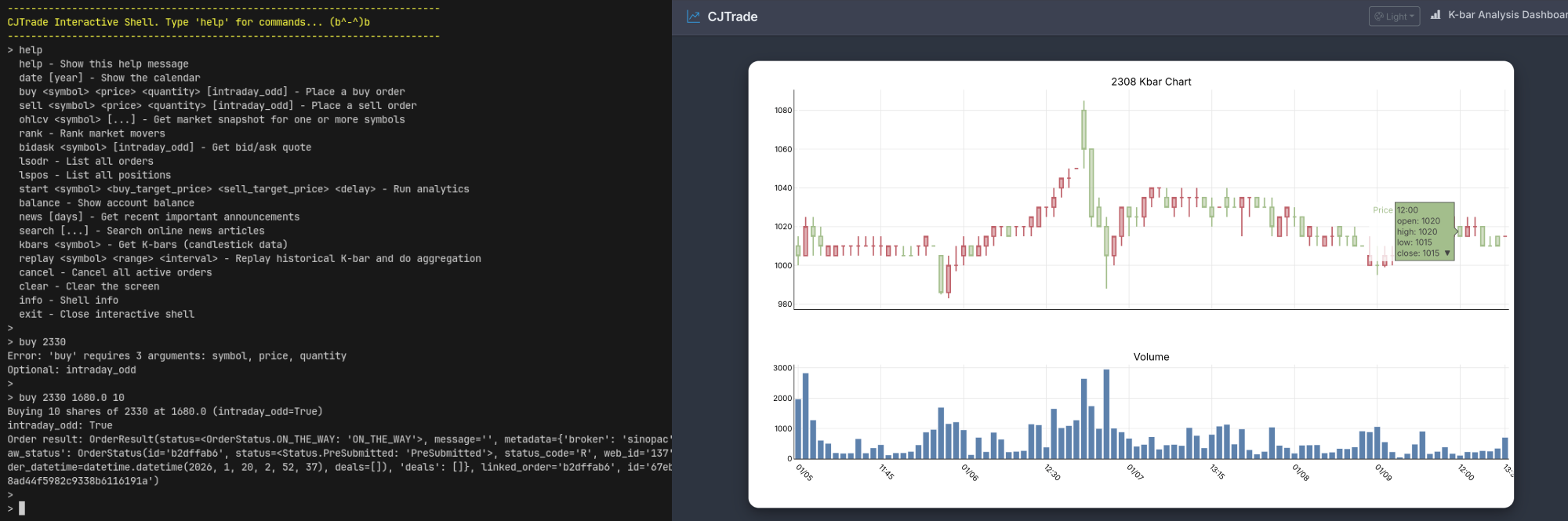
Features
- One broker API.
AccountClientcovers accounts, orders, quotes and historical bars, the same way for every broker. - ArenaX, a built-in simulated broker. A local server for demos, paper trading and backtests, with TWSE commission and tax applied to every fill.
- Reproducible backtesting. A fast in-memory backtester, and a trading engine that replays real bar timestamps so two runs give the same orders.
- Strategy authoring. A strategy is one file using a small vocabulary
(
on_bar,buy,sell,ta.*,param.*), checked before it runs. - Risk controls. Per-strategy capital limits, order-rate limits, duplicate-order detection and a loss kill switch.
- FinHub, a web UI. Start runs, watch each bot, and trade by hand from the browser.
- Analytics. Technical indicators (TA-Lib), TWSE fundamentals, news, LLM clients, quantstats reports and run diagnostics.
| Broker | Status |
|---|---|
| ArenaX (simulated) | demo, backtest, paper backends |
| Sinopac 永豐金證券 | Live trading and market data through shioaji |
| Cathay, Yuanta, Mega, Interactive Brokers | Planned |
Installation
Requires Python 3.12+ and uv.
The apps and scripts target Linux and macOS, and the shell scripts need jq.
git clone https://github.com/jackiesogi/CJTrade
cd CJTrade
uv sync
uv sync installs everything, including the optional integrations. To use
CJTrade as a library instead, install the core and the extras you need:
pip install 'cjtrade[sinopac,llm]'
The shell scripts (scripts/, poc/, tests/) are not in the package; use
a checkout for those.
| Extra | Adds |
|---|---|
sinopac |
The Sinopac broker (shioaji), also needed by ArenaX's backtest and paper backends |
llm |
Gemini and Azure OpenAI clients |
news |
The NewsAPI news source |
finhub |
The FinHub web UI |
all |
All of the above |
Reports, account snapshots and the price cache are written to per-user
platform directories, not the checkout. Set CJTRADE_HOME to keep them in
one place.
Quick start
Start the simulated broker and leave it running:
uv run arenaxd
Then connect to it from Python:
from cjtrade.pkgs.brokers.account_client import AccountClient, BrokerType
from cjtrade.pkgs.models.product import Product

client = AccountClient(BrokerType.ARENAX, api_key="testkey123")
client.connect()

print(client.get_balance())
print(client.get_snapshots([Product("2330")])[0].close)
result = client.buy_stock("2330", 1, 1000.0)    # 1 share, limit 1000
print(result.status)

client.disconnect()
Or explore the same API interactively with the shell:
bash scripts/gen_config.sh arenax   # writes arenax_system.cjconf
uv run cjshell --broker=arenax
The Get started guide walks through accounts, orders, market data, strategies and backtests.
Sinopac
Generate a config file, fill in the credentials from Sinopac's API portal, and connect:
bash scripts/gen_config.sh sinopac  # then edit sinopac_system.cjconf
uv run cjshell --broker=sinopac
Backtesting
| Method | How time moves | Reproducible | Use it for |
|---|---|---|---|
oneshot |
Walks a pre-fetched bar series | Yes | Parameter sweeps, quick screening |
Trading engine (cjtrade) |
Steps through real bar timestamps | Yes | Results you intend to compare |
Strategy windows are counted in bars, so changing --interval changes
the strategy: a 100-bar window is 100 minutes at 1m and 100 days at 1d.
oneshot
bash poc/backtest.sh --renderer=cli \
  --watch-list 2317,2357 --fund 1000000 \
  --start 2024-12-16 --days 60 --interval 1d \
  --strategy BollingerStrategy --mode demo
The script starts arenaxd if needed and asks for anything not given on the
command line. Built-in strategies: BollingerStrategy, ADXAdaptiveStrategy,
DCA_Monthly, DonchianBreakoutStrategy, SupportResistanceStrategy,
BaselineStrategy.
Trading engine
cjtrade is the trading app. Each strategy runs as its own process; only
the main process holds the broker session and the risk gate. Every bar, the
main process publishes each symbol's closed 1m bars
(client.market.get_kbars) to its bots. Before stepping to the next bar, it
waits for every bot to answer the current one, so --speed=0 and --speed=60 produce the same bars, orders and fills.
uv run arenaxd --backend=backtest --port=8802 > /dev/null 2>&1 &
sleep 15
uv run cjtrade --broker=arenax \
  --mode=backtest --watch-list=2357 \
  --fund=1000000 --days=30 --start-date=2025-09-01 --speed=0
The bots that run are listed in BOT_ROSTER in
src/cjtrade/apps/CJTrade/main.py, or in a file
passed with --roster=. A status page is served on
http://127.0.0.1:8898/status while a run is in progress, loopback only.
Reading the result
Each run leaves a result file and an HTML tearsheet. insight joins the
result with the price history for the same window and writes a diagnostic
report:
uv run insight            # the most recent run
uv run insight --list     # every run on this machine
FinHub
The web UI for the trading app. It starts the broker and the engine itself, shows each bot while it runs, and keeps a record of every run:
uv run finhub # http://127.0.0.1:8000, loopback only
See src/cjtrade/apps/FinHub/README.md
for its settings.
Writing a strategy
uv run strategy-tool templates                      # available templates
uv run strategy-tool template --kind bb             # a complete starter file (JSON)
uv run strategy-tool check < my_strategy.py         # diagnostics before you run it
See Write a strategy for the full vocabulary.
Development
uv run pytest                                       # unit + integration
uv run python scripts/check_readme_examples.py      # README commands still work
uv run --group docs mkdocs serve                    # docs at http://127.0.0.1:8000
The same checks run as pre-commit hooks and in CI. Developer notes, design
records and the to-do list are in ref/; every command and
script is listed in ref/TOOLS.md, and the branch,
commit and PR conventions are in CLAUDE.md §11.
License
MIT.
CJTrade is not investment advice, and nothing it prints is a recommendation to buy or sell. It can place real orders on a real account; you are responsible for every order it sends and for any loss that follows. Test a strategy on ArenaX, then on Sinopac's sandbox, before trading real money.
1 maintainer

Metadata
1 maintainer
Release files for cjtrade 0.5.0
For a detailed explanation of source distributions (sdists) and built distributions (wheels), please see the package formats documentation.
Source distribution (sdist)
| File | Size | Uploaded | Provenance | Actions |
|---|---|---|---|---|
| cjtrade-0.5.0.tar.gz | 4.2 MB | With provenance | Details for cjtrade-0.5.0.tar.gz |
Built distribution (wheel)
| File | Interpreter | ABI | Platform | Actions Reset |
|---|---|---|---|---|
| cjtrade-0.5.0-py3-none-any.whl | Python 3 | none | any | Details for cjtrade-0.5.0-py3-none-any.whl |
Total release size: 4.9 MB
Release files / cjtrade-0.5.0.tar.gz
| Download URL | cjtrade-0.5.0.tar.gz |
|---|---|
| Size | 4.2 MB |
| Tags | Source |
|
SHA-256 checksum How to use checksums |
3fd4ccdd7f170f5437c272a945184d95b92f91ed3a28da897fe263d91c845906
|
|
BLAKE2b-256 checksum How to use checksums |
53a8e14fdeedb11cdfcf3676eda10139858de53992672d22e7c7636bb6675e2a
|
| Upload date | |
|
Uploaded using Trusted Publishing? What is trusted publishing? |
Yes |
| Uploaded via |
twine/7.0.0 CPython/3.13.16
|
Provenance
Provenance describes where a file came from. On PyPI, provenance is shared via attestations, which provide a verifiable record of the build or publishing details. View details, limitations and caveats.


PyPI Publish Attestation
PyPI verified that this artifact, at this checksum, originated from the publisher listed below.
Signed by GitHub Actions, verified by PyPI on Nov 27, 2026.
Transparency logRelease files / cjtrade-0.5.0-py3-none-any.whl
| Download URL | cjtrade-0.5.0-py3-none-any.whl |
|---|---|
| Size | 711.0 kB |
| Tags | Python 3 |
|
SHA-256 checksum How to use checksums |
e95760d11e20e8f782cfbe7d5d49506bbb6f1c3ccd9d1203f9416555fbc4ee76
|
|
BLAKE2b-256 checksum How to use checksums |
6485ab63e932237e6591524a3f29e0b345b55cd93700c4442c47f2af167c0752
|
| Upload date | |
|
Uploaded using Trusted Publishing? What is trusted publishing? |
Yes |
| Uploaded via |
twine/7.0.0 CPython/3.13.16
|
Provenance
Provenance describes where a file came from. On PyPI, provenance is shared via attestations, which provide a verifiable record of the build or publishing details. View details, limitations and caveats.
PyPI Publish Attestation
PyPI verified that this artifact, at this checksum, originated from the publisher listed below.
Signed by GitHub Actions, verified by PyPI on Nov 27, 2026.
Transparency logSecurity for cjtrade 0.5.0
Provenance
Provenance describes where a file came from. On PyPI, provenance is shared via attestations, which provide a verifiable record of the build or publishing details. View details, limitations and caveats.
Full provenance
Both files in this release have been uploaded with provenance metadata.
Attestation for cjtrade-0.5.0.tar.gz
PyPI Publish Attestation
PyPI verified that this artifact, at this checksum, originated from the publisher listed below.
Signed by GitHub Actions, verified by PyPI on Nov 27, 2026.
Transparency logA note on package security
PyPI is a repository for distributing packages, not a service for auditing them. While third-party security researchers and our staff do their best to detect and remove malicious packages, PyPI cannot guarantee the quality, security or suitability of any given package.
To learn more about protecting yourself from malicious actors, visit our package security documentation.













