
CKAN extension that adds a "Download all" button to a dataset


Project description



ckanext-downloadall
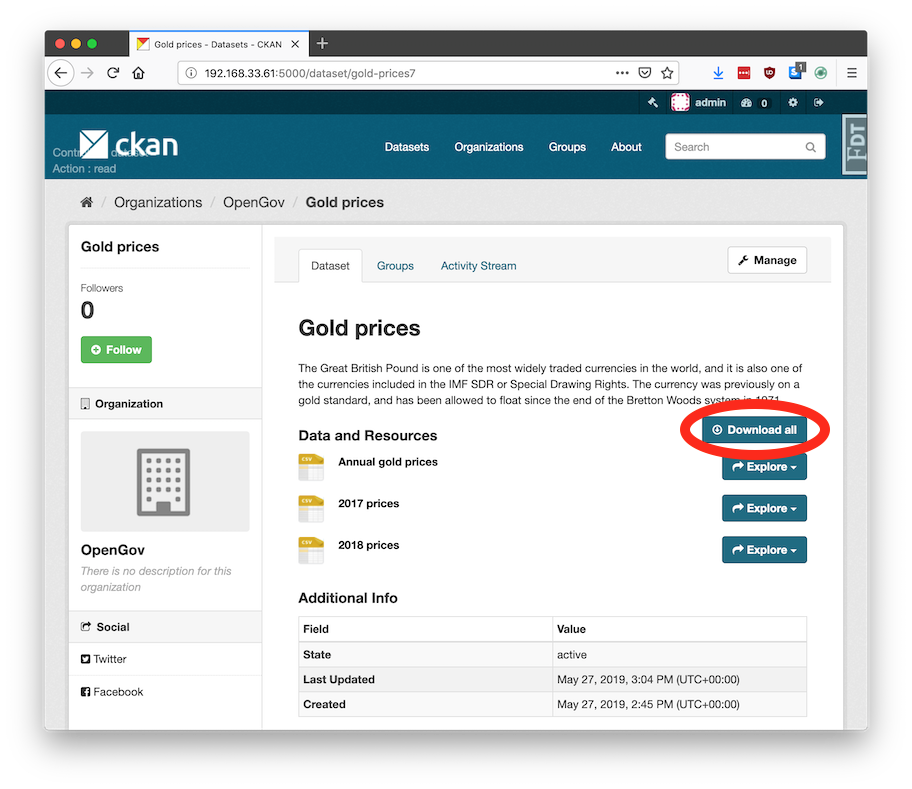
This CKAN extension adds a "Download all" button to datasets. This downloads a zip file containing all the resource files and a datapackage.json.
This zip file is a good way to package data for storing or sending, because:
- You keep all the data files together
- You include the documentation (metadata) – avoids the common problem of being handed some data files and not knowing anything about them or where to find info
- The metadata is machine-readable, so can be used by tools, software, and in automated workflows. For example:
- Validating a series of data releases all meet a standard schema
- Loading it into a database, using the column types and foreign key relations specified in the metadata
The datapackage.json is a Frictionless Data standard, also known as a Data Package.
Technical Notes
If the resource is pushed/xloaded to DataStore, the schema (column types) is also included in the datapackage.json file.
Each resource entry in datapackage.json carries a ckan_url_type field that indicates whether the resource is bundled inside the ZIP or is an external link:
ckan_url_type |
Meaning |
|---|---|
"upload" |
File is bundled inside the ZIP; path points to the local filename within the archive. |
"external" |
Resource is an external link; path is the original remote URL. |
This makes it straightforward to distinguish uploaded files from linked resources when importing the datapackage into another system, without having to inspect whether path looks like a URL or a filename.
This extension uses a hybrid approach for zip generation:
-
Small datasets (total resource size below the configured threshold) use a background job to pre-generate the zip every time the dataset is created or updated (or its data dictionary is changed). The resulting zip is stored in the CKAN filestore and served directly on demand. This suits CKANs where all files are uploaded – if the underlying data file changes without the CKAN URL changing, then the zip will not include the update (until something else triggers the zip to update).
-
Large datasets (total resource size at or above the configured threshold) are never pre-generated. Instead, the zip is assembled on the fly and streamed directly to the browser when the user clicks "Download all", without consuming any additional disk space. The threshold is configurable – see
ckanext.downloadall.stream_threshold_bytesin the Config Settings section.
(This extension is inspired by ckanext-packagezip, but that is old and relied on ckanext-archiver and IPipe.)
Requirements
| CKAN version | Compatibility |
|---|---|
| 2.8 and earlier | No |
| 2.9 | Yes |
| 2.10 | Yes – not tested though |
| 2.11 and later | Unknown |
Designed to work with CKAN 2.9+
Ideally it is used in conjunction with DataStore and xloader (or datapusher), so that the Data Dictionary is included as a schema in the datapackage.json, to describe the column types.
Installation
To install ckanext-downloadall:
-
Activate your CKAN virtual environment, for example:
. /usr/lib/ckan/default/bin/activate -
Install the
ckanext-downloadallPython package into your virtual environment:pip install ckanext-downloadall
-
Add
downloadallto theckan.pluginssetting in your CKAN config file (by default the config file is located at/etc/ckan/default/production.ini). For example:ckan.plugins = downloadall
-
Restart the CKAN worker. For example, if you've deployed it with supervisord:
sudo supervisorctl restart ckan-worker:ckan-worker-00
-
Restart the CKAN server. For example, if you've deployed CKAN with Apache on Ubuntu:
sudo service apache2 reload
-
Ensure the background job 'worker' process is running – see Running Background Jobs
Config Settings
# Total resource size in bytes at or above which a dataset's "Download all"
# zip is streamed on demand instead of being pre-generated and stored in the
# filestore. Set to 0 to stream all datasets. Set to a very large value to
# effectively disable streaming and pre-generate everything.
# (optional, default: 104857600 = 100 MB).
ckanext.downloadall.stream_threshold_bytes = 104857600

# Include additional fields from the dataset in the datapackage.json (e.g.
# those defined in a ckanext-scheming schema)
# (optional, space-separated list).
ckanext.downloadall.dataset_fields_to_add_to_datapackage = district county

# Maximum size (in bytes) for individual resources to include in the zip.
# Resources larger than this will be excluded from the zip and marked as
# external resources in the datapackage.json
# (optional, no limit by default).
# Examples: 104857600 (100MB), 1073741824 (1GB)
ckanext.downloadall.max_resource_size = 104857600

# Include external resources (links) in the zip download package.
# When set to false (default), only directly-uploaded files are included.
# When set to true, external resources are also downloaded and included.
# (optional, default: true)
ckanext.downloadall.include_external_resources = false

# Timeout in seconds for background zip generation jobs.
# Increase this for very large datasets that take longer to process.
# (optional, default: 1800)
ckanext.downloadall.job_timeout = 1800

# Name of the RQ queue that background zip generation jobs are sent to.
# Allows you to isolate downloadall jobs onto a dedicated worker so they
# do not compete with other CKAN background jobs.
# Start a matching worker with:
#   ckan -c /etc/ckan/default/ckan.ini jobs worker downloadall
# (optional, default: "default")
ckanext.downloadall.job_queue_name = downloadall
Command-line Interface
There is a command-line interface, assuming your ckan.ini is located at /etc/ckan/default:
ckan -c /etc/ckan/default/ckan.ini downloadall --help
Examples of use:
ckan -c /etc/ckan/default/ckan.ini downloadall update-zip gold-prices
ckan -c /etc/ckan/default/ckan.ini downloadall update-all-zips
Troubleshooting
"All resource data" appears as a normal resource, instead of seeing a "Download All" button
You need to enable this extension in the CKAN config and restart the server. See the Installation section above.
ImportError: No module named datapackage
This means you have an older version of ckanapi, which is a dependency of ckanext-downloadall. Install a newer version.
OSError: [Errno 13] Permission denied: '/data/ckan/resources/c89'
You are trying to update zips from the command-line but running the tasks synchronously, rather than with the normal worker process. In this case, you need to run it as the www-data user, for example:
sudo -u www-data /usr/lib/ckan/default/bin/downloadall -c /etc/ckan/default/production.ini update-all-zips --synchronous
Development Installation
To install ckanext-downloadall for development, activate your CKAN virtualenv and do:
git clone https://github.com/SDM-TIB/ckanext-downloadall.git
cd ckanext-downloadall
pip install -e .
pip install -r dev-requirements.txt
Remember to run the worker (in a separate terminal):
ckan -c /etc/ckan/default/development.ini jobs worker
Running the Tests
To run the tests, do:
pytest --ckan-ini=test.ini
To run the tests and produce a coverage report, first make sure you have pytest-cov installed in your virtualenv (pip install pytest-cov), then run:
pytest --ckan-ini=test.ini --cov=ckanext.downloadall --cov-report=term-missing
Releasing a New Version of ckanext-downloadall
ckanext-downloadall is available on PyPI at https://pypi.org/project/ckanext-downloadall/. To publish a new version to PyPI, follow these steps:
-
Update the version number in the
setup.pyfile. See PEP 440 for version numbering guidance. -
Update the
CHANGELOG.mdwith details of this release. -
Make sure you have the latest version of necessary packages:
pip install --upgrade setuptools wheel twine
-
Create a source and binary distribution of the new version:
python setup.py sdist bdist_wheel && twine check dist/*
Fix any errors you get.
-
Upload the source distribution to PyPI:
twine upload dist/*
-
Commit any outstanding changes:
git commit -a
git push
-
Tag the new release of the project on GitHub with the version number from the
setup.pyfile. For example, if the version number insetup.pyis0.1.0, then do:git tag 0.1.0 git push --tags
License
ckanext-downloadall is licensed under APGL-3.0, see the license file.


Download files
Download the file for your platform. If you're not sure which to choose, learn more about installing packages.
Source Distribution
Built Distribution
Filter files by name, interpreter, ABI, and platform.
If you're not sure about the file name format, learn more about wheel file names.
Copy a direct link to the current filters
File details
Details for the file ckanext_downloadall-0.3.0.tar.gz.
File metadata
- Download URL: ckanext_downloadall-0.3.0.tar.gz
- Upload date:
- Size: 40.8 kB
- Tags: Source
- Uploaded using Trusted Publishing? No
- Uploaded via: twine/6.1.0 CPython/3.13.12
File hashes
| Algorithm | Hash digest | |
|---|---|---|
| SHA256 |
86ab8271913d822525cf2f32662771f7a316bc671d3af054f4b6727a12e105d8
|
|
| MD5 |
95e2e3dba18cd98bffd000225579080a
|
|
| BLAKE2b-256 |
3ade7689ef0dd02d573b23f5cb32485f225085ef4152cd4680c024a31b149d8d
|
File details
Details for the file ckanext_downloadall-0.3.0-py3-none-any.whl.
File metadata
- Download URL: ckanext_downloadall-0.3.0-py3-none-any.whl
- Upload date:
- Size: 41.1 kB
- Tags: Python 3
- Uploaded using Trusted Publishing? No
- Uploaded via: twine/6.1.0 CPython/3.13.12
File hashes
| Algorithm | Hash digest | |
|---|---|---|
| SHA256 |
40581cbaf6f734b7a9076f1d3c117dc61f6cd5599827b104b940f43f5bdf7bbb
|
|
| MD5 |
236fa6b5266e7e569143acd5c9c5204b
|
|
| BLAKE2b-256 |
274e15c4e25c0e4d4400521ae564d6e1de0c34565338a1f363345d2f08d499b1
|






