

ckanext-orcid
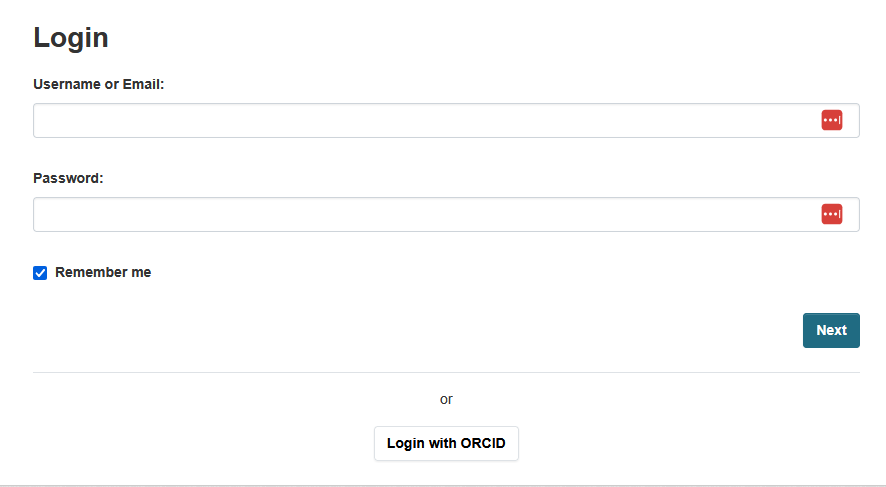
ORCID SSO integration for CKAN. Allows users to log in to your CKAN instance using their ORCID iD via OAuth2.
Requirements
Compatibility with core CKAN versions:
| CKAN version | Compatible? |
|---|---|
| 2.10 | not tested |
| 2.11+ | yes |
Installation
- Clone the source and install it on the virtualenv:
git clone https://github.com/DataShades/ckanext-orcid.git
cd ckanext-orcid
pip install -e .
- Add
orcidto theckan.pluginssetting in your CKAN config file:
ckan.plugins = ... orcid
- Run the database migration:
ckan db upgrade
-
Configure your ORCID credentials (see Obtaining ORCID credentials below).
-
Restart CKAN.
Obtaining ORCID credentials
To enable ORCID login you need to register an application in the ORCID developer portal and obtain a Client ID and Client Secret.
Using the sandbox (recommended for development)
The ORCID sandbox is a free test environment with no real user data.
- Create a sandbox account at https://sandbox.orcid.org/register.
- Log in and go to Developer Tools (under your account name menu).
- If prompted, verify your email address first.
- Click Register for the free ORCID public API.
- Fill in the application details:
- Name — your portal's name
- Website URL — your CKAN instance URL (e.g.
http://127.0.0.1:5000) - Description — short description of your portal
- Redirect URIs — add your callback URL:
http://127.0.0.1:5000/orcid/callback(replace the host with your actual domain in production)
- Save. You will be shown a Client ID (format
APP-XXXXXXXXXXXXXXXXX) and Client Secret.
Set in your CKAN config:
  ckanext.orcid.client_id = APP-XXXXXXXXXXXXXXXXX
  ckanext.orcid.client_secret = your-client-secret
  ckanext.orcid.sandbox = true
Using the production ORCID registry
- Log in (or register) at https://orcid.org.
- Go to Developer Tools under your account menu.
- Click Register for the free ORCID public API and follow the same steps as above, using your production redirect URI (e.g.
https://yourckan.example.org/orcid/callback). - Copy the Client ID and Client Secret.
Set in your CKAN config:
ckanext.orcid.client_id = APP-XXXXXXXXXXXXXXXXX
ckanext.orcid.client_secret = your-client-secret
Note:
ckanext.orcid.sandboxdefaults tofalse, so omit it (or set it tofalse) for production.
Members API
Email retrieval from ORCID requires access to the ORCID Members API, which is only available to ORCID member organisations. The public API used above supports authentication (verifying a user's identity) but not reading private profile data such as email addresses. If your organisation is an ORCID member, contact ORCID support to obtain member API credentials and a separate client ID/secret with the /read-limited scope.
Config settings
| Setting | Required | Default | Description |
|---|---|---|---|
ckanext.orcid.client_id |
yes | — | OAuth2 Client ID from the ORCID developer portal |
ckanext.orcid.client_secret |
yes | — | OAuth2 Client Secret from the ORCID developer portal |
ckanext.orcid.sandbox |
no | false |
Set to true to use the ORCID sandbox environment |
Tests
pytest --ckan-ini=test.ini
License
1 maintainer

Metadata
1 maintainer
Release files for ckanext-orcid 0.1.0
For a detailed explanation of source distributions (sdists) and built distributions (wheels), please see the package formats documentation.
Source distribution (sdist)
| File | Size | Uploaded | |
|---|---|---|---|
| ckanext_orcid-0.1.0.tar.gz | 25.5 kB | Details |
Built distribution (wheel)
| File | Interpreter | ABI | Platform | Reset |
|---|---|---|---|---|
| ckanext_orcid-0.1.0-py3-none-any.whl | Python 3 | none | any | Details |
Total release size: 52.5 kB
Release files / ckanext_orcid-0.1.0.tar.gz
| Download URL | ckanext_orcid-0.1.0.tar.gz |
|---|---|
| Size | 25.5 kB |
| Tags | Source |
|
SHA-256 checksum How to use checksums |
29912ed5727f6e6c5473644012d5c367362e520c251373927e01d07f8e989b05
|
|
BLAKE2b-256 checksum How to use checksums |
d876bc9bc7ee9d17245094add977486c1a14d7a6f35a9f22da5b9ef961ed7904
|
| Upload date | |
|
Uploaded using Trusted Publishing? What is trusted publishing? |
No |
| Uploaded via |
twine/6.2.0 CPython/3.12.13
|
Release files / ckanext_orcid-0.1.0-py3-none-any.whl
| Download URL | ckanext_orcid-0.1.0-py3-none-any.whl |
|---|---|
| Size | 27.0 kB |
| Tags | Python 3 |
|
SHA-256 checksum How to use checksums |
7c77fc08eb7d8413978ed8d710e9ace78d2ada5d7fb80414503da7d9150cb67c
|
|
BLAKE2b-256 checksum How to use checksums |
2179115164e5b91551c2334d98c2b3fb0bb236b89017f6c70397064877bdb0ee
|
| Upload date | |
|
Uploaded using Trusted Publishing? What is trusted publishing? |
No |
| Uploaded via |
twine/6.2.0 CPython/3.12.13
|













