




ckanext-webpageviewplus
Show web pages and uploaded HTML inside CKAN, safely. This extension replaces CKAN's built-in
rudimentary
webpage_view with a
"Website (Plus)" view. It puts a dashboard, chart, video, form or uploaded HTML page (such as a
qsv
Data Schematic)
on a resource's page, with a security setting per view, a height that fits the page, and
buttons to open it in a new tab or full screen. It runs beside webpage_view, so you can move
your views over when you're ready.
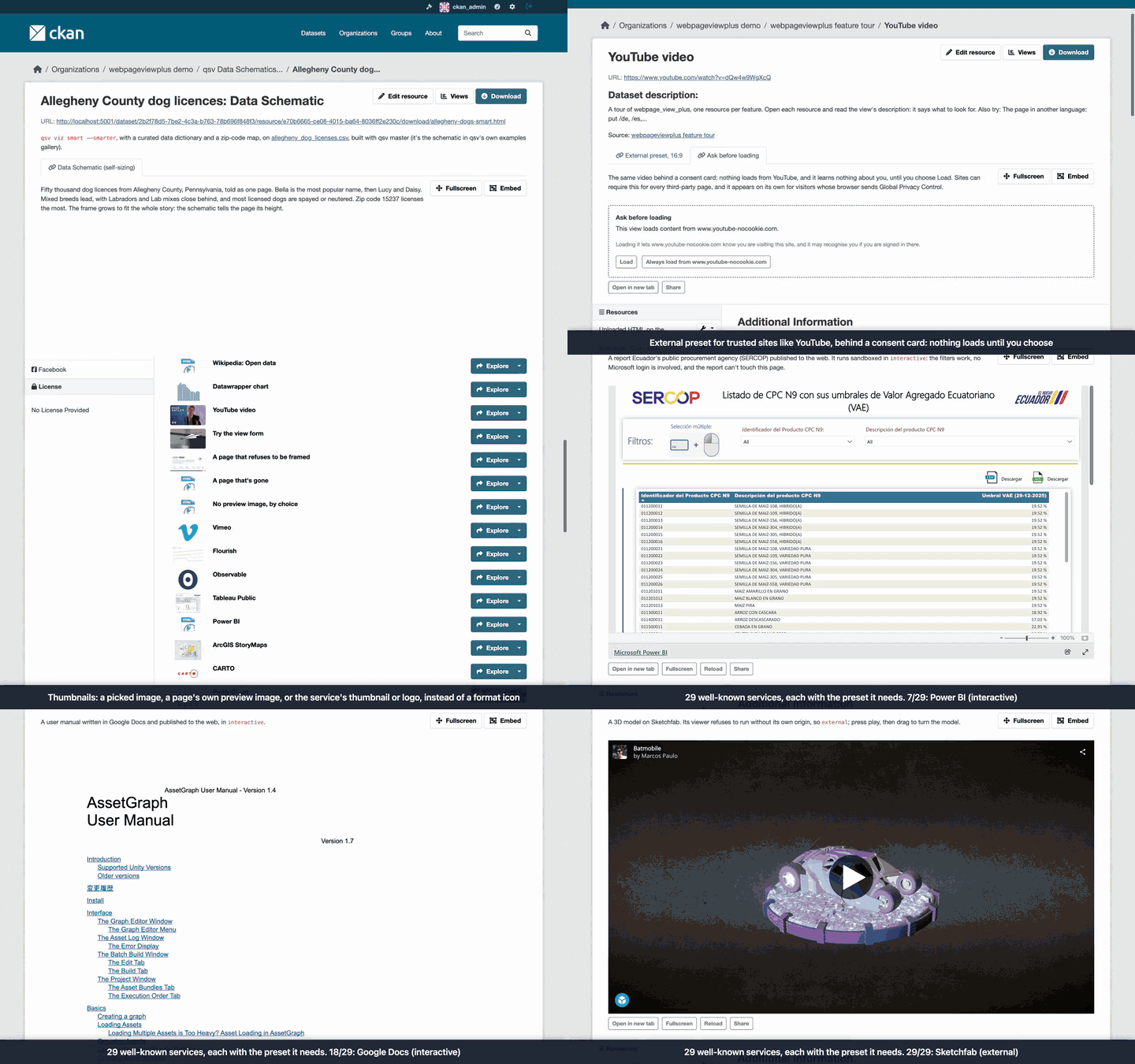
Why use it
It stops uploaded HTML from acting as your CKAN. Out of the box, CKAN shows an uploaded HTML
file on its own web address, so anyone who opens it runs its scripts as CKAN, logged in as
themselves. Stock webpage_view shows it the same way. This extension:
- always sandboxes uploads and CKAN's own pages, so no embedded page can run scripts as CKAN;
- sandboxes uploaded HTML, SVG and XML when they're downloaded, too;
- with a separate domain for uploads, moves uploaded HTML off CKAN's address entirely, so it can run in full.
It makes embedded pages look and work better. Heights that fit the page, a control bar, help for editors pasting links from well-known services, and a card explaining why a page can't be shown instead of a blank box. It works on phones and tablets, and with keyboards and screen readers.
It respects visitors' privacy. Nothing is tracked by default. Sites can ask visitors before loading third-party pages, and opt in to anonymous view counts.
Compared with webpage_view:
webpage_view (CKAN core) |
webpage_view_plus |
|
|---|---|---|
| Security | none: embedded pages run unrestricted, uploads run as CKAN | a security preset per view, checked when it's saved and when it's shown |
| Uploaded HTML | runs as CKAN, in the view and from its download link | sandboxed, or served from a separate domain |
| Page address | any text, unchecked | web addresses only, optionally limited to sites you list |
| Height | 600 px for other sites | fixed, a share of the window, an aspect ratio such as 16:9, or automatic (the page says how tall it is; qsv Data Schematics do it themselves) |
| Loading | right away | when scrolled into view; on request for visitors saving data; optionally only after the visitor agrees |
| Controls | CKAN's Fullscreen and Embed links | the same, plus a bar under the view: Open in new tab, Fullscreen (Expand on iPhone), Reload, Share |
| Accessibility | a generic "Webpage view" title | the view's title read out, a skip link, announcements, works at 400% zoom |
| Pages that can't be shown | a blank frame | a card saying why, with Open in new tab |
| Editor help | none | paste a link from one of 30 well-known services and the form fills in the embed settings; optional warning when a site refuses to be embedded |
| Resource list | a format label | optionally a thumbnail: an image the editor picks, the page's own preview image, or the service's thumbnail or logo |
| Finding broken views | none | one command lists views (core's too) whose page is gone or refuses to be embedded |
| Telemetry | none | none by default; opt-in view counting |
| Languages | CKAN's | English, German, Spanish, French, Italian, Japanese and Brazilian Portuguese |
| Moving over | n/a | one command converts existing views in place |
Requirements
| CKAN version | Compatible? |
|---|---|
| 2.9 and earlier | no |
| 2.10 | yes |
| 2.11 | yes |
| 2.12 | yes |
Browsers: Chrome and Edge 88+, Firefox 89+ and Safari 15+ (macOS, iOS and iPadOS), all from 2021. The security protection works in every browser still in use; older browsers just show less around the view. Internet Explorer isn't supported. Details are under Browser support.
A separate domain for uploads is optional, and needs a second, separately registered domain name. See A separate domain for uploads.
Installation
-
Activate your CKAN virtual environment, for example:
. /usr/lib/ckan/default/bin/activate -
Install the extension:
pip install ckanext-webpageviewplus(or, for unreleased changes,
pip install git+https://github.com/dathere/ckanext-webpageviewplus.git) -
Add
webpage_view_plustockan.pluginsin your CKAN config file (by default/etc/ckan/default/ckan.ini). Keepwebpage_viewenabled until you've migrated. -
Create the plugin's tables (used only by opt-in view counting, connection reports, the frameability check and thumbnails, but run it anyway so turning those on later just works). Run it again after every upgrade:
ckan -c /etc/ckan/default/ckan.ini db upgrade -p webpage_view_plus -
Restart CKAN. Settings are checked at startup, and an unsafe combination stops CKAN with a message naming the setting.
All settings are optional; they're listed under Config settings.
Adding a view
Add a "Website (Plus)" view to an HTML resource and pick a security preset:
| Preset | What the page can do | Use for |
|---|---|---|
strict |
show its HTML, with no scripts | static HTML: reports, notebooks without JavaScript |
interactive (the default) |
run scripts, submit forms, open popups and downloads, but keep no logins or saved data | charts and other scripted pages |
external |
everything it could do on its own site | third-party sites you trust (dashboards, apps, videos). Needs a separate domain for uploads; without one it runs as interactive. Never used for uploads or CKAN's own pages |
data-schematic |
what interactive allows, plus saved data and popups |
qsv Data Schematics (maps, Tour, Explore). Needs a separate domain for uploads; without one it runs as interactive and maps stay blank |
Editors pick the preset and the height. Sysadmins can also fine-tune a view's sandbox and browser features (see How the protection works).
Height. A view can be a fixed height, a share of the browser window, an aspect ratio (such
as 16:9 for video), or Auto. With Auto, the frame takes the height the page reports, between
min_height and max_height, and keeps a fallback height until it reports one. qsv Data
Schematics from the release after 27.0.1 report their height themselves; other pages can too
(see Auto height for your own pages).
Well-known services. Paste a link from one of these as the page URL, and the form offers the embed address, preset and height that service needs:
- Charts and dashboards: Datawrapper, Flourish, Infogram, Our World in Data, Observable, Tableau Public, Power BI, Looker Studio
- Maps: ArcGIS Online, ArcGIS StoryMaps, CARTO, Felt, uMap, OpenStreetMap
- Apps and notebooks: Plotly Cloud, Streamlit, Hugging Face Spaces, shinyapps.io, Jupyter notebooks, Google Colab
- Documents and forms: Google Sheets, Docs, Slides and Forms, Typeform, and Word, Excel and PowerPoint files through Microsoft's online viewer
- Video and collections: YouTube, Vimeo, Internet Archive, Sketchfab
Click "Use them" to accept; nothing changes until you do. Only public embeds work. More than half
of these need the external preset, and so a separate domain for uploads; on a site without
one, the form says so. The links recognised for
each service, and notes on self-hosted Superset and Dash dashboards, are under
Well-known services: recognised links.
Control bar. Under each view: Open in new tab, Fullscreen, Reload and Share. A site chooses
the buttons with ckanext.webpageviewplus.controls, and editors can hide the bar per view.
- Open in new tab and Reload go through CKAN's download link for uploads, so a private upload's link never goes stale.
- Fullscreen becomes Expand where the browser has no element fullscreen (iPhone Safari): the view fills the screen in place, with Close and Esc to leave. While fullscreen, a view that's wider than tall turns an Android phone sideways.
- Share opens the browser's share sheet with the CKAN page's address (never the embedded page's), where the browser offers one, desktops included.
Theme. ckanext.webpageviewplus.color_scheme = light (or dark) makes embedded pages see
that as the visitor's colour preference, so a qsv schematic matches the portal. Only Firefox
honours it for these frames so far; the default, auto, leaves it to the visitor's device.
Accessibility, phones and tablets
- A skip link jumps past each frame to its controls, screen readers announce "title loaded", and focus outlines and 24 px targets (44 px on touch screens) work in Windows High Contrast too. axe-core checks the extension's markup in the browser tests.
- Reflow: at 320 px wide (400% zoom), every frame is at least 600 px tall, and a view that
hides its bar still offers Open in new tab (unless the site's
controlsdropsopen). - Responsive height: below
narrow_width(576 px of view width by default), views sized by aspect ratio or share of the window take 80% of the screen's height. Fixed and auto heights don't change. - Tap to interact: on a touch screen, a frame taller than half the screen gets a "Tap to interact" overlay, so a swipe scrolls the page instead of getting stuck in the frame. It comes back once the frame has scrolled out of view.
- Load on tap: when the browser asks to save data (
Save-Data: on), a card with a Load button (and the resource's size, when CKAN knows it) stands in for the page until the reader taps it.
Keeping your site safe
CKAN's data viewer docs
say not to enable webpage_view unless you trust the URL sources, nor where all users can create
datasets. This extension removes the risk to CKAN itself: no embedded page or upload can run
scripts as CKAN, and editors can't loosen a view's sandbox.
What an embedded page shows is still up to its source. A sandbox limits what a page can reach,
not what it says, so a page can still be misleading, open popups (interactive) or load
trackers (see the consent card).
Where anyone can create datasets:
- set up a separate domain for uploads;
- keep
ckanext.webpageviewplus.editor_can_loosenoff (the default); - consider limiting the presets:
ckanext.webpageviewplus.presets = strict interactive data-schematic; - set
ckanext.webpageviewplus.allowed_hoststo the sites you embed with a page URL. It doesn't cover a view that leaves its page URL empty and shows the resource's own URL, so anyone who can create a resource still chooses what it shows.
Downloads change too. With this extension enabled, an uploaded HTML page opened from its download link runs sandboxed, so a page that needs saved data or a real web address (for example a qsv Data Schematic's maps) loses those features there. With a separate domain for uploads, downloads go there instead and work fully. See Uploaded HTML downloads are sandboxed.
A separate domain for uploads
A content origin serves uploaded HTML from a second domain, such as
https://example-usercontent.org for a CKAN at https://data.example.org, the way GitHub uses
githubusercontent.com. Pages there run in full (maps, saved data and all), and the browser
keeps them apart from CKAN's pages, logins and API. It's what lets the external and
data-schematic presets run as themselves.
It must be a separately registered domain, not a subdomain of CKAN's, pointed at the same CKAN through your web server, and it takes two settings. The steps are under Deploying a content origin. It serves uploads on CKAN's own disk, and on CKAN 2.12, uploads in cloud storage too. On CKAN 2.10 and 2.11, uploads kept by a cloud storage extension (ckanext-s3filestore, ckanext-cloudstorage) can't be served from it: they stay sandboxed on CKAN's own address, without maps or saved data. Upgrading to 2.12 and its file storage removes that limit.
Optional features
Warn about pages that refuse to be embedded. With
ckanext.webpageviewplus.frameability_check = true, the view form warns as an editor types the
address of a site that refuses to be embedded, and suggests linking to it instead. Saving a
view checks its page once, and a page that refuses shows a card saying so, with Open in new
tab, instead of a blank box. Visitors never make CKAN fetch anything. Because it makes your
server request addresses that editors type, it's off by default; see
Frameability check for how it's guarded. (An http:// page on an
https:// site always gets that card, since browsers block it.)
Find broken views. ckan webpageviewplus check-views lists the views (core webpage_view
ones too) whose page is gone, unreachable or refuses to be embedded. Run it weekly from cron
and have the output mailed to you:
0 4 * * 1 ckan -c /etc/ckan/default/ckan.ini webpageviewplus check-views
See Finding broken views for what it reports.
Ask before loading third-party pages. With consent_gate (for the site, or per view), a
third-party page waits behind a card, "This view loads content from host", until the visitor
asks for it, so nothing is requested from that site before. Visitors can choose
Always load from host, remembered in their own browser. privacy_profile = eu puts the
card on every third-party page, and browsers sending Global Privacy Control always get it.
Uploads and CKAN's own pages never need it. See Privacy and telemetry.
Count views. With view_counting = true and a privacy_policy_url, editors can tick "Count
visits" on a view. Only daily totals per view are kept, with nothing about the visitor, and the
view says it counts visits. See Opt-in view counting.
Show thumbnails in the resource list. Install with Pillow
(pip install ckanext-webpageviewplus[thumbnails]) and add webpage_view_plus_thumbnails to
ckan.plugins after webpage_view_plus. A dataset's resource list then shows a small image,
instead of the format icon, beside each resource with a Website (Plus) view. With
thumbnail_fetch = true, CKAN also takes the page's own preview image when a view is saved. See
Thumbnails in the resource list.
See what uploaded pages contact. With connection_reports = true and a content origin,
CKAN notes which other sites uploaded pages fetch from (map tiles, a CDN), and
show_connections = true lists them under the view. See
What uploaded pages contact.
Migrating from webpage_view
ckan webpageviewplus migrate converts webpage_view views in place, keeping their id, title,
description, order and page URL. It picks data-schematic for uploads that contain a qsv
schematic, and the default preset otherwise. To tell, it reads each uploaded page (up to
64 MB), from cloud storage too on CKAN 2.12, even with --dry-run. It never stores a preset
the site disallows or the security rule refuses: if none fits, it
skips the view and says so. Back up the database first, and start with a dry run:
ckan -c /etc/ckan/default/ckan.ini webpageviewplus migrate --dry-run
ckan -c /etc/ckan/default/ckan.ini webpageviewplus migrate [--uploads-only] [--preset NAME]
Without a content origin, if your site embeds third-party apps or dashboards, use
--uploads-only. Stock webpage_view runs embedded pages unsandboxed, and a migrated
third-party app (running as interactive) would lose its own logins and saved settings.
--uploads-only converts just the views of uploaded HTML, which gain the most. Linked pages
stay on webpage_view until you set up a content origin.
Translations
The view, its control bar and the view form come in English, German (de), Spanish (es),
French (fr), Italian (it), Japanese (ja) and Brazilian Portuguese (pt_BR), following the
visitor's CKAN language. These are first translations: corrections from native speakers are
very welcome, as pull requests to
ckanext/webpageviewplus/i18n/<locale>/LC_MESSAGES/ckanext-webpageviewplus.po (see
Adding or updating a language).
See CHANGELOG.md for what changed in each release.
FAQ
For site administrators
What exactly does the sandbox stop, and what doesn't it? It stops an embedded page from acting as CKAN: it can't read CKAN's pages, cookies or storage, or use a visitor's login to change anything, whether it's a third-party page or HTML someone uploaded. Without a separate domain for uploads, no frame is ever allowed to run scripts with a real origin, as that's the one combination that could reach an upload and run it as CKAN. It doesn't vouch for what a page says or loads: a page can still be misleading, and loading a third-party page still sends that site the visitor's own cookies for it, which is what the consent card is for. See How the protection works and Keeping your site safe.
Do I need a separate domain for uploads? Not to install it: without one, every view and
upload is sandboxed so it can't act as CKAN, and that's already safer than webpage_view.
What you lose is full strength: external and data-schematic run as interactive, so
third-party apps lose their logins and saved settings, and qsv Data Schematics lose their maps.
See A separate domain for uploads.
Is it safe to switch on a live site? Yes. It runs beside webpage_view, and nothing
changes until editors add "Website (Plus)" views or you run migrate (start with
--dry-run). One thing changes at once: uploaded HTML, SVG and XML opened from their download
links run sandboxed. See Migrating from webpage_view and
Uploaded HTML downloads are sandboxed.
Does it make my server fetch things from other sites? Not by default, and never while
showing a page to a visitor. Two settings make CKAN fetch when a view is saved: the
frameability check and thumbnail_fetch, both off by default and both
limited to public addresses.
We keep uploads in S3 or other cloud storage. Does it work? On CKAN 2.12, yes: uploads in
any ckan.files storage that can stream, S3 included, are served from your separate domain. On
CKAN 2.10 and 2.11, uploads kept by ckanext-s3filestore or ckanext-cloudstorage stay sandboxed
on CKAN's own address, so schematics lose their maps there. Upgrading to 2.12 lifts that. See
Deploying a content origin.
Can I control what editors embed? Yes: limit the presets, keep editor_can_loosen off so
only sysadmins can change a view's sandbox, and list the sites editors may embed with
allowed_hosts. See Keeping your site safe.
Does it track visitors? No. It sends no telemetry, and frames deny ad and tracking
features. You can ask visitors before loading third-party pages (consent_gate, or
privacy_profile = eu), and opt in to anonymous daily view counts. See
Privacy and telemetry.
How do I find embeds that have stopped working? Run ckan webpageviewplus check-views from
cron: it lists views, core webpage_view ones too, whose page is gone, unreachable or refuses
to be embedded. See Finding broken views.
What do I run after upgrading? ckan db upgrade -p webpage_view_plus, every time, then
restart CKAN. Settings are checked at startup, and an unsafe combination stops CKAN with a
message naming the setting.
Will it slow down dataset pages? No. Frames load only when scrolled into view, and showing a page never fetches anything from another site: the frameability check and thumbnails are made when a view is saved and only read afterwards. Thumbnails add one database query per dataset page. With view counting on, each page view that shows a counted view adds a count.
Does it work with private datasets? Yes. A view of a private resource shows only to people
who may see it, as in CKAN. An upload served from your separate domain gets a short-lived
signed address there, since that domain has no logins; it stops working within one to two
url_ttl windows (5 to 10 minutes by default). See Deploying a content origin.
We run several CKAN servers behind a load balancer. Anything to know? Give every server
the same signing_secret, so an address signed on one is accepted by another, and point your
separate domain at the same servers as CKAN. Stored checks, thumbnails and view counts are in
the database, so they need no shared disk. Uploads need shared storage as they always do in
CKAN.
Which browsers does it support? Chrome and Edge 88+, Firefox 89+ and Safari 15+, on desktops, phones and tablets. The protection works in every browser still in use; older ones just show less around the view. See Browser support.
How do I turn it off or roll back? Unsetting content_origin and restarting falls back to
the sandboxed behaviour at once, with no data changes. Removing webpage_view_plus from
ckan.plugins (with webpage_view_plus_thumbnails, if enabled: it won't start without it)
hides its views, as CKAN hides any view whose plugin isn't enabled, but keeps
them in the database: enabling it again brings them back. There's no command to convert views
back to webpage_view, so run migrate --dry-run first and back up the database before
migrating.
Which languages does it come in? English, German, Spanish, French, Italian, Japanese and Brazilian Portuguese, following the visitor's CKAN language. See Translations.
For editors
What does "sandboxed" mean for my page? The browser runs the page in a locked room: it
still shows, and depending on the preset its scripts run, but it can't reach CKAN, the visitor's
login or other tabs. A preset is a ready-made sandbox. Under strict nothing runs; under
interactive scripts, forms, popups and downloads work, but the page can't keep logins or
saved settings; data-schematic adds saved data and maps for qsv Data Schematics; external
lifts the sandbox for third-party sites you trust. The last two need your site to have a
separate domain for uploads, and run as interactive without one. If something in your page doesn't work,
check what its preset allows. See How the protection works.
Which preset should I pick? interactive, the default, suits most charts and scripted
pages. Use strict for plain HTML with no scripts, data-schematic for qsv Data Schematics,
and external only for third-party sites you trust that need their own logins or saved
settings. Pasting a link from a well-known service picks the preset for you. See
Adding a view.
Why does my view show "doesn't allow its pages to be shown inside other sites"? That site
refuses to be embedded, so a browser would show an empty box; the card offers Open in new tab
instead. A link to the page, instead of a view, is the way to share it. An http:// page on an
https:// site gets a card too: browsers block it. Use its https:// address if it has one.
The form says the service needs a separate domain for uploads. What now? That service only
works under external, which needs your site to have a
separate domain for uploads. Ask your site administrator, or
link to the page instead of embedding it.
Why did my YouTube link change to youtube-nocookie.com? It's YouTube's privacy-enhanced mode, in which YouTube says it stores nothing about visitors until they play the video. The video is the same. See Well-known services: recognised links.
Why are my qsv Data Schematic's maps blank? Maps and saved data need the
data-schematic preset and a separate domain for uploads. Without one, the schematic runs as
interactive: its charts work, its maps don't. On CKAN 2.10 and 2.11 with cloud storage it
runs that way too.
Can I upload a page that uses separate CSS, JavaScript or image files? Not as separate
files: a view shows one uploaded file, and a link from it to style.css or chart.js beside
it gets the page itself back, not that file. Upload a single HTML file with its styles,
scripts and images inside it (as data URLs), the way qsv Data Schematics are built. Files on
other public sites, such as a library from a CDN, load as usual.
Can I embed a private Google Sheet, Power BI report, or a dashboard that needs a login? Generally not: only public embeds work, as visitors would need their own login to that service inside your page. Publish it to the web first (Google's "Publish to web", Power BI's "Publish to web"), or link to it instead. See Well-known services: recognised links.
Can I show a Word, Excel or PowerPoint file? Yes, if it's public and your site has a
separate domain for uploads: paste the file's address as the page URL, or leave the page URL
empty on the file's own resource, and the form suggests Microsoft's online viewer. Files in
private datasets can't be shown that way, since Microsoft fetches the file itself, and
OpenDocument files (.odt, .ods, .odp) aren't supported. Your site administrator decides
whether Office resources offer the view. See
Well-known services: recognised links.
How tall will my view be? You choose: a fixed height, a share of the browser window, an aspect ratio such as 16:9 for video, or Auto, where the page reports its own height (qsv Data Schematics do). See Adding a view.
Can my own web page set its view's height? Yes: with Auto height, have the page post
{type: "webpageviewplus:resize", height: <px>} to its parent window when it loads and
whenever its height changes. See Auto height for your own pages.
Why does my view look different on a phone? It adapts to small screens. A tall view shows "Tap to interact" first, so visitors can still scroll past it; views sized to the window or to an aspect ratio get taller on narrow screens; Fullscreen becomes Expand on iPhones; and a phone saving data gets a Load button instead of loading the page at once. See Accessibility, phones and tablets.
How do I get a picture in the resource list? Where your site has thumbnails on, pick an image uploaded to the same dataset under "Thumbnail in the resource list" in the view form. Without one, a well-known service shows its own thumbnail or logo, and where the site allows it the page's own preview image is used; tick "Don't use the page's own preview image" to leave that out. See Thumbnails in the resource list.
Why do visitors see "This view loads content from …" first? That's the consent card: the site, or you for this view, asked visitors to agree before a third-party page loads, since loading it tells that site who is looking. Visitors can choose to always load pages from that site. See Privacy and telemetry.
Can I loosen a view's sandbox myself? Not unless your site allows it: the advanced sandbox and browser-feature fields are for sysadmins, so the preset is the editor's choice.
Can I see how often my view is viewed? Where your site has view counting on, tick "Count visits" on the view; its daily totals then show in the view form. Visitors see that the view counts visits, and nothing about them is kept. See Opt-in view counting.
Advanced
The details behind the sections above: how the protection works, browser versions, deployment, the settings and commands, and how to contribute.
How the protection works
Note: what sandboxing is. Browsers keep websites apart by their origin (scheme, host and port): under the same-origin policy, a page's scripts can read the cookies, storage and pages of their own origin, and act there as the logged-in visitor, but not another origin's. An
<iframe>'ssandboxattribute takes abilities away from the page inside it. An emptysandboxblocks scripts, forms, popups and downloads, and gives the page an opaque origin that matches no real site, so it can't reach any site's cookies or storage, CKAN's included. Eachallow-*token hands one ability back:allow-scriptslets it run JavaScript, andallow-same-originlets it keep its real origin. The two together on a page from CKAN's own origin undo the sandbox, since the page's scripts could then act as CKAN. The same restrictions can be applied to a whole response with the CSPsandboxheader, which is how this extension protects downloads.
The extension embeds pages in an <iframe> with a security preset per view, and uses its own
view type (webpage_view_plus), so it runs beside webpage_view while you migrate. The presets'
sandboxes:
| Preset | Sandbox |
|---|---|
strict |
everything restricted, no scripts |
interactive |
allow-scripts allow-forms allow-popups allow-downloads |
external |
none |
data-schematic |
interactive + allow-same-origin and popups that escape the sandbox |
The rule behind the presets: no frame may let scripts keep a real origin while uploaded
HTML could still run on CKAN's origin. Such a page could navigate itself to an upload and run
it as CKAN. Without a content origin, external and data-schematic therefore run as
interactive, and a sandbox combining allow-scripts with allow-same-origin is refused.
Uploads and pages on CKAN's own host are always sandboxed. The rule is enforced when a view is
saved and again when it's shown.
Every frame gets loading="lazy", a referrerpolicy, the view's title as its accessible
name, and an allow list (Permissions Policy) that always denies ad and tracking features.
Sysadmins can also set sandbox tokens, allowed features and the referrer policy per view
(editors too with editor_can_loosen). Page URLs must be http(s), and CKAN's own hosts
(ckan.site_url plus site_aliases) can't be framed unsandboxed.
credentialless (Chromium only) can load third-party frames of chosen presets without the
visitor's cookies or storage, as extra hardening against trackers.
Uploaded HTML downloads are sandboxed
With this plugin enabled, HTML, SVG and XML from CKAN's resource downloads and the resource
proxy get a Content-Security-Policy: sandbox header without allow-same-origin. Pages still
render and run scripts, but in an isolated origin. This changes core behaviour: opened
from its download link, a page that needs storage or a real origin (for example a qsv Data
Schematic's maps) loses those features. With a content origin, HTML upload downloads redirect
there instead, and work fully. Turn the header off with ckanext.webpageviewplus.harden_downloads = false only if you trust everyone who can upload. Doing so also keeps external and
data-schematic degraded.
Browser support
Supported: Chrome and Edge 88+, Firefox 89+ and Safari 15+ (macOS, iOS and iPadOS), all from 2021. In these, every view lays out as configured. A few extras (lazy loading, element fullscreen, Share) need newer versions and fall back as shown below. The browser tests run in current Chromium, Firefox and WebKit. Internet Explorer isn't supported.
The protection works in every browser still in use. It rests on the iframe sandbox
attribute (Chrome 5, Firefox 17, Safari 5) and the CSP sandbox header on downloads (Chrome
25, Firefox 50, Safari 7), not on the script or newer features. The one exception is the
optional credentialless setting, which only Chromium 110+ applies. Other browsers ignore
it, and the rest of the protection doesn't depend on it.
In older browsers, a view still shows its page, with less around it:
| Feature | Needs | Without it |
|---|---|---|
| Aspect-ratio height | Chrome 88 (Jan 2021), Firefox 89 (Jun 2021), Safari 15 (Sep 2021) | the frame is 600 px tall |
| Share-of-window height | Chrome 79 (Dec 2019), Firefox 75 (Apr 2020), Safari 13.1 (Mar 2020) | the same |
| Lazy loading | Chrome 77 (Sep 2019), Firefox 121 (Dec 2023), Safari 16.4 (Mar 2023) | frames load with the page |
referrerpolicy |
Chrome 51 (May 2016), Firefox 50 (Nov 2016), Safari 14 (Sep 2020) | the browser's default applies, which in those versions can send the dataset page's URL to the framed site |
| Fullscreen | Chrome 71 (Dec 2018), Firefox 64 (Dec 2018), Safari 16.4 (Mar 2023) | the button becomes Expand, which fills the window in place (as on iPhone) |
Share (navigator.share) |
Chrome 89 (Mar 2021) on Windows and ChromeOS, 128 (Aug 2024) on macOS and Linux; Chrome for Android 61 (Sep 2017); Edge 81 (Apr 2020) on Windows, 93 (Sep 2021) elsewhere; Firefox for Android 79 (Jul 2020), not desktop Firefox; Safari 12.1 (Mar 2019; iOS 12.2) | no Share button |
Thumbnails in the resource list (CSS :has()) |
Chrome 105 (Aug 2022), Firefox 121 (Dec 2023), Safari 15.4 (Mar 2022) | the list keeps its narrow gutter, so a thumbnail overlaps the start of the resource name |
| Responsive height on narrow screens | Chrome 88 (Jan 2021), Firefox 78 (Jun 2020), Safari 14.1 (Apr 2021; iOS 14.5) | heights don't change on narrow screens |
| Tap to interact | Safari 12.1 (Mar 2019; iOS 12.2) | no overlay; swipes over the frame scroll the frame |
| Windows High Contrast styles | Chrome 89 (Mar 2021), Firefox 89 (Jun 2021) | the default focus styles |
For reference, the current versions as of October 2026 are Chrome 157, Edge 156, Firefox 159 and Safari 27 (macOS and iOS). Minimum versions and dates are from MDN's browser-compat-data.
Without JavaScript (turned off, or the script blocked), frames still render with their sandbox and attributes, but:
- auto-height frames keep their fallback height (600 px, within
min_height/max_height); - the bar shows only Open in new tab, if the site's
controlsinclude it; - views held back by the consent card or Save-Data can't be loaded in place (Open in new tab still works when the bar includes it);
- with view counting on, impressions are still counted (on the server), but not seen, loaded, used or failed.
Well-known services: recognised links
What's saved is what's shown: nothing is rewritten when a view is displayed. Each embed was checked in Chrome under each preset:
| Service | Recognised links | Preset | Height |
|---|---|---|---|
| YouTube | youtube.com/watch?v=, youtu.be/, /shorts/, /embed/ (a t= start time is kept) |
external (youtube-nocookie.com) |
16/9 |
| Vimeo | vimeo.com/<id>, unlisted vimeo.com/<id>/<hash>, player.vimeo.com/video/<id> |
external |
16/9 |
| Datawrapper | datawrapper.dwcdn.net/<id>/, datawrapper.de/_/<id>/ |
interactive |
500 px |
| Flourish | public.flourish.studio/visualisation/<id>/, flo.uri.sh/... |
interactive |
600 px |
| Observable | observablehq.com/@user/notebook (with or without a version, /2), /d/<id>, /embed/..., and the same from old.observablehq.com |
external |
600 px |
| Tableau Public | public.tableau.com/app/profile/.../viz/<workbook>/<sheet>, /views/... |
external |
800 px |
| Power BI | Publish to web links, app.powerbi.com/view?r=... (a pageName is kept) |
interactive |
16/9 |
| ArcGIS StoryMaps | storymaps.arcgis.com/stories/<id> |
external |
800 px |
| CARTO | public Builder maps, app.carto.com/map/<id> or a regional <tenant>.app.carto.com |
interactive |
640 px |
| Plotly Cloud | Dash apps, including Plotly Studio's, at <name>.plotly.app |
external |
800 px |
| Google Forms | published forms, docs.google.com/forms/d/e/<id>/viewform |
external |
800 px |
| Typeform | form.typeform.com/to/<id> or <account>.typeform.com/to/<id> |
external |
600 px |
| ArcGIS Online | public Dashboards (arcgis.com/apps/dashboards/<id>), Experience Builder apps (experience.arcgis.com/experience/<id>), Instant Apps (.../apps/instant/<template>/index.html?appid=<id>) and web maps (.../apps/mapviewer/index.html?webmap=<id>, shown in Map Viewer's embeddable view), on www.arcgis.com or an organisation's <org>.maps.arcgis.com |
external |
800 px (maps 640 px) |
| Looker Studio | lookerstudio.google.com/reporting/<id> (or datastudio.google.com), with or without /page/<page>; the owner must allow embedding |
external |
4/3 |
| Google Sheets | sheets published to the web, docs.google.com/spreadsheets/d/e/<id>/pubhtml (a gid, single and range are kept) |
interactive |
600 px |
| Google Docs | documents published to the web, docs.google.com/document/d/e/<id>/pub |
interactive |
800 px |
| Google Slides | presentations published to the web, docs.google.com/presentation/d/e/<id>/pub or /embed (start, loop, delayms and slide are kept) |
interactive |
960/569 |
| Our World in Data | charts and explorers, ourworldindata.org/grapher/<chart> and /explorers/<name>, with the query that picks countries, years and tab |
interactive |
600 px |
| Streamlit | public apps on Community Cloud, <name>.streamlit.app (embedded with ?embed=true) |
external |
800 px |
| Hugging Face Spaces | huggingface.co/spaces/<owner>/<name> (embedded through its /embed address, which redirects to the Space's <name>.hf.space host, so allowed_hosts needs both), or a <name>.hf.space (or static <name>.static.hf.space) address |
external |
800 px |
| shinyapps.io | Shiny apps at <account>.shinyapps.io/<app>/ |
external |
800 px |
| Infogram | infogram.com/<name> (embedded from e.infogram.com) |
external |
600 px |
| Felt | public maps, felt.com/map/<name> (a loc and display options are kept, a private map's token isn't) |
interactive |
600 px |
| uMap | maps on umap.openstreetmap.fr and umap.openstreetmap.de, /<lang>/map/<name>_<id>, with uMap's own embed options |
external |
600 px |
| OpenStreetMap | the Share dialog's embed address, openstreetmap.org/export/embed.html?bbox=... (a map page's #map= position never reaches the server, so it can't be recognised) |
external |
500 px |
| Internet Archive | archive.org/details/<id>: films, audio and books |
external |
600 px |
| Sketchfab | 3D models, sketchfab.com/3d-models/<name>-<id> or sketchfab.com/models/<id> |
external |
16/9 |
| Google Colab | notebooks Colab opens from GitHub, colab.research.google.com/github/..., shown read-only through nbviewer (Colab itself refuses every frame; Drive notebooks can't be shown) |
interactive |
800 px |
| Jupyter | any public .ipynb: github.com/.../blob/..., raw.githubusercontent.com/..., gist.github.com/<user>/<id>, nbviewer.org/..., or any https:// URL ending .ipynb (without a query), shown read-only through nbviewer |
interactive |
800 px |
| Microsoft Office | public Word, Excel and PowerPoint files (.doc, .docx, .xls, .xlsx, .ppt, .pptx, .ppsx) on any site, CKAN's own uploads included, or Microsoft's own view.officeapps.live.com/op/view.aspx?src=... address, shown through Microsoft's viewer |
external |
800 px; slides 16/9 |
YouTube, Vimeo, Observable, Tableau Public, ArcGIS StoryMaps and ArcGIS Online, Looker
Studio, Infogram, uMap, the Internet Archive and Sketchfab fail inside a sandbox without
allow-same-origin, and so does OpenStreetMap (its map tiles then carry no Referer, which
its tile servers block), as do Google Forms and Typeform (without it a Google Form shows but its
inputs stay disabled), Streamlit, shinyapps.io and some Plotly Cloud apps (it depends on
the app), and Microsoft's Office viewer (its pages go blank or fail as soon as you scroll). They need external, and so a content origin; Hugging Face Spaces get it too, as
apps that call their own server. On a site without one, the form says so instead of
offering settings that won't play.
YouTube links become www.youtube-nocookie.com embeds, YouTube's privacy-enhanced mode, in
which YouTube says it stores nothing about visitors until they play the video. It's still
YouTube's player, though, so it's not consent: to load nothing from YouTube until a visitor
agrees, turn on consent_gate. Hosts in allowed_hosts must match exactly, so a site that
lists only www.youtube.com must also list www.youtube-nocookie.com, or the form reports
that the suggested address isn't allowed.
Microsoft Office files are shown by Microsoft's online viewer, which fetches the file from
Microsoft's own servers. So the file must be public: for a resource in a private dataset the
form says it can't be shown. Each view sends the visitor to Microsoft and gives Microsoft the
file's address, so consider consent_gate; with allowed_hosts, list
view.officeapps.live.com. To offer the view on Office resources, add their formats to
ckanext.webpageviewplus.formats (for example html htm doc docx xls xlsx ppt pptx ppsx);
with no page URL, the form then suggests the viewer for the resource's own file. The resource
list keeps the file's own format (DOCX, XLSX...). The viewer can't open OpenDocument files
(.odt, .ods, .odp), and neither can Google's. ckanext-officedocs
shows Office files without a sandbox, so it also works on sites without a separate domain.
Only public embeds are recognised. Power BI reports shared inside an organisation and private
CARTO maps need the viewer's login or an access token (as do private Plotly Cloud apps), and
Plotly's Chart Studio closed on 31 October 2025. A Plotly chart saved as HTML (fig.write_html)
can be uploaded and shown with interactive or data-schematic, like a qsv Data Schematic.
Self-hosted dashboards (Apache Superset, Plotly Dash). These have no fixed address to recognise, and whether they can be embedded is up to their own server:
- Superset's security headers (Talisman) usually refuse framing, so its admin has to allow
the CKAN site as a frame ancestor, and either give the dashboard to a public role or use
Superset's embedded SDK with guest tokens. Frame the dashboard's
?standalone=1address withexternal, and add Superset's host toallowed_hostsif you use one. A dashboard that needs a login won't work in browsers that block third-party cookies: visitors see Superset's login page instead. - Dash apps on your own server need
external, as on Plotly Cloud: some work without an origin and some don't. The app's server must not sendX-Frame-Optionsor aframe-ancestorsthat excludes the CKAN site.
Auto height for your own pages
With height "Auto", the frame takes the height the page reports, clamped to
min_height/max_height; until it reports one, it keeps a fixed fallback height. Any page can
report its height by posting {type: "webpageviewplus:resize", height: <px>} to its parent.
qsv Data Schematics from the release after 27.0.1 do it on their own, and the view also answers
their viewport and scroll requests (see the qsv wiki, Visualization#embedding). Only messages
from the view's own frame are accepted.
Deploying a content origin
A content origin serves uploaded HTML from a separate site, such as
https://example-usercontent.org for a CKAN at https://data.example.org (the way GitHub
uses githubusercontent.com). Pages there keep their own origin, so maps, storage and
workers work, and the browser keeps them apart from CKAN's pages, cookies and API.
-
Register a separate domain. It must be a different registrable domain, not a subdomain:
files.data.example.orgorfiles.example.orgis the same site asdata.example.org, and can set cookies CKAN reads. Startup checks this against the Public Suffix List and refuses a content origin on the same site as any CKAN host. -
Give it DNS and TLS, and proxy it to the same CKAN. Keep
ckan.site_urlas it is. With nginx:server { listen 443 ssl; server_name example-usercontent.org; ssl_certificate /etc/ssl/example-usercontent.org.pem; ssl_certificate_key /etc/ssl/example-usercontent.org.key; gzip on; gzip_types text/html; location /webpageviewplus/content/ { proxy_pass http://127.0.0.1:5000; # the same CKAN proxy_set_header Host $host; # required, see below proxy_set_header X-Forwarded-Proto $scheme; } # only needed with connection_reports = true location /webpageviewplus/report/ { proxy_pass http://127.0.0.1:5000; proxy_set_header Host $host; proxy_set_header X-Forwarded-Proto $scheme; } location / { return 404; } }The proxy must pass the original
Hostheader (proxy_set_header Host $hostin nginx,ProxyPreserveHost Onin Apache, and the same in any CDN in front of it). CKAN recognises the content domain by that header. Only on it does CKAN answer the content route alone and 404 everything else. If the header is rewritten, the whole CKAN site answers on the content domain. Check it after deploying:curl -I https://example-usercontent.org/dataset/must return 404. -
Configure CKAN, with a fresh 32+ character secret (for example from
python -c "import secrets; print(secrets.token_urlsafe(48))"):ckanext.webpageviewplus.content_origin = https://example-usercontent.org ckanext.webpageviewplus.signing_secret = <secret> # optional: how long a private resource's content URL lasts (one to two windows) ckanext.webpageviewplus.url_ttl = 300 -
Restart CKAN. Views of HTML uploads now load from the content origin, and
external/data-schematicstop degrading.
How content is served:
- Public datasets get a stable, unsigned URL, sent with an ETag and
Cache-Control: public, no-cache. A CDN in front of the content origin may store it, but checks with CKAN before each reuse (a cheap 304 while unchanged). So a dataset made private stops being served at once, even through the CDN. - Private datasets get a URL signed with the secret when CKAN renders the view, after its
normal access check. It stays valid for one to two
url_ttlwindows, and is sent withCache-Control: private, max-age=<url_ttl>, so only the viewer's own browser keeps a copy, for at most that long. Anyone holding a signed URL can open it until it expires, so keepurl_ttlshort. Rotatingsigning_secretinvalidates every signed URL for new requests; copies already in a viewer's browser last until theirmax-ageruns out. - Responses send
frame-ancestors(only CKAN's hosts may frame them) andnosniff, and never set a cookie. - Which uploads are served: those in CKAN's own upload folder, and on CKAN 2.12 those in any
ckan.filesstorage that can stream its files:ckan:fson disk, or a cloud storage through file-keeper's adapters,file_keeper:s3,file_keeper:gcsorfile_keeper:azure_blob(each registers once its client library is installed:boto3,google-cloud-storageorazure-storage-blob). CKAN reads a cloud file and streams it to the visitor, so its bytes pass through CKAN (without range requests). The storage's hash of the file is its ETag, so a browser revalidating an unchanged page gets a 304 and the file isn't read again. Uploads on disk are sent as files, as before. This keeps every rule above in force (signed URLs,frame-ancestors, no cookies) whatever the storage, where sending visitors to the storage's own link would not. - CKAN 2.10 and 2.11 with cloud storage: uploads kept by an extension such as ckanext-s3filestore or ckanext-cloudstorage aren't served: each has its own way of storing files, with no common way to read them. Their views stay framed from CKAN's origin under the sandbox, so a qsv Data Schematic loses its maps and saved data there. CKAN 2.12's file storage gives them one way to read any storage; upgrade to it to have these uploads served.
- Rollback: unset
content_originand restart. No data changes, and views fall back to the sandboxed behaviour.
Frameability check
With ckanext.webpageviewplus.frameability_check = true, the view form warns as an editor types
a page URL whose site refuses to be framed (X-Frame-Options, or a CSP frame-ancestors that
excludes your CKAN), and suggests linking to it instead. It never blocks saving.
A card instead of a blank frame. Saving a view checks its page once more (at most 5 seconds,
redirects included) and stores the answer. A view whose page refuses to be framed then shows a
card, "host doesn't allow its pages to be shown inside other sites", with Open in new tab
(if the site's controls include it), instead of the empty box browsers draw. Showing a view
only reads the stored answer: visitors never make CKAN fetch anything, so a slow site can't
hold up dataset pages. An answer counts only for the URL it was taken for, so a view whose page
URL changed, or that was never checked, shows its frame as before. Pages that couldn't be
checked show their frame too. Keep answers current with check-views from cron (see
Finding broken views).
An http:// page on an https:// site gets a card too, whatever this setting: browsers block
it as mixed content. That needs no fetch. With the setting on, so does a page whose stored check
found it redirecting to http://.
It makes your CKAN server request URLs that editors type, so it's off by default. If you enable it, the server:
- checks only for users who may add views to that resource;
- fetches only
http(s)URLs whose host resolves entirely to public addresses, re-checking every redirect (at most three); - reads headers only, times out after 5 seconds, and caches each answer for 5 minutes;
- gives the same "couldn't check" answer for every failure, so it can't be used to probe hosts.
Requests go out through any proxy your environment configures for Python requests. Each
direct connection is checked again once it's open, before anything is sent, so a host whose DNS
answer changes to an internal address between the check and the connection (DNS rebinding)
gets nothing. Through a proxy, the proxy looks up the address, so filtering internal addresses
is up to it.
Finding broken views
ckan webpageviewplus check-views checks every webpage_view_plus and core webpage_view view
and lists the ones that can't show their page:
| Problem | Meaning |
|---|---|
refuses-embedding |
the page's X-Frame-Options or CSP frame-ancestors refuses your CKAN |
gone |
the page answers 404 or 410 |
http-error |
any other 4xx or 5xx answer |
unreachable |
no answer: unknown host, network error, timeout or more than three redirects |
mixed-content |
an http:// page on an https:// site, or one redirecting to http://, which browsers block |
not-http |
not an http:// or https:// URL |
host-not-allowed |
a page URL outside allowed_hosts (webpage_view_plus views only) |
unsandboxed-upload |
with harden_downloads = false, a core webpage_view framing uploaded HTML, SVG or XML unsandboxed, as CKAN; migrate fixes it |
It fetches each URL once per run, with the same guards as the form's check (public addresses
only, headers only), whatever frameability_check is set to. Uploads and CKAN's own pages
aren't fetched. Options: --dataset NAME, --all (every view, not just broken ones), --json,
--timeout SECONDS (per page, default 10), --no-store. It exits with status 1 when any view
has a problem, so it fits a cron job that mails its output.
It also saves each webpage_view_plus view's answer, which with frameability_check on decides
which views show the "doesn't allow" card.
Thumbnails in the resource list
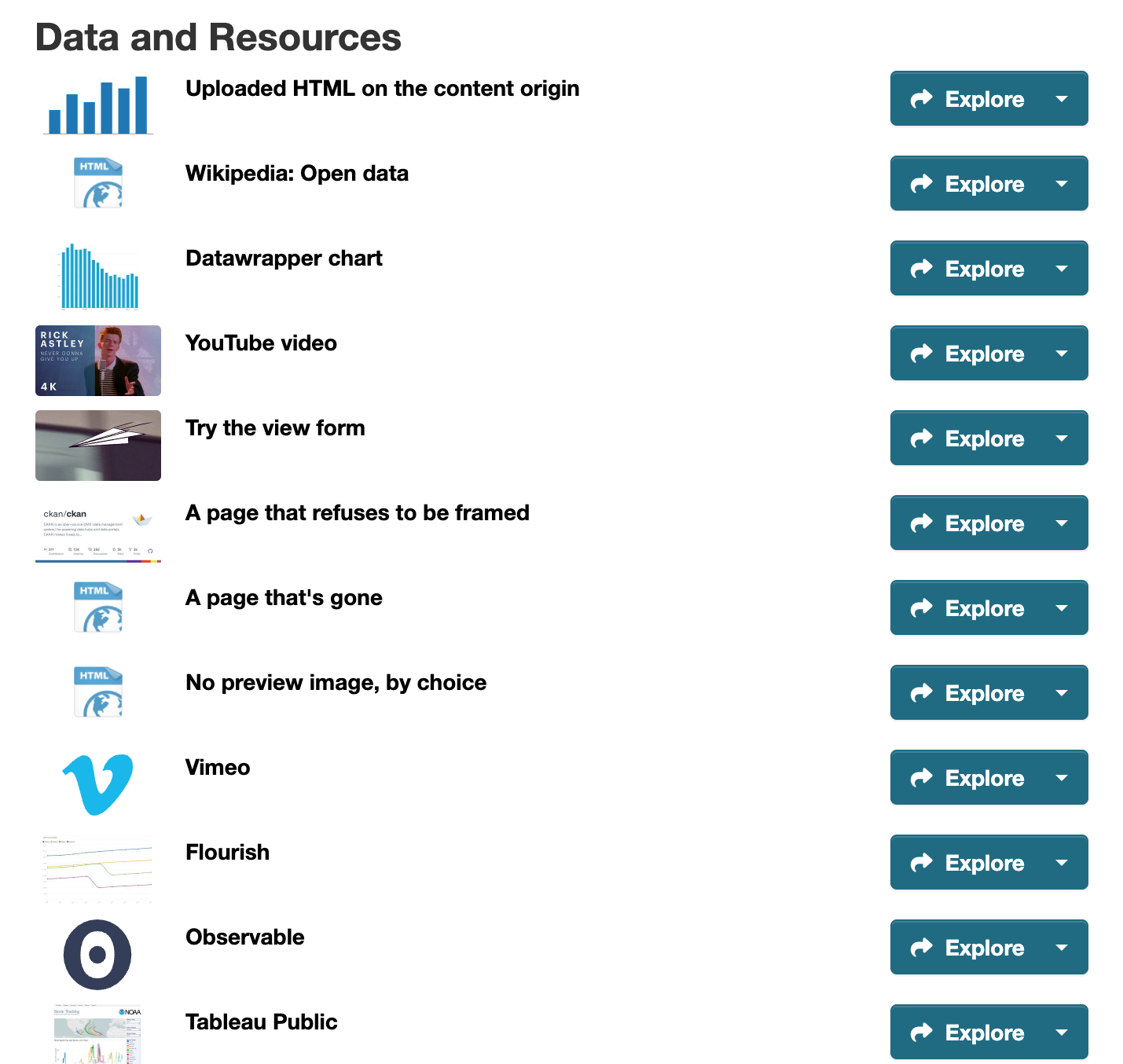
The webpage_view_plus_thumbnails plugin replaces the format icon in a dataset's resource
list for resources with a Website (Plus) view. It's a plugin of its own, so a site that
doesn't enable it never loads its override of package/snippets/resource_item.html (the
resource_item_title block), which could clash with a theme's. It needs Pillow
(pip install ckanext-webpageviewplus[thumbnails]), and CKAN won't start without it. The
image comes from, first match wins:
- An image the editor picks in the view form ("Thumbnail in the resource list"): a PNG,
JPEG, WebP or GIF uploaded to the same dataset, or with
thumbnail_fetchon, linked from it. When the view is saved, CKAN reads it from its storage (or fetches it), shrinks it to fit 320 x 180, drops its metadata and stores it as a small JPEG in the database (tablewebpage_view_plus_thumbnails). It's served from/webpageviewplus/thumbnail/<view_id>to whoever may see the dataset. Images kept by a cloud storage extension on CKAN 2.10 or 2.11 can't be read, so they get no thumbnail; on 2.12 anyckan.filesstorage that can stream is read. A good source for qsv Data Schematics is their static image export (viz_static), uploaded as a second resource. - The page's own preview image, with
ckanext.webpageviewplus.thumbnail_fetch = true(off by default), fetched once when the view is saved and stored the same way. For YouTube, Datawrapper, Flourish, Tableau Public and Internet Archive it's the image each service publishes at a fixed address (YouTube'si.ytimg.com/vi/<id>/mqdefault.jpg, Datawrapper'splain.png...), so the page itself isn't fetched. Otherwise it's the image the page names for link previews (og:image, thentwitter:image). Uploads and CKAN's own pages aren't fetched. Power BI, Looker Studio and Typeform name only their own logo or a stock image, so they're skipped. An editor can tick "Don't use the page's own preview image" on a view. A copy counts only for the address it was taken from: when a view's page changes, its thumbnail goes until the view is saved again orcheck-viewsruns. - The service's logo, when the resource has only this one view and its address is a well-known service's. The logos ship with the extension (from Simple Icons 16.36.0, CC0; each brand's trademark rules still apply). Datawrapper, Flourish, Tableau Public, Power BI, Our World in Data, shinyapps.io, Infogram, Felt and uMap have none there, so they keep the format icon. Looker Studio shows Looker's logo.
- Otherwise CKAN's format icon stays.
A resource with several Website (Plus) views uses the first one in view order. When a resource
has exactly one view and it's a well-known service's, screen readers hear the service's name
("YouTube") instead of the format; the resource's format itself isn't changed unless
service_format is on (below). Visitors only
ever load images from CKAN, never from the service, and a dataset page looks up all its
resources' thumbnails in one query.
Fetching. With thumbnail_fetch on, CKAN's server requests the page and its image once
per save, with the same guards as the frameability check: only http(s)
addresses that resolve to public addresses, every redirect checked again (at most 3), 5
seconds for the whole of it, at most 512 KB of the page and 2 MB of the image (counted while
reading), and every failure the same "no thumbnail". Each connection is checked once it's
open, before anything is sent, so a host whose DNS answer changes to an internal address in
between (DNS rebinding) gets nothing. Through an egress proxy (HTTPS_PROXY), the proxy looks
up the address, so filtering internal addresses is up to it. Only PNG, JPEG, WebP and GIF are
decoded, never SVG, and CKAN never serves the fetched bytes as they came.
Service names as formats. With ckanext.webpageviewplus.service_format = true (off by
default), saving a view on a resource whose only view is a well-known service's, and whose
format is empty or HTML, sets format to the service's name. The Formats facet then lists
them ("YouTube: 12"). It's off by default because format is also in the API and is published
as DCAT's dct:format, where profiles expect a media type. It never overwrites any other
format, and isn't undone if the view changes later. It's a resource update, so it shows in
the dataset's activity stream and runs other plugins' resource hooks.
ckan webpageviewplus check-views remakes every Website (Plus) view's thumbnail too, so run
from cron it picks up changed pages and images replaced through package_update. When
remaking one fails, it keeps the copy it has.
Privacy and telemetry
By default the extension sends no telemetry and adds no tracking. Every frame's allow list
denies ad and tracking features (Topics, Attribution Reporting, FLEDGE), and its
referrerpolicy keeps the dataset's URL from third-party pages.
- Consent card. A third-party page can wait behind a card ("This view loads content from
host") until the reader asks, so nothing is requested from that host before. It's on with
consent_gate(for the site, or per view), withprivacy_profile = eufor every third-party page whatever its preset, and whenever the browser sends Global Privacy Control (Sec-GPC: 1). Uploads and CKAN's own pages never get it. The card says what loading tells the host, links the site'sprivacy_policy_urlif set, and offers Always load from host: remembered in that browser only (local storage), so later views from that host load without asking, each with an "Ask me again" button that forgets it. A browser sendingSave-Data: onstill gets the card. A sandbox doesn't make visitors anonymous: even understrictorinteractive, the browser sends their cookies for the host when the frame loads (a Google Form shows the visitor's signed-in account), so turn the card on where that matters. View pages sendVary: Save-Data, Sec-GPC. - For a site's own analytics, each view fires DOM events that bubble from its wrapper:
webpageviewplus:loaded,webpageviewplus:expandedandwebpageviewplus:failed(a load the view started, Load or Reload, that took over 15 s). The extension sends them nowhere. - Server logs for admins, on the
ckanext.webpageviewplus.eventslogger, with structured fields and nothing about the visitor:view_rendered(preset, notices),same_origin_refused,signature_refusedandframeability_blocked.
Opt-in view counting
Off unless a sysadmin sets view_counting = true (which requires an http(s)
privacy_policy_url), and then only for views whose editors tick "Count visits". A counted view
says "This view counts visits", linking to the privacy policy.
- What's counted: impressions when the view is rendered, then one beacon per page load saying whether the view was seen (half on screen for a second), loaded, used (Load, the bar's buttons, tapping through) or failed. Only per-view daily totals are stored: no IP, user, user agent or referrer. Browsers sending Global Privacy Control, and obvious bots, aren't counted.
- Where to see them: the view's edit form (last 30 days), the
webpageviewplus_view_stats_showaction (for anyone who can edit the resource), andckan webpageviewplus stats-summary. - Retention: run
ckan webpageviewplus purge-statsdaily from cron; it deletes totals older thanview_counting_retention_days(365). - Anyone can post to the beacon endpoint, so totals can be inflated: treat them as indicative.
What uploaded pages contact
With connection_reports = true (off by default: each report request is a database write) and
a content origin, uploaded pages are served with a Content-Security-Policy-Report-Only
header, which never blocks anything. Browsers report each fetch from another host (map tiles, a
CDN) back to the content origin, and CKAN keeps just the hosts per resource. Read them with the
webpageviewplus_connections_show action or ckan webpageviewplus connections;
show_connections = true also lists them under the view as "This page connects to". Anyone can
post a report, so the list is a hint, not proof. Reports are posted to
/webpageviewplus/report/ on the content origin, so its proxy must pass that path to CKAN
too (see the nginx example under Deploying a content origin).
Config settings
All optional. See ckanext/webpageviewplus/config_declaration.yaml for details.
| Key | Default | Meaning |
|---|---|---|
ckanext.webpageviewplus.content_origin |
empty (off) | Origin serving uploaded HTML, a separate site from CKAN's; see Deploying a content origin |
ckanext.webpageviewplus.signing_secret |
empty | HMAC key (32+ characters) for private content URLs; required with content_origin |
ckanext.webpageviewplus.url_ttl |
300 |
Signing window for private content URLs, in seconds (minimum 30) |
ckanext.webpageviewplus.harden_downloads |
true |
Sandbox HTML/SVG/XML that CKAN serves from its own origin (downloads, resource proxy) |
ckanext.webpageviewplus.default_preset |
interactive |
Preset for new views |
ckanext.webpageviewplus.presets |
all four | Presets editors may choose from |
ckanext.webpageviewplus.editor_can_loosen |
false |
Let editors (not only sysadmins) set sandbox, allow and referrer policy |
ckanext.webpageviewplus.referrer_policy |
strict-origin-when-cross-origin |
Default referrerpolicy |
ckanext.webpageviewplus.credentialless |
empty (off) | Presets whose frames of third-party pages load without the visitor's cookies or storage (Chromium only, extra hardening; never uploads or CKAN's own pages). Breaks logins and sign-in popups in those frames |
ckanext.webpageviewplus.min_height / max_height |
400 / 4000 |
Clamp for viewport and auto heights, in px |
ckanext.webpageviewplus.site_aliases |
empty | Other hosts this CKAN is reachable under; treated as CKAN's own |
ckanext.webpageviewplus.allowed_hosts |
empty (any) | Allow-list of hosts a view's page URL may point to (not checked when a view frames its resource's URL) |
ckanext.webpageviewplus.formats |
html htm |
Resource formats the view is offered for |
ckanext.webpageviewplus.controls |
open fullscreen reload share |
Buttons in the control bar; empty hides it |
ckanext.webpageviewplus.frameability_check |
false |
Warn editors as they type a page URL that refuses framing, check pages when views are saved, and show a card for those that refuse. Makes CKAN request editor-typed URLs, see Frameability check |
ckanext.webpageviewplus.thumbnail_fetch |
false |
With the webpage_view_plus_thumbnails plugin, fetch thumbnails when views are saved: the page's own preview image, and linked images editors pick. Makes CKAN request page and image URLs, see Thumbnails in the resource list |
ckanext.webpageviewplus.service_format |
false |
With the webpage_view_plus_thumbnails plugin, set an empty or HTML format to the service's name when a resource's only view is a well-known service's, see Thumbnails in the resource list |
ckanext.webpageviewplus.color_scheme |
auto |
light or dark: the colour scheme framed pages see (Firefox only so far) |
ckanext.webpageviewplus.narrow_width |
576 |
View width, in px, below which aspect and viewport heights become 80% of the screen; 0 turns it off |
ckanext.webpageviewplus.privacy_profile |
default |
eu puts the consent card on every third-party page, whatever its preset |
ckanext.webpageviewplus.consent_gate |
false |
Consent card on every third-party view (editors can also turn it on per view) |
ckanext.webpageviewplus.view_counting |
false |
Let editors turn on view counting per view |
ckanext.webpageviewplus.view_counting_retention_days |
365 |
Days of daily totals (and reported hosts) purge-stats keeps |
ckanext.webpageviewplus.privacy_policy_url |
empty | Linked from "This view counts visits"; required with view_counting |
ckanext.webpageviewplus.connection_reports |
false |
Report which hosts uploaded pages contact (needs a content origin) |
ckanext.webpageviewplus.show_connections |
false |
Show those hosts under the view |
Commands and API
| Command | Does |
|---|---|
ckan webpageviewplus migrate [--dry-run] [--uploads-only] [--preset NAME] |
Convert webpage_view views, see Migrating from webpage_view |
ckan webpageviewplus check-views [--dataset NAME] [--all] [--json] [--timeout S] [--no-store] |
List views whose page can't be shown, see Finding broken views; also remakes thumbnails, except with --no-store (cron) |
ckan webpageviewplus purge-stats |
Delete view counts and reported hosts older than the retention period (cron) |
ckan webpageviewplus stats-summary [--limit N] |
Site-wide view counts, busiest first |
ckan webpageviewplus connections [--limit N] |
Hosts uploaded pages were seen contacting, site-wide |
API actions: webpageviewplus_frameability and webpageviewplus_service_suggest (url,
resource_id; for those who may add views; the second fetches nothing),
webpageviewplus_view_stats_show (id of a view, optional days) and
webpageviewplus_connections_show (id of a resource), both for those who may update the
resource.
Contributing
Adding or updating a language
Strings follow CKAN's i18n guidelines:
python setup.py extract_messages             # refresh the .pot from the code
python setup.py init_catalog -l de           # a new language, or:
python setup.py update_catalog -l es         # merge new strings into an existing one
# translate the .po, keeping every {placeholder}
python setup.py compile_catalog -l es        # the .mo CKAN reads; commit both
test_i18n.py checks that each catalogue covers every string, keeps its placeholders and
matches its .mo. The script takes its labels from the template, so ckan translation js
isn't needed for this extension.
Developer installation
To install ckanext-webpageviewplus for development, activate your CKAN virtualenv and do:
git clone https://github.com/dathere/ckanext-webpageviewplus.git
cd ckanext-webpageviewplus
pip install -e .
pip install -r dev-requirements.txt
Tests
To run the tests, do:
pytest --ckan-ini=test.ini
test.ini inherits from /srv/app/src/ckan/test-core.ini, the path in the
ckan/ckan-dev Docker images used by CI. Elsewhere, edit its use = config: line
to point at your CKAN checkout's test-core.ini. The tests create the plugin's tables
themselves (CKAN's fixtures drop them when they reset the test database).
browser_tests/ drives a running CKAN with Playwright in Chromium, Firefox and WebKit; see
.github/workflows/test.yml for how CI starts and seeds one. The CKAN under test needs both
plugins, webpage_view_plus webpage_view_plus_thumbnails (so the [thumbnails] extra), and a
content origin, as in browser_tests/ci.ini.
Releasing a new version of ckanext-webpageviewplus
-
Refresh the translations:
python setup.py extract_messages, thenupdate_catalogand, once the new strings are translated,compile_catalog(see Adding or updating a language). -
Update the version number in
pyproject.toml(see PEP 440), and date the release in CHANGELOG.md. -
Optionally build locally to catch packaging errors early:
pip install --upgrade build twine rm -rf dist && python -m build && twine check dist/* -
Commit, tag with the version from
pyproject.toml, and push:git commit -a git tag 0.1.0 git push && git push --tagsPushing the tag runs
publish.yml, which checks that the tag matchespyproject.toml, builds, and publishes to PyPI with trusted publishing (no API token; the job runs in thepypienvironment).
License
1 maintainer

Metadata
1 maintainer
Release files for ckanext-webpageviewplus 0.7.0
For a detailed explanation of source distributions (sdists) and built distributions (wheels), please see the package formats documentation.
Source distribution (sdist)
| File | Size | Uploaded | Provenance | Actions |
|---|---|---|---|---|
| ckanext_webpageviewplus-0.7.0.tar.gz | 262.1 kB | With provenance | Details for ckanext_webpageviewplus-0.7.0.tar.gz |
Built distribution (wheel)
| File | Interpreter | ABI | Platform | Actions Reset |
|---|---|---|---|---|
| ckanext_webpageviewplus-0.7.0-py3-none-any.whl | Python 3 | none | any | Details for ckanext_webpageviewplus-0.7.0-py3-none-any.whl |
Total release size: 540.2 kB
Release files / ckanext_webpageviewplus-0.7.0.tar.gz
| Download URL | ckanext_webpageviewplus-0.7.0.tar.gz |
|---|---|
| Size | 262.1 kB |
| Tags | Source |
|
SHA-256 checksum How to use checksums |
4391d97507016a7f07b0b138313a49bc56449a28439559dd098f48f15bffc9d5
|
|
BLAKE2b-256 checksum How to use checksums |
6e8180359731eb395a0e2db3af57e7ca3b2bb543e4af36620c351330ecd41a07
|
| Upload date | |
|
Uploaded using Trusted Publishing? What is trusted publishing? |
Yes |
| Uploaded via |
twine/7.0.0 CPython/3.13.16
|
Provenance
Provenance describes where a file came from. On PyPI, provenance is shared via attestations, which provide a verifiable record of the build or publishing details. View details, limitations and caveats.


PyPI Publish Attestation
PyPI verified that this artifact, at this checksum, originated from the publisher listed below.
Signed by GitHub Actions, verified by PyPI on Nov 1, 2026.
Transparency logRelease files / ckanext_webpageviewplus-0.7.0-py3-none-any.whl
| Download URL | ckanext_webpageviewplus-0.7.0-py3-none-any.whl |
|---|---|
| Size | 278.1 kB |
| Tags | Python 3 |
|
SHA-256 checksum How to use checksums |
c8f86fbfd8619119bdeeb4ed3a11f4286151abd048d4bfe7cc640a61b837f080
|
|
BLAKE2b-256 checksum How to use checksums |
c71055ddade4bf360b1436b716fdd664d9cd3311caaff89a66a75a6a06eb72e0
|
| Upload date | |
|
Uploaded using Trusted Publishing? What is trusted publishing? |
Yes |
| Uploaded via |
twine/7.0.0 CPython/3.13.16
|
Provenance
Provenance describes where a file came from. On PyPI, provenance is shared via attestations, which provide a verifiable record of the build or publishing details. View details, limitations and caveats.
PyPI Publish Attestation
PyPI verified that this artifact, at this checksum, originated from the publisher listed below.
Signed by GitHub Actions, verified by PyPI on Nov 1, 2026.
Transparency logSecurity for ckanext-webpageviewplus 0.7.0
Provenance
Provenance describes where a file came from. On PyPI, provenance is shared via attestations, which provide a verifiable record of the build or publishing details. View details, limitations and caveats.
Full provenance
All 2 files in this release have been uploaded with provenance metadata.
Attestation for ckanext_webpageviewplus-0.7.0.tar.gz
PyPI Publish Attestation
PyPI verified that this artifact, at this checksum, originated from the publisher listed below.
Signed by GitHub Actions, verified by PyPI on Nov 1, 2026.
Transparency logA note on package security
PyPI is a repository for distributing packages, not a service for auditing them. While third-party security researchers and our staff do their best to detect and remove malicious packages, PyPI cannot guarantee the quality, security or suitability of any given package.
To learn more about protecting yourself from malicious actors, visit our package security documentation.














