

The Chokepoint CLI
Who can poison your app? Ask from your terminal, on your own machine.
No account, no limits, nothing leaves your laptop, and no AI needed.
Install
You need Python 3.12 (for the built-in graph database). On Python 3.11 the CLI still works, but needs a
FalkorDB server running (for example with Docker: docker run -p 6379:6379 falkordb/falkordb), so 3.12 is the
easy path.
pipx install --python 3.12 ckpoint
The package is called ckpoint (the name chokepoint was taken on PyPI); the command it gives you is
chokepoint. No pipx? This works too:
pip install ckpoint
Or try it without installing anything:
uvx --python 3.12 --from ckpoint chokepoint
See what happened, then protect your app
1 · See what happenedThe real npm attack of Sept 8, 2025, replayed on a real project's real lockfile. No project of yours needed, and it never touches your projects, files or repos.chokepoint replay …
|
2 · Protect your appThe real thing: your app, your lockfile, your graph, Nightjar guarding it, and fixes and PRs on your own repo.chokepoint … inside your app's folder
|
Same questions, same answers, two places: everything under chokepoint replay is history, everything else is
about the app you're in.
1. See what happened: the Sept 8 replay
On Sept 8, 2025, one npm maintainer (@qix) was phished and 18 of their packages, with about two billion
weekly downloads, were poisoned for about two hours. The replay is webpack-dev-server exactly as it stood
two weeks before (its real lockfile of Aug 25, 2025), with npm's real publish times and OSV's real advisory
times. Run it anywhere, no project needed:
chokepoint replay
It loads the example (the first time, about a minute) and shows who could have poisoned it.
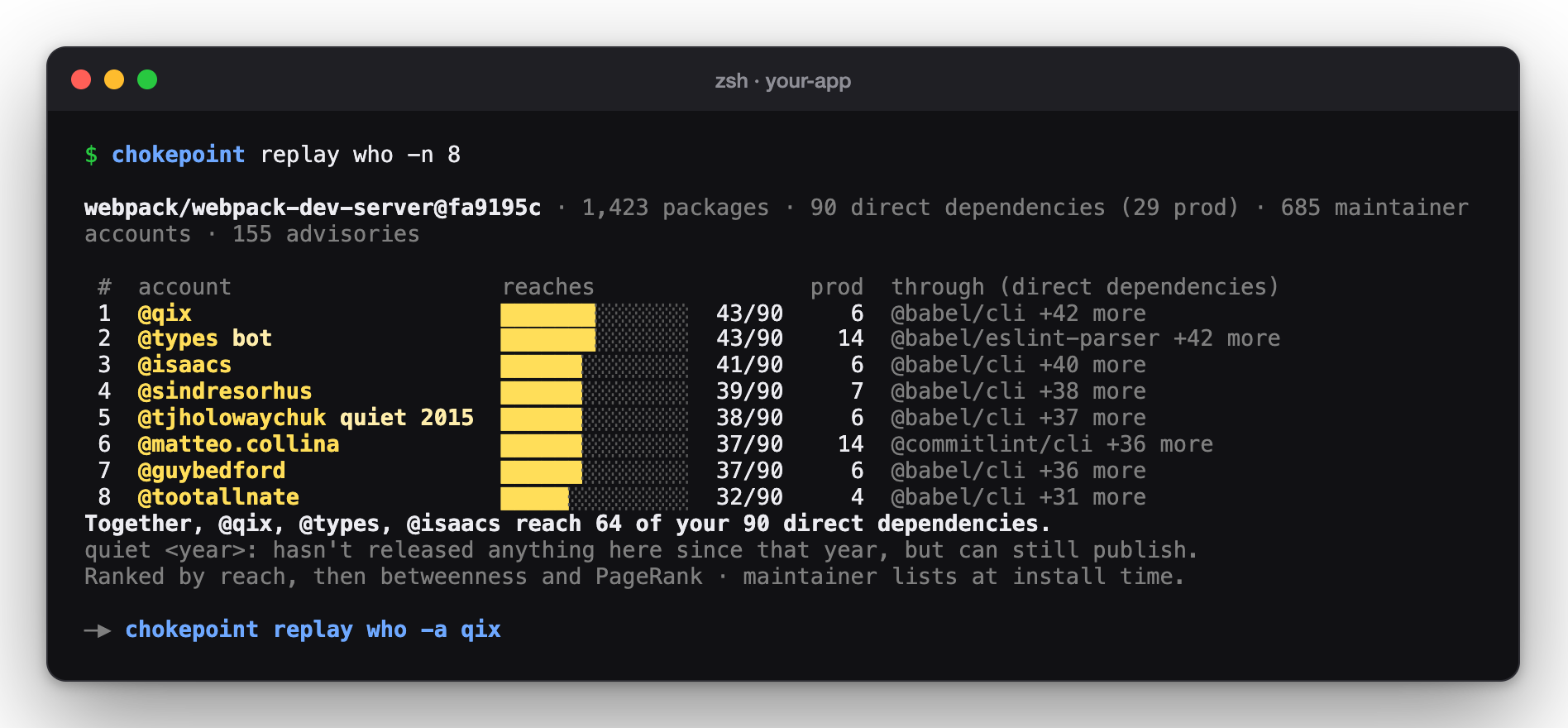
Who could publish code into it? @qix could reach 43 of its 90 direct dependencies:
chokepoint replay who
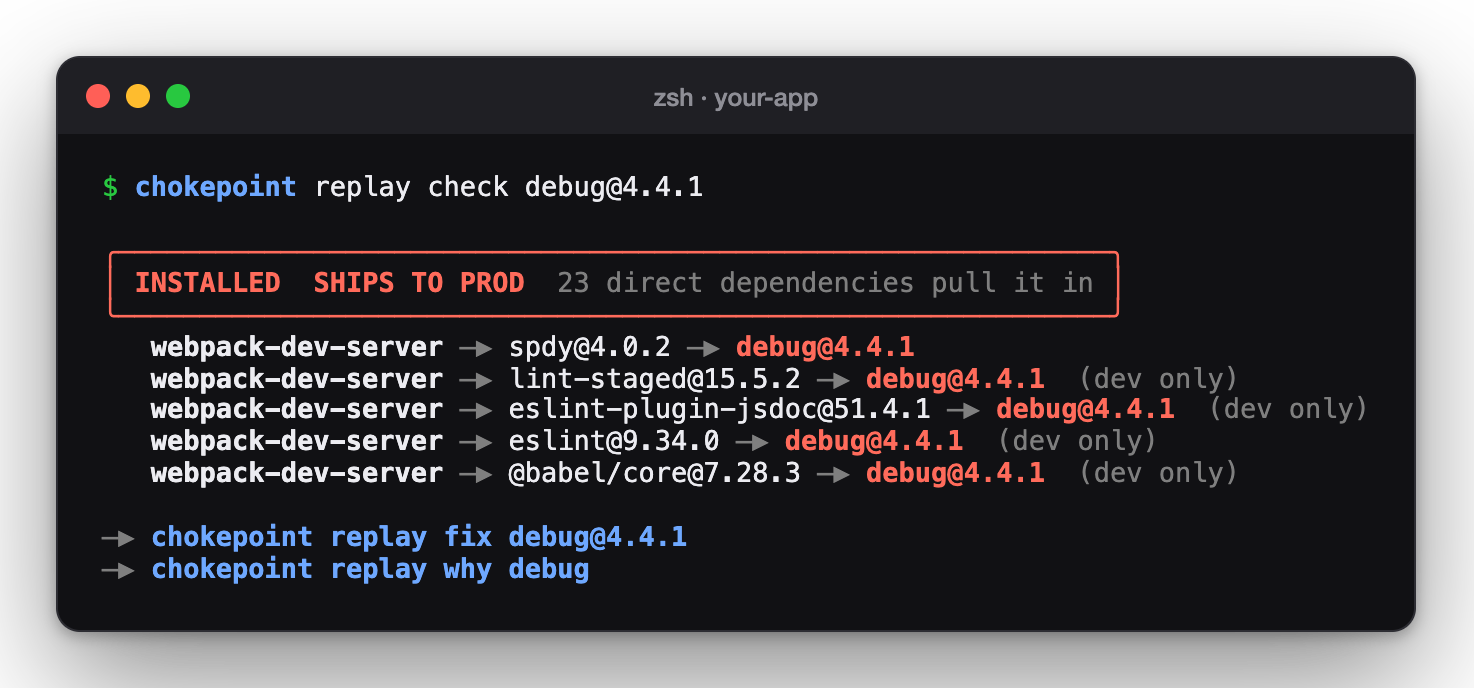
Was the poisoned debug in it, and how did it get in?
chokepoint replay check debug@4.4.1
Would Nightjar have caught it? Nightjar on the real timeline: its first ALERT at 13:13, 74 minutes before the first advisory:
chokepoint replay nightjar --live
See it as a graph, step by step, in your browser (on your machine only):
chokepoint replay map
Every replay command
| Command | What it does |
|---|---|
chokepoint replay |
Loads the example and shows who could have poisoned it. |
chokepoint replay who |
The npm accounts that could publish into it, ranked by reach (-a qix focuses on one, --prod puts production first). Maintainer lists as they were then. |
chokepoint replay check <pkg@ver> |
Was this exact version in it, through which road, and did it ship to production? |
chokepoint replay investigate <pkg@ver> |
Every check on one version at once. |
chokepoint replay why <pkg> |
Every road a package took into it. |
chokepoint replay saved <pkg@ver> |
Would a fresh npm install that day have pulled the poisoned version, or did the lockfile save it? |
chokepoint replay fix <pkg@ver> |
The safe version to pin, shown only: the replay never writes files or opens PRs. |
chokepoint replay advisories |
The advisories (malware first) for what it had installed. |
chokepoint replay nightjar |
Nightjar on the real Sept 8 timeline (--live prints it at a readable pace). |
chokepoint replay ask "…" |
Ask about the replay in plain words. |
chokepoint replay recall |
What Nightjar noted during the replay. |
chokepoint replay report |
A Markdown report of the replay. |
chokepoint replay map |
The step-by-step timeline and graph, in your browser. |
Want to see Nightjar handle the attack in your own app instead? That's the fire drill, in part 2.
2. Protect your app
Everything here works on the app you're in, the way git finds your repo: any folder with a
package-lock.json. When your lockfile changes, the graph rebuilds itself. Outside any project, Chokepoint
uses the last project of yours you used, and says so. It never falls back to the replay.
Your first two minutes
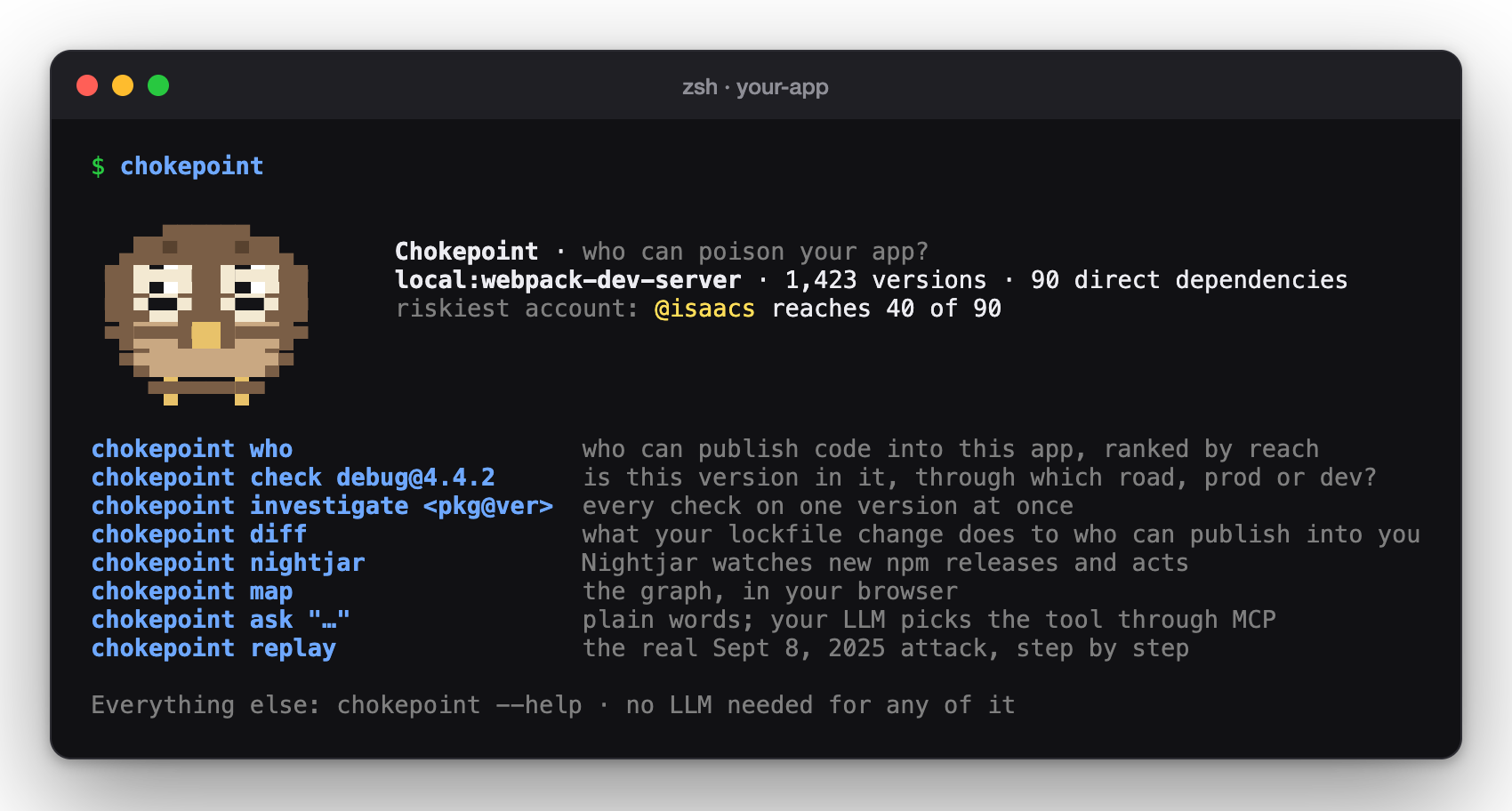
1. Go to your app's folder and say hello. Chokepoint shows what it sees and what to run next:
chokepoint
2. See which npm accounts can publish code into your app. The first time, it builds a graph of your app (about 30 seconds); after that, answers take milliseconds:
chokepoint who
3. Check one exact version: is it in your app, how did it get in, and does it ship to production?
chokepoint check debug@4.4.2
4. See the same answers as a graph, in your browser (on your machine only):
chokepoint map
The screens look just like the replay's above, with your app's numbers.
Every command
Start
| Command | What it does |
|---|---|
chokepoint |
The home screen: where you are, the riskiest account, and the commands you'll use most. |
chokepoint setup |
Guided setup for an AI helper: a model on your machine, your own API key, or none at all. |
chokepoint scan [folder] |
Builds the graph for a project. Usually automatic; --github owner/repo scans a public repo instead. |
chokepoint projects |
Lists your scanned projects (the replay is listed apart). |
chokepoint use <project> |
Picks the project to use when you're outside any project folder. |
chokepoint doctor |
Checks that everything works: Python, the graph, npm, OSV and your AI settings. |
Questions about your app
| Command | What it does |
|---|---|
chokepoint who |
Ranks the npm accounts that can publish code into your app, by how much they reach. --prod puts production first, -a qix focuses on one account, -n 20 shows more. |
chokepoint check <pkg@ver> |
Is this exact version in your app? Through which road, and does it ship to production? |
chokepoint investigate <pkg@ver> |
Every check on one version at once: installed? fresh install? fix? who can publish it? |
chokepoint why <pkg> |
Every road a package takes into your app, for each version you have. |
chokepoint saved <pkg@ver> |
Would a fresh npm install have pulled this version, or did your lockfile save you? |
chokepoint fix <pkg@ver> |
The safe version to use instead, as a package.json override. --write adds it for you; --pr opens a pull request on your repo. |
chokepoint advisories |
Known advisories (malware first, then vulnerabilities) for what you have installed. |
chokepoint diff [base] |
What your lockfile change does: npm accounts that can newly publish into your app, and how far they reach. Compares with HEAD by default, or main, origin/main… |
chokepoint map |
Opens the Chokepoint app in your browser, for your project, on your machine only. |
Nightjar, the watcher agent

| Command | What it does |
|---|---|
chokepoint nightjar |
Nightjar watches npm for new releases of your app's packages, checks each one in the graph, and decides by plain rules. Ctrl+C to stop. |
chokepoint nightjar --act |
…and on an ALERT, pins the version you already have in package.json (only the poisoned version). |
chokepoint nightjar --pr |
…and on an ALERT, opens a fix PR on your repo (set up once, see below). |
chokepoint nightjar --drill |
A fire drill: the real releases of the Sept 8, 2025 attack, fed into Nightjar's live loop against your app. Add --act to watch it pin. Nothing is published anywhere, and it never opens PRs. |
chokepoint nightjar --once |
One check, then exit (for cron or CI; exit code 1 on an ALERT). |
chokepoint nightjar --install |
Keeps Nightjar running in the background from login (macOS and Linux). --uninstall stops it. |
chokepoint recall |
What Nightjar noticed, decided and wrote before (its memory). --drill includes fire-drill notes, which never count as real history. |
chokepoint watch is another name for chokepoint nightjar. Want to see Nightjar work right now? Run the
fire drill in your app's folder:
chokepoint nightjar --drill --act
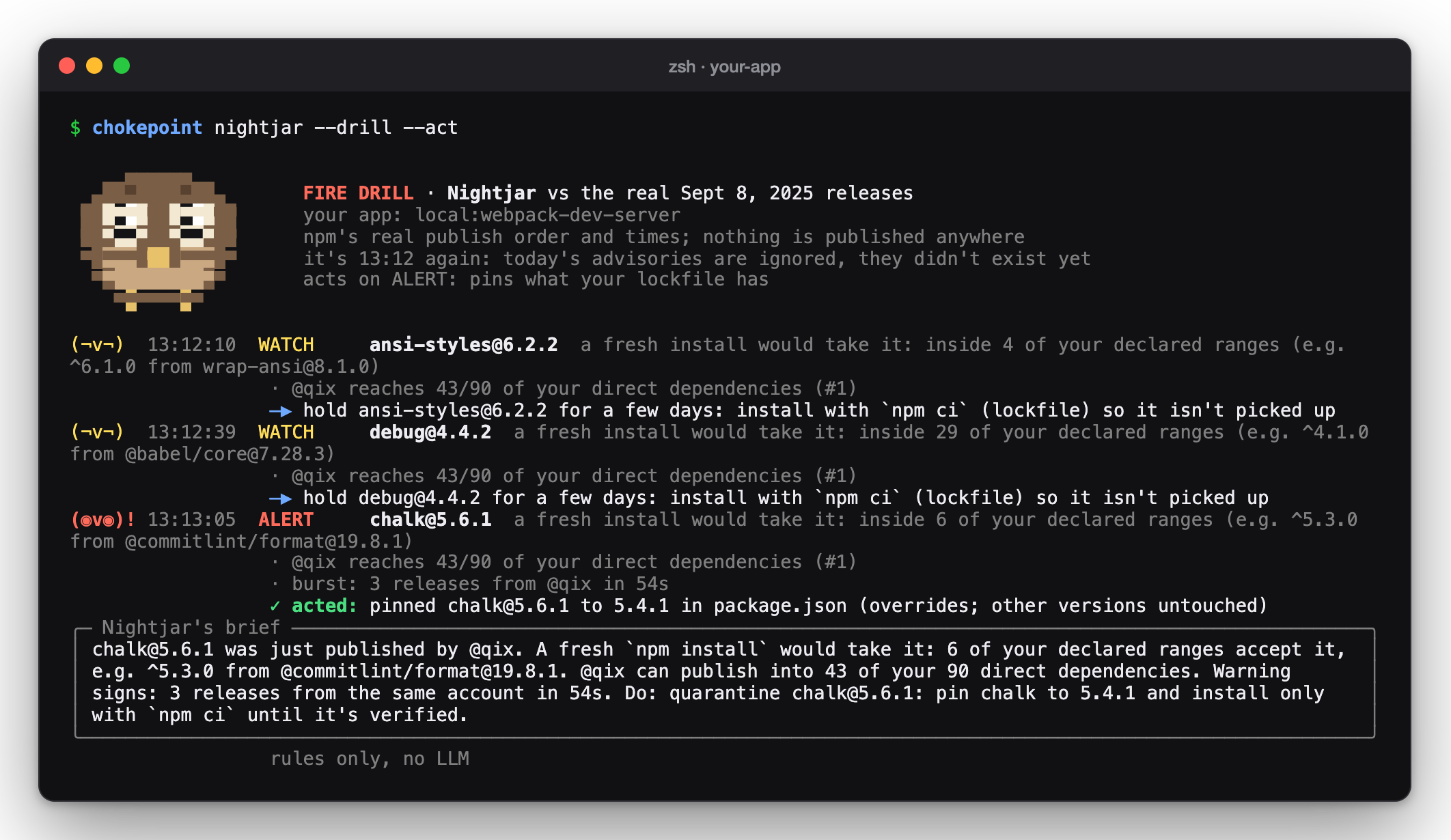
With --act the drill writes real overrides into your package.json: each one only takes effect if that
exact poisoned version ever shows up, so your installed versions don't change. Undo it with git if you like.
Ask in plain words
| Command | What it does |
|---|---|
chokepoint ask "…" |
Ask anything; it shows each step it took. Works without AI too (keyword matching). |
chokepoint mcp |
Starts Chokepoint's MCP server, so an AI assistant can use the same tools. |
For example:
chokepoint ask "is debug@4.4.2 in my app and what do I pin?"
Share
| Command | What it does |
|---|---|
chokepoint report -o report.md |
A Markdown report: size, top accounts, malware, recent Nightjar alerts. |
chokepoint share owner/repo |
Asks the hosted site to scan a public repo, to get a link you can share. It asks you first, because the result is public on the site. Uploads nothing from your machine: only the repo name. |
Options for every command
| Option | What it does |
|---|---|
--json |
The raw result as JSON, for scripts and CI. |
--explain |
Also prints the graph queries (Cypher) that ran, in colour. |
-p <project> |
Use another of your projects than the one you're in. |
Setup
An AI helper (optional)
Everything works without AI: the graph answers, and Nightjar's rules decide. An AI helper only makes ask
understand any wording, and lets Nightjar write its alerts in plain words. The guided setup finds Ollama if
you run it, or asks for a provider (OpenAI, Groq, Gemini, OpenRouter, Anthropic, or any OpenAI-compatible URL)
and your key:
chokepoint setup
Your key is saved in your system's keychain and sent only to that provider, encrypted (see Your keys). If the AI is slow, out of credits or answers badly, Chokepoint quietly uses the no-AI path instead.
For scripts and CI, set it without prompts (the key is read from an environment variable):
chokepoint config llm --provider groq --model <model> --key-env GROQ_API_KEY
Back to no AI:
chokepoint config llm --provider off
See what's set (keys are never printed):
chokepoint config show
Let Nightjar open fix PRs
Nightjar (or chokepoint fix --pr) can open a pull request on your repo that pins the poisoned version.
It never merges anything: you review and merge.
1. Create a token for just that repo at github.com/settings/personal-access-tokens/new:
- Repository access: Only select repositories → your repo
- Permissions: Contents and Pull requests → Read and write (nothing else)
2. Give it to Chokepoint, from inside your app's folder. It checks the token can write to that repo, refuses
broad "classic" tokens, and saves it in your keychain (add --path packages/web if package.json isn't at the
root of the repo). The repo is tied to this app: Chokepoint never opens a PR about one app on another app's
repo, and never from the replay.
chokepoint config github --repo you/your-app
3. Use it. One fix, asking before it opens:
chokepoint fix debug@4.4.2 --pr
Or let Nightjar open one on each ALERT:
chokepoint nightjar --pr
Safety: at most 5 new PRs a day, one PR per poisoned version (another alert updates the same PR), and never during a fire drill. To forget the repo and token:
chokepoint config github --remove
Alerts in Slack or Discord
Nightjar shows a desktop notification on every ALERT (--no-notify turns that off). To also post to Slack or
Discord, give it a webhook:
chokepoint config watch --webhook https://hooks.slack.com/your/webhook
In CI
Fail a pull request that lets a far-reaching new npm account into your app:
chokepoint diff origin/main --fail-on risky
Fail only if a bad version ships to production:
chokepoint check debug@4.4.2 --fail-on prod
Run one Nightjar check (exit code 1 on an ALERT):
chokepoint nightjar --once
--fail-on options: diff takes never (default), new-account or risky (a new account reaching at least
10% of your direct dependencies); check takes installed (default), prod or never.
What stays on your machine
- Your code and your lockfile. Only package names go to npm and OSV, to look them up.
- The graph, in a database inside the CLI (no Docker needed), in your user data folder
(set
CHOKEPOINT_DATA_DIRto move it). - Chokepoint stores npm usernames, never emails. The CLI sends no telemetry. The full privacy notice (website and CLI) is at chokepoint.onrender.com/privacy.
Your keys
Your AI key and GitHub token are yours, and Chokepoint treats them that way:
- Kept in your system keychain, never in a settings file (for CI: read from an environment variable you name).
- Each goes to its own service only: the AI key to the provider you chose, the GitHub token to
api.github.com. Never to Chokepoint's website, never to each other's service. - Only encrypted: a key is never sent over plain
http://to another computer. Plain http is allowed only on your own machine or network (a local model like Ollama). - Never printed: not in
config show, not in--json, not in error messages (anything shaped like a key is blanked out), not in a crash report. - Never handed on: helper processes (the MCP server) get no keys; a
.envfile or a stray script in the folder you're in can't redirect or read them;chokepoint mapanswers only tolocalhost.
Uninstall
If Nightjar runs in the background, stop it first:
chokepoint nightjar --uninstall
Forget your GitHub token:
chokepoint config github --remove
Remove Chokepoint:
pipx uninstall ckpoint
Part of Chokepoint · MIT license · Watches from the shadows. Speaks up before the advisory does.
1 maintainer

Metadata
1 maintainer
Release files for ckpoint 0.1.4
For a detailed explanation of source distributions (sdists) and built distributions (wheels), please see the package formats documentation.
Source distribution (sdist)
| File | Size | Uploaded | |
|---|---|---|---|
| ckpoint-0.1.4.tar.gz | 1.0 MB | Details |
Built distribution (wheel)
| File | Interpreter | ABI | Platform | Reset |
|---|---|---|---|---|
| ckpoint-0.1.4-py3-none-any.whl | Python 3 | none | any | Details |
Total release size: 2.1 MB
Release files / ckpoint-0.1.4.tar.gz
| Download URL | ckpoint-0.1.4.tar.gz |
|---|---|
| Size | 1.0 MB |
| Tags | Source |
|
SHA-256 checksum How to use checksums |
e72c950a67fbcbe2cb47ae27ce9f08460c18f6c1a7a9fa207fa155efc23b138b
|
|
BLAKE2b-256 checksum How to use checksums |
344e7b5137ac15801ffec6a0d36c757f7585f91773845c8987bf1f38051f77d0
|
| Upload date | |
|
Uploaded using Trusted Publishing? What is trusted publishing? |
Yes |
| Uploaded via |
twine/7.0.0 CPython/3.13.14
|
Provenance
Provenance describes where a file came from. On PyPI, provenance is shared via attestations, which provide a verifiable record of the build or publishing details. View details, limitations and caveats.


PyPI Publish Attestation
PyPI verified that this artifact, at this checksum, originated from the publisher listed below.
Signed by GitHub Actions, verified by PyPI on Oct 17, 2026.
Transparency logRelease files / ckpoint-0.1.4-py3-none-any.whl
| Download URL | ckpoint-0.1.4-py3-none-any.whl |
|---|---|
| Size | 1.1 MB |
| Tags | Python 3 |
|
SHA-256 checksum How to use checksums |
6ef605f16c3d6f2f683882768294c46956252d81a0cb3a19c8ba41987750e05f
|
|
BLAKE2b-256 checksum How to use checksums |
2875298948d3ad79057f576f55277af08dea1ae1c7294e5fd6e4f9b5b16861d0
|
| Upload date | |
|
Uploaded using Trusted Publishing? What is trusted publishing? |
Yes |
| Uploaded via |
twine/7.0.0 CPython/3.13.14
|
Provenance
Provenance describes where a file came from. On PyPI, provenance is shared via attestations, which provide a verifiable record of the build or publishing details. View details, limitations and caveats.
PyPI Publish Attestation
PyPI verified that this artifact, at this checksum, originated from the publisher listed below.
Signed by GitHub Actions, verified by PyPI on Oct 17, 2026.
Transparency log













