
Pydantic AI CLI: command line interface to chat to LLMs


Project description
clai





(pronounced "clay")
Command line interface to chat to LLMs, part of the Pydantic AI project.
Usage
You'll need to set an environment variable depending on the provider you intend to use.
E.g. if you're using OpenAI, set the OPENAI_API_KEY environment variable:
export OPENAI_API_KEY='your-api-key-here'
Then with uvx, run:
uvx clai
Or to install clai globally with uv, run:
uv tool install clai
...
clai
Or with pip, run:
pip install clai
...
clai
Either way, running clai will start an interactive session where you can chat with the AI model. Special commands available in interactive mode:
/exit: Exit the session/markdown: Show the last response in markdown format/multiline: Toggle multiline input mode (use Ctrl+D to submit)/cp: Copy the last response to clipboard
Help
usage: clai [-h] [-l] [--version] [-m MODEL] [-a AGENT] [-t CODE_THEME] [--no-stream] [prompt]

Pydantic AI CLI v...

subcommands:
  web           Start a web-based chat interface for an agent
                Run "clai web --help" for more information

positional arguments:
  prompt                AI prompt for one-shot mode. If omitted, starts interactive mode.

options:
  -h, --help            show this help message and exit
  -l, --list-models     List all available models and exit
  --version             Show version and exit
  -m MODEL, --model MODEL
                        Model to use, in format "<provider>:<model>" e.g. "openai:gpt-5" or "anthropic:claude-sonnet-4-6". Defaults to "openai:gpt-5".
  -a AGENT, --agent AGENT
                        Custom Agent to use: a module path like "module:variable" or a YAML/JSON spec file like "agent.yml"
  -t CODE_THEME, --code-theme CODE_THEME
                        Which colors to use for code, can be "dark", "light" or any theme from pygments.org/styles/. Defaults to "dark" which works well on dark terminals.
  --no-stream           Disable streaming from the model
For more information on how to use it, see the CLI documentation.
Web Chat UI
Launch a web-based chat interface:
clai web -m openai:gpt-5.2
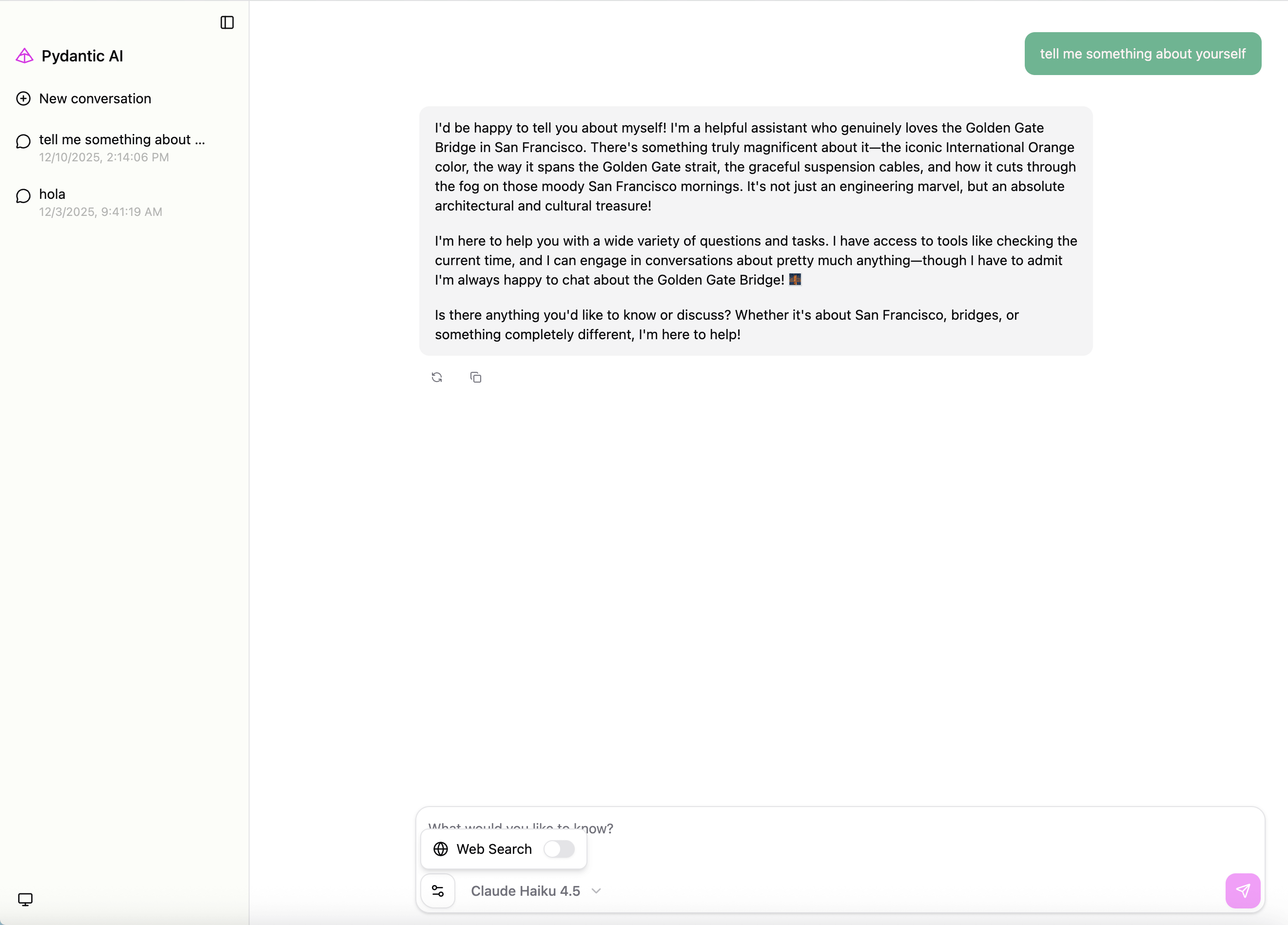
This will start a web server (default: http://127.0.0.1:7932) with a chat interface.
You can also serve an existing agent. For example, if you have an agent defined in my_agent.py:
from pydantic_ai import Agent

my_agent = Agent('openai:gpt-5.2', instructions='You are a helpful assistant.')
Launch the web UI with:
clai web --agent my_agent:my_agent
For full Web UI documentation, see Web Chat UI.
Project details
Release history Release notifications | RSS feed


Download files
Download the file for your platform. If you're not sure which to choose, learn more about installing packages.
Source Distribution
Built Distribution
Filter files by name, interpreter, ABI, and platform.
If you're not sure about the file name format, learn more about wheel file names.
Copy a direct link to the current filters
File details
Details for the file clai-2.5.1.tar.gz.
File metadata
- Download URL: clai-2.5.1.tar.gz
- Upload date:
- Size: 4.5 kB
- Tags: Source
- Uploaded using Trusted Publishing? Yes
- Uploaded via: twine/6.1.0 CPython/3.13.13
File hashes
| Algorithm | Hash digest | |
|---|---|---|
| SHA256 |
d6f4fb4b7f6fa933a9e8eb302304a382c733e026a5d18b3db4dfabf923715e89
|
|
| MD5 |
0d0b824aae96860fa145920de39e3783
|
|
| BLAKE2b-256 |
704009b68ce9997ecc714502e835e0d684f680441264ebfcc58c939b83c2ec97
|
Provenance
The following attestation bundles were made for clai-2.5.1.tar.gz:
Publisher:
ci.yml on pydantic/pydantic-ai
-
Statement:
-
Statement type:
https://in-toto.io/Statement/v1 -
Predicate type:
https://docs.pypi.org/attestations/publish/v1 -
Subject name:
clai-2.5.1.tar.gz -
Subject digest:
d6f4fb4b7f6fa933a9e8eb302304a382c733e026a5d18b3db4dfabf923715e89 - Sigstore transparency entry: 2092743425
- Sigstore integration time:
-
Permalink:
pydantic/pydantic-ai@8fb1144e529cdb10caca121b68c9de687eab77be -
Branch / Tag:
refs/tags/v2.5.1 - Owner: https://github.com/pydantic
-
Access:
public
-
Token Issuer:
https://token.actions.githubusercontent.com -
Runner Environment:
github-hosted -
Publication workflow:
ci.yml@8fb1144e529cdb10caca121b68c9de687eab77be -
Trigger Event:
push
-
Statement type:
File details
Details for the file clai-2.5.1-py3-none-any.whl.
File metadata
- Download URL: clai-2.5.1-py3-none-any.whl
- Upload date:
- Size: 4.3 kB
- Tags: Python 3
- Uploaded using Trusted Publishing? Yes
- Uploaded via: twine/6.1.0 CPython/3.13.13
File hashes
| Algorithm | Hash digest | |
|---|---|---|
| SHA256 |
92d8454227b106ec4ffbbf0ac57ac14678265fd8f3b8aa4202996b26a3dfeb6f
|
|
| MD5 |
6f9c5d4930bf5bb94d74f6a551213e8c
|
|
| BLAKE2b-256 |
7816f025b5460efc741350690e3a16f952a028c7ca5f0695eeb4522dcf8172e8
|
Provenance
The following attestation bundles were made for clai-2.5.1-py3-none-any.whl:
Publisher:
ci.yml on pydantic/pydantic-ai
-
Statement:
-
Statement type:
https://in-toto.io/Statement/v1 -
Predicate type:
https://docs.pypi.org/attestations/publish/v1 -
Subject name:
clai-2.5.1-py3-none-any.whl -
Subject digest:
92d8454227b106ec4ffbbf0ac57ac14678265fd8f3b8aa4202996b26a3dfeb6f - Sigstore transparency entry: 2092744044
- Sigstore integration time:
-
Permalink:
pydantic/pydantic-ai@8fb1144e529cdb10caca121b68c9de687eab77be -
Branch / Tag:
refs/tags/v2.5.1 - Owner: https://github.com/pydantic
-
Access:
public
-
Token Issuer:
https://token.actions.githubusercontent.com -
Runner Environment:
github-hosted -
Publication workflow:
ci.yml@8fb1144e529cdb10caca121b68c9de687eab77be -
Trigger Event:
push
-
Statement type:






