
English · Português (Brasil)
clamav-tray
Tray indicator for a ClamAV installation managed by systemd. It answers, without opening a terminal: are the services up, is a scan running right now, and how did the last one end?

One click opens the full state — services, scan, removable media and quarantine:
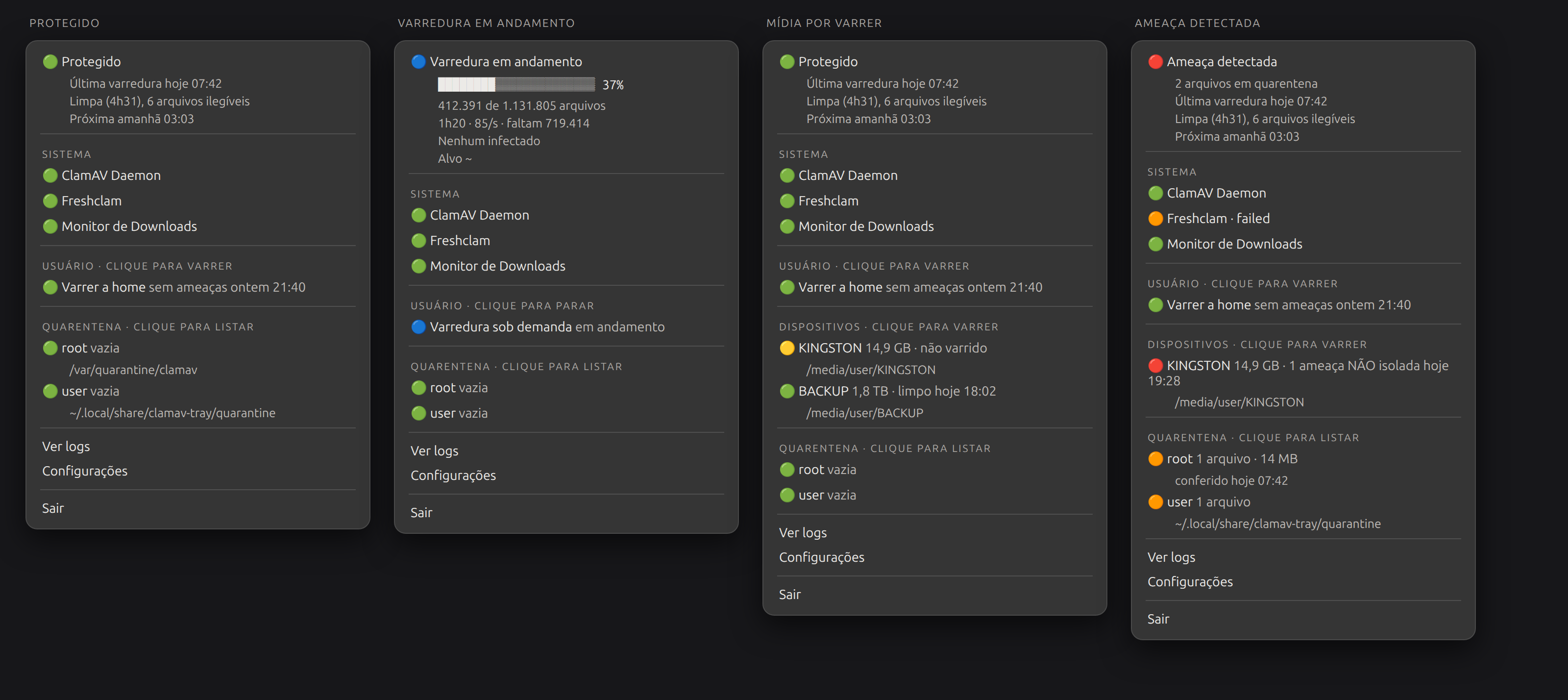
The images are faithful renderings, built from the structure the program itself produces, with the Adwaita theme SVGs. The icons show up white because that is what they really are: the indicator asks for an icon by name (
security-high-symbolic) and the shell paints it, with the panel's foreground color — what tells one state from another is the shape and the label next to it, not the color. The progress bar uses the constants fromwidgets.pyitself, read from the code, so the image cannot drift from the program. Both are regenerable:python3 docs/screenshots/make-tray-states.pyandmake-menu-states.py.
Why it exists
ClamTk is the reference in the category (436★), but it is an on-demand scanner: zero references to systemd, zero to the tray, and its last code push was in March 2024. The other projects in the search have 0 or 1 star.
Nobody had filled the gap of "my ClamAV already runs under systemd, I want to see its state".
Requires systemd. That is the premise, not a temporary limitation — the project's value is precisely reading the state of the units.
Installation
# 1. system dependencies — pick your distro
sudo apt install python3-gi gir1.2-ayatanaappindicator3-0.1 pipx                  # Debian/Ubuntu
sudo dnf install python3-gobject gtk3 libayatana-appindicator-gtk3 pipx            # Fedora
sudo pacman -S python-gobject gtk3 libayatana-appindicator python-pipx             # Arch

# 2. the program
pipx install --system-site-packages clamav-tray
All three commands were checked in clean containers (current Ubuntu 24.04, Fedora and Arch), installing the package. On Fedora and Arch the container ran systemd, and unit discovery was checked live; on Ubuntu, it is the one in daily use on the origin machine.
--system-site-packages is required. PyGObject (gi) comes from the
distro, not from pip — building it in a virtualenv needs a toolchain and the GTK
headers. Without the flag, the pipx venv cannot see the system's python3-gi;
the program detects this and tells you how to fix it.
System dependencies: python3-gi, GTK 3 and one of the two AppIndicators
(gir1.2-ayatanaappindicator3-0.1 or gir1.2-appindicator3-0.1 — the program
tries both).
From source: clone and pipx install --system-site-packages .
First: ClamAV has to be up
The tray observes the ClamAV units; it does not create them. If none is found, it says so ("no ClamAV service found") instead of showing the green shield. Two pitfalls, checked:
- Fedora enables nothing, and
/etc/clamd.d/scan.confships withLocalSocketcommented out. UncommentLocalSocket(andLogFile, if you want the log), runsudo freshclamand thensudo systemctl enable --now clamd@scan. - Arch (and the upstream package):
clamav-daemon.servicehas aConditionPathExistsGlobfor the signature database. Withoutsudo freshclamfirst, the unit "starts" without an error, stays inactive and drops off systemd's list. Runfreshclamfirst, thensudo systemctl enable --now clamav-daemon.
Start on login
A program that registers itself to run at every login asks for trust. That is why the first step is to look, not to install:
clamav-tray --show-autostart          # shows destination, command and exact content — writes nothing
clamav-tray --show-autostart --xdg    # the same, for XDG autostart
It shows where the file would be written, which command would run at every
login, the whole file and the systemctl --user commands that would follow. If
a file already exists at the destination — yours, from another version, or
hand-edited —, it shows the difference line by line instead of the whole
file.
Once checked, install:
clamav-tray --install-autostart           # user service, supervised (recommended)
clamav-tray --install-autostart --xdg     # XDG autostart, unsupervised
clamav-tray --uninstall-autostart         # undo (with --xdg, the XDG one)
--install-autostart shows the same content again and only writes after you
answer y (or s). Outside a terminal it refuses, unless given --yes — so no script
writes an autostart without someone having decided to. Removal follows the same
rule.
None of this needs root: the service goes to ~/.config/systemd/user/ and the
XDG entry to ~/.config/autostart/. Prefer the service: if the process dies, it
comes back, and the journal keeps the reason. XDG autostart fires and forgets —
that is how the indicator that gave rise to this project vanished from the tray
without a trace.
After writing, the installer checks that the service came up, instead of
claiming "enabled" without looking. Running from source (no clamav-tray on
PATH), it points the unit at python3 -m clamav_tray in this directory — and
--show-autostart says so beforehand. If you cloned the repository you can also
use ./packaging/install-autostart.sh [xdg], which forwards to the same command.
The extras (scheduled scan, USB, Downloads) remain repository-only: they install a system unit and need root, which the package deliberately does not do.
Tray on your desktop
| Desktop | Status |
|---|---|
| KDE, XFCE, Cinnamon, MATE | native |
| Ubuntu | works (Canonical ships ubuntu-appindicators) |
| Plain GNOME | needs an extension — GNOME removed the tray in 3.26 |
What works on a clean installation
The program observes what exists. It does not install units, does not schedule scans and does not decide what to scan — that choice is what keeps it installable without root.
| Out of the box | |
|---|---|
| ClamAV Daemon, Freshclam, On-Access | yes, they come with the packages |
| Scan home, scan removable media | yes, only needs clamd running |
| User quarantine, progress bar | yes |
| Scheduled scan, "Next", "Last" | no — no distro ships it |
| Folder monitor, system quarantine | no |
The top half works; the scan half starts empty. It is not a bug: the distro does not schedule scans, and the program should not invent one.
To fill it in, there are optional and independent extras in
contrib/extras/ — daily scan, Downloads monitor,
USB scan and publishing of quarantine statistics. Each one has its own
installer, which refuses to overwrite and tells you how to uninstall.
Configuration
There is a Settings item in the menu: it creates the commented file if it does not exist and opens it in your editor. The file is reloaded on save.
Nothing is required — the program discovers units through the clam* glob and
paths through clamconf.
For scripts and dashboards
clamav-tray --dump            # what the tray would see, as text
clamav-tray --dump --json     # the same, as data — stable format
clamav-tray --dump --json | jq -r .status    # ok | busy | warn | threat
No display and no PyGObject needed. The JSON is a versioned contract (schema
field), described in docs/json.md.
Language
English is the default and the source. Translating is optional by construction: a key without a translation shows up in English instead of breaking.
[general]
language = "pt_BR"   # or "auto" to follow the locale
To contribute a language, copy the pt_BR block in
clamav_tray/i18n.py and translate it — no tool to
install. It deliberately does not use gettext; the reason is in
docs/design.md.
Documentation
| docs/design.md | design decisions and what they cost |
| docs/dbusmenu.md | what crosses the menu protocol, and what does not |
| docs/quarantine.md | the two quarantines and the statistics convention |
| docs/progress.md | progress by counting, not by clock |
| docs/json.md | the --dump --json format and what is stable in it |
| docs/removable-media.md | detection without subprocesses |
| ROADMAP.md | the product, and the migration to Rust |
| CONTRIBUTING.md | how to contribute |
This project is also my Rust notebook
I decided to use this project to learn Rust, migrating one module at a time until no Python is left.
- The migration happens on a separate branch (
rust), never onmain mainremains the Python version, working and maintained- The switch only happens once I am confident in the language — not by a deadline, not at half the modules ported. If that confidence does not come, the Python version stays and that is not a failure
- Whoever installs uses Python and does not need to know any of this
The modular design exists because of this: each file has a clear boundary and can be ported on its own. The order and the criteria are in the ROADMAP.
If you are a contributor: send PRs against main, in Python. The rust
branch is a personal exercise and may be force-rewritten at any time.
Status
On PyPI, in daily use by one person. Published because the niche was empty, not because it is mature. If you use it, expect rough edges — and open an issue.
License
MIT.
1 maintainer

Metadata
1 maintainer
Release files for clamav-tray 0.4.0
For a detailed explanation of source distributions (sdists) and built distributions (wheels), please see the package formats documentation.
Source distribution (sdist)
| File | Size | Uploaded | Provenance | |
|---|---|---|---|---|
| clamav_tray-0.4.0.tar.gz | 60.0 kB | With provenance | Details |
Built distribution (wheel)
| File | Interpreter | ABI | Platform | Reset |
|---|---|---|---|---|
| clamav_tray-0.4.0-py3-none-any.whl | Python 3 | none | any | Details |
Total release size: 117.6 kB
Release files / clamav_tray-0.4.0.tar.gz
| Download URL | clamav_tray-0.4.0.tar.gz |
|---|---|
| Size | 60.0 kB |
| Tags | Source |
|
SHA-256 checksum How to use checksums |
3238fd86f91cb485f385ace1eed78857f096a22d1616130efe387ed2c712664f
|
|
BLAKE2b-256 checksum How to use checksums |
5524b606bdb3aecd407b257036af154b993f626ccdb55812768abe61b996d565
|
| Upload date | |
|
Uploaded using Trusted Publishing? What is trusted publishing? |
Yes |
| Uploaded via |
twine/7.0.0 CPython/3.13.14
|
Provenance
Provenance describes where a file came from. On PyPI, provenance is shared via attestations, which provide a verifiable record of the build or publishing details. View details, limitations and caveats.


PyPI Publish Attestation
PyPI verified that this artifact, at this checksum, originated from the publisher listed below.
Signed by GitHub Actions, verified by PyPI on Oct 13, 2026.
Transparency logRelease files / clamav_tray-0.4.0-py3-none-any.whl
| Download URL | clamav_tray-0.4.0-py3-none-any.whl |
|---|---|
| Size | 57.6 kB |
| Tags | Python 3 |
|
SHA-256 checksum How to use checksums |
ecb02ac8775e7ec69c5266a2d23acec95db59dc23acae078f287fb5c3293ac11
|
|
BLAKE2b-256 checksum How to use checksums |
7f2493391ce0d71e77bc11395f777c793e81b55a79f3a70345efe2c1a004d90d
|
| Upload date | |
|
Uploaded using Trusted Publishing? What is trusted publishing? |
Yes |
| Uploaded via |
twine/7.0.0 CPython/3.13.14
|
Provenance
Provenance describes where a file came from. On PyPI, provenance is shared via attestations, which provide a verifiable record of the build or publishing details. View details, limitations and caveats.
PyPI Publish Attestation
PyPI verified that this artifact, at this checksum, originated from the publisher listed below.
Signed by GitHub Actions, verified by PyPI on Oct 13, 2026.
Transparency logSecurity for clamav-tray 0.4.0
Provenance
Provenance describes where a file came from. On PyPI, provenance is shared via attestations, which provide a verifiable record of the build or publishing details. View details, limitations and caveats.
Full provenance
All 2 files in this release have been uploaded with provenance metadata.
Attestation for clamav_tray-0.4.0.tar.gz
PyPI Publish Attestation
PyPI verified that this artifact, at this checksum, originated from the publisher listed below.
Signed by GitHub Actions, verified by PyPI on Oct 13, 2026.
Transparency logA note on package security
PyPI is a repository for distributing packages, not a service for auditing them. While third-party security researchers and our staff do their best to detect and remove malicious packages, PyPI cannot guarantee the quality, security or suitability of any given package.
To learn more about protecting yourself from malicious actors, visit our package security documentation.














