










clana
clana is a library and command line application to visualize confusion matrices of
classifiers with lots of classes. The two key contribution of clana are
Confusion Matrix Ordering (CMO) as explained in chapter 5 of Analysis and Optimization of Convolutional Neural Network Architectures and an optimization
algorithm to to achieve it. The CMO technique can be applied to any multi-class
classifier and helps to understand which groups of classes are most similar.
Installation
The recommended way to install clana is:
$ pip install clana --user --upgrade
If you want the latest version:
$ git clone https://github.com/MartinThoma/clana.git; cd clana
$ pip install -e . --user
Usage
$ clana --help
Usage: clana [OPTIONS] COMMAND [ARGS]...

  Clana is a toolkit for classifier analysis.

  See https://arxiv.org/abs/1707.09725, Chapter 4.

Options:
  --version  Show the version and exit.
  --help     Show this message and exit.

Commands:
  distribution   Get the distribution of classes in a dataset.
  get-cm         Generate a confusion matrix from predictions and ground...
  get-cm-simple  Generate a confusion matrix.
  visualize      Optimize and visualize a confusion matrix.
The visualize command gives you images like this:
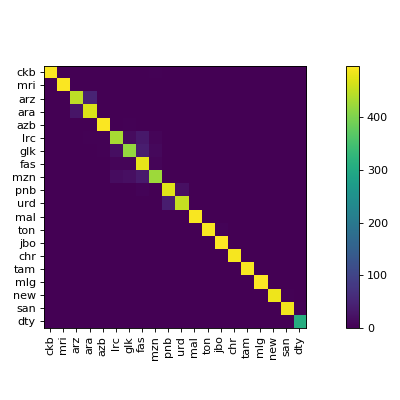
MNIST example
$ cd docs/
$ python mnist_example.py  # creates `train-pred.csv` and `test-pred.csv`
$ clana get-cm --gt gt-train.csv  --predictions train-pred.csv --n 10
2019-09-14 09:47:30,655 - root - INFO - cm was written to 'cm.json'
$ clana visualize --cm cm.json --zero_diagonal
Score: 13475
2019-09-14 09:49:41,593 - root - INFO - n=10
2019-09-14 09:49:41,593 - root - INFO - ## Starting Score: 13475.00
2019-09-14 09:49:41,594 - root - INFO - Current: 13060.00 (best: 13060.00, hot_prob_thresh=100.0000%, step=0, swap=False)
[...]
2019-09-14 09:49:41,606 - root - INFO - Current: 9339.00 (best: 9339.00, hot_prob_thresh=100.0000%, step=238, swap=False)
Score: 9339
Perm: [0, 6, 5, 8, 3, 2, 1, 7, 9, 4]
2019-09-14 09:49:41,639 - root - INFO - Classes: [0, 6, 5, 8, 3, 2, 1, 7, 9, 4]
Accuracy: 93.99%
2019-09-14 09:49:41,725 - root - INFO - Save figure at '/home/moose/confusion_matrix.tmp.pdf'
2019-09-14 09:49:41,876 - root - INFO - Found threshold for local connection: 398
2019-09-14 09:49:41,876 - root - INFO - Found 9 clusters
2019-09-14 09:49:41,877 - root - INFO - silhouette_score=-0.012313948323292875
    1: [0]
    1: [6]
    1: [5]
    1: [8]
    1: [3]
    1: [2]
    1: [1]
    2: [7, 9]
    1: [4]
This gives
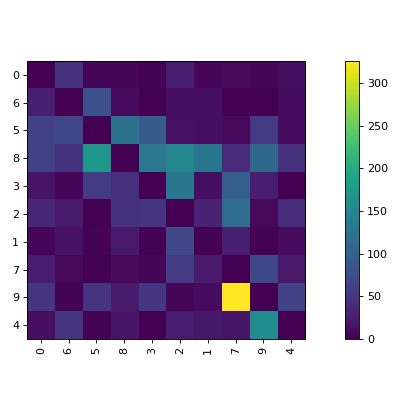
Label Manipulation
Prepare a labels.csv which has to have a header row:
$ clana visualize --cm cm.json --zero_diagonal --labels mnist/labels.csv
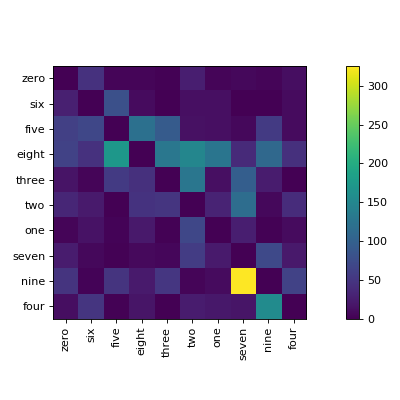
Data distribution
$ clana distribution --gt gt.csv --labels labels.csv [--out out/] [--long]
prints one line per label, e.g.
60% cat (56789 elements)
20% dog (12345 elements)
 5% mouse (1337 elements)
 1% tux (314 elements)
If --out is specified, it creates a horizontal bar chart. The first bar is
the most common class, the second bar is the second most common class, ...
It uses the short labels, except --long is added to the command.
Visualizations
See visualizations
Usage as a library
>>> import numpy as np
>>> arr = np.array([[9, 4, 7, 3, 8, 5, 2, 8, 7, 6],
                    [4, 9, 2, 8, 5, 8, 7, 3, 6, 7],
                    [7, 2, 9, 1, 6, 3, 0, 8, 5, 4],
                    [3, 8, 1, 9, 4, 7, 8, 2, 5, 6],
                    [8, 5, 6, 4, 9, 6, 3, 7, 8, 7],
                    [5, 8, 3, 7, 6, 9, 6, 4, 7, 8],
                    [2, 7, 0, 8, 3, 6, 9, 1, 4, 5],
                    [8, 3, 8, 2, 7, 4, 1, 9, 6, 5],
                    [7, 6, 5, 5, 8, 7, 4, 6, 9, 8],
                    [6, 7, 4, 6, 7, 8, 5, 5, 8, 9]])
>>> from clana.optimize import simulated_annealing
>>> result = simulated_annealing(arr)
>>> result.cm
array([[9, 8, 7, 6, 5, 4, 3, 2, 1, 0],
       [8, 9, 8, 7, 6, 5, 4, 3, 2, 1],
       [7, 8, 9, 8, 7, 6, 5, 4, 3, 2],
       [6, 7, 8, 9, 8, 7, 6, 5, 4, 3],
       [5, 6, 7, 8, 9, 8, 7, 6, 5, 4],
       [4, 5, 6, 7, 8, 9, 8, 7, 6, 5],
       [3, 4, 5, 6, 7, 8, 9, 8, 7, 6],
       [2, 3, 4, 5, 6, 7, 8, 9, 8, 7],
       [1, 2, 3, 4, 5, 6, 7, 8, 9, 8],
       [0, 1, 2, 3, 4, 5, 6, 7, 8, 9]])
>>> result.perm
array([2, 7, 0, 4, 8, 9, 5, 1, 3, 6])
You can visualize the result.cm and use the result.perm to get your labels
in the same order:
# Just some example labels
# ['0', '1', '2', '3', '4', '5', '6', '7', '8', '9', '10']
>>> labels = [str(el) for el in range(11)]
>>> np.array(labels)[result.perm]
array(['2', '7', '0', '4', '8', '9', '5', '1', '3', '6'], dtype='<U2')
1 maintainer

Metadata
1 maintainer
Release files for clana 0.4.1
For a detailed explanation of source distributions (sdists) and built distributions (wheels), please see the package formats documentation.
Source distribution (sdist)
| File | Size | Uploaded | Provenance | |
|---|---|---|---|---|
| clana-0.4.1.tar.gz | 21.5 kB | Without provenance | Details |
Built distribution (wheel)
| File | Interpreter | ABI | Platform | Reset |
|---|---|---|---|---|
| clana-0.4.1-py3-none-any.whl | Python 3 | none | any | Details |
Total release size: 45.4 kB
Release files / clana-0.4.1.tar.gz
| Download URL | clana-0.4.1.tar.gz |
|---|---|
| Size | 21.5 kB |
| Tags | Source |
|
SHA-256 checksum How to use checksums |
ae17fe68c210ff2234ebf067e37087204f0230af386c00c43e316c1362d40f5c
|
|
BLAKE2b-256 checksum How to use checksums |
7ed605952905917360df922718a0b15bcc123565ee21c46bf42493115070fd45
|
| Upload date | |
|
Uploaded using Trusted Publishing? What is trusted publishing? |
No |
| Uploaded via |
twine/3.7.1 importlib_metadata/4.10.1 pkginfo/1.8.2 requests/2.27.1 requests-toolbelt/0.9.1 tqdm/4.62.3 CPython/3.7.7
|
Release files / clana-0.4.1-py3-none-any.whl
| Download URL | clana-0.4.1-py3-none-any.whl |
|---|---|
| Size | 23.9 kB |
| Tags | Python 3 |
|
SHA-256 checksum How to use checksums |
e0d81d2c7eb054527f1a36ae0a66e91713f6eada7fc06a5581d6e5bd6e4ba2de
|
|
BLAKE2b-256 checksum How to use checksums |
75681d9b34e4085da8595108dc994864cd66f0b1285bcdaa3bf3bf1ae9a30a94
|
| Upload date | |
|
Uploaded using Trusted Publishing? What is trusted publishing? |
No |
| Uploaded via |
twine/3.7.1 importlib_metadata/4.10.1 pkginfo/1.8.2 requests/2.27.1 requests-toolbelt/0.9.1 tqdm/4.62.3 CPython/3.7.7
|
Security for clana 0.4.1
Provenance
Provenance describes where a file came from. On PyPI, provenance is shared via attestations, which provide a verifiable record of the build or publishing details. View details, limitations and caveats.
No provenance found
None of the files in this release were uploaded with provenance metadata.
A note on package security
PyPI is a repository for distributing packages, not a service for auditing them. While third-party security researchers and our staff do their best to detect and remove malicious packages, PyPI cannot guarantee the quality, security or suitability of any given package.














