
clapclap
clapclap is a python CLI for managing your CLAP embedding (Contrastive Language-Audio Pretraining).
It can be used as a song recommendation system for Navidrome.
clapclap is build with the idea of working well with small and large databases
Recommended setup with Navidrome
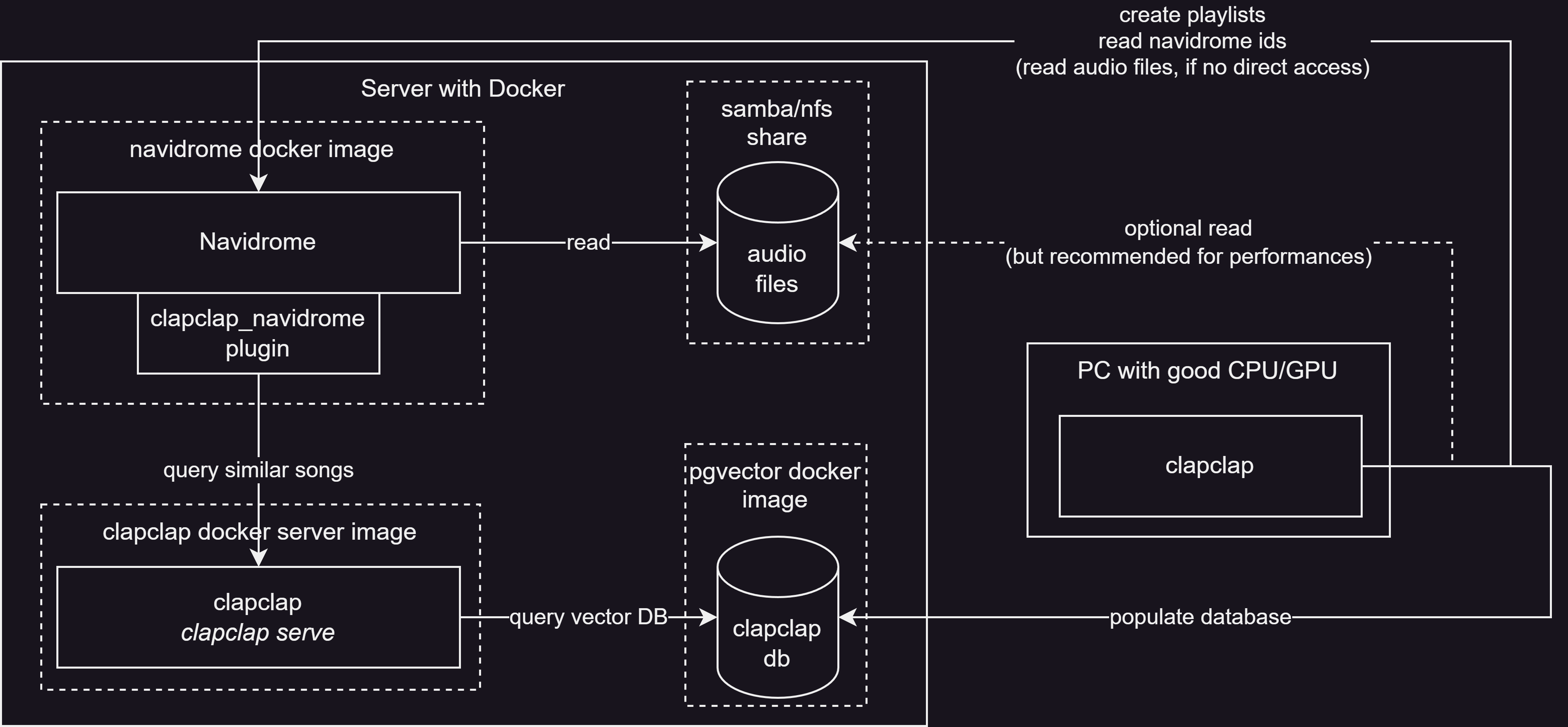
Install
The same python package can be installed in two modes:
- Server: Bare necessary to run the server, no optional dependencies
- Client: All dependencies, can compute new embeddings (includes: pytorch, transformers, etc...), require the '[all]' optional dependencies argument.
For the navidrome extension please refer to the clapclap_navidrome repository: https://github.com/TheRaphael0000/clapclap_navidrome
Install with PyPi (recommended for client)
# client (recommended)
pip install "clapclap-cli[client]"
clapclap --version

# server (not recommended, use docker instead)
pip install "clapclap-cli[server]"
clapclap --version
clapclap serve
Install with Docker (recommended for server)
todo
Install from python wheel
WHL_URL=$(curl -s https://api.github.com/repos/TheRaphael0000/clapclap/releases/latest | jq -r '.assets[0].browser_download_url')
pip install "clapclap-cli[client,server] @ $WHL_URL"

# test installation
clapclap --version

# configure, see configuration section
vim ~/.config/clapclap/config.ini
Or get the latest wheel here: https://github.com/TheRaphael0000/clapclap/releases/latest
Install from sources
# clone repository
git clone https://github.com/TheRaphael0000/clapclap.git
cd clapclap
# install with dev capabilities
pip install -e ".[client,server]" --group dev

# test installation
clapclap --version

# configure, see configuration section
vim ~/.config/clapclap/config.ini
Configuration
Every configuration key value can either be set with environement variable when running the script (useful for docker for example). Or in a .ini configuration file.
Default configuration file location is: ~/.config/clapclap/config.ini But it can be overwritten with the --config
config.ini should start with [settings]
| Key | Description | Default value | Setup (Server or CLI) |
|---|---|---|---|
| POSTGRES_USER | Username for the pgvector DB | user | Both |
| POSTGRES_PASSWORD | Password for the pgvector DB | password | Both |
| POSTGRES_DB | clapclap database name in pgvector | clapclap | Both |
| POSTGRES_HOST | Hostname of the pgvector DB | 127.0.0.1:5432 | Both |
| DATA_ROOT_DIR | Path to the audio files, navidrome | /music/ | CLI |
| NAVIDROME_URL | URL of your Navidrome instance | http://127.0.0.1:4533/ | CLI |
| NAVIDROME_USER | Navidrome account | user | CLI |
| NAVIDROME_PASSWORD | Navidrome password | password | CLI |
| NAVIDROME_ROOT_DIR | Full path of your music directory on your navidrome server, needed to do exact path substition | /music/ | CLI |
| NAVIDROME_PLAYLIST_PREFIX | Optional prefix for all clapclap created playlists | empty | CLI |
Example for clapclap CLI
# ~/.config/clapclap/config.ini
[settings]
POSTGRES_USER=clapclap
POSTGRES_PASSWORD=mydbpass1234
POSTGRES_DB=clapclap
POSTGRES_HOST=192.168.0.2:5432
DATA_ROOT_DIR=/mnt/samba/music/
NAVIDROME_URL=https://navi.example.com
NAVIDROME_USER=navi
NAVIDROME_PASSWORD=mynavipass1234
NAVIDROME_ROOT_DIR=/music/ # slash is important here
NAVIDROME_PLAYLIST_PREFIX=cc
CLI
Commands examples, for the full list use --help with any subcommand
clapclap --help # list subcommands
clapclap update --help # work for any subcommand

# create the database
clapclap db --create

# update the clapclap database with the
clapclap update
# to download songs through navidrome API instead of network mount or local files
# clapclap update --navidrome

# query the database using the text strategy using "breakcore"
# limit it to 100 closest songs and save it to navidrome
clapclap query --save --limit 100 text "breakcore"

# start a clapclap server, not useful locally, must be run on the navidrome server, see
clapclap serve
Example of an update script
#!/bin/bash
# run a navidrome scan in detached mode
clapclap navidrome scan --detach
# start updating your clapclap database, compute the clap embeddings
clapclap update
# wait for the scan previously started to finish
clapclap navidrome scan --wait
# update the clapclap database with IDs from navidrome, we assume that the new songs are within the 50 newest albums added to navidrome to have a faster matching
clapclap navidrome update --limit 50
Example of a clustering script
#!/bin/zsh
# remove navidrome playlists starting with 'cc/'
clapclap navidrome playlist -r "cc/.*" -d
# create 300 playlists using kmeans on navidrome and with a prefix "cc/" will use "smart-naming" by default
clapclap clustering --prefix "cc/" kmeans -k 300
1 maintainer

Metadata
1 maintainer
Release files for clapclap-cli 0.2.0
For a detailed explanation of source distributions (sdists) and built distributions (wheels), please see the package formats documentation.
Built distribution (wheel)
| File | Interpreter | ABI | Platform | Actions Reset |
|---|---|---|---|---|
| clapclap_cli-0.2.0-py3-none-any.whl | Python 3 | none | any | Details for clapclap_cli-0.2.0-py3-none-any.whl |
Release files / clapclap_cli-0.2.0-py3-none-any.whl
| Download URL | clapclap_cli-0.2.0-py3-none-any.whl |
|---|---|
| Size | 92.2 kB |
| Tags | Python 3 |
|
SHA-256 checksum How to use checksums |
1231736349d3d83d4a12eb109d19e8b9d25950a84c8d207940116965d20ae97c
|
|
BLAKE2b-256 checksum How to use checksums |
ee879d1c71a5a0fb6509146708850bc0f231f4b41504542695c69d04e15e1f09
|
| Upload date | |
|
Uploaded using Trusted Publishing? What is trusted publishing? |
Yes |
| Uploaded via |
twine/7.0.0 CPython/3.13.16
|
Provenance
Provenance describes where a file came from. On PyPI, provenance is shared via attestations, which provide a verifiable record of the build or publishing details. View details, limitations and caveats.


PyPI Publish Attestation
PyPI verified that this artifact, at this checksum, originated from the publisher listed below.
Signed by GitHub Actions, verified by PyPI on Nov 16, 2026.
Transparency logSecurity for clapclap-cli 0.2.0
Provenance
Provenance describes where a file came from. On PyPI, provenance is shared via attestations, which provide a verifiable record of the build or publishing details. View details, limitations and caveats.
Full provenance
1 file in this release has been uploaded with provenance metadata.
Attestation for clapclap_cli-0.2.0-py3-none-any.whl
PyPI Publish Attestation
PyPI verified that this artifact, at this checksum, originated from the publisher listed below.
Signed by GitHub Actions, verified by PyPI on Nov 16, 2026.
Transparency logA note on package security
PyPI is a repository for distributing packages, not a service for auditing them. While third-party security researchers and our staff do their best to detect and remove malicious packages, PyPI cannot guarantee the quality, security or suitability of any given package.
To learn more about protecting yourself from malicious actors, visit our package security documentation.














