
ClassCorpus




Ask your AI assistant about your lectures and get answers with exact slide and page citations.
ClassCorpus indexes a semester of local PDF, PowerPoint, Word, Markdown, and text materials once. After that, Claude Code, Codex, and other Agent Skills-compatible assistants can answer course questions, build study guides, and generate flashcards that cite the exact source — without reloading every file into context.
> Explain Bellman-Ford from class and cite the slides.

Bellman-Ford relaxes every edge V - 1 times, so it handles negative edge
weights that break Dijkstra's greedy invariant [Algorithms,
handout-shortest-paths.pdf, Page 2]. One extra relaxation pass detects
negative cycles [Algorithms, study-notes.md, Page 1].
Everything runs locally. No account, no hosted backend, no telemetry, no required model API.
Try It In One Command
No course files needed. This generates a small synthetic course, indexes it, and searches it:
pipx run classcorpus demo
Or after installing:
classcorpus demo
The demo prints the folder it generated. Drop the index with
classcorpus remove "ClassCorpus Demo" --confirm, then delete that folder if you
want the generated files gone too. Like every course folder, ClassCorpus treats
it as a source and never deletes it for you.
See It In Action
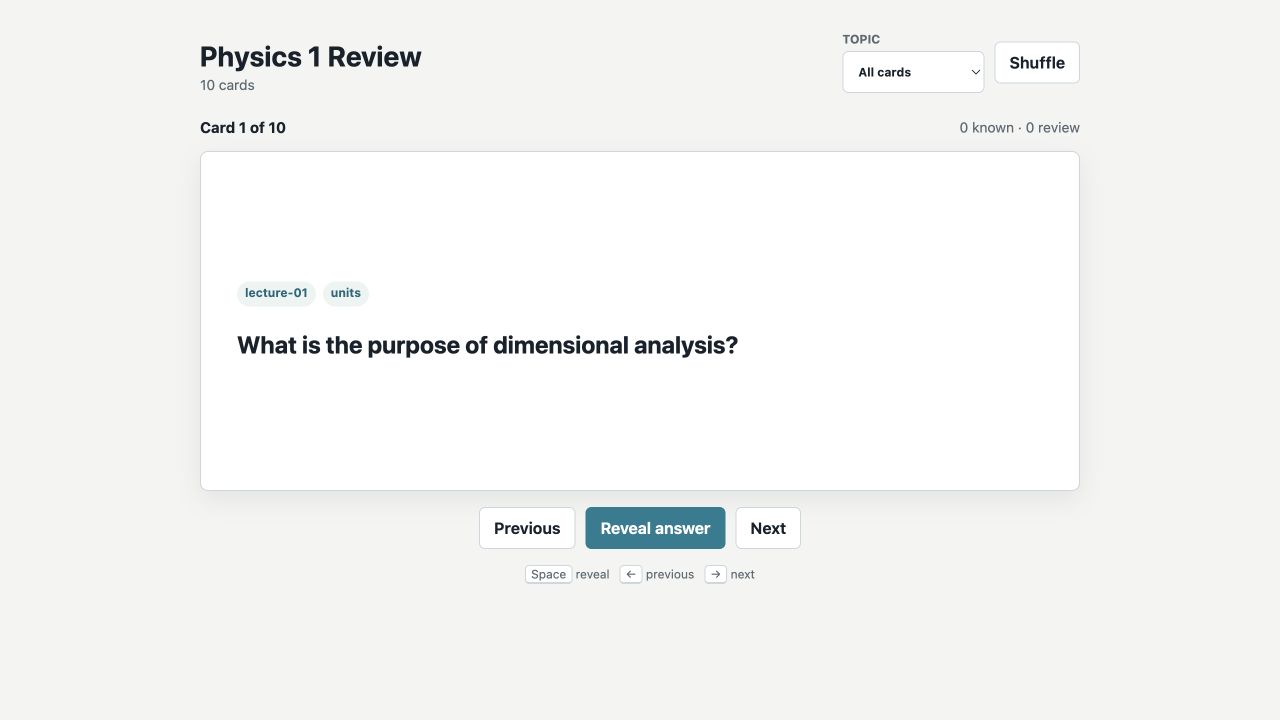
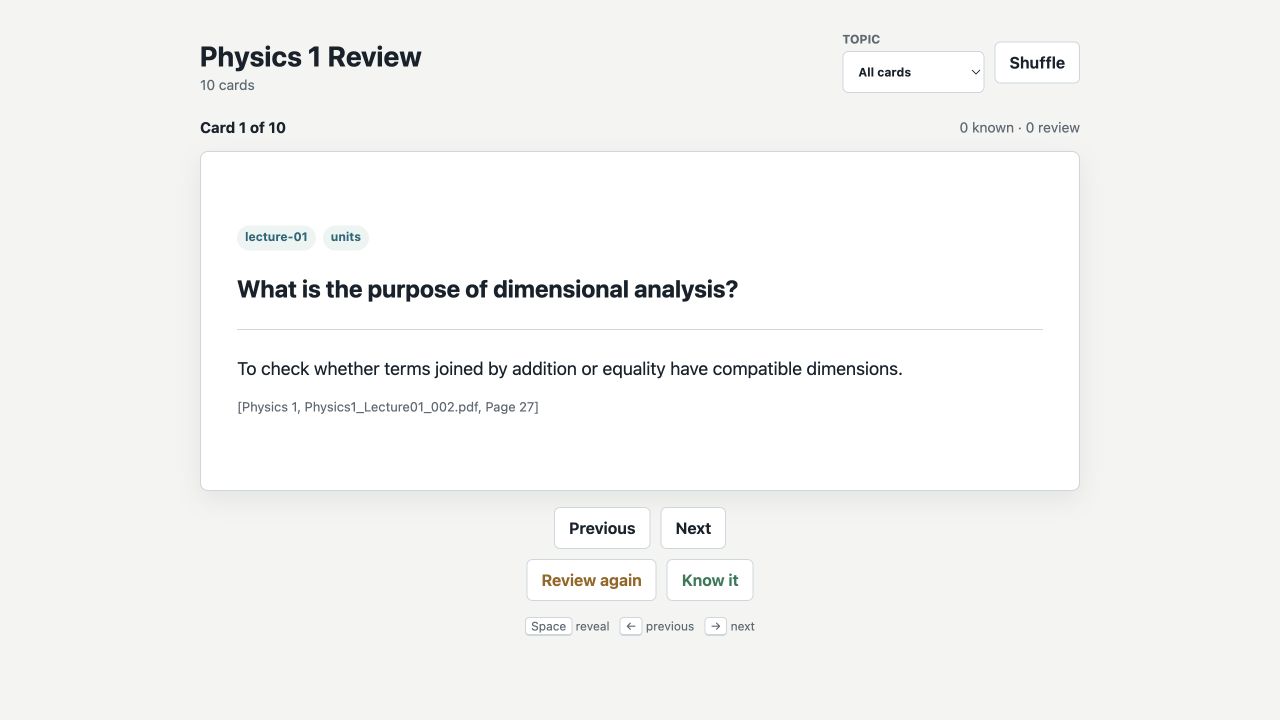
Interactive Flashcards
Self-contained decks include topic filters, reveal controls, review tracking, keyboard navigation, and exact source citations.
Cited PDF Study Guides
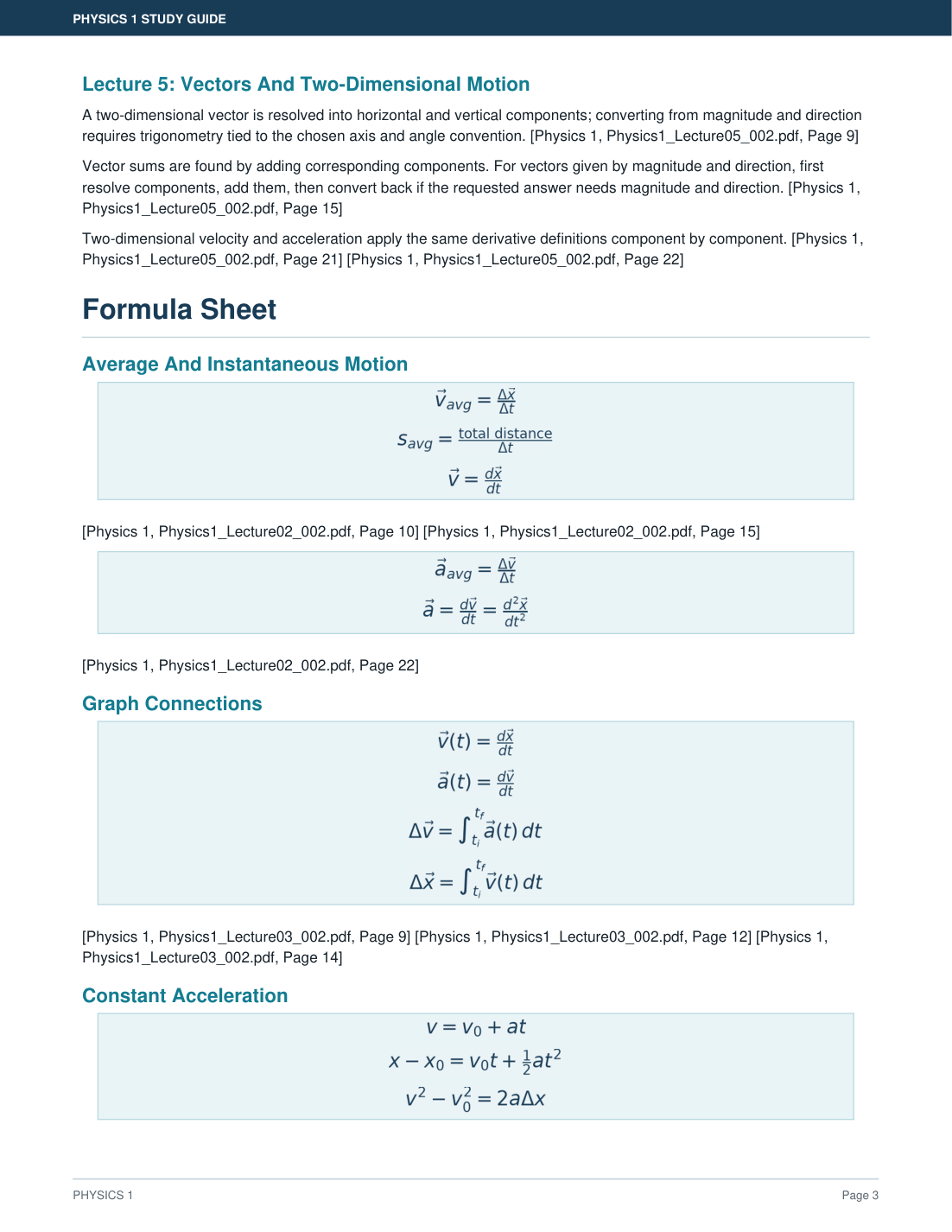
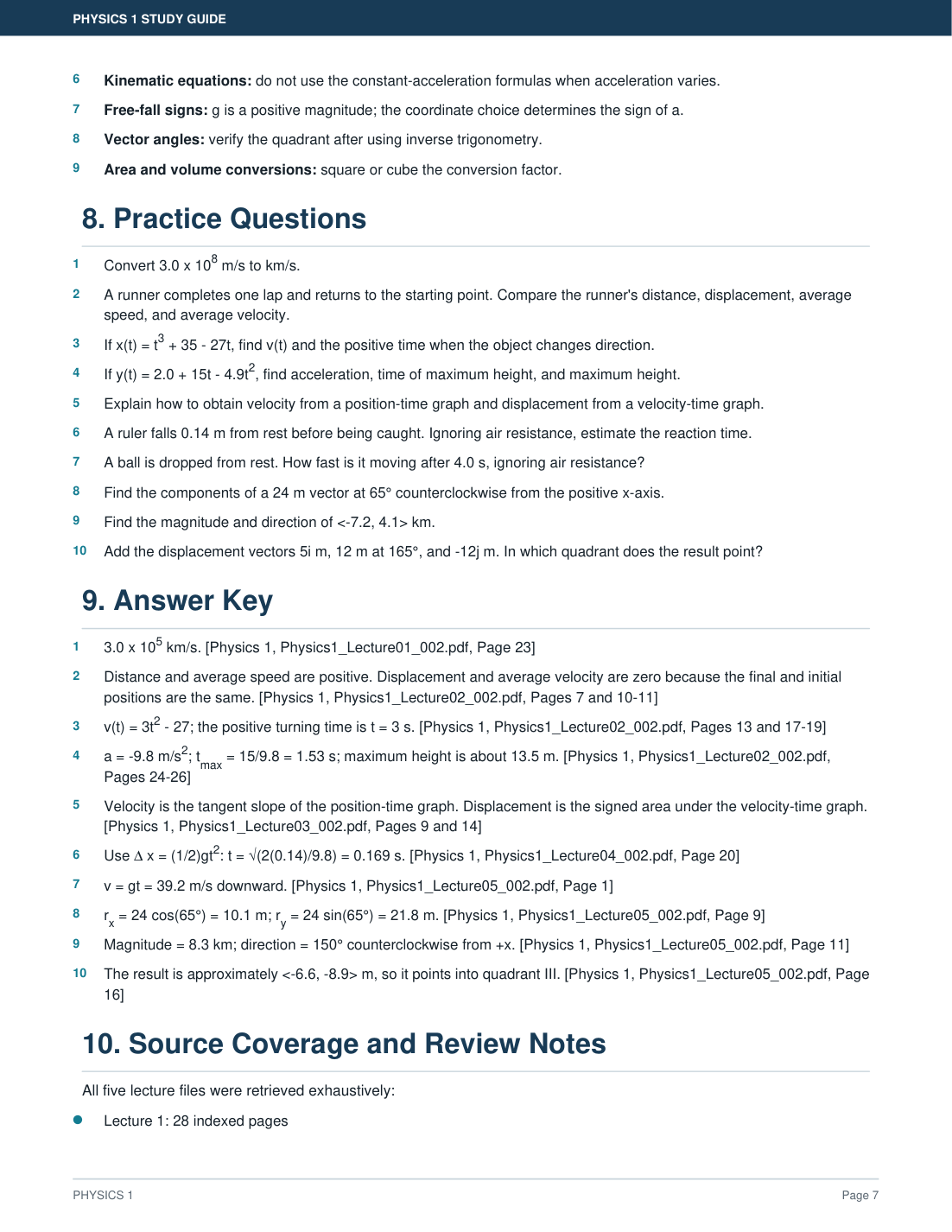
Printable guides render vectors, derivatives, integrals, fractions, and exponents as readable mathematical notation, then connect practice questions and answer keys back to the source lectures.
Install
Requires Python 3.11 or newer. Baseline indexing and search need no model download.
From PyPI
pipx install classcorpus
classcorpus install-skill
The first command installs the CLI and library. The second copies the skill
itself — SKILL.md, references/, and scripts/ — into your agent's skills
directory, so the agent can discover it. Restart or reload the agent afterwards.
uv tool install classcorpus and pip install classcorpus also work.
install-skill detects Claude Code and Codex from ~/.claude and ~/.codex,
and installs for every agent it finds. Narrow it with --agent claude or
--agent codex, or choose any other location with --target DIRECTORY. It
refuses to replace a directory it did not install unless you pass --overwrite.
From A Clone
ClassCorpus is an Agent Skill, not an application. Cloning straight to the skill location also works, and is the better option if you want to modify it. Only ClassCorpus code goes here; lecture materials stay in their existing folders.
Codex:
DEST="${CODEX_HOME:-$HOME/.codex}/skills/classcorpus"; mkdir -p "$(dirname "$DEST")" && git clone --depth 1 https://github.com/haixinnn05/classcorpus.git "$DEST" && cd "$DEST" && python3 -m venv .venv && .venv/bin/python -m pip install -e . && .venv/bin/classcorpus doctor
Claude Code:
DEST="$HOME/.claude/skills/classcorpus"; mkdir -p "$(dirname "$DEST")" && git clone --depth 1 https://github.com/haixinnn05/classcorpus.git "$DEST" && cd "$DEST" && python3 -m venv .venv && .venv/bin/python -m pip install -e . && .venv/bin/classcorpus doctor
These commands are for a first installation and stop if the destination already
exists rather than replacing it. Restart or reload the agent after doctor
passes, so it discovers SKILL.md. On Windows, use .venv\Scripts\python.exe
and .venv\Scripts\classcorpus.exe.
You can also paste this into an agent and let it do the work:
Install ClassCorpus from
https://github.com/haixinnn05/classcorpusin your Agent Skills directory. Create its.venv, install the package, runclasscorpus doctor, and tell me when to restart or reload the agent.
Optional Extras
pip install -e ".[pdf]"          # printable PDF study guides
pip install -e ".[embeddings]"   # local sentence-transformers vectors
pip install -e ".[fastembed]"    # local FastEmbed vectors
pip install -e ".[ocr]"          # local Tesseract OCR adapter
Verify
classcorpus doctor
If a moved or renamed environment breaks the generated classcorpus script,
python -m classcorpus keeps working and doctor reports the repair.
Update
Installed from PyPI:
pipx upgrade classcorpus     # or: uv tool upgrade classcorpus
classcorpus install-skill    # refresh the installed skill files
Installed as a cloned skill:
cd "$HOME/.claude/skills/classcorpus"   # or your Codex skills path
git pull
.venv/bin/python -m pip install -e .
.venv/bin/classcorpus doctor
Reload the agent afterwards. Indexed courses survive updates; run
classcorpus sync COURSE if a parser change requires re-extraction.
Five-Minute Start
Keep course files where they already are. You do not upload or copy slides into the agent or this repository. Point ClassCorpus at any folder on the device and it reads supported files without modifying the originals.
Add the course once. The path is remembered:
classcorpus add "Algorithms" "/absolute/path/to/Algorithms"
Then ask your agent:
Index my Algorithms lectures at
/absolute/path/to/Algorithms.Explain Bellman-Ford from class and cite the slides.
Or search directly:
classcorpus search "Bellman-Ford" --course "Algorithms"
classcorpus list
classcorpus sync "Algorithms"
classcorpus status --course "Algorithms"
To forget a course, use classcorpus remove "Algorithms" --confirm. This
deletes generated data only and never touches the lecture folder.
classcorpus index COURSE SOURCE_ROOT remains supported as a compatibility
alias for add.
For the token-efficient retrieval path, exhaustive coverage, citation verification, and artifact provenance, see docs/retrieval-guide.md.
What Gets Extracted
| Format | Records | Notes |
|---|---|---|
| One per page, with page renders | Native text and tables | |
| PPTX | One per slide | Text, tables, speaker notes, exact embedded image bytes and placement |
| DOCX | One logical Page 1 record | Paragraphs, hyperlinks, tables; Word pagination depends on the renderer |
| Markdown, text | One cited page per file | UTF-8 |
ClassCorpus also provides:
- Recursive local discovery and incremental SHA-256 synchronization
- Atomic replacement that preserves valid records after parse failures
- Explicit stale-source warnings when a refresh fails
- Untrusted-content boundaries for prompt-injection-resistant retrieval
- SQLite FTS5 retrieval with optional local embeddings
- Cursor-based exhaustive reading without model-selected omissions
- Opt-in, agent-native visual slide descriptions
- Cited summaries, comparisons, flashcards, exams, cheat sheets, and plans
Embedded Word images and equations, plus PowerPoint charts, equations, SmartArt, OLE objects, and exact composition, are flagged for review rather than guessed at. Export to PDF when pixel-accurate visual evidence is required.
For PowerPoint review planning, inspect the complete layout-risk inventory:
python scripts/review_powerpoint.py "Algorithms" --source "Lecture08.pptx" --json
Visual Slide Analysis
Visual analysis is opt-in because images are viewed by the active agent under that agent's data policy. After confirmation, the agent requests a small batch:
python scripts/vision_queue.py "Algorithms" --limit 5 --json
It describes the returned diagrams, equations, charts, annotations, and layout,
then stores those descriptions locally with
scripts/store_visual_description.py. Interrupted work remains queued.
Optional Semantic Retrieval
Full-text search works immediately. For a dependency-free local vector index, use deterministic feature hashing:
python scripts/build_embeddings.py \
  "Algorithms" --backend hashing --dimensions 384 --json
python scripts/search_lectures.py \
  "cached recursion" --course "Algorithms" --semantic \
  --backend hashing --dimensions 384 --json
Hashing improves fuzzy lexical matching but is not a learned semantic model. For
learned local embeddings, install the embeddings or fastembed extra, then
pass --backend sentence-transformers or --backend fastembed to both the build
and search commands. Learned backends may download model weights on first use;
inference and vector storage remain local. Embeddings are never required for
baseline indexing or search.
Optional Local OCR
OCR is opt-in and runs locally. Install the ocr extra plus the Tesseract
executable provided by your operating system:
python scripts/run_ocr.py "Algorithms" --backend tesseract --language eng --json
The command processes a small resumable batch of PDF renders or embedded PPTX
assets. OCR text becomes searchable while remaining separate from native text.
Every result reports its backend and a 0 to 1 confidence computed from the
mean accepted Tesseract word confidence. This value is not calibrated factual
certainty; inspect low-confidence text and original visual evidence. No image or
extracted text is sent to a network service.
Flashcards And Study Guides
Save agent-generated cited cards as JSON, then render the default interactive deck:
python scripts/render_flashcards.py \
  cards.json cards.html --title "Algorithms Review" --json
The HTML is self-contained, responsive, keyboard accessible, and offline. It
supports reveal, navigation, shuffle, topic filters, and session-only
known/review tracking while preserving citations. It writes atomically and
refuses to replace an existing file or provenance sidecar unless --overwrite is
explicit.
CSV and TSV are optional interchange formats:
python scripts/convert_flashcards.py cards.json cards.tsv --json
Render printable study guides with the pdf extra installed:
python scripts/render_study_guide.py guide.md guide.pdf
See references/flashcard-formats.md for the normalized schema and output rules.
Privacy
- Extraction, indexing, storage, and search are local.
- No telemetry or provider API is built into the scripts.
- Generated data uses the operating system's user data directory. Set
CLASSCORPUS_DATA_DIRto choose another location. - Only opt-in visual batches are viewed by the active agent.
- Do not process confidential, restricted, or copyrighted materials through an agent unless its data handling is approved for those materials.
Documentation
| Document | Contents |
|---|---|
| SKILL.md | Agent workflow and boundaries |
| docs/retrieval-guide.md | Focused retrieval, coverage, verification, provenance |
| references/cli.md | Unified CLI and diagnostic semantics |
| references/record-schema.md | Stable JSON contracts for agents |
| references/citation-rules.md | Citation contract |
| references/security.md | Untrusted-content boundaries |
| references/parser-plugins.md | Parser extension contract |
| references/study-workflows.md | Study-artifact workflows |
| docs/architecture.md | Design boundaries |
| docs/privacy.md | Data handling detail |
| benchmarks/README.md | Corpus, metrics, benchmark contract |
| ROADMAP.md | Planned work and where to help |
| CONTRIBUTING.md | Development setup and boundaries |
| SECURITY.md | Reporting a vulnerability, and scope |
| CODE_OF_CONDUCT.md | Community expectations |
Repository Structure
SKILL.md               Agent workflow and boundaries
scripts/               Stable agent-facing commands
src/classcorpus/       Local parsing, storage, indexing, and retrieval library
references/            JSON, citation, and study-workflow contracts
examples/              Reproducible local usage walkthrough
tests/                 Unit and integration tests with generated fixtures
benchmarks/            Published synthetic extraction/retrieval benchmark
Development
python3 -m venv .venv
.venv/bin/python -m pip install -e ".[dev]"
.venv/bin/ruff check benchmarks src scripts tests
.venv/bin/python -m pytest -q
.venv/bin/python -m benchmarks.run
Read CONTRIBUTING.md before proposing changes, and docs/releasing.md for release and PyPI publishing steps.
Contributions are welcome. ROADMAP.md lists work that is wanted but not yet done; open an issue before starting a parser, storage, or workflow change so the approach can be agreed first.
License
1 maintainer

Metadata
1 maintainer
Release files for classcorpus 0.6.1
For a detailed explanation of source distributions (sdists) and built distributions (wheels), please see the package formats documentation.
Source distribution (sdist)
| File | Size | Uploaded | |
|---|---|---|---|
| classcorpus-0.6.1.tar.gz | 152.2 kB | Details |
Built distribution (wheel)
| File | Interpreter | ABI | Platform | Reset |
|---|---|---|---|---|
| classcorpus-0.6.1-py3-none-any.whl | Python 3 | none | any | Details |
Total release size: 274.5 kB
Release files / classcorpus-0.6.1.tar.gz
| Download URL | classcorpus-0.6.1.tar.gz |
|---|---|
| Size | 152.2 kB |
| Tags | Source |
|
SHA-256 checksum How to use checksums |
2842063331d523a55a29cc57f8c36512b2e3d32586a015c91127428e3bca63bf
|
|
BLAKE2b-256 checksum How to use checksums |
604421c05b47f37427667a7e722bca133ae0111dd8962c0c4a9cada4a04ad9f8
|
| Upload date | |
|
Uploaded using Trusted Publishing? What is trusted publishing? |
Yes |
| Uploaded via |
twine/6.1.0 CPython/3.13.14
|
Provenance
Provenance describes where a file came from. On PyPI, provenance is shared via attestations, which provide a verifiable record of the build or publishing details. View details, limitations and caveats.


PyPI Publish Attestation
PyPI verified that this artifact, at this checksum, originated from the publisher listed below.
Signed by GitHub Actions, verified by PyPI on Jul 28, 2026.
Transparency logRelease files / classcorpus-0.6.1-py3-none-any.whl
| Download URL | classcorpus-0.6.1-py3-none-any.whl |
|---|---|
| Size | 122.3 kB |
| Tags | Python 3 |
|
SHA-256 checksum How to use checksums |
518f7c01e107cc1fd2e109a52fc88ba8b988bfdfd51da7a9d7d4dc927d0bd0b5
|
|
BLAKE2b-256 checksum How to use checksums |
1992c1338bc574ea41cdbd8f82e91bb76ac0aa65d0a672ca659a6cf56ad6c12e
|
| Upload date | |
|
Uploaded using Trusted Publishing? What is trusted publishing? |
Yes |
| Uploaded via |
twine/6.1.0 CPython/3.13.14
|
Provenance
Provenance describes where a file came from. On PyPI, provenance is shared via attestations, which provide a verifiable record of the build or publishing details. View details, limitations and caveats.
PyPI Publish Attestation
PyPI verified that this artifact, at this checksum, originated from the publisher listed below.
Signed by GitHub Actions, verified by PyPI on Jul 28, 2026.
Transparency log













