



ClassCounter
Fast class counting for NumPy arrays, PyTorch tensors, and GeoTIFFs.
Installation
pip install classcounter
Optional backends:
pip install classcounter[torch]   # PyTorch support
pip install classcounter[geo]     # GeoTIFF support via rasterio
pip install classcounter[numba]   # Numba-accelerated backend
pip install classcounter[all]     # Everything
Requires Python 3.10+.
Usage
import numpy as np
from classcounter import count_classes

arr = np.random.default_rng(0).integers(0, 5, size=(100, 100), dtype=np.int32)

count_classes(arr)
# {0: 2017, 1: 1960, 2: 2050, 3: 1932, 4: 2041}

# Map class IDs to names
count_classes(arr, names={0: "water", 1: "forest", 2: "urban", 3: "crop", 4: "bare"})
# {'water': 2017, 'forest': 1960, 'urban': 2050, 'crop': 1932, 'bare': 2041}

# Get percentages instead of counts
count_classes(arr, percent=True)
# {0: 20.17, 1: 19.6, 2: 20.5, 3: 19.32, 4: 20.41}
Input arrays can be any shape — they are flattened internally. Negative integers and floats are supported via a np.unique fallback path.
GeoTIFF files
count_classes("land_cover.tif")
Requires the geo extra.
Saving results to GeoTIFF metadata
Write class counts back into the raster's GDAL metadata tags:
# One-liner: count and save in one step
count_classes("land_cover.tif", save_metadata=True)
# Writes tags: CLASS_COUNT_0=2017, CLASS_COUNT_1=1960, ...

# With percentages — automatically uses CLASS_PERCENT_ prefix
count_classes("land_cover.tif", percent=True, save_metadata=True)
# Writes tags: CLASS_PERCENT_0=20.17, CLASS_PERCENT_1=19.6, ...

# Custom prefix
count_classes("land_cover.tif", save_metadata=True, metadata_prefix="LAND_")
# Writes tags: LAND_0=2017, LAND_1=1960, ...
Or use the standalone function for more control:
from classcounter import save_counts_to_raster

counts = count_classes("land_cover.tif", names={0: "water", 1: "forest"})
save_counts_to_raster("land_cover.tif", counts)
# Writes tags: CLASS_COUNT_water=2017, CLASS_COUNT_forest=1960
Stale tags from previous runs are automatically cleared before writing.
PyTorch tensors
import torch

tensor = torch.randint(0, 5, (100, 100))
count_classes(tensor)

tensor = tensor.to("cuda")  # GPU — counting happens on-device
count_classes(tensor)
Backend selection
The backend is chosen automatically based on the input type:
- NumPy arrays → Numba (if installed), otherwise NumPy
- PyTorch tensors → PyTorch (runs on-device, including CUDA)
- File paths → loaded via rasterio, then counted with Numba/NumPy
API
count_classes(data, names=None, percent=False, save_metadata=False, metadata_prefix=None)
| Parameter | Type | Description |
|---|---|---|
data |
ndarray, Tensor, str, or Path |
Input array, tensor, or path to a raster file |
names |
dict[int, str] or None |
Optional mapping of class IDs to human-readable names |
percent |
bool |
Return percentages (0–100) instead of raw counts. Default False |
save_metadata |
bool |
Write results as GDAL tags in the source GeoTIFF. Only valid when data is a file path. Default False |
metadata_prefix |
str or None |
Custom tag prefix. Defaults to CLASS_COUNT_ or CLASS_PERCENT_ (when percent=True) |
Returns: dict[int | str, int] mapping class values (or names) to counts, or dict[int | str, float] when percent=True.
When names is provided, classes present in the data but missing from the mapping use their integer key (with a warning). Classes in the mapping but absent from the data receive a count of 0.
save_counts_to_raster(path, counts, *, prefix=None)
| Parameter | Type | Description |
|---|---|---|
path |
str or Path |
Path to an existing GeoTIFF file |
counts |
dict |
Dict of class counts as returned by count_classes |
prefix |
str or None |
Tag name prefix. Defaults to CLASS_COUNT_ |
Writes each entry as a GDAL metadata tag (e.g. CLASS_COUNT_0=1234). Existing tags matching the prefix are cleared before writing.
Performance
Benchmarks on a Ryzen 9 5950X with RTX 4090, 100M-element arrays:
| Backend | Time (ms) |
|---|---|
| NumPy | 178 |
| Numba | 17 |
| PyTorch CPU | 38 |
| PyTorch GPU | 2 |
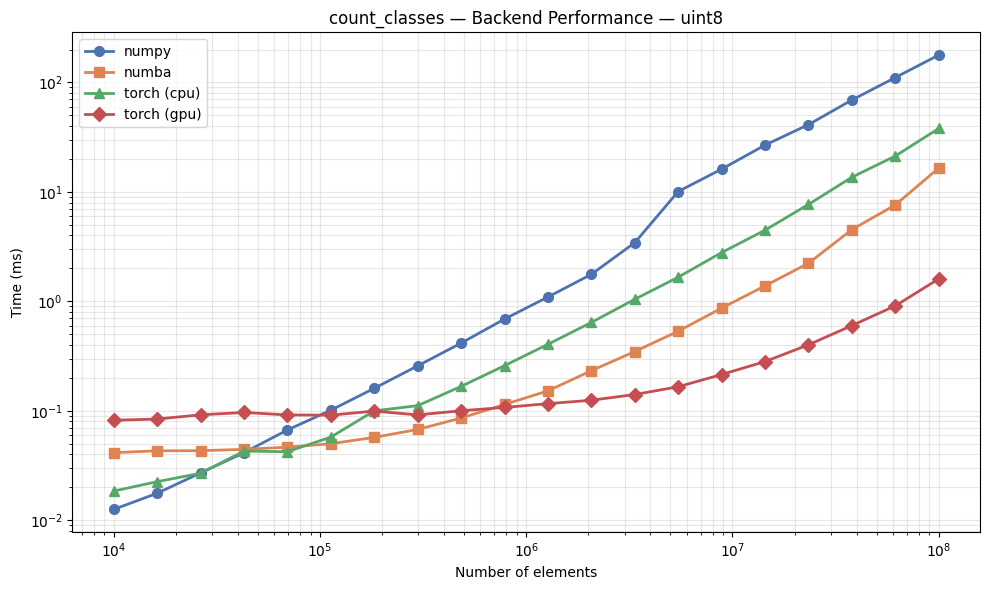
Run the included benchmark notebook to compare backends on your hardware.
See Examples.ipynb for a walkthrough of all features including name mapping, percentages, PyTorch tensors, and GPU acceleration.
Contributing
Contributions are welcome! Please:
- Fork the repository
- Create a feature branch (
git checkout -b feature/my-feature) - Run tests:
uv run pytest - Submit a pull request
License
MIT
1 maintainer

Download files
Download the file for your platform. If you're not sure which to choose, learn more about installing packages.
Source Distribution
Built Distribution
Filter files by name, interpreter, ABI, and platform.
If you're not sure about the file name format, learn more about wheel file names.
Copy a direct link to the current filters
File details
Details for the file classcounter-0.1.0.tar.gz.
File metadata
- Download URL: classcounter-0.1.0.tar.gz
- Upload date:
- Size: 179.3 kB
- Tags: Source
- Uploaded using Trusted Publishing? No
- Uploaded via:
uv/0.8.15
File hashes
| Algorithm | Hash digest | |
|---|---|---|
| SHA256 |
628a129e403373c5e181a46d6affbc32bb261c55a7a6bb68b6764331acc5ec7b
|
|
| MD5 |
c473ea8640d3bb6eea0b0f7116f7d345
|
|
| BLAKE2b-256 |
6b0470cef4dfe83a533fb0b708f70d3f52d518676cd7f12c2ccf0feaa8d5a5bb
|
File details
Details for the file classcounter-0.1.0-py3-none-any.whl.
File metadata
- Download URL: classcounter-0.1.0-py3-none-any.whl
- Upload date:
- Size: 8.3 kB
- Tags: Python 3
- Uploaded using Trusted Publishing? No
- Uploaded via:
uv/0.8.15
File hashes
| Algorithm | Hash digest | |
|---|---|---|
| SHA256 |
eb9192d233f1b8a2d6f0e8938ab573af655654fa6d662bc1a1c32922593b711f
|
|
| MD5 |
b39bd9f8c362a32c9e310aa8d2e87733
|
|
| BLAKE2b-256 |
e84588e10d5cb888ce5eca9a3478280ce79395a242468f0f98a218283cfa8eb4
|













