
claude-top
top for your Claude Code sessions: what each one is doing, what it's waiting on, and how fast you're using your plan.




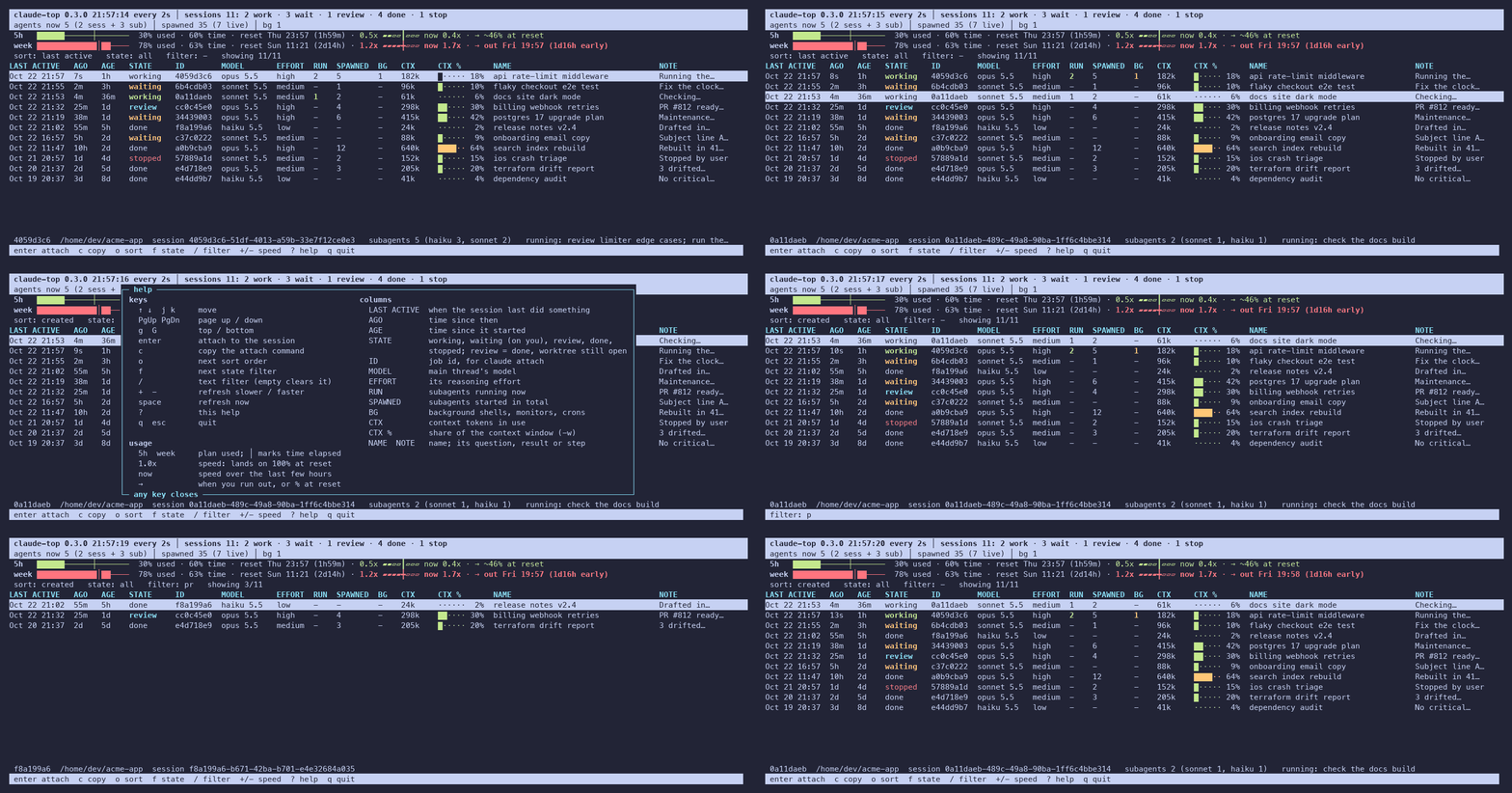
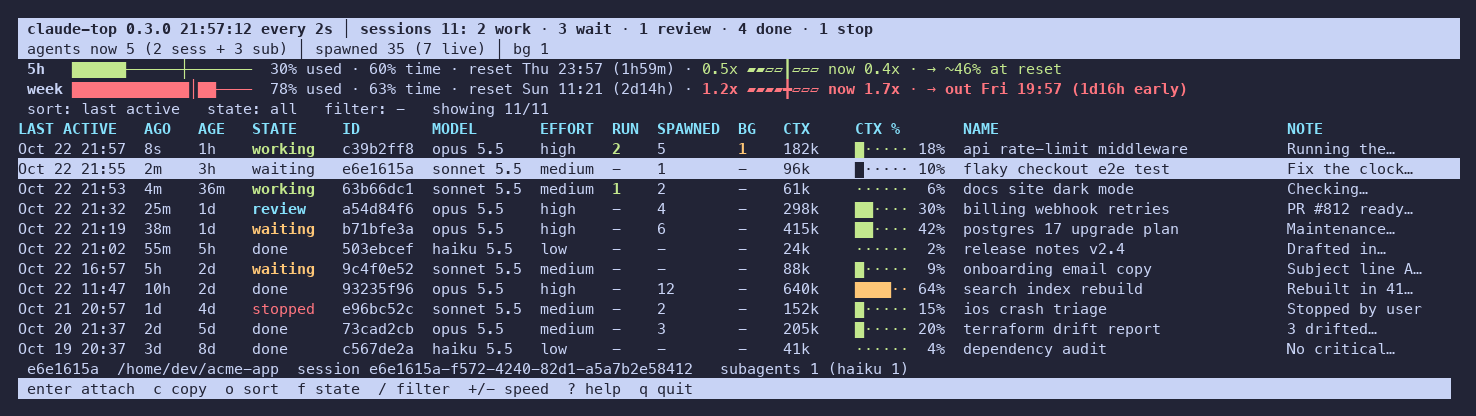
It's a live view of every background session showing when it was last active, what it's waiting on, its model, effort and context size, and the helpers it started. The header shows your 5-hour and weekly plan usage, how fast you're using it, and when you'd run out.
Install
uv tool install claude-agents-top   # or: pipx install claude-agents-top
uv tool install git+https://github.com/jachai/claude-top   # the latest from main
The package is claude-agents-top on PyPI because claude-top there is an unrelated project. Both install a claude-top command, so don't install both. This one is a single file with no dependencies: Python 3.9+ on macOS or Linux (on Windows only --once works). You can also copy claude_top.py anywhere on your PATH.
Show plan usage (optional)
Claude Code hands your plan limits to its status-line command, so claude-top needs to be that command to see them:
claude-top init          # sets the status line in ~/.claude/settings.json (backs it up first)
claude-top init --wrap   # already have a status line? keep it: record the limits, then run yours
Your status line then shows a line like 5h 38% 0.6x · week 54% 1.3x → out Fri 13:37 (with --wrap, your own line, unchanged). --dry-run shows the change, --undo puts things back. If you'd rather edit your own script, add echo "$input" | claude-top record to it.
Use
claude-top              # full screen, refreshes every 2s
claude-top -s waiting   # only sessions waiting for you (Claude Code calls it "blocked"; -s blocked works too)
claude-top -g billing   # text filter
claude-top --once       # print once and exit
| Key | Action |
|---|---|
↑ ↓ / j k |
move |
enter |
open the session (claude attach <id>) |
c |
copy the attach command |
o |
sort: last active, created, context, agents, name |
f |
filter by state |
/ |
text filter |
+ - |
refresh slower / faster |
? |
help: every key and column |
u |
update claude-top (offered in the footer when a newer release is out) |
q |
quit |
Reading it
- Header: sessions by state (
working,waiting for you,review= finished in a worktree that's still open,done,stopped), then what's running now: working sessions + subagents, subagents spawned in total, and background tasks. - Usage bars (5h, week): the bar fills with the % of the limit used, and
│marks how much of the window (time) has passed. A bar filled past the│means you're ahead of budget. - Speed (
1.3x): % used ÷ % of time elapsed.1.0xlands exactly on 100% at reset, and2.0xruns out halfway through. The gauge's middle line is 1x. now is the speed over the last few hours (--rate-hours, default 3; the week uses a little more because limits come in whole percents). - →: when you'll run out at the current speed (and how early that is), or roughly where you'll end up at reset.
- LAST ACTIVE / AGE: last activity vs. when the session was created. The built-in agents view only shows age.
- RUN / SPAWNED: subagents running now / started in total. BG: background shells, monitors and crons in flight.
- CTX %: context used, measured against a 1M window. Change it with
-w 200000orCLAUDE_TOP_CONTEXT_WINDOW.
Try it without your data
python3 scripts/demo.py # made-up sessions in a temp dir
CLAUDE_CONFIG_DIR and CLAUDE_TOP_RATE_LIMITS override where it reads from; CLAUDE_TOP_LIVE=0 skips claude agents. Running the tests and regenerating the images is covered in CONTRIBUTING.md, and changes are listed in CHANGELOG.md.
Notes
- Session states and names come from
claude agents --json, the same source as the built-in view. Everything else comes from Claude Code's local files (~/.claude/jobs,~/.claude/projects). They aren't a public API, so a Claude Code update can break a column; please open an issue if it does. - It reads only local files, and writes only its own files in
~/.claude/claude-top/and, withinit, thestatusLineentry of~/.claude/settings.json. Once a day the full-screen view asks GitHub for the latest release's version number (nothing about you or your sessions is sent); turn that off withCLAUDE_TOP_NO_UPDATE_CHECK=1. - This is an independent project, not affiliated with Anthropic.
MIT licensed.
1 maintainer

Metadata
1 maintainer
Release files for claude-agents-top 0.3.0
For a detailed explanation of source distributions (sdists) and built distributions (wheels), please see the package formats documentation.
Source distribution (sdist)
| File | Size | Uploaded | Provenance | |
|---|---|---|---|---|
| claude_agents_top-0.3.0.tar.gz | 33.9 kB | With provenance | Details |
Built distribution (wheel)
| File | Interpreter | ABI | Platform | Reset |
|---|---|---|---|---|
| claude_agents_top-0.3.0-py3-none-any.whl | Python 3 | none | any | Details |
Total release size: 56.7 kB
Release files / claude_agents_top-0.3.0.tar.gz
| Download URL | claude_agents_top-0.3.0.tar.gz |
|---|---|
| Size | 33.9 kB |
| Tags | Source |
|
SHA-256 checksum How to use checksums |
b7df47e7e41053c2e3b62f38c78c2b5c8ff18b62546fb5b1ec01301f885e4237
|
|
BLAKE2b-256 checksum How to use checksums |
06b1927f1332a6f655e576c989bb020c016620a4455f59448cb63284c4090fe7
|
| Upload date | |
|
Uploaded using Trusted Publishing? What is trusted publishing? |
Yes |
| Uploaded via |
twine/7.0.0 CPython/3.13.16
|
Provenance
Provenance describes where a file came from. On PyPI, provenance is shared via attestations, which provide a verifiable record of the build or publishing details. View details, limitations and caveats.


PyPI Publish Attestation
PyPI verified that this artifact, at this checksum, originated from the publisher listed below.
Signed by GitHub Actions, verified by PyPI on Oct 22, 2026.
Transparency logRelease files / claude_agents_top-0.3.0-py3-none-any.whl
| Download URL | claude_agents_top-0.3.0-py3-none-any.whl |
|---|---|
| Size | 22.8 kB |
| Tags | Python 3 |
|
SHA-256 checksum How to use checksums |
4cea50b82d3f06ab41d65009a88489f96b749829c104cdd50f2b2c0fdcfdc4c2
|
|
BLAKE2b-256 checksum How to use checksums |
42549f0963399dd88098b3618443c27a727ece915f04f49ff759b6b140d0f6cb
|
| Upload date | |
|
Uploaded using Trusted Publishing? What is trusted publishing? |
Yes |
| Uploaded via |
twine/7.0.0 CPython/3.13.16
|
Provenance
Provenance describes where a file came from. On PyPI, provenance is shared via attestations, which provide a verifiable record of the build or publishing details. View details, limitations and caveats.
PyPI Publish Attestation
PyPI verified that this artifact, at this checksum, originated from the publisher listed below.
Signed by GitHub Actions, verified by PyPI on Oct 22, 2026.
Transparency logSecurity for claude-agents-top 0.3.0
Provenance
Provenance describes where a file came from. On PyPI, provenance is shared via attestations, which provide a verifiable record of the build or publishing details. View details, limitations and caveats.
Full provenance
All 2 files in this release have been uploaded with provenance metadata.
Attestation for claude_agents_top-0.3.0.tar.gz
PyPI Publish Attestation
PyPI verified that this artifact, at this checksum, originated from the publisher listed below.
Signed by GitHub Actions, verified by PyPI on Oct 22, 2026.
Transparency logA note on package security
PyPI is a repository for distributing packages, not a service for auditing them. While third-party security researchers and our staff do their best to detect and remove malicious packages, PyPI cannot guarantee the quality, security or suitability of any given package.
To learn more about protecting yourself from malicious actors, visit our package security documentation.














