
List active Claude sessions for the current user with their state.

Project description
claude-busy-monitor


Live view of your Claude Code sessions on your machine — which one is busy, which one is asking for your input, which one is idle — with cumulative token totals.
Ships as a claude-busy-monitor command and a Python library (get_sessions(), get_state_counts()).
Why
When you run many Claude Code sessions in parallel, keeping an overview of their states is a job in itself. You want every session working — every minute it isn't is time you don't get back:
- A busy session is the productive one — Claude is doing the work you asked for.
- An idle session is waiting for your next prompt — feed it.
- An asking session is fully stalled on a menu (most often a permission prompt) — answer it to unstuck Claude.
claude-busy-monitor surfaces the asking sessions instantly so they don't sit there burning your wall-clock.
Scope
What it sees and does:
- Local Claude Code sessions of the running user (
~/.claude/sessions/is per-user — the tool sees only your own sessions). - Their live state (
busy/asking/idle) and cumulative token totals.
What it deliberately does not do:
- No API calls — works entirely from local files; no quota burn, no auth needed.
- No web or desktop sessions — those don't write the
~/.claude/sessions/files this tool reads. - No mutation, no daemon, no IPC — read-only, ephemeral, nothing to start or supervise.
Features
| Feature | What it gives you |
|---|---|
| No daemon, no IPC | Reads the files Claude Code itself writes. Nothing to start, nothing to keep running. |
| Authoritative state | status comes straight from Claude Code's own probe files — no inference, no heuristics, no race-prone proxies. |
| Cache-aware token totals | Sums all four usage categories (fresh, cache-create, cache-read, output). Naïvely counting only input_tokens underreports by ~10× on cached prompts. |
| Summary at a glance | Coloured pill counts on the first line — scannable from across the room. |
watch-friendly |
Stable, line-oriented output; no spinners, no cursor-move escapes. |
| Zero configuration | Reads ~/.claude/sessions/ and ~/.claude/projects/. Nothing to set up. |
Install
pip install claude-busy-monitor
# or, with uv:
uv tool install claude-busy-monitor
Only prerequisite is Python 3.11+.
From source (contributors)
git clone https://github.com/pbauermeister/claude-busy-monitor.git
cd claude-busy-monitor
make require        # installs uv if missing (idempotent; Linux/macOS)
make venv-activate  # creates .venv, syncs dev deps, opens an activated shell
# or, to install the local source globally for end-to-end use:
make install        # = uv tool install .
make help lists every target (lint, format, test, build, publish-quality, …).
Usage
Command
claude-busy-monitor                       # one-shot listing
watch -n 1 -c claude-busy-monitor         # live refresh (the -c keeps colours)
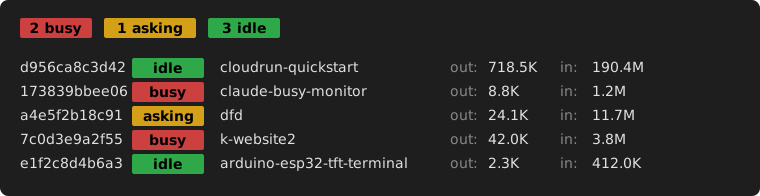
The output is one summary line followed by one line per session. Each session line reads:
| Column | Meaning |
|---|---|
| 1 | session id (first 12 hex chars) |
| 2 | state pill — busy (red) / asking (yellow) / idle (green) |
| 3 | working directory (basename) |
| 4 | output tokens, cumulative (out:) |
| 5 | input tokens, cumulative (in: — fresh + cached, summed) |
Library
Build your own: a tmux notifier, a status-bar widget, a custom dashboard. The library exposes the same data the command uses.
from claude_busy_monitor import get_sessions, get_state_counts, ClaudeState

# Find sessions stalled on a permission prompt and act on them.
asking = [s for s in get_sessions() if s.state == ClaudeState.ASKING]
for s in asking:
    print(f"waiting: {s.cwd} ({s.session_id[:12]})")

# Or just summarise the states.
counts = get_state_counts()
print(f"{counts[ClaudeState.BUSY]} busy, {counts[ClaudeState.ASKING]} asking")
Public API: ClaudeSession, ClaudeState, TokenStats, get_sessions(), get_state_counts().
How it works
claude-busy-monitor reads two on-disk sources that Claude Code itself writes:
~/.claude/sessions/<pid>.json— one probe file per live session, with the authoritativestatusfield (busy/idle/waiting).~/.claude/projects/<encoded-cwd>/<sid>.jsonl— the per-session transcript, used only to total token usage.
State classification is a one-row table — no inference, no heuristics.
Token usage sums the four usage categories per assistant entry.
For the full design — assumptions the classifier depends on, diagnostic recipes for when something looks wrong, and the repair playbook — see README-STATE-DETECTION.md.
Compatibility
- Operating system: Linux (relies on
/proc/<pid>/comm). macOS is not supported yet — collaboration is very welcome. Please start by opening a Discussion so we can align on the approach before any issue or PR. - Claude Code: v2.1.119 introduced the
statusfield this tool relies on; older versions are silently dropped./exitandclaude --resume <sessionId>will migrate them.
License
MIT — see CHANGES.md for the version history.
Release history Release notifications | RSS feed


Download files
Download the file for your platform. If you're not sure which to choose, learn more about installing packages.
Source Distribution
Built Distribution
Filter files by name, interpreter, ABI, and platform.
If you're not sure about the file name format, learn more about wheel file names.
Copy a direct link to the current filters
File details
Details for the file claude_busy_monitor-1.0.1.tar.gz.
File metadata
- Download URL: claude_busy_monitor-1.0.1.tar.gz
- Upload date:
- Size: 98.9 kB
- Tags: Source
- Uploaded using Trusted Publishing? No
- Uploaded via: uv/0.11.7 {"installer":{"name":"uv","version":"0.11.7","subcommand":["publish"]},"python":null,"implementation":{"name":null,"version":null},"distro":{"name":"Linux Mint","version":"22","id":"wilma","libc":null},"system":{"name":null,"release":null},"cpu":null,"openssl_version":null,"setuptools_version":null,"rustc_version":null,"ci":null}
File hashes
| Algorithm | Hash digest | |
|---|---|---|
| SHA256 |
844775768b2e42396fbdf77372298f0119b6df9b0aed60963dffdbfda7f01169
|
|
| MD5 |
3d6733cce74732f7a3edc40cf2288f1a
|
|
| BLAKE2b-256 |
2980a73810ad289f0ddf98a2a35ecd4d198220ee7e73e34da87b01767455362a
|
File details
Details for the file claude_busy_monitor-1.0.1-py3-none-any.whl.
File metadata
- Download URL: claude_busy_monitor-1.0.1-py3-none-any.whl
- Upload date:
- Size: 10.5 kB
- Tags: Python 3
- Uploaded using Trusted Publishing? No
- Uploaded via: uv/0.11.7 {"installer":{"name":"uv","version":"0.11.7","subcommand":["publish"]},"python":null,"implementation":{"name":null,"version":null},"distro":{"name":"Linux Mint","version":"22","id":"wilma","libc":null},"system":{"name":null,"release":null},"cpu":null,"openssl_version":null,"setuptools_version":null,"rustc_version":null,"ci":null}
File hashes
| Algorithm | Hash digest | |
|---|---|---|
| SHA256 |
28cf0f4f417e6bc098e46fcb2b89c67b49c17ddb7eeb03a89695833c5fd8811f
|
|
| MD5 |
d9bfa0df99d7f423e380c3a75f91b5cf
|
|
| BLAKE2b-256 |
e6e577e370c8327ac0b435954e2678bb09b59dddfa5c21cb391476d534c7add9
|






