
A command-line tool for aggregating and displaying costs associated with Claude API usage

Project description
Claude Code Cost Collector (CCCC)
This repository's code was created with Claude Code
A command-line tool for aggregating and displaying costs associated with Claude API usage.
Overview
Claude Code Cost Collector (CCCC) is a tool designed to provide transparency into the costs of using Anthropic's Claude API, enabling users to easily track and manage their expenses.
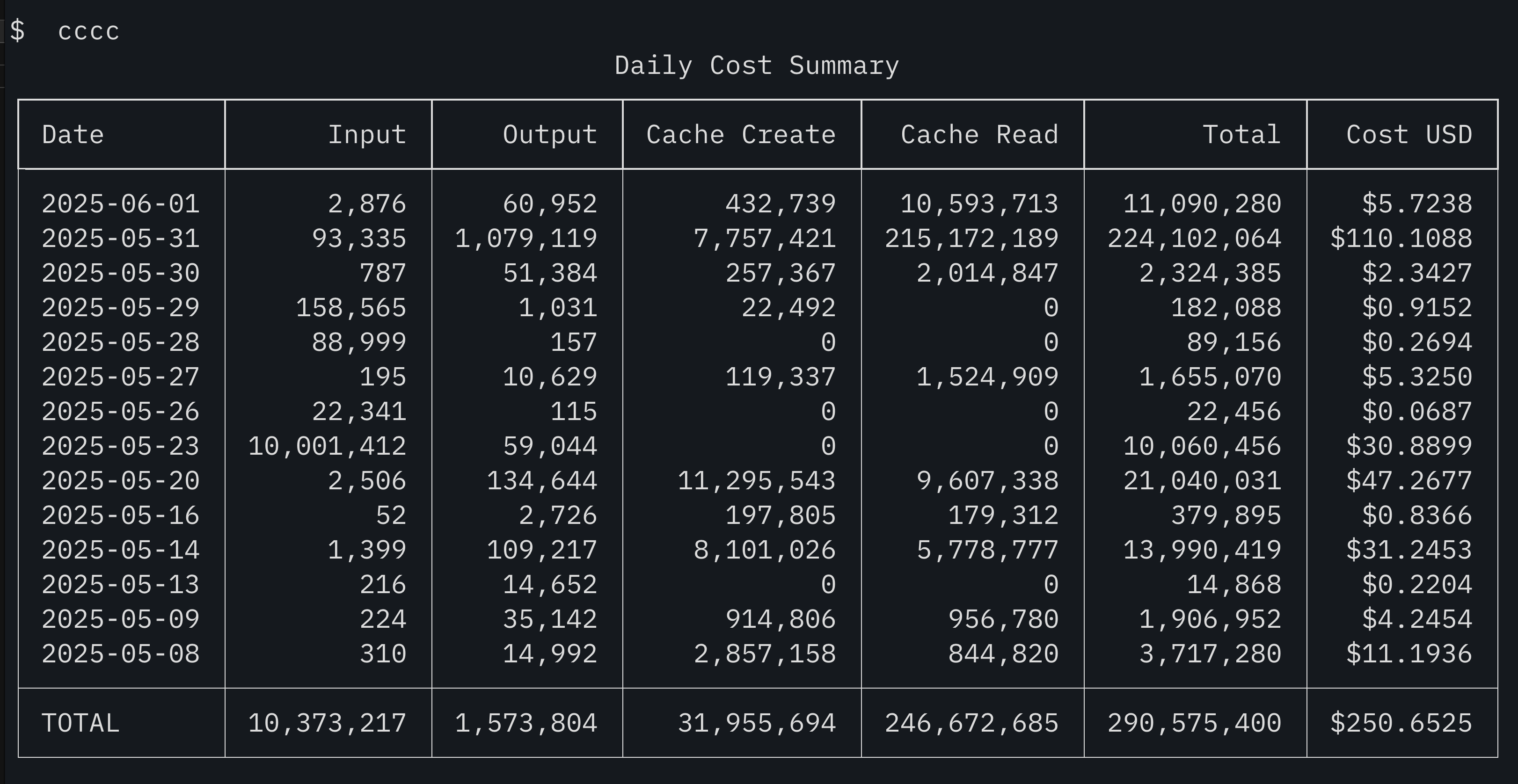
The tool analyzes Claude CLI usage log files and aggregates costs across various dimensions (daily, monthly, per-project, per-session), displaying the results in user-friendly formats.
Key Features
Cost Aggregation Units
- Daily (Default): Aggregates costs by day
- Monthly: Aggregates costs by month
- Per-Project: Aggregates costs by project
- Per-Session: Aggregates costs by session
- Individual Log Entry Display: Shows individual log entries without aggregation
Output Formats
- Formatted Text Table (Default): Clean tabular display
- JSON: Format suitable for programmatic processing
- YAML: Human-readable structured data format
- CSV: Format compatible with spreadsheet software
Currency Display
- US Dollar (USD): Default display currency
Filtering & Sorting Features
- Date Range Filtering: Filter data by specifying start and end dates
- Default Period Limitation: Shows only the last 30 days by default for performance
- Sort Functionality: Sort by input tokens, output tokens, total tokens, or cost in ascending/descending order
Timezone Support
- Automatic Timezone Detection: Calculates dates based on system timezone (default)
- Custom Timezone: Specify any timezone (e.g.,
Asia/Tokyo,UTC) - Accurate Date Aggregation: Precise daily cost aggregation considering timezones
Installation
From PyPI (Recommended)
pip install claude-code-cost-collector
System Requirements
- Python 3.13 or higher
Usage
Basic Usage
# After installation via pip
cccc

# Or run directly with Python
python -m claude_code_cost_collector
Note: By default, only the last 30 days of data are displayed. Use the --all-data option to show all data.
Command Line Options
Basic Options
# Show help
cccc --help

# Specify custom directory
cccc --directory /path/to/claude/logs

# Change aggregation unit
cccc --granularity monthly    # Monthly
cccc --granularity project    # Per-project
cccc --granularity session    # Per-session
cccc --granularity all        # Individual display (no aggregation)

# Change output format
cccc --output json           # JSON format
cccc --output yaml           # YAML format
cccc --output csv            # CSV format

# Sort functionality
cccc --sort input            # Sort by input tokens (ascending)
cccc --sort cost --sort-desc # Sort by cost (descending)
cccc --sort total            # Sort by total tokens (ascending)
cccc --sort output --sort-desc # Sort by output tokens (descending)
Date Range and Data Control
# Specify a specific period
cccc --start-date 2024-01-01 --end-date 2024-01-31

# Specify start date only
cccc --start-date 2024-01-01

# Specify end date only
cccc --end-date 2024-01-31

# Show all data (disable default 30-day limit)
cccc --all-data

# Limit results for large datasets
cccc --all-data --limit 100
Timezone Settings
# Use system timezone (default)
cccc --timezone auto

# Aggregate in UTC time
cccc --timezone UTC

# Aggregate in Japan time
cccc --timezone Asia/Tokyo

# Other timezone examples
cccc --timezone America/New_York
cccc --timezone Europe/London
Sort Functionality
# Sort by input tokens (ascending)
cccc --sort input

# Sort by cost (descending)
cccc --sort cost --sort-desc

# Sort by total tokens (monthly aggregation, descending)
cccc --granularity monthly --sort total --sort-desc

# Sort by output tokens (per-project, ascending)
cccc --granularity project --sort output

# Available sort fields:
# - input:  Input token count
# - output: Output token count
# - total:  Total token count
# - cost:   Cost (uses currency converted if available, otherwise USD)
Configuration File
You can persist settings using a configuration file:
# config.yaml
timezone: "Asia/Tokyo"              # Default timezone
default_date_range_days: 30         # Default period (0 = all data)
default_granularity: "daily"        # Default aggregation unit
default_output_format: "text"       # Default output format
# Use configuration file
cccc --config /path/to/config.yaml
Data Source
The tool analyzes JSON/JSONL format log files from the following locations:
- Default:
~/.claude/projects/ - Custom: Specified with
--directoryoption
Log File Structure
The following information is extracted from JSON/JSONL log files generated by Claude CLI:
- Timestamp (timezone-aware)
- Session ID
- Project name (determined from directory structure)
- Model used
- Token counts (input, output, cache)
- Cost (USD)
Performance Optimization
To efficiently process large amounts of data, the following features are provided:
- Default 30-day limit: Automatically processes only the last 30 days of data
- Custom period specification: Specify any period with
--start-date/--end-date - Full data access: Use
--all-datato disable the limit - Result limiting: Limit display count with
--limit(planned for future implementation)
Output Examples
Text Format (Default)
┏━━━━━━━━━━━━┳━━━━━━━━━━━━┳━━━━━━━━━━━━┳━━━━━━━━━━━━━━━┳━━━━━━━━━━━━┓
┃ Date       ┃ Input      ┃ Output     ┃ Total       ┃ Cost (USD) ┃
┡━━━━━━━━━━━━╇━━━━━━━━━━━━╇━━━━━━━━━━━━╇━━━━━━━━━━━━━━━╇━━━━━━━━━━━━┩
│ 2024-01-01 │ 1,234      │ 567        │ 1,801       │ $1.23      │
│ 2024-01-02 │ 2,345      │ 890        │ 3,235       │ $2.45      │
└────────────┴────────────┴────────────┴─────────────┴────────────┘
Total: 3,579 input, 1,457 output, 5,036 total tokens, $3.68
JSON Format
[
  {
    "key": "2024-01-01",
    "input_tokens": 1234,
    "output_tokens": 567,
    "total_tokens": 1801,
    "cost_usd": 1.23
  }
]
Troubleshooting
Common Issues
Log files not found
No log files found.
Solution:
- Verify that you have used Claude CLI before
- Check log file location:
~/.claude/projects/ - Specify the correct path with
--directoryoption
Date format error
error: argument --start-date: Invalid date format
Solution:
- Ensure date format is
YYYY-MM-DD - Example:
2024-01-01
No data displayed (default 30-day limit)
No log entries found in the specified date range.
Solution:
- By default, only the last 30 days are displayed
- Use
--all-dataoption to show all data - Explicitly specify
--start-dateto check older data
Timezone issues
When cost aggregation results differ from other tools: Solution:
- Explicitly specify Japan time with
--timezone Asia/Tokyo - Use UTC time with
--timezone UTC - Set default timezone in configuration file
Advanced Usage Examples
Combined Multi-Condition Usage Examples
# Monthly aggregation for specific period with JSON output
cccc --granularity monthly \
    --output json \
    --start-date 2024-01-01 \
    --end-date 2024-06-30

# Per-project aggregation in CSV format (cost descending)
cccc --granularity project --output csv --sort cost --sort-desc > project_costs.csv

# Individual display of all logs in specific directory
cccc --directory /custom/logs --granularity all --all-data

# Last 7 days data in Japan time (input tokens descending)
cccc --timezone Asia/Tokyo --start-date $(date -v-7d '+%Y-%m-%d') --sort input --sort-desc

# Performance-focused: show only top 50 results (total tokens descending)
cccc --all-data --limit 50 --granularity session --sort total --sort-desc

# TOP 10 most expensive projects
cccc --granularity project --sort cost --sort-desc --limit 10

# Monthly aggregation showing highest token usage months first
cccc --granularity monthly --sort total --sort-desc --all-data
Automation Usage
#!/bin/bash
# Monthly report generation script example

# Get last month's data
LAST_MONTH=$(date -v-1m '+%Y-%m')
START_DATE="${LAST_MONTH}-01"
END_DATE=$(date -v-1m -v+1m -v-1d '+%Y-%m-%d')

# Generate monthly report
cccc --granularity monthly \
    --start-date $START_DATE \
    --end-date $END_DATE \
    --output json > "claude_code_costs_${LAST_MONTH}.json"
License
This project is licensed under the Apache License 2.0. See the LICENSE file for details.
Copyright 2025 Claude Code Cost Collector Contributors
Licensed under the Apache License, Version 2.0 (the "License"); you may not use this file except in compliance with the License. You may obtain a copy of the License at
http://www.apache.org/licenses/LICENSE-2.0
Unless required by applicable law or agreed to in writing, software distributed under the License is distributed on an "AS IS" BASIS, WITHOUT WARRANTIES OR CONDITIONS OF ANY KIND, either express or implied. See the License for the specific language governing permissions and limitations under the License.
Development & Contributing
For contributing to development, please see CONTRIBUTING.md.
Development Environment Setup
# Clone the project
git clone <repository-url>
cd cccc

# Using uv (recommended)
uv sync

# Or using traditional pip
pip install -e .
Dependencies
requests: For HTTP requests (exchange rate retrieval)PyYAML: For YAML format outputrich: For formatted text display
Development Commands
# Run tests
uv run python -m pytest

# Code formatting
uv run python -m black .

# Linting
uv run python -m flake8

# Type checking
uv run python -m mypy claude_code_cost_collector
Release history Release notifications | RSS feed


Download files
Download the file for your platform. If you're not sure which to choose, learn more about installing packages.
Source Distribution
Built Distribution
Filter files by name, interpreter, ABI, and platform.
If you're not sure about the file name format, learn more about wheel file names.
Copy a direct link to the current filters
File details
Details for the file claude_code_cost_collector-1.0.1.tar.gz.
File metadata
- Download URL: claude_code_cost_collector-1.0.1.tar.gz
- Upload date:
- Size: 97.4 kB
- Tags: Source
- Uploaded using Trusted Publishing? No
- Uploaded via: twine/6.1.0 CPython/3.13.2
File hashes
| Algorithm | Hash digest | |
|---|---|---|
| SHA256 |
b977959486baac2c562800ad40782eb059505700120757014f1a16c9df137e0b
|
|
| MD5 |
a5e83b9ede45f51c8e27438bc510d356
|
|
| BLAKE2b-256 |
0f1b91762bd27b14520edba425b9de1bac58122838d0583d40762bf1a8b8c7c2
|
File details
Details for the file claude_code_cost_collector-1.0.1-py3-none-any.whl.
File metadata
- Download URL: claude_code_cost_collector-1.0.1-py3-none-any.whl
- Upload date:
- Size: 34.1 kB
- Tags: Python 3
- Uploaded using Trusted Publishing? No
- Uploaded via: twine/6.1.0 CPython/3.13.2
File hashes
| Algorithm | Hash digest | |
|---|---|---|
| SHA256 |
ce28f8c5a04a65851197b234d196bf19f6ae78f554b74e6be108c1cbe4cae23f
|
|
| MD5 |
3817350d1c8293444d3ce48352850bbd
|
|
| BLAKE2b-256 |
fa90b7084b52b7e5bdcde55240bc10f472c155e2f29e2e37b3946a15a70c8c87
|






