
Claude Code Statusline Designer
A statusline designer for Claude Code. Pick a theme, tune every color with a live preview, and install it in one keystroke.






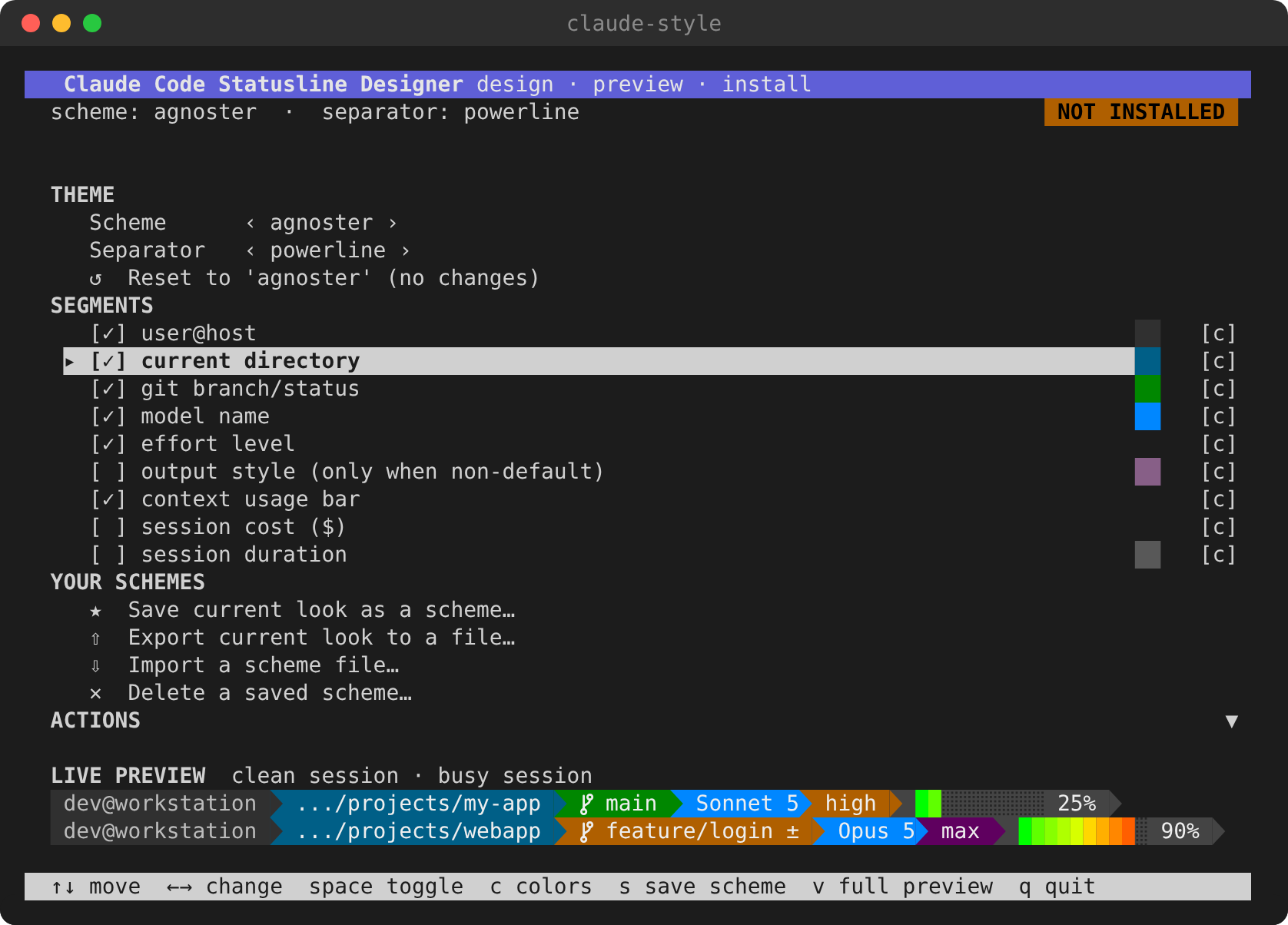
Claude Code can run any shell script as its status line. This tool writes that script for you. It shows the model, effort level, git branch, context usage, cost and more as powerline segments, in a theme you design in an interactive terminal UI.
Highlights
- Live preview while you design. Two sample statuslines, a clean session and a busy one, repaint on every change. They even update while you hover over a color in the palette. The preview runs the real generated script, so it shows exactly what Claude Code will display.
- 16 themes, dark and light. Agnoster, Dracula, Nord, Gruvbox, Solarized, Neon, Mono and Minimal, each with a variant tuned for light terminals.
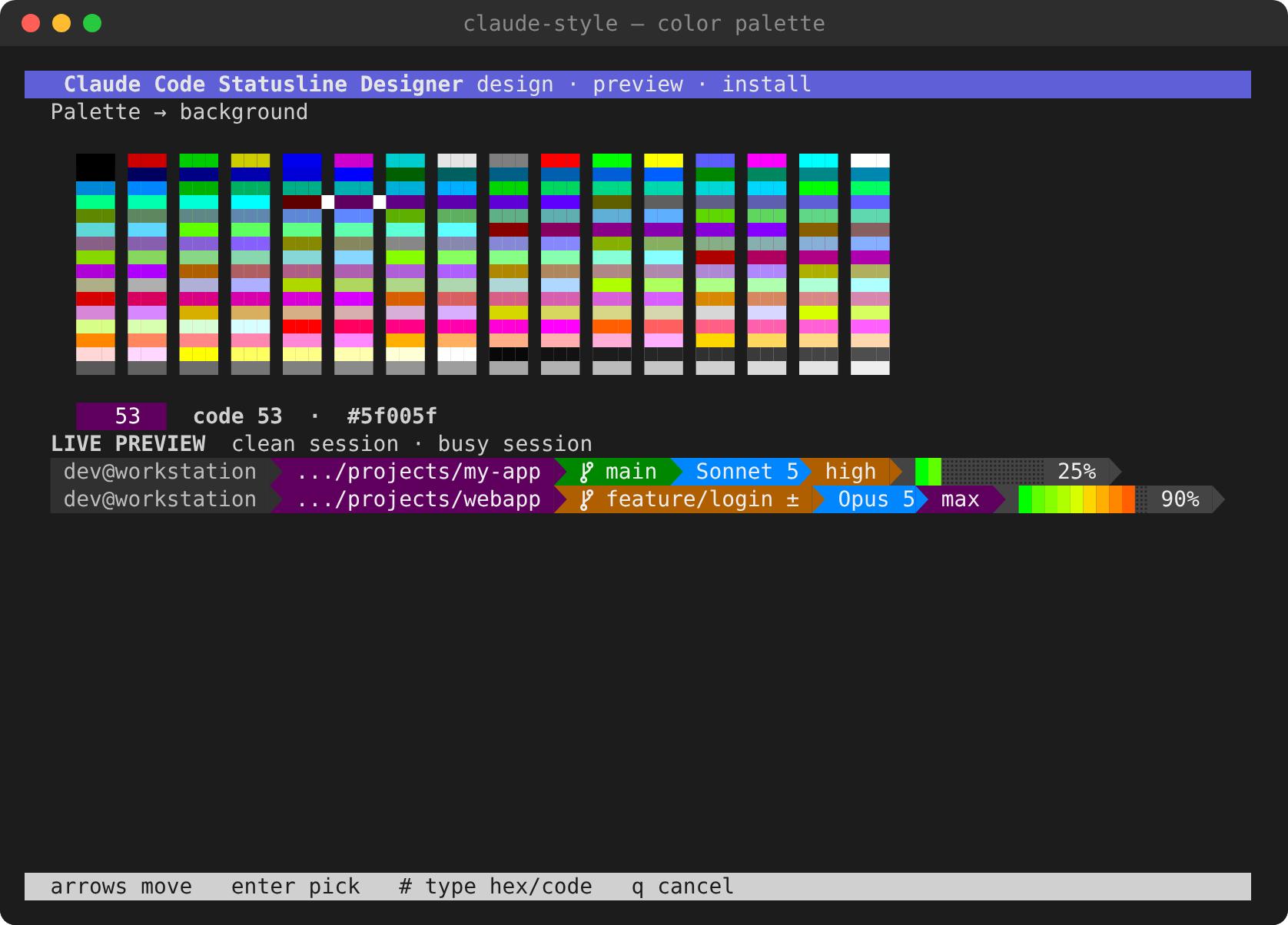
- Every color is editable. Use a 256-color palette picker, nudge values
with the arrow keys, or type a hex code such as
#5e81ac. - Readable by construction. A test checks every built-in theme against the WCAG contrast minimum for UI text (3:1). The color editor warns you when your own choice becomes hard to read.
- Your own schemes. Save a look, then export it to a file and share it. Imports are validated strictly, so a shared file can't inject shell code into your statusline.
- Safe to experiment. Every change can be reset per field, per segment or all at once. You can exit without saving, and your previous statusline is backed up on install.
- Adapts to split panes. The directory segment shortens itself when the terminal gets narrow.
- No runtime dependencies. The designer uses only the Python standard
library. The generated statusline needs just
bash,jqandgit.
Themes
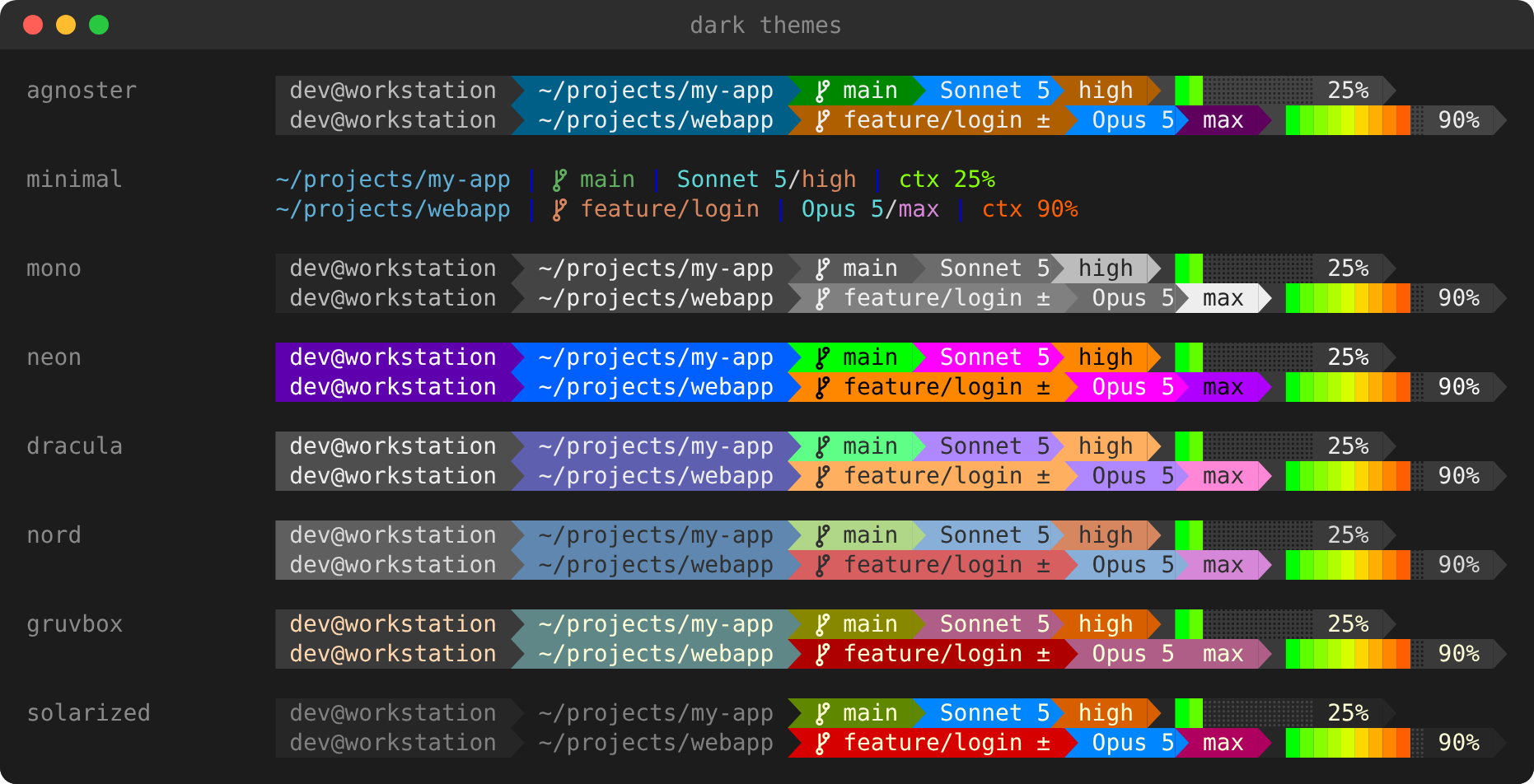
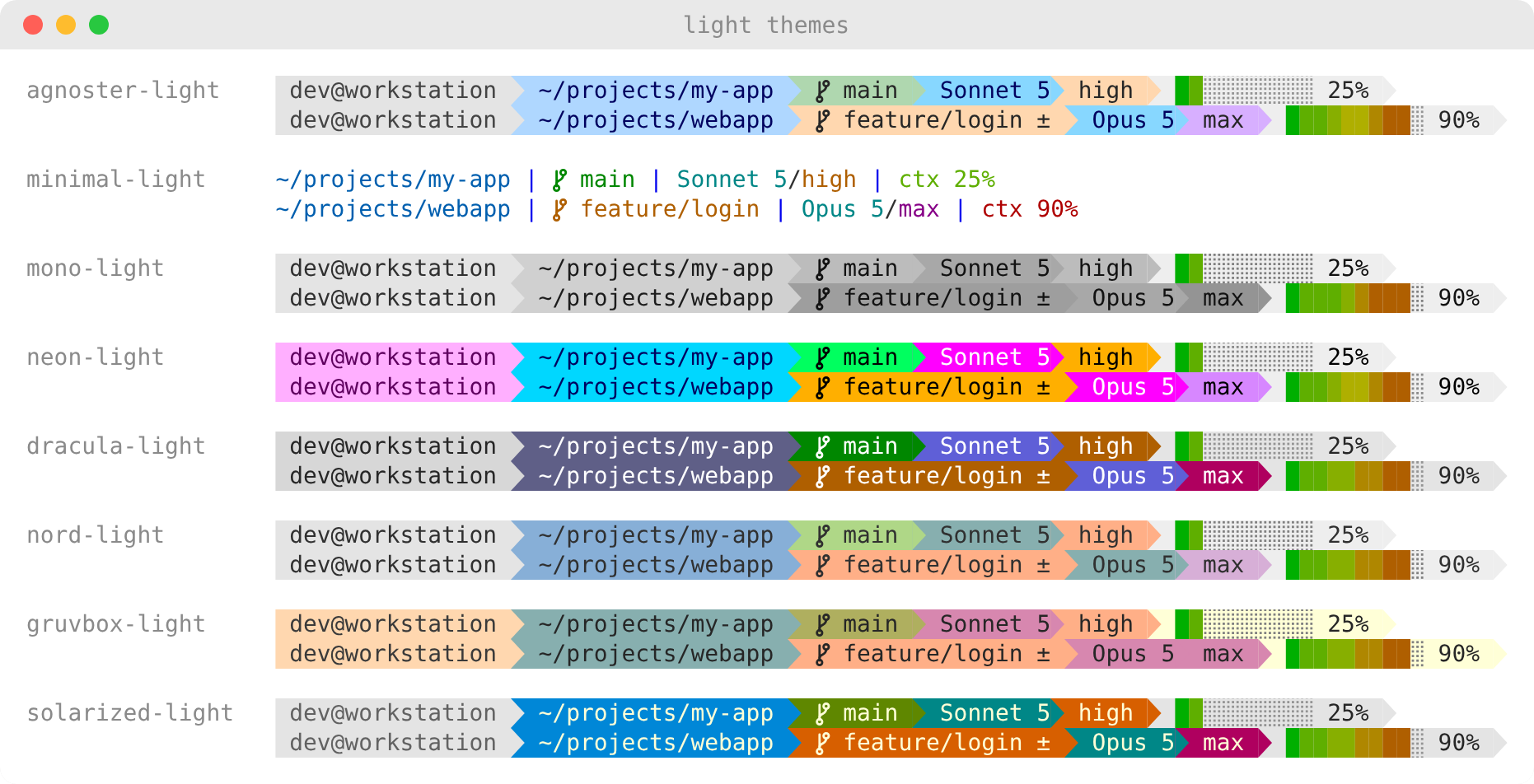
Every row shows a clean repo at 25% context above a repo with uncommitted changes, max effort and 90% context. On terminals with 24-bit color the context bar is a smooth green → yellow → red gradient. Otherwise it falls back to three color steps.
Quick start
Install it as a standalone command with pipx or uv. Both keep it in its own environment:
pipx install claude-code-statusline-designer
# or
uv tool install claude-code-statusline-designer
Then open the designer:
claude-style
To try it without installing anything, run
uvx --from claude-code-statusline-designer claude-style.
To work on the code, see Development.
In the designer, pick a theme with ←/→ and toggle the segments you want.
Then choose Install. Open a new Claude Code session to see your
statusline. Run claude-style again any time to change it.
The designer
| Key | Where | Action |
|---|---|---|
↑ ↓ |
everywhere | Move between rows or fields |
← → |
Scheme / Separator | Cycle themes (each dark theme is followed by its light variant) |
space / enter |
segment row | Turn a segment on or off |
c |
segment row | Open the segment's color editor |
← → / PgUp PgDn |
color editor | Nudge the color code by 1 / 16 |
enter |
color editor | Open the 256-color palette; the preview follows the hovered color |
# |
color editor, palette | Type a hex color (#5e81ac) or a code (0–255) |
r / R |
color editor | Reset this field / every color of the segment |
s |
menu | Save the current look as your own scheme |
v |
menu | Full-screen preview in your terminal's exact colors |
q |
menu | Save selections and quit |
Colors you changed are marked • along with their original value
(was 24). The scheme shows as ● unsaved (from nord) until you save it.
Switching themes asks for a second key press before it discards your edits.
Reset to '…' returns everything to the theme you started from, and
Exit without saving leaves your configuration untouched. The menu scrolls,
so it also works in a short split pane.
If the terminal can't run the full-screen UI (for example over a pipe or on a
dumb terminal), the designer falls back to a numbered menu with the same
features. You can also force it with claude-style menu --classic.
Command line
Everything in the designer is also scriptable:
| Command | Description |
|---|---|
claude-style |
Open the designer |
claude-style install |
Write ~/.claude/statusline-command.sh and register it in ~/.claude/settings.json |
claude-style uninstall |
Remove the statusLine entry and restore your previous script |
claude-style preview |
Render the sample statuslines in this terminal |
claude-style presets |
List built-in themes and your schemes |
claude-style preset <name> |
Switch theme (nord, gruvbox-light, one of yours, …) |
claude-style toggle <segment> on|off |
Show or hide a segment |
claude-style separator powerline|plain |
Powerline arrows or plain | separators |
claude-style color list |
Every editable color, with its code and hex value |
claude-style color set <segment> <field> <color> |
Set a color: 61 or '#5e81ac' |
claude-style color reset <segment> [field] |
Reset one field, or the whole segment |
claude-style reset |
Undo all changes and return to the theme you started from |
claude-style scheme save <name> |
Save the current look as a scheme |
claude-style scheme export [name] [-o file] |
Export a scheme (default: current look, to stdout) |
claude-style scheme import <file|-> [--name n] [--apply] |
Import a shared scheme |
claude-style scheme delete <name> |
Delete one of your schemes |
claude-style show |
Print the current configuration as JSON |
The Makefile wraps the common ones: make menu, make preview,
make reinstall, make uninstall.
Segments
| Segment | Shows | Default |
|---|---|---|
user_host |
user@host |
on |
dir |
Working directory, shortened in narrow terminals | on |
git |
Branch; the color and a ± mark flag uncommitted changes |
on |
model |
Model name, e.g. Opus 5 |
on |
effort |
Effort level, colored from low (green) to max |
on |
context |
Context-window usage as a 10-block bar or a percentage | on |
output_style |
Output style, shown only when it isn't default |
off |
cost |
Session cost in USD; turns red past a threshold (default $5) | off |
duration |
Session duration, e.g. 12m34s |
off |
All values come from the JSON that Claude Code passes to the statusline script.
Your own schemes
A scheme is a complete look: colors, visible segments and separator style.
Saved schemes live in ~/.config/claude-style/schemes/ and appear alongside
the built-in themes everywhere. An exported scheme is a small JSON file you
can share:
{ "format": "claude-style-scheme", "version": 1, "name": "mine", "config": { … } }
Imports are validated before anything is written. Scheme values end up inside a shell script that runs on every prompt, so the designer is strict:
- Every color must be an integer from 0 to 255.
- Every option must have its expected type.
- Names may contain only letters, digits,
-and_. - Unknown keys are dropped.
- Files over 64 KiB are refused.
A rejected file is reported with the offending field. The same validation
runs whenever the statusline is generated, which protects a hand-edited
config.json too.
Configuration
Your selections are stored in ~/.config/claude-style/config.json. The
designer and the CLI cover everything, but a few options exist only in the
file:
| Key | Default | Meaning |
|---|---|---|
segments.dir.responsive |
true |
Shorten the path when the terminal is narrow |
segments.dir.narrow_cols / medium_cols |
60 / 100 |
Below narrow_cols: basename only. Below medium_cols: …/last/parts |
segments.dir.medium_segments |
2 |
Number of path parts kept at medium width |
segments.context.style |
"bar" |
"bar" or "percent" |
segments.context.true_color |
true |
Use the 24-bit gradient when COLORTERM is truecolor or 24bit |
segments.context.gradient_peak |
255 |
Brightest gradient channel (100–255). Light themes use about 175 |
segments.cost.warn_threshold_usd |
5.0 |
Cost above which the segment turns red |
segments.cost.hide_zero, segments.duration.hide_zero |
true |
Hide the segment while its value is zero |
How it works
The designer renders your configuration into a self-contained bash script at
~/.claude/statusline-command.sh. It then registers the script under
statusLine in ~/.claude/settings.json. Claude Code runs the script with a
JSON description of the session on stdin. The script reads it with jq,
checks the repository with git --no-optional-locks, and prints ANSI-colored
segments.
The designer's preview runs that same script against sample sessions. These run in a throwaway home directory with two tiny git repositories, one clean and one with uncommitted changes. That way the git segment shows its colors even if your own directories are not repositories.
install backs up an existing script to statusline-command.sh.bak, and
uninstall restores it.
Requirements
- Designer: Python 3.9 or newer on Linux or macOS. It uses
cursesfrom the standard library. - Statusline:
bash,jqandgiton yourPATH. - Font: a Nerd Font for the powerline arrows
and the git icon. Without one, use
claude-style separator plainor theminimaltheme.
Troubleshooting
| Symptom | Fix |
|---|---|
| Boxes instead of arrows or the git icon | Switch your terminal to a Nerd Font, or use separator plain |
| The context bar has three flat colors, not a gradient | Your terminal doesn't advertise 24-bit color. Set COLORTERM=truecolor if it supports it |
| Nothing shows up after installing | Start a new Claude Code session and check that statusLine exists in ~/.claude/settings.json |
| Colors look washed out on a white terminal | Pick a -light theme; they are tuned for light backgrounds |
Development
git clone https://github.com/aleslanger/claude-code-statusline-designer.git
cd claude-code-statusline-designer
pip install -e ".[dev]"   # editable install + pytest, pytest-cov, ruff, pyte
make test                 # full suite with coverage
make lint                 # ruff
make docs                 # regenerate the screenshots in docs/ (needs Chromium for the PNGs)
make dist                 # build the sdist and wheel into dist/ and check them
The suite includes end-to-end tests of the designer. They drive the real curses UI in a pseudo-terminal, rebuild the screen with the pyte terminal emulator, and assert on what a user would see: characters and their colors. Other tests enforce the contrast rules for every theme, the import validation, and regressions for past rendering bugs.
Releasing
Releases go to PyPI from GitHub Actions through Trusted Publishing, so no API token is stored anywhere.
One-time setup:
- On PyPI, go to Account settings → Publishing and add a pending trusted
publisher with these values:
- project:
claude-code-statusline-designer - owner:
aleslanger - repository:
claude-code-statusline-designer - workflow:
release.yml - environment:
pypi
- project:
- In the GitHub repository settings, create an environment named
pypi. Add a required reviewer if you want to approve each upload.
For each release:
- Bump
versioninpyproject.toml, then commit and push. - Publish a GitHub Release tagged
vX.Y.Zwith the same version. TheReleaseworkflow checks that the tag matches, runs the tests, builds, and uploads to PyPI.
The images in this README are generated from real output by
scripts/make_screenshots.py. It uses a placeholder dev@workstation
identity, so no personal user or host names end up in the repository.
Acknowledgements
Cost and duration tracking, and hiding empty values, were inspired by other Claude Code statusline projects, notably those by kcchien, rz1989s and ilia-pluzhnikov. Theme palettes follow Dracula, Nord, Gruvbox and Solarized, mapped to the xterm 256-color palette.
License
MIT © 2026 Aleš Langer
1 maintainer

Release files for claude-code-statusline-designer 0.1.0
For a detailed explanation of source distributions (sdists) and built distributions (wheels), please see the package formats documentation.
Source distribution (sdist)
| File | Size | Uploaded | |
|---|---|---|---|
| claude_code_statusline_designer-0.1.0.tar.gz | 55.4 kB | Details |
Built distribution (wheel)
| File | Interpreter | ABI | Platform | Reset |
|---|---|---|---|---|
| claude_code_statusline_designer-0.1.0-py3-none-any.whl | Python 3 | none | any | Details |
Total release size: 102.7 kB
Release files / claude_code_statusline_designer-0.1.0.tar.gz
| Download URL | claude_code_statusline_designer-0.1.0.tar.gz |
|---|---|
| Size | 55.4 kB |
| Tags | Source |
|
SHA-256 checksum How to use checksums |
95b0399c92e6f402017e6e1433b15efbebc353d6e2be7b148d0c9dff99fbf0d7
|
|
BLAKE2b-256 checksum How to use checksums |
767178b49adc85c71eb0745afb9bfe6bb7ae7fe822be3ef19138d32d949e5bcd
|
| Upload date | |
|
Uploaded using Trusted Publishing? What is trusted publishing? |
Yes |
| Uploaded via |
twine/7.0.0 CPython/3.13.14
|
Provenance
Provenance describes where a file came from. On PyPI, provenance is shared via attestations, which provide a verifiable record of the build or publishing details. View details, limitations and caveats.


PyPI Publish Attestation
PyPI verified that this artifact, at this checksum, originated from the publisher listed below.
Signed by GitHub Actions, verified by PyPI on Sep 24, 2026.
Transparency logRelease files / claude_code_statusline_designer-0.1.0-py3-none-any.whl
| Download URL | claude_code_statusline_designer-0.1.0-py3-none-any.whl |
|---|---|
| Size | 47.3 kB |
| Tags | Python 3 |
|
SHA-256 checksum How to use checksums |
fb20e17b794ca5f76a0aa0487eb903d8d8004dc3682f53d7aee4a74c3f6ee872
|
|
BLAKE2b-256 checksum How to use checksums |
35fb759b4cd025df56967679f2ea746086fe9471faabd4ccff4d01948a12abc1
|
| Upload date | |
|
Uploaded using Trusted Publishing? What is trusted publishing? |
Yes |
| Uploaded via |
twine/7.0.0 CPython/3.13.14
|
Provenance
Provenance describes where a file came from. On PyPI, provenance is shared via attestations, which provide a verifiable record of the build or publishing details. View details, limitations and caveats.
PyPI Publish Attestation
PyPI verified that this artifact, at this checksum, originated from the publisher listed below.
Signed by GitHub Actions, verified by PyPI on Sep 24, 2026.
Transparency log












