
Local queue and auto-continue runner for Claude Code sessions and Codex App tasks.
Verified details
These details have been verified by PyPIProject links
GitHub Statistics
Maintainers

Project description

Claude + Codex Queue
Queue prompts for existing Claude Code sessions and Codex App tasks.
Wait out usage limits, retry the interrupted turn correctly, then resume the queue without wasting the next prompt.





Quick start | Limit recovery | Roadmap | Discussions
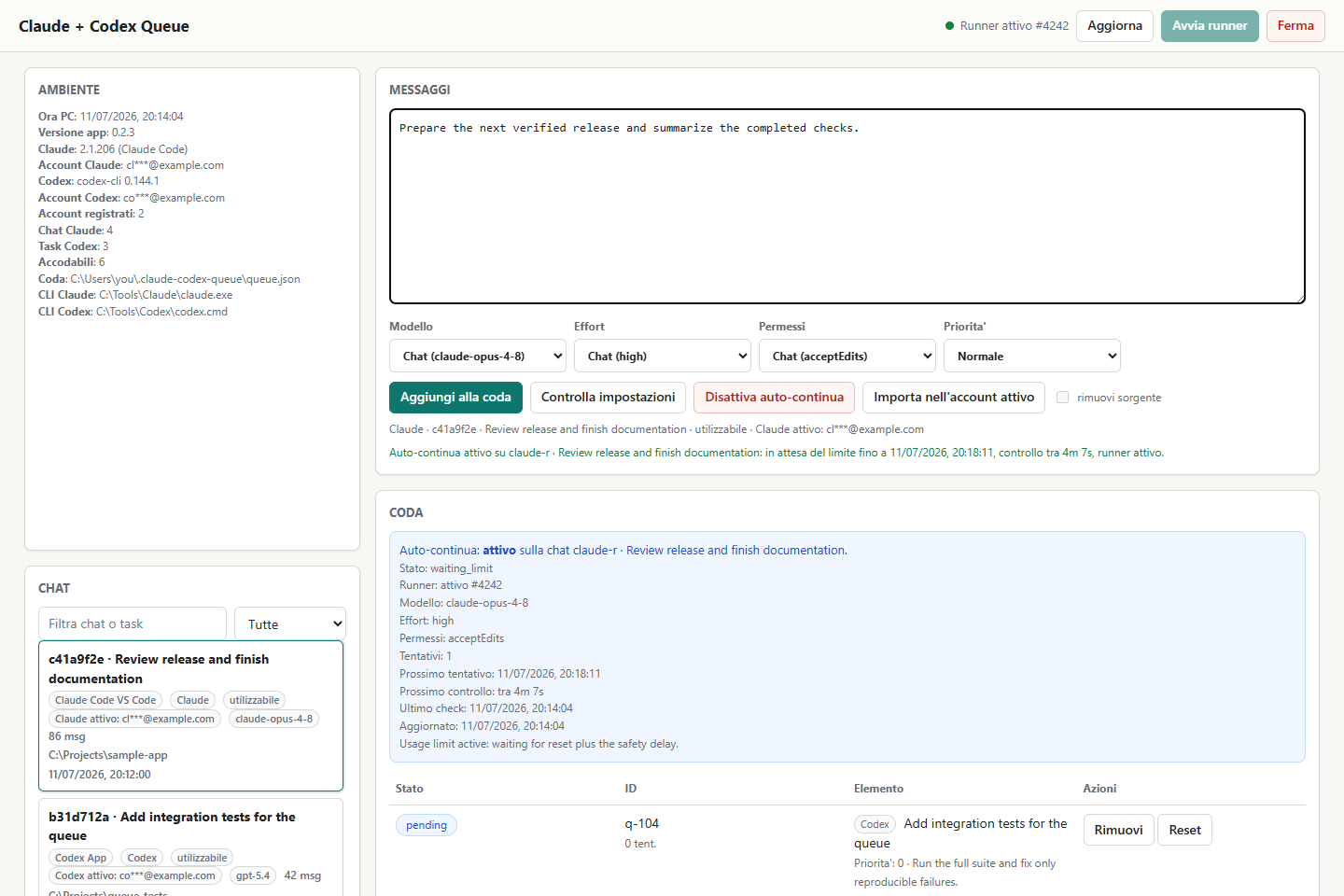
Why use it?
AI coding sessions often stop at the usage-limit boundary. Sending the next real prompt immediately can waste it on another limit response. Claude + Codex Queue keeps that prompt pending, waits for the reset, and recovers the interrupted turn without duplicating a failed message. It then processes the rest of the queue in order.
The app works with sessions you already use. It does not create a separate chat system and does not require external Anthropic or OpenAI API keys.
What it supports
| Source | Discover | Queue prompts | Auto-continue | Preserve settings |
|---|---|---|---|---|
| Claude Code in VS Code | Yes | Yes | Yes | Model, effort, permissions |
| Claude Desktop Code sessions | Yes | Yes, when locally resumable | Yes | Model, effort, permissions |
| Claude Code over Remote SSH | Yes | When enough metadata exists | Yes | Remote effective settings |
| Codex App tasks | Yes | Yes | Yes | Model, reasoning, sandbox, approvals |
Additional capabilities:
- newest-real-message sorting across Claude and Codex;
- persistent FIFO queue with per-prompt priorities;
- one-minute safety delay after a parsed reset time;
- multi-account Claude Code, Cowork artifact and private Claude Code artifact synchronization with archive and delete propagation;
- Codex task forks for the active ChatGPT-authenticated account, with linked lifecycle sync;
- account mismatch and view-only checks before actions are enabled;
- transcript confirmation after every Codex send;
- local web UI plus a scriptable CLI;
- no runtime Python dependencies outside the standard library.
Multi-account chat copies
Claude Desktop Code sessions are replicated once per known account. Archive and unarchive changes propagate in either direction. A missing known replica is observed twice before it is treated as a deletion; the app then writes a durable tombstone, backs up the remaining metadata and removes the other replicas. A surviving Claude transcript cannot recreate or relist a tombstoned chat. Remote bridge identifiers remain owned by their original Claude account and are never copied to another account, preventing failed remote deletes from restoring a local replica. Account switches and session-directory changes wake the sync monitor immediately instead of waiting for the normal polling deadline.
Account changes are read from Claude's session-bridge log as soon as login
finishes, before the app writes its first activity to config.json. Cowork
artifact manifests are replicated to every known account/organization and their
session links are remapped to the destination copy. Connector grants, published
share IDs and other account-local fields are not copied. Artifact deletion uses
the same two-scan confirmation rule; the physical Artifacts/<id>/index.html
file remains provider-owned and is never deleted by this project.
Claude Code web artifacts use a different, account-private service. The sync
monitor verifies locally cached OAuth credentials against /api/oauth/profile,
caches the rendered artifact locally, creates one private server copy per
account and points an account-specific derived transcript at that copy. The
original provider transcript is never edited. If an account is logged out or
its token is not currently cached, the UI reports that copy as waiting and
finishes it automatically after the next login; a token belonging to another
account is never substituted.
When the monitor runs in WSL, private artifact replication uses hidden
PowerShell 7 (pwsh.exe) to decrypt Claude Desktop's Chromium AES-GCM cache
under the current Windows user. Without PowerShell 7, chat and lifecycle sync
continue normally while private artifact copies remain pending.
The chat list keeps one row per logical Claude session and shows every account that currently owns a replica. Account identifiers are searchable, so switching accounts never makes the previous account's sessions appear to vanish. Each row also shows the beginning of the latest real user message from the transcript, excluding assistant output and tool results.
For Codex, Copy to active ChatGPT account uses Codex app-server
thread/fork and creates a new thread ID instead of relabelling the old task.
Only copies linked by this app share archive, unarchive and delete state. Those
operations use the official codex archive, codex unarchive and
codex delete --force commands; the project never edits Codex SQLite or rollout
files directly.
The local web process runs a complete transcript and artifact scan on startup,
then a fast linked-account check on a ten-second cadence and another full scan
every minute. Account and session-directory changes wake it immediately, so
clicking Aggiorna is not required. Verified OAuth sessions are retained only
in process memory between fast checks; any credential-file change invalidates
that cache immediately.
Discovery, chat lifecycle replication and local artifact caching continue while
Claude Desktop, Codex and VS Code are closed. A due Claude Desktop native
Try again action opens the selected Claude session through its registered
claude:// link because that final UI action necessarily needs Claude Desktop.
The browser API uses the fast metadata path first; Claude chats appear while the
full Claude/Codex list is refreshed in the background. Slow transcript discovery
does not add another fixed delay before the next metadata check, so lifecycle
synchronization does not depend on an open or foreground browser tab. The Windows
Startup entry keeps the program running after login.
Filesystem discovery, account synchronization and queue persistence do not require Claude, Codex or VS Code to be open. Sending still requires the matching authenticated CLI; Claude Desktop native retry opens the exact app session when needed.
Codex changes for a copy owned by another ChatGPT account remain pending until that account becomes active, then the monitor applies them automatically. State updates are locked across local processes; a corrupt or unreadable state file stops synchronization instead of being replaced with an empty one.
Here, “ChatGPT account” means the account authenticating Codex. This feature does not copy ordinary conversations from chatgpt.com, and the Claude feature does not copy ordinary claude.ai chats.
Quick start
Windows app and Desktop shortcut
Requirements: Windows, WSL, Python 3.10+ in WSL, and at least one authenticated Claude Code or Codex CLI installation.
git clone https://github.com/ravhello/claude-codex-queue.git
cd claude-codex-queue
powershell.exe -NoProfile -ExecutionPolicy Bypass -File .\install-desktop-shortcut.ps1
Open Claude + Codex Queue from the Desktop. The launcher starts the local server and opens http://127.0.0.1:8765/. Both the Desktop and Startup shortcuts use the windowless Windows Script Host; WSL, PowerShell, Claude and Codex child processes are launched with hidden/no-window settings, so the app does not create terminal windows in normal operation. Under WSL, PowerShell scripts are stored atomically in the current user's private queue cache and invoked by file; large encoded scripts and raw child commands are never returned by the web diagnostics.
The installer also registers the app in the current Windows user's Startup folder. At login it starts the server in the background and opens the browser after the health check succeeds. The page refreshes every five seconds and again whenever its tab regains focus. A server-side supervisor starts the queue runner whenever pending messages, recovery work or auto-continue need it, so the Refresh and Start runner buttons are not required for normal use.
To install or repair only the automatic startup entry:
powershell.exe -NoProfile -ExecutionPolicy Bypass -File .\install-autostart.ps1
To run it without installing a shortcut:
.\start-claude-codex-queue.ps1
Install the CLI from the latest wheel
Run this inside WSL:
python3 -m pip install claude-codex-queue
claude-codex-queue doctor
claude-codex-queue-web --host 127.0.0.1 --port 8765
The source checkout is recommended if you want the Windows launcher and Desktop shortcut. The wheel is useful for CLI-only installations.
How limit recovery works
flowchart LR
    A["Queued prompt"] --> B["Resume selected session"]
    B --> C{"Usage limit?"}
    C -- "No" --> D["Confirm prompt in transcript"]
    C -- "Yes" --> E["Keep prompt pending"]
    E --> F["Wait until reset + 60 seconds"]
    F --> G{"Provider and turn state"}
    G -- "Claude Desktop Code" --> H["Invoke native Try again"]
    G -- "Codex prompt never started" --> I["Rollback failed turn and resend the same prompt"]
    G -- "Codex work stopped before recap" --> J["Send 'continua'"]
    I --> K["Queue any additional failed prompts in order"]
    J --> K
    H --> A
    K --> A
Auto-continue can monitor any number of selected sessions with an empty queue. Each session keeps independent status, timing, settings and cancellation state; one failed or waiting session does not replace or stop the others.
For Claude Desktop Code sessions, auto-continue opens the exact local session
through Claude's supported deep link and invokes the visible Try again control
through Windows UI Automation. It checks the native control directly because
Claude Desktop can show it without recording a limit in the transcript, and it
keeps monitoring after a successful invocation. It never substitutes a new
continua message.
For Codex App tasks, the runner reads structured turn state through app-server:
a failed turn with no agent progress is removed with thread/rollback and sent
again unchanged, while an interrupted turn that already contains agent activity
receives continua. Additional failed text prompts are placed in the persistent
queue in their original order.
Safety guarantees
- The project does not bypass or evade provider limits.
- The next queued prompt remains pending when a limit is detected.
- Failed Codex prompts are rolled back before replay, so the task does not show a duplicate user message.
- Claude Desktop
Try againfailures never fall back to sending a new prompt. - Chat settings are fingerprinted and checked before sending.
- External Anthropic and OpenAI API-key/base-URL overrides are removed from child processes, so local CLI authentication remains authoritative.
- Codex dangerous bypass mode is never enabled implicitly.
- Codex account copies receive a new thread ID and require an explicit confirmation.
- Destructive lifecycle changes are debounced and verified before linked copies are changed.
- Controls are disabled for sessions that are genuinely view-only.
- Queue state and logs stay local under the detected Windows profile.
Read SECURITY.md before sharing diagnostics. Never publish private transcripts, authentication files, tokens, or unredacted logs.
CLI
claude-codex-queue doctor
claude-codex-queue list --limit 30
claude-codex-queue add --chat <selector> [--priority 100] "message"
claude-codex-queue status -v
claude-codex-queue check-settings
claude-codex-queue run
claude-codex-queue remove <item-id>
claude-codex-queue reset <item-id>
claude-codex-queue clear
<selector> accepts a visible row number, session-ID prefix, title fragment,
or working-directory fragment. Multiple messages can be supplied in order or
loaded from @prompt.md.
State and compatibility
New installations use:
<Windows user profile>\.claude-codex-queue
Existing installations automatically keep using .claude-vscode-queue, so an
upgrade does not reset queues or logs. The old Python modules, commands, and
launcher names remain as compatibility aliases.
Development
python3 -m unittest discover -s tests -v
python3 -m build
python3 -m twine check dist/*
See CONTRIBUTING.md, ARCHITECTURE.md, and the roadmap. Questions and setup help belong in Discussions; reproducible defects belong in Issues.
Project status
Current release: v0.2.8. The project is alpha software tested on Windows/WSL with local Claude Code and Codex App workflows. Upstream desktop metadata is not a public compatibility contract and may change between provider releases.
Claude + Codex Queue is an independent open-source project. It is not affiliated with, endorsed by, or sponsored by Anthropic or OpenAI.
Released under the MIT License.
Project details
Verified details
These details have been verified by PyPIProject links
GitHub Statistics
Maintainers
Release history Release notifications | RSS feed


Download files
Download the file for your platform. If you're not sure which to choose, learn more about installing packages.
Source Distribution
Built Distribution
Filter files by name, interpreter, ABI, and platform.
If you're not sure about the file name format, learn more about wheel file names.
Copy a direct link to the current filters
File details
Details for the file claude_codex_queue-0.2.8.tar.gz.
File metadata
- Download URL: claude_codex_queue-0.2.8.tar.gz
- Upload date:
- Size: 142.7 kB
- Tags: Source
- Uploaded using Trusted Publishing? Yes
- Uploaded via: twine/6.1.0 CPython/3.13.13
File hashes
| Algorithm | Hash digest | |
|---|---|---|
| SHA256 |
d81410934df56c3317956261a3f0851a17076533c86e1c8eb1df4529a1121009
|
|
| MD5 |
7fce93e3fbfa7b66618faa890bf531ea
|
|
| BLAKE2b-256 |
086dbe633ece8ba02a4f7a8f45a8770ad6aaf138eea7419f5ea37d0157f2c11c
|
Provenance
The following attestation bundles were made for claude_codex_queue-0.2.8.tar.gz:
Publisher:
publish-pypi.yml on ravhello/claude-codex-queue
-
Statement:
-
Statement type:
https://in-toto.io/Statement/v1 -
Predicate type:
https://docs.pypi.org/attestations/publish/v1 -
Subject name:
claude_codex_queue-0.2.8.tar.gz -
Subject digest:
d81410934df56c3317956261a3f0851a17076533c86e1c8eb1df4529a1121009 - Sigstore transparency entry: 2193198086
- Sigstore integration time:
-
Permalink:
ravhello/claude-codex-queue@0fa20b8f045395230dd4316d3491eda3c1ff6e53 -
Branch / Tag:
refs/heads/main - Owner: https://github.com/ravhello
-
Access:
public
-
Token Issuer:
https://token.actions.githubusercontent.com -
Runner Environment:
github-hosted -
Publication workflow:
publish-pypi.yml@0fa20b8f045395230dd4316d3491eda3c1ff6e53 -
Trigger Event:
workflow_dispatch
-
Statement type:
File details
Details for the file claude_codex_queue-0.2.8-py3-none-any.whl.
File metadata
- Download URL: claude_codex_queue-0.2.8-py3-none-any.whl
- Upload date:
- Size: 111.6 kB
- Tags: Python 3
- Uploaded using Trusted Publishing? Yes
- Uploaded via: twine/6.1.0 CPython/3.13.13
File hashes
| Algorithm | Hash digest | |
|---|---|---|
| SHA256 |
b792e47d5e97de9853b5e646dc80aba222ca5b7f146c1f6bb0d27b5dac887e5c
|
|
| MD5 |
fba89871d4433091e6f34ae60e14e414
|
|
| BLAKE2b-256 |
7de3cd9b901e6a10a0526a9bfd5f128118a3c63fae40e80762030a26599d2695
|
Provenance
The following attestation bundles were made for claude_codex_queue-0.2.8-py3-none-any.whl:
Publisher:
publish-pypi.yml on ravhello/claude-codex-queue
-
Statement:
-
Statement type:
https://in-toto.io/Statement/v1 -
Predicate type:
https://docs.pypi.org/attestations/publish/v1 -
Subject name:
claude_codex_queue-0.2.8-py3-none-any.whl -
Subject digest:
b792e47d5e97de9853b5e646dc80aba222ca5b7f146c1f6bb0d27b5dac887e5c - Sigstore transparency entry: 2193198116
- Sigstore integration time:
-
Permalink:
ravhello/claude-codex-queue@0fa20b8f045395230dd4316d3491eda3c1ff6e53 -
Branch / Tag:
refs/heads/main - Owner: https://github.com/ravhello
-
Access:
public
-
Token Issuer:
https://token.actions.githubusercontent.com -
Runner Environment:
github-hosted -
Publication workflow:
publish-pypi.yml@0fa20b8f045395230dd4316d3491eda3c1ff6e53 -
Trigger Event:
workflow_dispatch
-
Statement type:






