
Local web dashboard for your installed Claude Code configuration — plugins, agents, skills, commands, hooks, MCP servers, and rules, with usage analytics.
Verified details
These details have been verified by PyPIProject links
GitHub Statistics
Maintainers

Project description
claude-config-dashboard


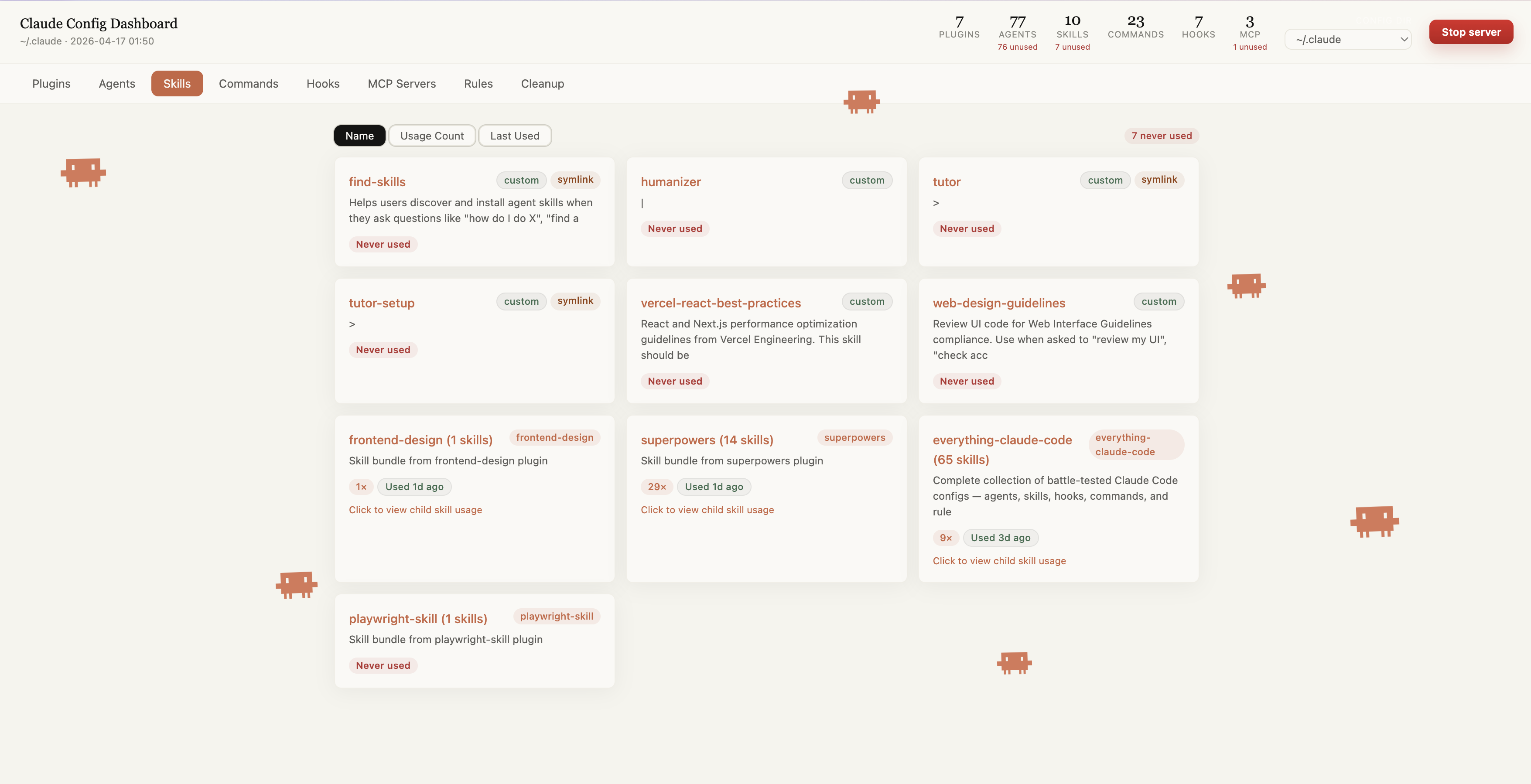
A local web dashboard for everything installed in your ~/.claude — plugins, agents, skills, commands, hooks, MCP servers, and rules — with usage analytics pulled from your session history, and a project-only view that diffs your current project's .claude against your home config. Ships as a standalone CLI (PyPI) and as a Claude Code plugin.
Unlike config managers, this is a deliberately read-only, zero-dependency analyzer (Python stdlib, no Node/React/build step): it tells you what your config costs. The Context Tax tab estimates how many tokens your setup adds to every single session, and — for anything unused for 30+ days — can generate a plain shell script that archives it (mv, never rm) for you to review and run yourself. The dashboard never touches your filesystem on its own.
Install & run
No install, always latest (uv):
uvx claude-config-dashboard
pip:
pip install claude-config-dashboard
claude-config-dashboard
Claude Code plugin (adds the /claude-config-dashboard:show slash command):
/plugin marketplace add AshtonYoon/claude-config-dashboard
/plugin install claude-config-dashboard
/reload-plugins
then run /claude-config-dashboard:show inside Claude Code.
All three open the dashboard at http://localhost:9876. Pass --port to use a different one, or --no-open to skip launching a browser.
Features
| Tab | Contents |
|---|---|
| Plugins | Installed plugins with version, GitHub link, install date |
| Agents | Agents grouped by category — click name to open file |
| Skills | Custom and plugin-provided skills |
| Commands | Slash commands with descriptions — click to open file |
| Hooks | Hook scripts by trigger type — click to open script |
| MCP Servers | Configured MCP servers from settings.json and ~/.claude.json |
| Rules | Rule files by category — click to open file |
| Context Tax | Estimated tokens your config adds to every session, per item, plus a downloadable cleanup script (archive-only, review before running) for unused items |
| Cleanup | Agents, skills, and MCP servers unused for 30+ days |
| Project-only config | MCP servers, skills, commands, hooks, and rules that exist only in the current project's .claude |
Clicking any file name opens it in the OS default app (editor, Finder, etc.). Usage counts and "last used" come from parsing your local session transcripts — nothing leaves your machine.
Security
The dashboard binds to localhost only. Opening a file (/open) or stopping the server (/stop) requires a per-run token embedded in the page and only accepts paths the dashboard itself is already showing you — a malicious web page open in another tab cannot trigger either endpoint. See CHANGELOG.md (v1.6.1) for the fix history.
Update
/plugin update claude-config-dashboard
/reload-plugins
If
/plugin updateshows a "browse plugins" prompt instead of updating directly, the local marketplace cache is stale. Run this once to refresh it:cd ~/.claude/plugins/marketplaces/claude-config-dashboard && git pullThen retry
/plugin update claude-config-dashboard.
pip/uvx installs pick up new releases automatically the next time you run them (uvx always fetches latest; pip install -U claude-config-dashboard to upgrade an existing install).
Development
git clone https://github.com/AshtonYoon/claude-config-dashboard
cd claude-config-dashboard
uv venv .venv && uv pip install -p .venv pytest pytest-cov ruff

.venv/bin/pytest --cov            # 67 tests, coverage gate at 80%
.venv/bin/ruff check .
.venv/bin/ruff format .
The app lives in claude_config_dashboard/ (collectors → usage → enrich → render → server); dashboard.py at the repo root is a thin backward-compatible launcher for the plugin command. Design notes: docs/DESIGN.md.
Requirements
- Python ≥ 3.9, standard library only at runtime (no dependencies to install)
- macOS or Linux (uses
open/xdg-opento launch default apps)
Project details
Verified details
These details have been verified by PyPIProject links
GitHub Statistics
Maintainers


Download files
Download the file for your platform. If you're not sure which to choose, learn more about installing packages.
Source Distribution
Built Distribution
Filter files by name, interpreter, ABI, and platform.
If you're not sure about the file name format, learn more about wheel file names.
Copy a direct link to the current filters
File details
Details for the file claude_config_dashboard-1.9.0.tar.gz.
File metadata
- Download URL: claude_config_dashboard-1.9.0.tar.gz
- Upload date:
- Size: 54.5 kB
- Tags: Source
- Uploaded using Trusted Publishing? Yes
- Uploaded via: twine/6.1.0 CPython/3.13.12
File hashes
| Algorithm | Hash digest | |
|---|---|---|
| SHA256 |
75461eb56a5e90b26a6a966d3caaa8ec291351cb55d8c2062c98e422207a3076
|
|
| MD5 |
6a78ebce380a4f7f24b22853778dff3e
|
|
| BLAKE2b-256 |
56c98f6d898fe69a8d2ad2c948c1d9f3640f78a478429083bf70ebed98488a4b
|
Provenance
The following attestation bundles were made for claude_config_dashboard-1.9.0.tar.gz:
Publisher:
release.yml on AshtonYoon/claude-config-dashboard
-
Statement:
-
Statement type:
https://in-toto.io/Statement/v1 -
Predicate type:
https://docs.pypi.org/attestations/publish/v1 -
Subject name:
claude_config_dashboard-1.9.0.tar.gz -
Subject digest:
75461eb56a5e90b26a6a966d3caaa8ec291351cb55d8c2062c98e422207a3076 - Sigstore transparency entry: 2195442754
- Sigstore integration time:
-
Permalink:
AshtonYoon/claude-config-dashboard@4de444ed9373409bb28862be617e02d86f21f3f3 -
Branch / Tag:
refs/tags/v1.9.0 - Owner: https://github.com/AshtonYoon
-
Access:
public
-
Token Issuer:
https://token.actions.githubusercontent.com -
Runner Environment:
github-hosted -
Publication workflow:
release.yml@4de444ed9373409bb28862be617e02d86f21f3f3 -
Trigger Event:
push
-
Statement type:
File details
Details for the file claude_config_dashboard-1.9.0-py3-none-any.whl.
File metadata
- Download URL: claude_config_dashboard-1.9.0-py3-none-any.whl
- Upload date:
- Size: 32.4 kB
- Tags: Python 3
- Uploaded using Trusted Publishing? Yes
- Uploaded via: twine/6.1.0 CPython/3.13.12
File hashes
| Algorithm | Hash digest | |
|---|---|---|
| SHA256 |
497bec1a4597785b6b358e1217d310133eb2c538aee67f30ab262009d6113505
|
|
| MD5 |
709357ac67a4e9896b7419c57ae86075
|
|
| BLAKE2b-256 |
fb48569207edfa69ed5b5d07b4fe22e0fb25fae3a6e7f481a2d5046fdf49bbd8
|
Provenance
The following attestation bundles were made for claude_config_dashboard-1.9.0-py3-none-any.whl:
Publisher:
release.yml on AshtonYoon/claude-config-dashboard
-
Statement:
-
Statement type:
https://in-toto.io/Statement/v1 -
Predicate type:
https://docs.pypi.org/attestations/publish/v1 -
Subject name:
claude_config_dashboard-1.9.0-py3-none-any.whl -
Subject digest:
497bec1a4597785b6b358e1217d310133eb2c538aee67f30ab262009d6113505 - Sigstore transparency entry: 2195442763
- Sigstore integration time:
-
Permalink:
AshtonYoon/claude-config-dashboard@4de444ed9373409bb28862be617e02d86f21f3f3 -
Branch / Tag:
refs/tags/v1.9.0 - Owner: https://github.com/AshtonYoon
-
Access:
public
-
Token Issuer:
https://token.actions.githubusercontent.com -
Runner Environment:
github-hosted -
Publication workflow:
release.yml@4de444ed9373409bb28862be617e02d86f21f3f3 -
Trigger Event:
push
-
Statement type:






