
A zero-dependency Python module for inspecting and converting coding-agent session files (.jsonl) — Claude Code, Codex, and Pi — into the messages format expected by Hugging Face Transformers.
Each of these tools stores its session history as a JSONL file on disk, one JSON record per line: user prompts, assistant responses, tool calls, tool results, and extended thinking/reasoning blocks. This module parses each tool's format and flattens it into the same simple [{"role": ..., "content": ...}] list that tokenizer.apply_chat_template() consumes directly — so downstream code doesn't need to know or care which tool produced the session.
Why this exists
The conversion pipeline has two stages that are often conflated:
Session JSONL (Claude Code / Codex / Pi)  →  [claude_converter]  →  messages[]  →  apply_chat_template()  →  tokens
                                                 (this module)                        (transformers handles this)
apply_chat_template() handles stage 2 (turning a messages list into model-specific token sequences), but it knows nothing about any of these tools' JSONL formats. This module handles stage 1, for all three.
Installation
uv pip install claude-converter
Quick start
The unified Converter class is the recommended entry point. Pick the tool with the converter argument ("claude-code" is the default) and every method behaves the same regardless of which tool produced the file.
Claude Code
from claude_converter import Converter
from huggingface_hub import hf_hub_download

converter = Converter()

hf_hub_download(repo_id="armand0e/claude-fable-5-claude-code",
        filename="06ec42c3-2184-40c5-b0ee-98c3235b4c4c.jsonl",
        repo_type="dataset",
        local_dir=".")

converter.inspect_session("06ec42c3-2184-40c5-b0ee-98c3235b4c4c.jsonl")
Codex
from claude_converter import Converter
from huggingface_hub import hf_hub_download

converter = Converter(converter="codex")

hf_hub_download(repo_id="AletheiaResearch/GPT-5.5-Codex",
        filename="rollout-2026-06-22T08-33-58-019eee77-052d-7530-af09-17a140e08123.jsonl",
        repo_type="dataset",
        local_dir=".")

converter.inspect_session("rollout-2026-06-22T08-33-58-019eee77-052d-7530-af09-17a140e08123.jsonl")
Pi
from claude_converter import Converter
from huggingface_hub import hf_hub_download

converter = Converter(converter="pi")

hf_hub_download(repo_id="armand0e/claude-opus-4.8-pi-traces",
        filename="2026-06-07T00-07-46-038Z_019e9f68-3075-7136-b429-c6b2c871ed67.jsonl",
        repo_type="dataset",
        local_dir=".")

converter.inspect_session("2026-06-07T00-07-46-038Z_019e9f68-3075-7136-b429-c6b2c871ed67.jsonl")
huggingface_hub is only needed to pull the example files above — it is not a dependency of claude_converter itself.
To go straight to a messages list ready for apply_chat_template():
from claude_converter import Converter

converter = Converter(converter="codex")  # or "claude-code" / "pi"
messages  = converter.session_to_messages("session.jsonl")
Legacy API (still supported)
If you only ever work with Claude Code sessions and don't need the multi-tool dispatch, the original module-level functions are still available and unchanged — nothing here was touched or deprecated:
from claude_converter.claude import load_session, session_to_messages, records_to_messages, inspect_session

messages = session_to_messages("session.jsonl")
This is exactly the API that existed before Converter was introduced. Use
it if you want a direct import with no dispatch layer in between; use
Converter if you want one interface across Claude Code, Codex, and Pi.
API reference
Converter(converter="claude-code")
converter accepts "claude-code", "codex", or "pi". All four methods
below route to the matching tool-specific implementation.
.load_session(path)
Loads a .jsonl file and returns the raw list of record dicts — one per line, in the source tool's native schema.
records = converter.load_session("session.jsonl")
Raises FileNotFoundError if the file doesn't exist, ValueError if the extension is not .jsonl or .json, or if the file contains no valid records.
.session_to_messages(path, output=None)
Loads a session and converts it to a messages list in one call. Optionally saves the result to a JSON file.
# In-memory only
messages = converter.session_to_messages("session.jsonl")

# Save to disk too
messages = converter.session_to_messages("session.jsonl", output="messages.json")
Returns list[{"role": str, "content": str}]. Tool calls, tool results, and thinking/reasoning are flattened to plain text using the same XML-style tags across all three converters, so downstream tooling doesn't need per-tool special-casing.
.records_to_messages(records)
Converts an already-loaded list of records into the messages format. Useful when you want to load once and run multiple transformations without re-reading the file.
records  = converter.load_session("session.jsonl")
messages = converter.records_to_messages(records)
.inspect_session(path, show_flow=False, show_blocks=False, show_raw=False)
Prints a color-coded report of a session: record type counts, message role breakdown, and token usage totals. The conversation flow is optional and off by default. The same report format is used regardless of which tool produced the session.
# Stats only (default)
converter.inspect_session("session.jsonl")

# Stats + timestamped conversation flow
converter.inspect_session("session.jsonl", show_flow=True)

# Flow + content of every block inline
converter.inspect_session("session.jsonl", show_flow=True, show_blocks=True)
Example output (Claude Code, default):
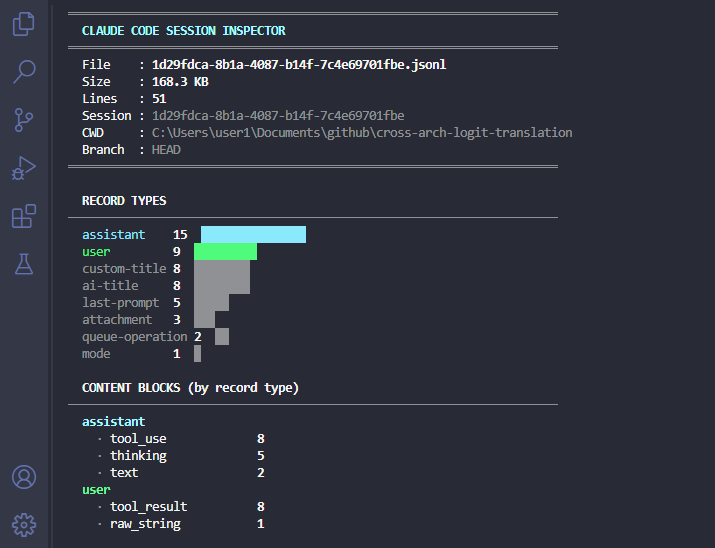
show_raw (Claude Code only, via the legacy module) additionally appends one raw record example per record type found.
Using the output with Transformers
from transformers import AutoTokenizer, AutoModelForCausalLM
from claude_converter import Converter

MODEL_ID = "your-model-id"

converter = Converter(converter="claude-code")  # or "codex" / "pi"
messages  = converter.session_to_messages("session.jsonl", output="messages.json")
tokenizer = AutoTokenizer.from_pretrained(MODEL_ID)

tokens = tokenizer.apply_chat_template(
    messages,
    tokenize=True,
    add_generation_prompt=True,
    return_dict=True,
    return_tensors="pt",
)
Fine-tuning local models
Coding-agent sessions are a natural source of training data: they capture
real coding conversations (tool calls, reasoning traces, multi-turn edits)
in a format that maps directly to the messages list expected by every major
fine-tuning framework — and that holds whether the sessions came from
Claude Code, Codex, or Pi.
Preprocessing recommendations
Before training, filter the messages list for your target model:
- Strip tool blocks: most local models don't understand
<tool_use>/<tool_result>tags. Remove or replace them unless you are training a tool-calling model. - Strip thinking blocks:
<thinking>blocks leak chain-of-thought that may not generalize. Keep them only if you are distilling reasoning behavior. - Drop short or empty turns: single-word assistant replies and empty user turns add noise.
def clean_messages(messages, keep_tool_calls=False, keep_thinking=False):
    import re
    cleaned = []
    for msg in messages:
        content = msg["content"]
        if not keep_thinking:
            content = re.sub(r"<thinking>.*?</thinking>", "", content, flags=re.DOTALL)
        if not keep_tool_calls:
            content = re.sub(r"<tool_use.*?>.*?</tool_use>", "", content, flags=re.DOTALL)
            content = re.sub(r"<tool_result.*?>.*?</tool_result>", "", content, flags=re.DOTALL)
        content = content.strip()
        if content:
            cleaned.append({"role": msg["role"], "content": content})
    return cleaned
TRL / SFTTrainer example
from datasets import Dataset
from trl import SFTTrainer, SFTConfig
from transformers import AutoTokenizer, AutoModelForCausalLM
from claude_converter import Converter
import glob

MODEL_ID = "your-model-id"
converter = Converter(converter="claude-code")  # switch per source of your files

all_messages = []
for path in glob.glob("~/.claude/projects/**/*.jsonl", recursive=True):
    msgs = converter.session_to_messages(path)
    msgs = clean_messages(msgs)
    if len(msgs) >= 2:
        all_messages.append({"messages": msgs})

tokenizer = AutoTokenizer.from_pretrained(MODEL_ID)
model     = AutoModelForCausalLM.from_pretrained(MODEL_ID)
dataset   = Dataset.from_list(all_messages)

trainer = SFTTrainer(
    model=model,
    args=SFTConfig(output_dir="./output", max_seq_length=4096),
    train_dataset=dataset,
    processing_class=tokenizer,
)
trainer.train()
If you're mixing sessions from more than one tool into a single dataset,
just instantiate one Converter per source and run each glob through the
matching converter before merging all_messages.
Axolotl / LLaMA-Factory
Both frameworks accept a sharegpt format, which is structurally identical to
the messages list this module produces. Save the cleaned messages list with
output="messages.json" and point your framework config at that file.
Content block mapping
All three converters normalize their tool-specific blocks (tool calls,
tool outputs, reasoning/thinking, custom tools) to the same tags, so a
messages list looks the same downstream no matter which tool it came from:
| Concept | Flattened as |
|---|---|
| Plain text | as-is |
| Thinking / reasoning | <thinking>...</thinking> |
| Tool call | <tool_use name='...'>{input}</tool_use> |
| Tool result / output | <tool_result>...</tool_result> |
| System / developer instructions | skipped (not included in messages output) |
Records with an empty content string after flattening are also skipped. Consecutive records from the Codex and Pi converters that resolve to the same role are merged into a single message, since those formats represent tool calls and their outputs as separate top-level records instead of nesting them inside one message like Claude Code does.
Where sessions are stored
~/.claude/projects/
└── <url-encoded-project-path>/
    └── <session-uuid>.jsonl
Claude Code's project path is URL-encoded: /home/user/myapp becomes
-home-user-myapp. Each session is a separate file, append-only, one JSON
object per line.
Codex and Pi each have their own session storage location and file naming
convention (see the rollout-*.jsonl and <timestamp>_<uuid>.jsonl examples
above) — check that tool's own documentation for where it writes sessions on
your system. This module only needs a path to the .jsonl file; it doesn't
search for sessions itself.
Limitations
- Graph structure: Claude Code sessions are directed acyclic graphs linked by
parentUuid, and Pi sessions byparentId. This module reads lines in file order (linear), which is correct for the vast majority of sessions. Branched or multi-agent sessions may need custom traversal. - Tool call fidelity: Most local models don't natively understand
<tool_use>or<tool_result>tags. For inference-only use cases, consider stripping those blocks before passing toapply_chat_template(). - No streaming: The module loads the full file into memory. For very large sessions, use
.load_session()and process records in batches. - Data quality for fine-tuning: Sessions include failed attempts, retries, and exploratory tool calls. Blindly training on raw sessions will teach the model bad habits. Filter aggressively: keep only sessions where the final assistant turn solves the stated problem, and prefer sessions with a high ratio of
textblocks totool_useblocks unless tool-calling is your training target.
1 maintainer

Download files
Download the file for your platform. If you're not sure which to choose, learn more about installing packages.
Source Distribution
Built Distribution
Filter files by name, interpreter, ABI, and platform.
If you're not sure about the file name format, learn more about wheel file names.
Copy a direct link to the current filters
File details
Details for the file claude_converter-1.9.0.tar.gz.
File metadata
- Download URL: claude_converter-1.9.0.tar.gz
- Upload date:
- Size: 27.3 kB
- Tags: Source
- Uploaded using Trusted Publishing? No
- Uploaded via:
twine/6.1.0 CPython/3.12.3
File hashes
| Algorithm | Hash digest | |
|---|---|---|
| SHA256 |
ee72aebcd3834b0cf10eddf993ad9d8294842a9034303d50e9deb2b53202414e
|
|
| MD5 |
961c9ecfce108857395611b6859eae5d
|
|
| BLAKE2b-256 |
e1c474de4bd8f11b67dd849c49c526d58fe6dd530ec506421b7ecdeee1c6111f
|
File details
Details for the file claude_converter-1.9.0-py3-none-any.whl.
File metadata
- Download URL: claude_converter-1.9.0-py3-none-any.whl
- Upload date:
- Size: 27.4 kB
- Tags: Python 3
- Uploaded using Trusted Publishing? No
- Uploaded via:
twine/6.1.0 CPython/3.12.3
File hashes
| Algorithm | Hash digest | |
|---|---|---|
| SHA256 |
444b0eefe25bebcfb00b2384c7ff71d50a52db71216bf52efc175c87b3c459a1
|
|
| MD5 |
3eaace366e737342e6be9a61b91b3dca
|
|
| BLAKE2b-256 |
f1d189f3f60f9209949256f158bac4879d6ad7ab43c4b0bef8caea31599016de
|







